
Gulp Succinctly®

CHAPTER 6
The future looks bright
Gulp 4
In Figure 3, we saw that the current version of Gulp was 3.9.0. This version was used throughout this book as well. In IT, and especially the internet, such versions don’t stay very long. Gulp 4 is already on the horizon, and might even be the current version by the time you start reading this book. No worries—we have you covered. You will notice that much will stay the same, while some things become easier to grasp. You will also gain more control over the way Gulp runs its tasks.
The four APIs
In case you were becoming afraid that something might change, you are in luck. The API of Gulp 4 remains the same as what we used in the previous version, so the following are still valid to make use of:
- task
- src
- dest
- watch
The syntax of the task function changes a bit, however:
- Gulp 3: gulp.task(name [, dependent tasks], fn)
- Gulp 4: gulp.task(name, fn)
We will see a bit further in this chapter what fn can do in Gulp 4.
If you want to keep up to date with what might still be changing (or being added), be sure to check out the Gulp changelog.
How Gulp runs tasks
Orchestrator
In Gulp 3, we noticed that we can write task dependencies in an easy way, like the following: ['css:less', 'script:typescript']. This would result in those dependent tasks running in a maximum possible concurrency. Behind the scenes, Gulp will make a dependency tree and orchestrate the exact running of the tasks, in order. Code Listing 12 showed this. For the sake of continuous reading, we will repeat that listing:
Code Listing 12: Running a task from different places
"use strict"; var gulp = require('gulp'); gulp.task('clean', function () { console.log('Cleaning up...'); }); gulp.task('task1', ['clean'], function () { console.log('Task 1 is executing...'); }); gulp.task('task2', ['clean'], function () { console.log('Task 2 is doing its thing...'); }); gulp.task('build', ['task1', 'task2']); gulp.task('default', ['build'], function () { console.log('default task...'); }); |
The clean task will be executed only once, even though it was referenced as a dependent task of both task1 and task2. Orchestrator makes sure that it happens like that, and the clean task does not get called twice. If it were called twice, or even more, then some task might cause havoc by cleaning out the results of another task that had already made the clean task run. That is a situation you do not want to happen.
Series and parallels
With the usage of Orchestrator, things will run for you in the order that it makes up the dependency tree, but that might feel a bit like magic. Things are running without you having much control over it. You can give Gulp hints to run in a certain way, thanks to the usage of dependent tasks, but still it feels a bit like you do not have everything under control.
Gulp 4 addresses this. as people wanted to have more control over what will run, and when. As such, the Orchestrator has been set aside, and two new execution functions have been introduced:
- Gulp.series: Used for sequential execution
- Gulp.parallel: Used for parallel execution
Both accept parameters that are the:
- Task name to execute
- Function to execute
By combining these, you can make up execution orders as complex as you need them to be. Be advised, though, that keeping it simple is still a good thing, as overly complex systems tend to become hard to debug and maintain.
We mentioned before that in Gulp 4, the task API will look somewhat different: gulp.task(name, fn).
fn can be a series, parallel, a combination of series and parallel, or a function.
Writing a task that you want to have run in parallel, like transforming Less to CSS and TypeScript to JavaScript, might look like this:
Code Listing 70: Gulp.parallel
gulp.task('default', gulp.parallel('css:less', 'js:typescript')); |
Take another look at Code Listing 12 and try to rewrite that with the new syntax, like the following:
Code Listing 71: Code Listing 12 rewritten with Gulp 4
"use strict"; var gulp = require('gulp'); gulp.task('clean', function () { console.log('Cleaning up...'); }); gulp.task('task1', function () { console.log('Task 1 is executing...'); }); gulp.task('task2', function () { console.log('Task 2 is doing its thing...'); }); gulp.task('build', gulp.series('clean', gulp.parallel('task1', 'task2'))); gulp.task('default', gulp.series('build')); |
The syntax looks pretty much the same, except that we introduced the gulp.series and gulp.parallel function calls. One very important thing to notice is the call for the clean task; it’s been taken out as a dependency of both task1 and task2. These two are allowed to run in parallel, but as in Gulp 4, we do not have Orchestrator available anymore. This would lead to the clean task being run twice, which we need to avoid at all costs.
A diagram might illustrate this in a more intuitive way. An extra series step was added after the parallel call to show that this is also possible.
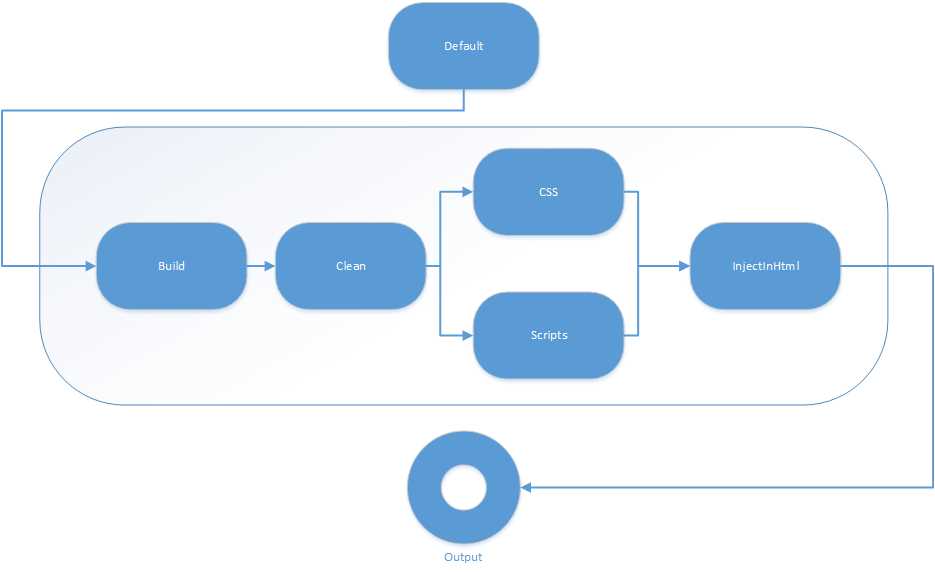
Figure 47: Series and parallel tasks in Gulp 4
npm
npm as a build tool? Up until now, we saw npm being used to download and manage Gulp plugins. Well, there are articles online to be found of people making sole use of npm to do all the stuff we talked about in this book. This could become a new way of doing things in the ever-changing world. For the moment, Gulp is still a great and emerging tool, and the adoption by Microsoft also indicates its importance.
HTTP 2
Up until now, web developers made a lot of effort to minimize and concatenate scripts or CSS files. With HTTP 2, that will no longer be necessary. According to some sources, it might even be counterproductive to do so, and harm performance. As such, you will likely need to revise your crafted Gulp files to keep up with progressing web technology and protocols to squeeze the maximum performance out of your applications.
Modern browsers (also often called “evergreen” browsers, as they are always up to date), already support HTTP 2. Server software is quickly jumping onto the bandwagon as well, and in the next years we will see support everywhere for this improved protocol, so be sure to keep your applications closely monitored for this.
Summary
This was a shorter chapter, as it is difficult to predict the future. We can, however, foresee that HTTP 2 will quickly become big over the next years. There will be an increase in the number of (web) applications, and we will see them in different shapes, like packaged as an app on a smart device, with things like Ionic, Cordova, and manifold.js.
I hope you enjoyed reading this book.


- 1800+ high-performance UI components.
- Includes popular controls such as Grid, Chart, Scheduler, and more.
- 24x5 unlimited support by developers.