
Gradle Succinctly®

CHAPTER 7
Build Hooks
Overview
Gradle is a highly customizable tool for creating custom build software. It exposes a rich set of APIs for introducing novel functionality into a build. But the ability to customize a build doesn’t end with plugins.
Gradle also offers the ability to modify the execution of a build by hooking a variety of events that occur during the configuration and execution of a build. These hooks can run when tasks are added, when projects are created, and at other times during configuration sequence.
Reviewing the Gradle lifecycle
As explained in Chapter 4, a Gradle build always proceeds through three phases exactly in the same order: initialization, configuration, and execution.
The initialization phase lets Gradle start up and locates all the build files it must process. In this phase, Gradle also determines if the build is a single-project or multi-project build. For a single-project build, Gradle identifies a single build file and continues to the next phase. For a multi-project build, Gradle locates all the build files needed for processing and continues to the next phase.
The next phase is configuration. In this phase, Gradle executes each build file as a Groovy script, but this is not the actual execution of build actions. This is the creation of a directed acyclic graph (DAG) of task objects (explained in the “Configuration blocks” section of Chapter 5). Many hooks can run during the construction of this graph.
The last phase is execution. In this phase, Gradle identifies the tasks that must be executed by looking into the DAG. Then, Gradle executes them in dependency order (as explained in the “Task dependencies” section of Chapter 4). All build activities occur during the execution phase and, as in the configuration phase, some hooks can run during execution.
The “advice” terminology
A paradigm for managing the complexity of enterprise Java software became marginally popular in the early 2000s. This paradigm was known as aspect-oriented programming (AOP). AOP focused on stating that programs often contain individual functional units that need to be enhanced with code, with a purpose not directly related to the unit in question. For example, a method that writes into a database might have to set up a database context first, and a transaction committed after.
AOP developed a particular vocabulary and some Java frameworks emerged with an AOP implementation. A special name was given to the code that ran before and after the original method: an advice action. The advice code relies on this principle: the code block that runs before the original method has no correlation with the code that runs after, even though the execution sequence does.
During the explanation of build hooks, the “advice” special name will be used.
Advices to a project evaluation
An individual Gradle build file sets up a project with all of the settings and tasks it needs in order to give Gradle useful work to do during the execution phase. This setup occurs during the configuration phase, and notifications can be received about a project as it’s evaluated.
The project.afterEvaluate method is used to execute code after the project has been evaluated.
Code Listing 69
/* Declaring default tasks will ensure the zip packaging after the build. */ defaultTasks 'build', 'packageDistribution' /* Execute gradle with no tasks, in order to succeed. */ apply plugin: 'java' /* Adding the needed attributes to the manifest file. */ jar { manifest { attributes 'Specification-Title' : 'Gradle Succinctly' attributes 'Specification-Version' : '1.0' attributes 'Specification-Vendor' : 'Syncfusion, Inc.' attributes 'Implementation-Title' : 'hello.HelloWorld' attributes 'Implementation-Version' : 'build02' attributes 'Implementation-Vendor' : 'Syncfusion, Inc.' attributes 'Main-Class': 'hello.HelloWorld' } } /* This task will be executed after the build task and will create a zip file with the contents of the build\libs directory (the jar program).
The zip file will be saved in the build\distributions folder, and will be named distPackage-1.0.zip */ task packageDistribution(type: Zip){ from 'build\\libs' baseName = 'distPackage' version = '1.0' } /* In this case, and for testing purposes only, a directory named backuprepo is searched within the project's tree structure. If such directory doesn't exist, a message is displayed. */ afterEvaluate { if (!file('backuprepo').isDirectory()) { println "There is no directory for backing up source files of project {project.name}" } } |
In the previous example, the project.afterEvaluate method searches for a given directory within the project’s directory tree structure. In this case, a simple message is displayed when that directory isn’t found. As shown in code, there is a project object, which is available at project’s evaluation. In this case, the code uses the project object to display the project’s name in the warning message. This is trivial, of course, but this advice can have many applications, such as setting up a proper directory structure to be used by the execution phase, sending notifications to the project managers, etc.
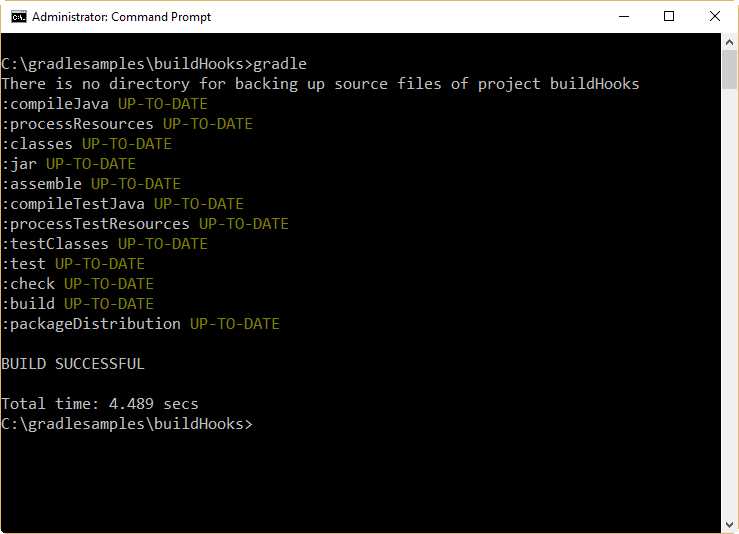
- Project.afterEvaluate example output
The result of a project’s evaluation can be inquired by means of an advice. To do this, we use the afterProject method of the gradle object. This method takes two parameters in order to handle the project. The first one is the project object itself, and the second parameter is the state of the project after its evaluation.
Code Listing 70
/* Declaring default tasks will ensure the zip packaging after the build. */ defaultTasks 'build', 'packageDistribution' /* Execute gradle with no tasks, in order to succeed. */ apply plugin: 'java' /* Adding the needed attributes to the manifest file. */ jar { manifest { attributes 'Specification-Title' : 'Gradle Succinctly' attributes 'Specification-Version' : '1.0' attributes 'Specification-Vendor' : 'Syncfusion, Inc.' attributes 'Implementation-Title' : 'hello.HelloWorld' attributes 'Implementation-Version' : 'build02' attributes 'Implementation-Vendor' : 'Syncfusion, Inc.' attributes 'Main-Class': 'hello.HelloWorld' } } /* This task will be executed after the build task and will create a zip file with the contents of the build\libs directory (the jar program).
The zip file will be saved in the build\distributions folder, and will be named distPackage-1.0.zip */ task packageDistribution(type: Zip){ from 'build\\libs' baseName = 'distPackage' version = '1.0' } /* In this case, and for testing purposes only, a directory named backuprepo is searched within the project's tree structure. If such directory doesn't exist, a message is displayed. */ afterEvaluate { if (!file('backuprepo').isDirectory()) { println "There is no directory for backing up source files of project ${project.name}" } } /* The result of the evaluation for a project can be trapped with this code. */ gradle.afterProject {project, projectState -> if (projectState.failure) { println "Evaluation of $project FAILED" } else { println "Evaluation of $project succeeded" } } |
The output for the previous code is displayed in the following figure.
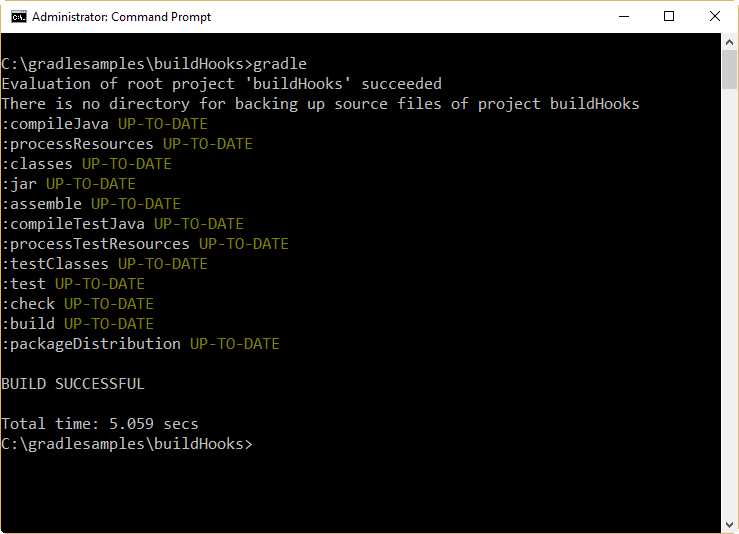
- AfterProject sample output
Note the sequence of how both afterProject and afterEvaluate advices are fired in Figure 32. In this case, afterProject takes place just after project’s evaluation is ended. Then, the code associated to this advice is executed. Once this execution ends, the afterEvaluate advice code is executed.
Advices to tasks creation
An advice can be attached to notify you when a task is added to a project. This can be useful to set some values that are needed before the task is made available for the build. The whenTaskAdded method of the tasks object is used for that purpose. This method receives the task object as a parameter.
Code Listing 71
/* Declaring default tasks will ensure the zip packaging after the build. */ defaultTasks 'packageDistribution' /* Execute gradle with no tasks, in order to succeed. */ apply plugin: 'java' /* Adding the needed attributes to the manifest file. */ jar { manifest { attributes 'Specification-Title' : 'Gradle Succinctly' attributes 'Specification-Version' : '1.0' attributes 'Specification-Vendor' : 'Syncfusion, Inc.' attributes 'Implementation-Title' : 'hello.HelloWorld' attributes 'Implementation-Version' : 'build02' attributes 'Implementation-Vendor' : 'Syncfusion, Inc.' attributes 'Main-Class': 'hello.HelloWorld' } } /* This task will be executed after the build task and will create a zip file with the contents of the build\libs directory (the jar program).
The zip file will be saved in the build\distributions folder, and will be named distPackage-1.0.zip */ task packageDistribution(type: Zip){ from 'build\\libs' baseName = 'distPackage' version = '1.0' } packageDistribution { dependsOn 'build' } /* In this case, and for testing purposes only, a directory named backuprepo is searched within the project's tree structure. If such directory doesn't exist, a message is displayed. */ afterEvaluate { if (!file('backuprepo').isDirectory()) { println "There is no directory for backing up source files of project ${project.name}" } } /* The result of the evaluation for a project can be trapped with this code. */ gradle.afterProject {project, projectState -> if (projectState.failure) { println "Evaluation of $project FAILED" } else { println "Evaluation of $project succeeded" } } tasks.whenTaskAdded { task -> println "The task '${task.name}' was added to the execution plan" } |
The previous code simply displays the task’s name when it is added to the project. The output for this build is displayed in the following figure.
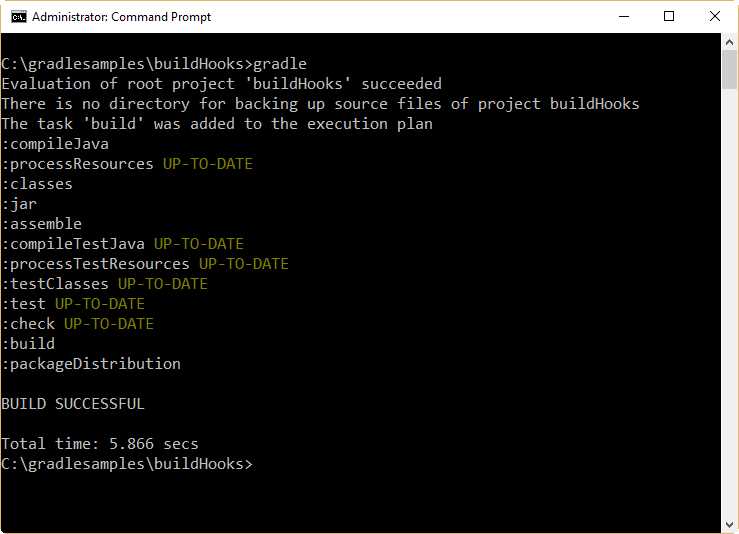
- Task creation advice sample output
According to the output shown in Figure 33, task creation happens after the project’s evaluation.
Advices to execution phase
Task execution
Advices can be used before and after any task is executed. This can be done by using the beforeTask and afterTask methods of the gradle.taskGraph object.
The beforeTask method receives the task object as a parameter, so the user can query any property of a task in order to make a behavior change, before the task’s execution.
Code Listing 72
/* Declaring default tasks will ensure the zip packaging after the build. */ defaultTasks 'packageDistribution' /* Execute gradle with no tasks, in order to succeed. */ apply plugin: 'java' /* Adding the needed attributes to the manifest file. */ jar { manifest { attributes 'Specification-Title' : 'Gradle Succinctly' attributes 'Specification-Version' : '1.0' attributes 'Specification-Vendor' : 'Syncfusion, Inc.' attributes 'Implementation-Title' : 'hello.HelloWorld' attributes 'Implementation-Version' : 'build02' attributes 'Implementation-Vendor' : 'Syncfusion, Inc.' attributes 'Main-Class': 'hello.HelloWorld' } } /* This task will be executed after the build task and will create a zip file with the contents of the build\libs directory (the jar program).
The zip file will be saved in the build\distributions folder, and will be named distPackage-1.0.zip */ task packageDistribution(type: Zip){ from 'build\\libs' baseName = 'distPackage' version = '1.0' } packageDistribution { dependsOn 'build' } /* In this case, and for testing purposes only, a directory named backuprepo is searched within the project's tree structure. If such directory doesn't exist, a message is displayed. */ afterEvaluate { if (!file('backuprepo').isDirectory()) { println "There is no directory for backing up source files of project ${project.name}" } } /* Every time a task is added its name is displayed */ tasks.whenTaskAdded { task -> println "The task '${task.name}' was added to the execution plan" } /* The result of the evaluation for a project can be trapped with this code. */ gradle.afterProject {project, projectState -> if (projectState.failure) { println "Evaluation of $project FAILED" } else { println "Evaluation of $project succeeded" } } /* Every task name is displayed before task's execution begins */ gradle.taskGraph.beforeTask {Task task -> println "Executing $task" } |
The previous code adds the beforeTask method to display every task name, before execution begins.
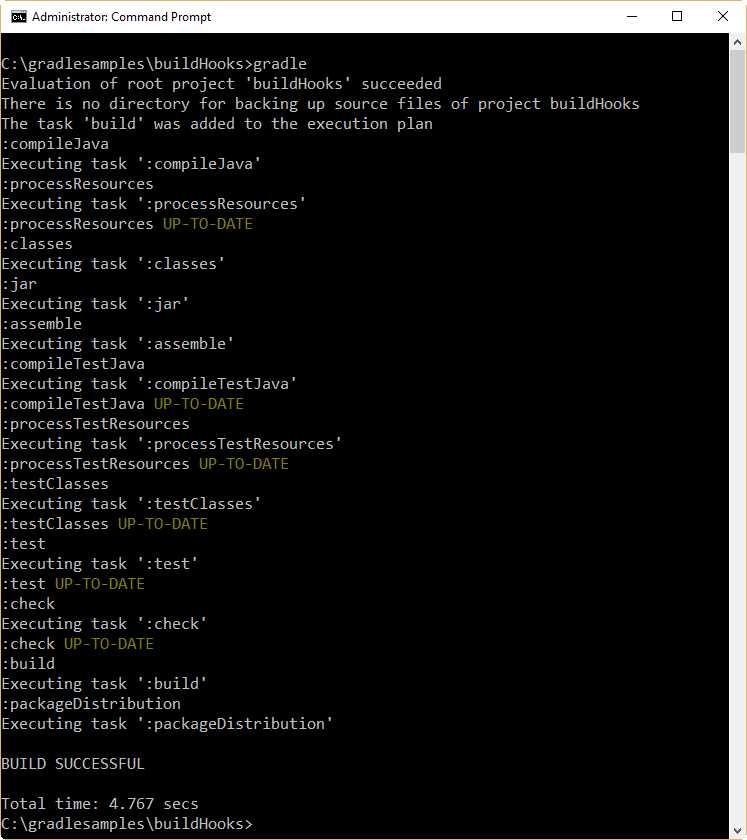
- The output generated by the beforeTask method
The afterTask method can be used to know the state of a task when the task’s execution finishes. This method receives the task object and the TaskState as parameters. The following code snippet shows its implementation.
Code Listing 73
/* The state for every task is displayed just after its execution. */ gradle.taskGraph.afterTask {Task task, TaskState state -> if (state.failure) { println 'Task FAILED' } else { println 'Task DONE' } } |
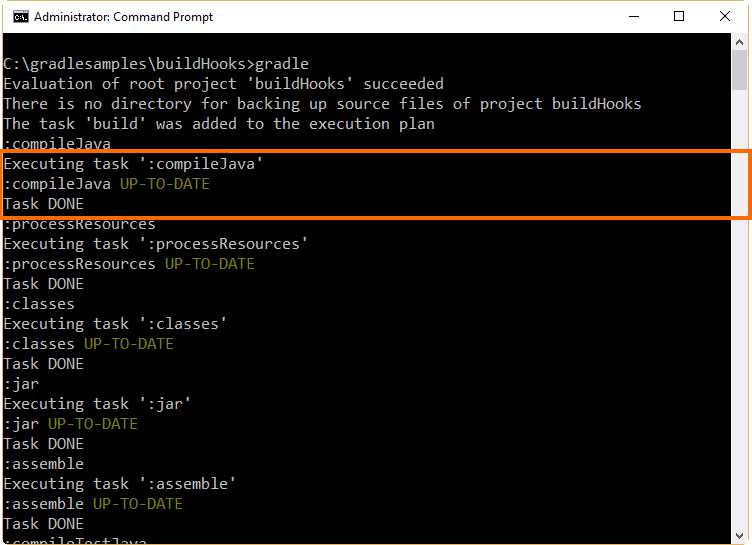
- The output for the build when afterTask is added
Note: The afterTask method is executed regardless of whether the task is successfully completed or fails with an exception.
Build finished
Sometimes the user may want to know when a build is finished, and whether it ended successfully or with an error. This can be useful to write a sort of log that keeps track of all build executions.
The method buildFinished of the gradle object is used to trap a build finished notification. The following code snippet shows the implementation.
Code Listing 74
/* If the build fails, the reason why it fails is displayed. */ gradle.buildFinished {buildResult -> if (buildResult.failure != null) { println "Build has failed - ${buildResult.failure}" } else { println "BUILD SUCCESFUL AGAIN" } } |
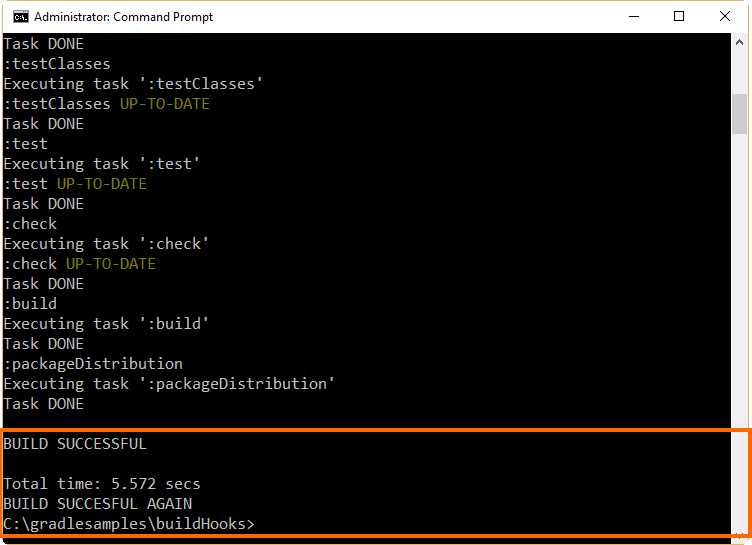
- The output for the buildFinished method
Chapter summary
Gradle is a highly customizable tool for creating custom build software. It exposes a rich set of APIs for introducing novel functionality into a build. Gradle also offers the ability to modify the execution of a build by hooking a variety of events that occur during the configuration and execution of a build.
As explained in Chapter 4, a Gradle build always proceeds through three phases exactly in the same order: initialization, configuration, and execution. The initialization phase lets Gradle start up and locates all the build files it must process. The configuration phase executes each build file as a Groovy script and creates a directed acyclic graph (DAG) of task objects. The execution phase identifies the tasks that must be executed by looking into the DAG, and then executes them in dependency order. All build activities occur during the execution phase.
In the early 2000s, a paradigm known as aspect-oriented programming (AOP) became marginally popular. AOP focused on stating that individual functional units of programs need to be enhanced with code not directly related to the unit in question. AOP developed a particular vocabulary and some Java frameworks emerged with an AOP implementation. A special name was given to the code that ran before and after the original method: advice.
The user can create advices for Project Evaluation and tasks creation in the configuration phase. In the execution phase, advices for task execution and buildFinished can be created.
The project.afterEvaluate method is used to execute code after the project has been evaluated. Also, the result of a project’s evaluation can be found using the afterProject method of the gradle object. This method receives two parameters: the project object itself, and the state of the project after its evaluation.
An advice can be attached to notify you when a task is added to a project by using the whenTaskAdded method of the tasks object. This method receives the task object as a parameter.
Advices can be used before and after any task is executed. This can be done by using the beforeTask and afterTask methods of the gradle.taskGraph object. The beforeTask method receives the task object as a parameter. The afterTask method can be used when a task’s execution just finishes. This method receives the task object and the TaskState as parameters.
Sometimes, the user may want to know when a build is finished, and whether it ended successfully or with an error. The method buildFinished of the gradle object is used for this purpose.


- 1800+ high-performance UI components.
- Includes popular controls such as Grid, Chart, Scheduler, and more.
- 24x5 unlimited support by developers.