
Go Web Development Succinctly®

CHAPTER 1
Introduction
Who is this e-book for?
This book is for any developer who has a basic familiarity with the Go programming language and is interested in using Go to write web applications.
If you can write simple console applications with Go, you shouldn’t have any problem understanding the contents of this short e-book.
If you’re looking for a primer on the language itself, may I humbly recommend my book Go Succinctly, which will take you from zero to… well, if not exactly mastery, to an appreciation and understanding of the Go programming language. It also gives you links to other resources that will help you become familiar with Go.
Like all e-books in Syncfusion’s Succinctly series, you can download Go Succinctly free of charge from the Syncfusion website.
Why use Go for web development?
Go is an excellent language for writing web applications, specifically for web services. In fact, it was designed specifically with the web in mind. After all, any modern programming language can hardly gain traction if it ignores the web.
So, which features of the Go programming language are particularly useful for web development? Here are a few:
Concurrency
Any decent-sized web server needs to run many thousands of tasks concurrently. Concurrency is complex and difficult in many languages because it is usually implemented as an afterthought. Concurrency, however, is built into the Go language. Indeed, concurrency is one of the main problems the Go language was designed to solve.
In Go, concurrency is achieved by using Goroutines, which are lightweight threads that allow developers to perform multiple operations asynchronously. These are incredibly useful in web applications. For example, when a user connects to your web server, you can simply spawn a Goroutine to handle any interactions with that client. It’s very easy to do—merely prefix the function call with the go keyword. Better still, Goroutine scales incredibly well, and your Go web applications will purr along quite happily while servicing many thousands of users.
Modularity
Web applications, like many other modern applications, usually grow to include a lot of code. Keeping this code organized and efficient, so that it’s easy to understand and maintain, is a challenge for today’s developers. This is especially the case when several developers are working on the same application and each developer formats their code differently.
Go takes away many of these problems by imposing a specific method of structuring and formatting code. Functions, variables, constants, and type declarations are all expected to be in predictable places, and Go requires them all to be coded in a specific way.
If Go sounds draconian in this regard, consider this—what you lose in freedom of expression you gain in predictability; everything is where you expect it to be and formatted identically throughout.
Go makes it easy for you to satisfy its code formatting rules by providing you with the fmt package that you can build into your workflow to automatically Go-ify your code.
Compilation
Unlike many recent web development server-side languages, the Go programming language is compiled. This means that a problem such as a runtime error that might be difficult to track down is instead caught in the compilation step. Go’s static typing system also helps you discover errors during development that might otherwise escape into production.
The net/http package
Go’s net/http package is excellent and makes starting a web server while having full control of accepting requests and delivering responses very easy. Routing is handled by a multiplexer. You can either adopt the one in the standard library or select from several third-party options. In this book, we’ll start by using Go’s DefaultServeMux, then we’ll consider a very capable alternative: gorilla/mux.
Setting up your development environment
I won’t delve too deeply into setup here because I’m going to assume that you have some experience using Go. However, if you need to recap, I suggest referring to my e-book Go Succinctly or visiting the official Golang.org “Getting Started” page: https://golang.org/doc/install.
The steps involved in setting up your environment consist of:
- Installing the Go tools.
- Creating a workspace and setting the GOPATH environment variable.
Installing the Go tools
The exact steps you will need to follow depend on which platform you are using. Go binaries are available for Windows, Mac OS X, and *nix platforms.
You can download them here: https://golang.org/dl/, as shown in Figure 1.
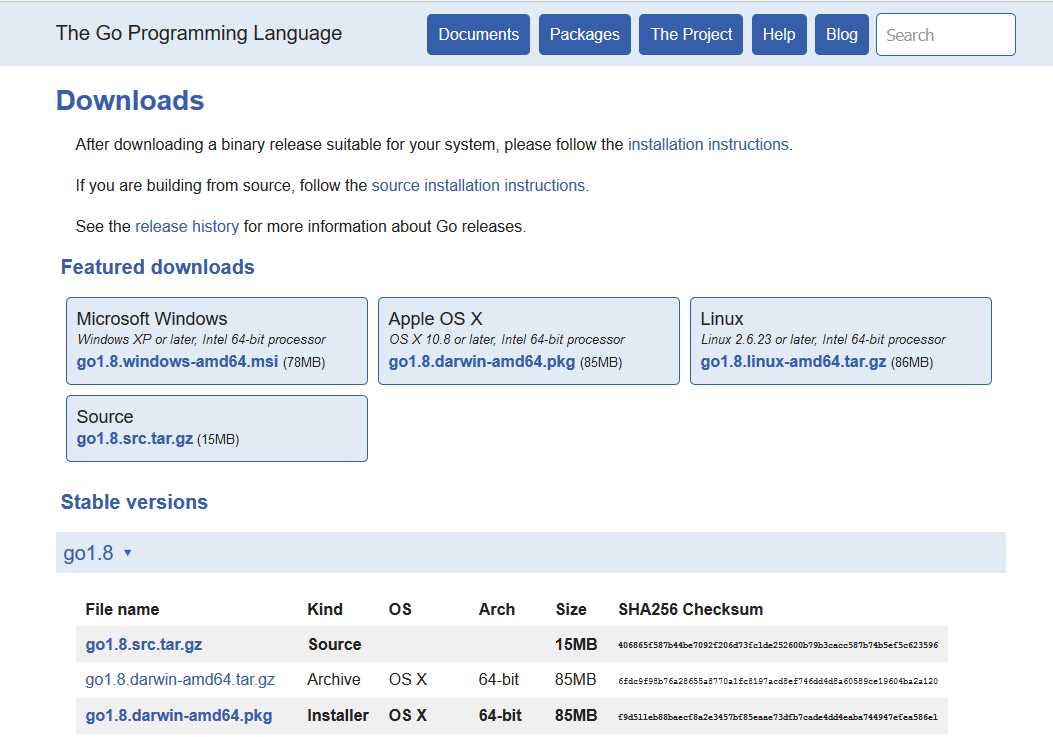
Figure 1: The Golang Downloads Webpage
Tip: If you are upgrading to a later version of Go, you must uninstall the previous version first.
Windows
The easiest way to install the Go tools in Windows is to download the MSI installer, launch it, then follow the prompts. By default, Go installs everything in C:\Go, then it adds C:\Go\bin to your PATH environment variable.
Alternatively, if you would rather have more control over your environment variables, you can download the .zip file and extract it to a directory of your choice. In this case, you’ll need to configure the environment variables yourself.
You can set environment variables through the Environment Variables button on the Advanced tab of the System control panel. Some versions of Windows provide this control panel through the Advanced System Settings option inside the System control panel.
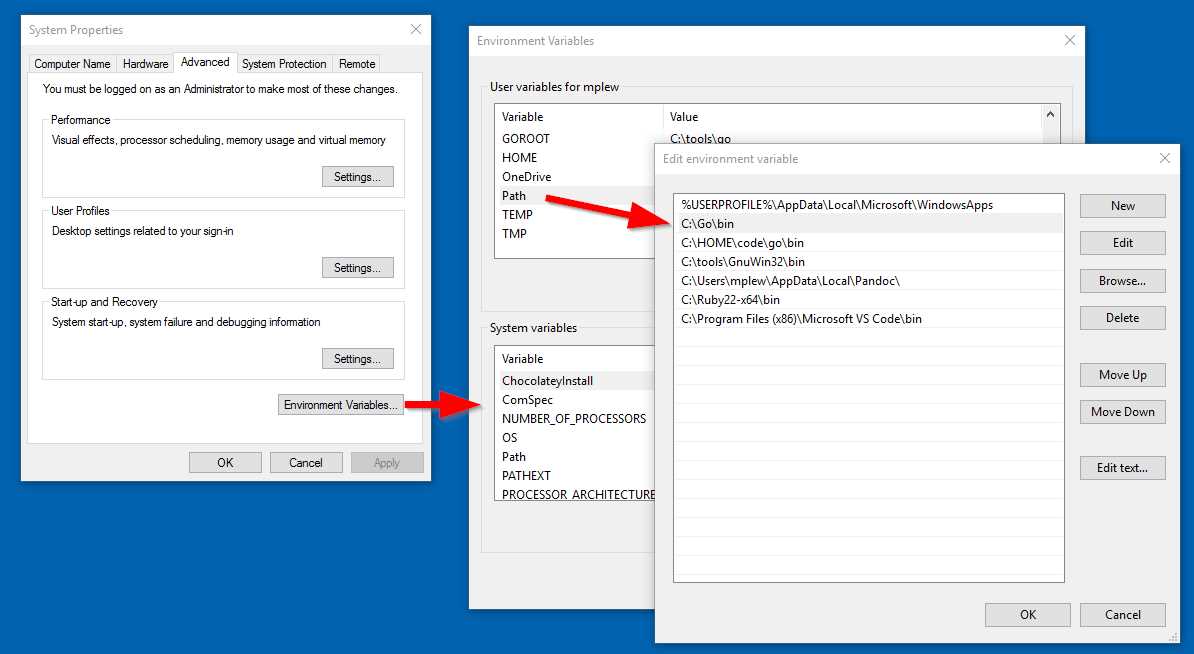
Figure 2: Setting Go Environment Variables in Windows
You might need to close and re-open any command-line sessions in order for the changes to take effect.
Mac OS X
Download the .pkg file and follow the prompts. The package installs the Go distribution to /usr/local/go and adds /usr/local/go/bin to your PATH.
Linux, Unix, and FreeBSD
You’ll notice that *nix-based systems expect a bit more from you. But as a *nix user, you are more than up to the challenge.
Download the .tar.gz file and extract it to /usr/local as the root user, or get it via sudo:
sudo tar -C /usr/local -xzf go$VERSION.$OS-$ARCH.tar.gz
You next need to add /usr/local/go/bin permanently to your PATH. Put the following line in your /etc/profile (for all users) or ~/.profile (for only you) to make this a permanent thing:
export PATH=$PATH:/usr/local/go/bin
Custom installation locations
Those methods decide where Go will be installed. If you don’t like to be bossed around that way, you must tell Go where to find itself by setting the GOROOT environment variable. If you’re happy with the default location, then don’t specify GOROOT. You’ll only confuse things.
Creating a workspace
The final step is telling Go where any code you write, as well as any third-party libraries that you download with go get, will reside. Do this by setting the GOPATH environment variable using the same techniques described above.
Go will create bin, pkg, and src files in this location:
- bin: Contains executables
- pkg: Contains package objects
- src: Contains Go source code
Code examples
All code examples in this book can be found on GitHub at https://github.com/marklewin/go-web-succinctly.git.
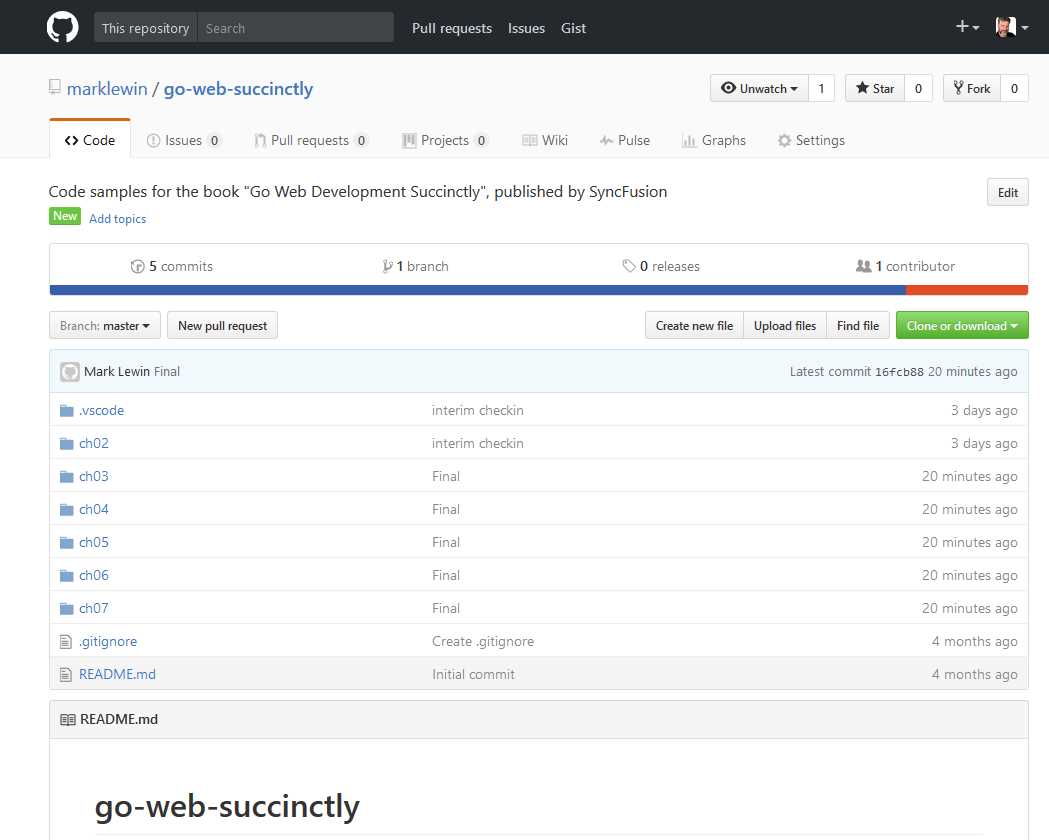
Figure 3: The Github Repository for This E-Book's Code Samples
You can identify each sample by the chapter and topic it matches in this e-book.
You can either download each file individually or clone the repository by using the following commands:
$ git clone git://github.com/marklewin/go-web-succinctly.git
$ git pull origin


- 1800+ high-performance UI components.
- Includes popular controls such as Grid, Chart, Scheduler, and more.
- 24x5 unlimited support by developers.