
Go Web Development Succinctly®

CHAPTER 6
Cookies and Sessions
As you are doubtlessly aware, HTTP is a stateless protocol. Each request by a client to a web server is completely unrelated to any previous exchange between the two, and the communication mechanism consists solely of request/response pairs. The server is not required to retain any information regarding any previous requests.
The benefit of this approach is that the server doesn't need to assign memory to do so (because it doesn’t “remember” any previous requests from the clients), and if the client connection dies, the server doesn't have to do any cleanup.
The downside of this approach is that, well, the server doesn't remember anything. This can make it tricky to build a rich, interactive web application because all too often we must send extra information with each request so that the server knows enough about the state of the client to provide a useful response.
The keys to making all this happen are cookies and sessions. Let's define both before we demonstrate how to use them in our Go web applications.
Introducing cookies and sessions
What is a cookie?
A cookie is simply a little text file that a browser puts on the user’s computer. It stores information that helps to maintain the illusion of a persistent connection.
Cookies are often used for authentication, storing site-visitor preferences, maintaining shopping cart items, and identifying server sessions.
When the browser interacts with the web server, it passes the information in the cookie as part of the request. Note that cookies are domain-specific. If a browser creates a cookie for twitter.com, it cannot suddenly send that cookie to google.com.
Essentially, cookies are great for storing information about a user's interaction with a webpage as he or she moves from one page to the next.
What is a session?
Sessions allow you to store information about the client’s interaction with a website just as cookies do, but the data gets stored on the server instead of on the client.
Sessions are a better alternative to stuffing lots of constantly changing information in cookies. Instead, the client stores only a unique identifier (the “Session ID”) and passes the ID to the web server with every request. The server uses the Session ID to look up information in its internal database and retrieve variables relating to the user's use of the application.
What is a session cookie? Or a persistent cookie?
Uh-oh. Just to confuse you even further, there are not only cookies and sessions, but there is also a session cookie!
With cookies, your application can set an expiry time. You might have seen this when the login page for a website gives you the “Keep me logged in?” option.
If you set an expiry time, the browser saves the cookie to the local file system. This is called a persistent cookie.
If you don’t set an expiry time, the browser usually keeps the cookie hanging around in memory, and this is called a session cookie.
So, session cookies and persistent cookies are simply cookies, but with different expiration times.
Working with cookies
Setting cookies
In order to write information to a cookie in Go, you use the net/http’s package’s SetCookie function, whose signature looks like this:
http.SetCookie(w ResponseWriter, cookie *Cookie)
The w is the response to the request and cookie is a struct:
type Cookie struct {
Name string
Value string
Path string
Domain string
Expires time.Time
RawExpires string
MaxAge int
Secure bool
HttpOnly bool
Raw string
Unparsed []string
}
The cookie can hold a lot of information, but the most important fields are:
- Name: A key for the cookie for referring to it in your code.
- Value: The cookie’s data.
- Expires: A Time value that denotes when the browser can delete it.
Other fields that might be useful for controlling access to the cookie are:
- Path
- Domain
- HttpOnly
For now, let’s keep it simple.
Here is an example of how you can set a cookie:
expiration := time.Now().Add(365 * 24 * time.Hour)
cookie := http.Cookie{Name: "username", Value: "jsmith", Expires: expiration}
http.SetCookie(w, &cookie)
Tip: Go’s time functions are sophisticated but complex. For more information, see the documentation at https://golang.org/pkg/time/.
Fetching cookies
In order to retrieve a cookie from a request, you can do the following:
cookie, _ := r.Cookie("username")
fmt.Fprint(w, cookie.)
Or, if several cookies are associated with a request, you can iterate through them, as follows:
for _, cookie := range r.Cookies() {
fmt.Fprint(w, cookie.Name)
}
Using cookies
Let’s create a simple application that uses a cookie.
The following code checks to see if this is a visitor’s first visit to our site. If it is, it displays a welcome message. If not, it displays the time of the last visit.
Code Listing 35: Using a Cookie to Check Site Visitor Status
package main import ( "net/http" "strconv" "time" ) func CheckLastVisit(w http.ResponseWriter, r *http.Request) { c, err := r.Cookie("lastvisit") // expiry := time.Now().AddDate(0, 0, 1) cookie := &http.Cookie{ Name: "lastvisit", Expires: expiry, Value: strconv.FormatInt(time.Now().Unix(), 10), } http.SetCookie(w, cookie) if err != nil { w.Write([]byte("Welcome to the site!")) } else { lasttime, _ := strconv.ParseInt(c.Value, 10, 0) html := "Welcome back! You last visited at: " html = html + time.Unix(lasttime, 0).Format("15:04:05") w.Write([]byte(html)) } } func main() { http.HandleFunc("/", CheckLastVisit) http.ListenAndServe(":8999", nil) } |
The first line of code in the handler tries to drop the cookie to the user’s browser. If it succeeds, it records the current time in the cookie’s Value field and displays a “Welcome to the site!” message. If there is an error, this will occur because the cookie already exists, which means all it will do is update the time in the Value field and display it to users as the time they last visited.
If we run the application and visit the root of the application, we’ll see the message in Figure 30.
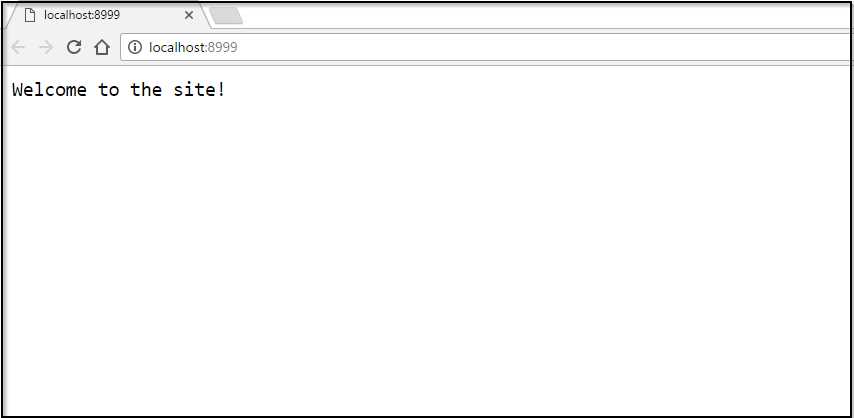
Figure 29: First Visit to the Site
If we refresh the page, we’ll see Figure 31.
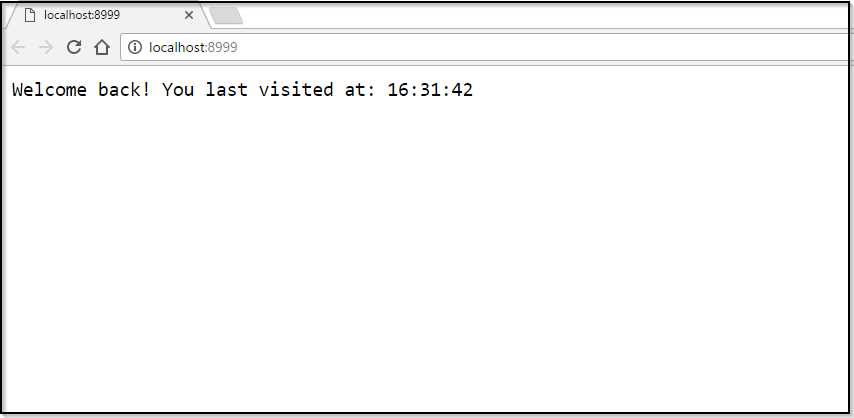
Figure 30: Subsequent Visits to the Site
If you’re using Chrome, as I am, you can delete the cookie this way:
- Open Developer Tools (Chrome menu > More Tools > Developer Tools).
- Select the Network tab.
- Expand the Cookies section under Storage in the left pane.
- Right-click the domain (http://localhost:8999) and click Clear.
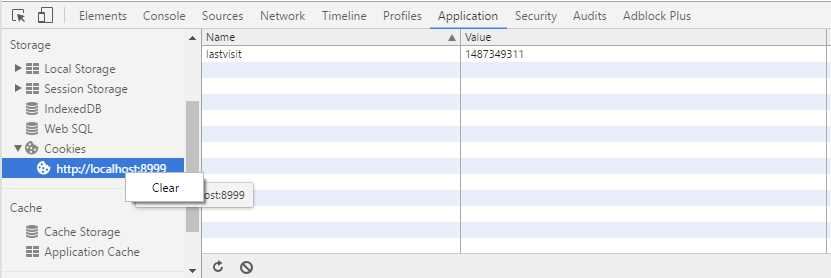
Figure 31: Deleting the Cookie Using Chrome's Web Developer Tools
If you’re using Firefox, you can delete the cookie this way:
- From the Firefox button or the Tools menu, go to the Options > Privacy panel.
- Select Firefox Will: Use Custom Settings for History.
- Click Show Cookies.
- Use the search box to enter the domain name of your site under development (http://localhost:8999) or drill down the folder lists to locate it.
- Select the cookie in the list that you want to delete and click Remove Cookie.
If you delete the cookie and refresh the browser page, you’ll be presented with the “Welcome to the site!” message again.
Working with sessions
In order to work with sessions in Go, I’m going to suggest that we revisit the Gorilla Web Toolkit’s sessions module because, in my opinion, it’s a much cleaner implementation than the native Go approach.
Install it from GitHub as follows:
go get github.com/gorilla/sessions
Basics
The following code demonstrates the basics of using the gorilla/sessions package to create and authenticate a session, retrieve the session, set some values, then save the session.
Code Listing 36: Using gorilla/sessions
package main import ( "net/http" "github.com/gorilla/mux" "github.com/gorilla/sessions" ) var store = sessions.NewCookieStore( func handler(w http.ResponseWriter, r *http.Request) { session, err := store.Get(r, "session-name") if err != nil { http.Error(w, err.Error(), http.StatusInternalServerError) return } // Set some session values. session.Values["abc"] = "cba" session.Values[111] = 222 // Save the session values session.Save(r, w) } func main() { router := mux.NewRouter() http.Handle("/", router) router.HandleFunc("/", handler) http.ListenAndServe(":8999", nil) } |
This code first initializes the session store by calling NewCookieStore with a secret key used to authenticate the session.
Then, in our handler, we call the store’s Get function to retrieve the session called “session-name.” If it finds that, we’ll have access to the session. If a session of that name does not exist, one will be created.
Tip: Session cookies created by Gorilla will last for a month by default. If this is too long for your requirements, you can either set the MaxAge property in each session’s Options or configure the session store so that all session cookies have the same MaxAge value.
When we have a session, we can assign values using its Values property. The Values property is a Go map, which is basically Go’s implementation of a hash table that allows you to set properties using key/value pairs.
Next, we call the session’s Save method to save the session in the response.
Tip: Always save the session values before returning the response. Otherwise, the response won’t receive the session cookie.
That’s Gorilla’s basic implementation of sessions. However, gorilla/sessions also gives us extra, useful functionality that we will look at next.
Flash messages
Gorilla borrowed the idea of flash messages from Ruby. A flash message is simply a session value that exists until it is read.
We use flash messages to temporarily store data between requests, such as a success or error message during the form submission process, in order to avoid it being duplicated in error later.
We add a flash message using the session’s AddFlash method and retrieve the flash messages by calling session.Flash.
We won’t dwell too much on flash messages here—just be aware that they exist. Code Listing 37 demonstrates how to get and set flash messages.
Code Listing 37: Using Flash Messages in gorilla/sessions
package main import ( "fmt" "net/http" "time" "github.com/gorilla/mux" "github.com/gorilla/sessions" ) var store = sessions.NewCookieStore( []byte("keep-it-secret-keep-it-safe")) func handler(w http.ResponseWriter, r *http.Request) { session, err := store.Get(r, "session-name") if err != nil { http.Error(w, err.Error(), http.StatusInternalServerError) return } // Get any previous flashes. if flashes := session.Flashes(); len(flashes) > 0 { // Do something with them for f := range flashes { fmt.Println(flashes[f]) } } else { // Set a new flash. session.AddFlash("Flash! Ah-ah, savior of the universe!" + time.Now().String()) } session.Save(r, w) } func main() { router := mux.NewRouter() http.Handle("/", router) router.HandleFunc("/", handler) http.ListenAndServe(":8999", nil) } |


- 1800+ high-performance UI components.
- Includes popular controls such as Grid, Chart, Scheduler, and more.
- 24x5 unlimited support by developers.