
GitHub Succinctly®

CHAPTER 4
Searching GitHub
Searching GitHub is pretty simple; much like a Google search, you simply type what you’re looking for in the search bar at the top of the screen.

Figure 17-Searching GitHub
Hit Enter to bring back the search results. In this example, I’ve searched for any repository about NLP (Natural Language Processing). For this particular search, GitHub found over 4,800 matching repositories—maybe a few more than I had hoped.
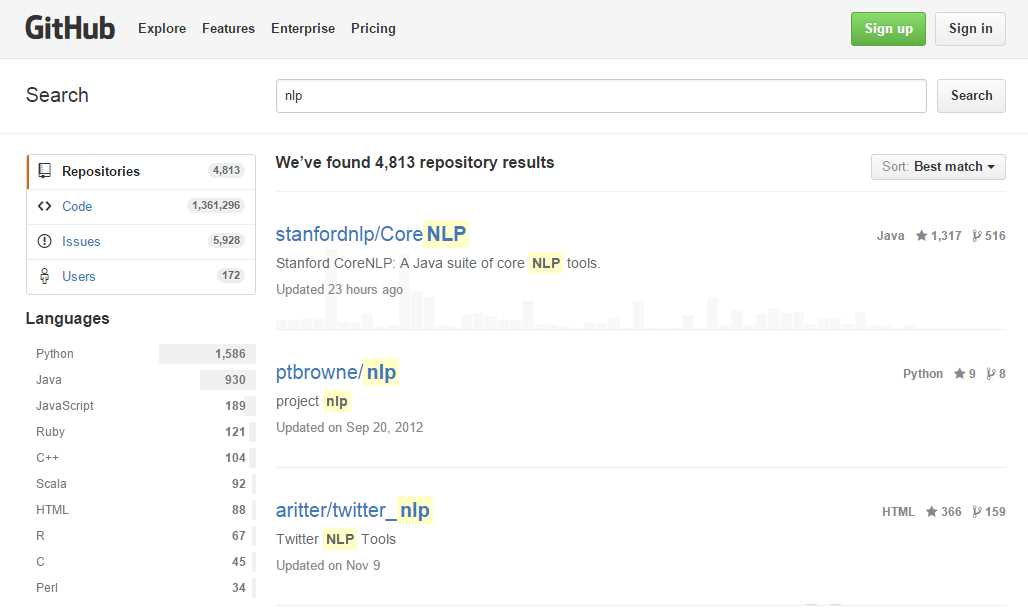
Figure 18: GitHub search results
Fortunately, GitHub provides both sorting and filtering options to make searching all those repositories easier.
Sorting the results
By default, GitHub returns the most likely matches to your search query. The Sort dropdown control below your search bar shows you the current sort order of the results:

Figure 19: Sort order
If you click on the Down Arrow key, you can see the other sort options. This will help you quickly explore the search results.
Most stars
As we mentioned earlier, GitHub offers social media-like features, in addition to simply being a repository. If users find a particular repository useful, or if they are actively involved in it, they can give the project a star. For example, the popular JavaScript Bootstrap framework has over 90,000 stars, and jQuery is approaching 40,000.
Note: You must have an account and be signed in to “star” a repository.
If you’re a new developer, and want to know what the most popular JavaScript framework is, a search and sort by “Most Stars” would give you an idea of which framework might be a good starting point to learn.

Figure 20: Rating Stars
You can see the number of stars next to the repository name, as shown in Figure 20. As you can see, the File-Upload jQuery module from blueimp has over 22,000 stars. It’s probably a safe bet that it’s been tested and used by a large pool of developers.
Fewest stars
You can also sort by fewest stars, but you shouldn’t assume that a project with fewer stars is necessary a bad project. The fact that it has less stars might also attest to the fact it’s an unknown project or a new contribution. It could be a great project, but very few people either need it or have discovered it yet. There can be some hidden gems in these type of projects, particularly if you are working on an uncommon application.
Most/least forks
Although we will discuss GitHub forks in a later chapter, a brief description here should help. A fork is a copy of the repository that someone has downloaded, most likely with the intent to suggest changes or as a starting point for their own project.
Note: A fork isn’t simply a download of the files; you can do that easily. A fork is generally made with the intent to add to the existing project.
The number of forks gives you a sense of how many developers are interested and contributing to the project. For example, there’s a LINQ to CSV project that allows .NET developers to use LINQ Queries against CSV (Comma Separated Values) files. This project has 64 stars (as of this book) and 51 forks. This would indicate that the project has a lot of work being done on it, and suggests a number of developers are using the library.
Sometimes, a developer who needs some code might put a first version up on GitHub and find other interested developers to work on the project. Collaboration is a hallmark of the Open Source community, so an interesting project may get help from all over the world from a community of users to improve existing code.
A project with few forks, but lots of stars, could suggest a very stable and complete project. A project with many forks, but few stars, might be a niche topic that a small number of very active developers are using.
Recently updated
Another sort option is the recently updated sort, which sorts the list from most recently updated to oldest updates. New projects or recently active projects will be presented first. Simple downloads of the project don’t count as activity, only actions that update the repository. Some projects don’t necessarily need recent updates. For example, there is a .NET component to retrieve geographic coordinates (latitude and longitude) from a zip code. It hasn’t been active in over a year, but the data content was based on the most recent (2010) census data, so once the code settles down, there’s no need to update it until another census or more current zip code data becomes available.
Least recently updated
Least recently updated shows the oldest (in terms of activity) first. Again, the project update date only provides an idea of how active the project is. Scriptaculous (a JavaScript framework) hasn’t been updated in six months, but has almost 2,400 stars. This suggests a framework that is still in use, and pretty mature. It was actually written in 2005 (ancient in Internet time) and feature-frozen in 2010, yet still is in use, and still has contributors listed on the project even though it’s frozen.
With new browsers and technology coming out frequently, an older web project might not be compatible with the new technology. Remember that I.E. 9 was not released until 2011, so this particular framework (Scriptaculous) worked well with I.E. 8 versions. It could be a good framework for web applications where the computers are older and not running the latest browsers.
Between the sort options, the stars (how many developers like the project after using it), the forks (how many developers are interested enough to enhance the project), and activity (how recently was the project worked on), you should be able to choose a good project for your application.
Filtering the results
In addition to sorting the results, the GitHub search results also provides some basic filtering options, primarily letting you focus on a particular programming language. For example, let’s assume we are working on a project to integrate QuickBooks with some application you are working on. A search for “QuickBooks” in GitHub yields over 300 results. If I sort them by most stars, I find PHP and Ruby implementations dominating the top 10 results.
However, to the left side of the search results, GitHub shows a breakdown of languages groups for all the found repositories.
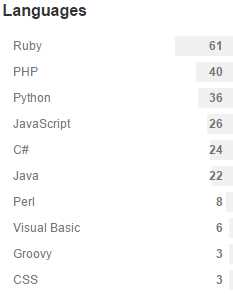
Figure 21: Languages
By clicking on the language name, we can filter the results to only display the 24 projects that are about QuickBooks and use C# as the base language.
Note: Keep in mind that a library written in C# can be accessed from any .NET language, such as Visual Basic.
Summary
The basic searching within GitHub, and the sorting and filtering options, should allow you to move through the repositories and find the library, application, etc. that you need to jumpstart your development efforts.


- 1800+ high-performance UI components.
- Includes popular controls such as Grid, Chart, Scheduler, and more.
- 24x5 unlimited support by developers.