
GitHub Succinctly®

CHAPTER 12
Pull Request
At some point during the collaboration, a contributor is likely to have completed and tested the code well enough that she feels the code could be added to the main branch. Genevieve decides to create the pull request by click on the Pull request button.

Figure 83: Pull request
Creating the request
Genevieve submits the request and adds a description of the work she has done.
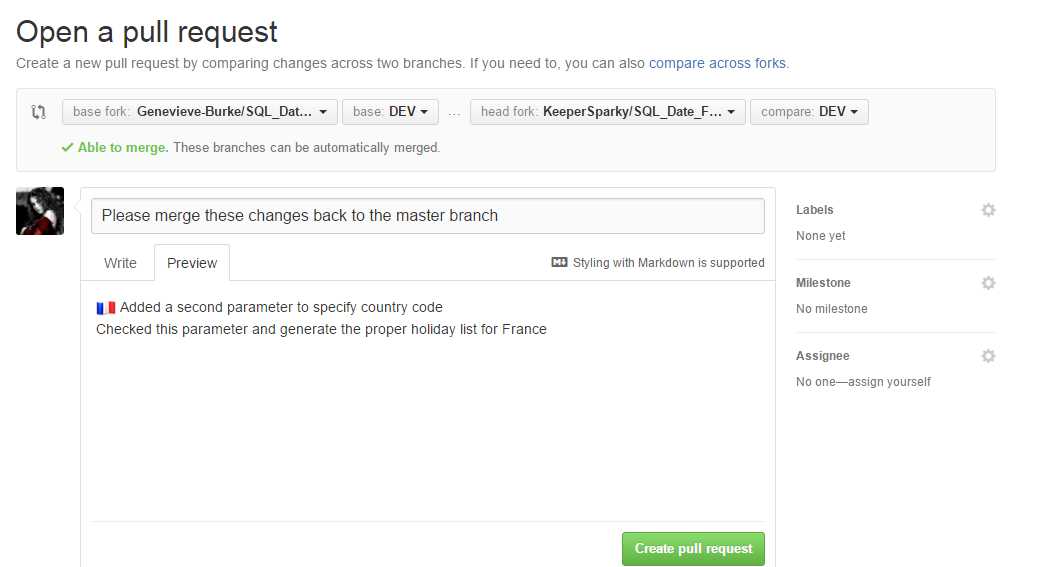
Figure 84: Pull request details
The repository owner will now see the pull request when he opens the repository. The owner would have also received an email that a pull request has been made.
Reviewing the request
The owner sees the request when he opens the repository.
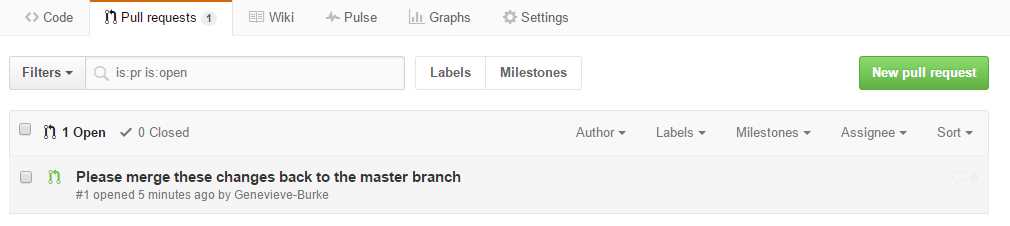
Figure 85: Pull request view
By clicking on the pull request itself, the details of the request are displayed.

Figure 86: Pull request details
The owner can now look at the commits and actual file changes to decide whether or not to merge the code. After reviewing the changes and accepting them, the owner clicks on the Merge pull request button. GitHub will ask for a confirmation, and once the confirmation is made, will perform the merge.
Successful merge
When the merge is successful, GitHub will report it and update the repository:

Figure 87: Successful pull request
Since the pull request is complete, it will now appear as a closed pull request when the repository is being viewed.
Summary
Once the collaborator completes the requests, and they request that the code be merged back in, the owner can review the changes and accept them (perform the merger), or perhaps ask the collaborator questions, or identify additional work that needs to be done before accepting the changes. GitHub provides all the tools and comparisons that the owner needs to make a decision to include the new code.


- 1800+ high-performance UI components.
- Includes popular controls such as Grid, Chart, Scheduler, and more.
- 24x5 unlimited support by developers.