
GitHub Succinctly®

CHAPTER 11
Collaboration
In the earlier chapters, we focused on searching GitHub and downloading project files. In the next couple of chapters, we’re going to focus on collaboration, how to create forks, and how to deal with pull requests.
SQL Date functions
Early on in this book, we created a repository of some SQL code dealing with dates. One of the scripts (holiday list) would create a list of holidays for a given year. Genevieve, a programmer in France, likes the script, but she wants to revamp it for French holidays, not just American ones. Rather than simply downloading the script and modifying it for her own use, she decides to submit an issue, suggesting holidays for different countries.
Submitting an issue
Genevieve opens the repository in GitHub and clicks the Issues tab. She clicks New Issue to submit a new issue about the code.
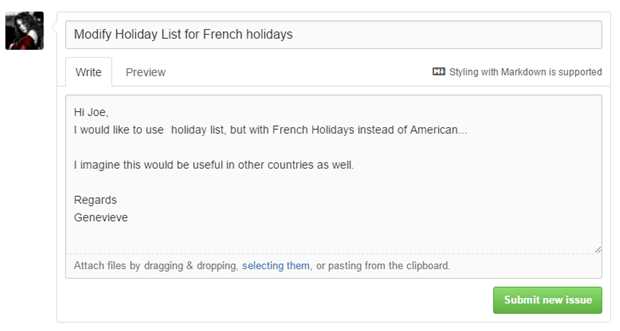
Figure 76: Submit issues
Note that she can use Markdown syntax to control her issue appearance, and can upload files related to the issue as well.
Joe receives the email
Since I am watching my own repository, I received the email from GitHub letting me know that an issue has been submitted.
Hi Joe,
I would like to use holiday list, but with French holidays instead of American holidays.
I imagine this would be useful in other countries as well.
Regards,
Genevieve
—
Reply to this email directly or view it on GitHub.
I think it’s an excellent suggestion, but I’m not sure I have the time to research holidays for multiple countries.
Viewing the issue
I open up GitHub and log in, and I can view the issues associated with this repository. So far, this is the only issue reported.

Figure 77: Issues
Since this is the only issue so far, and it will take some research or assistance to get the holidays from other countries, I decide to create a new branch. I’ll call this branch RELEASE and use it to do the work for adding country support. If any bugs get reported in the existing base, I can correct those without giving users any partially completed code for language support.
Creating the branch
A branch represents a totally separate copy of all of the code in the repository. This allows you or any collaborators to work on this code without impacting the main branch. Once you’ve completed your code, GitHub will help you merge it back into the main branch if you choose to.
To create the branch, click on Branch in the repository and type in the name of the branch.
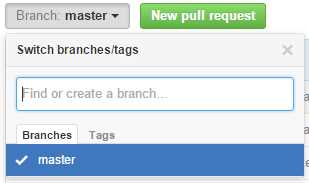
Figure 78: Creating a new branch
GitHub will see that the branch does not exist, and offer to create a new branch for you from the currently selected branch (master in this example).
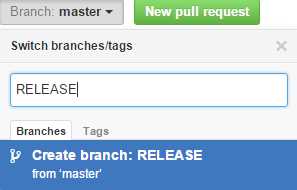
Figure 79: New branch
You will now have a separate copy of the code so that you can work on it without disturbing the main code branch.
Adding a collaborator
Since Genevieve has agreed to help out, I update the repository settings and add her as a collaborator.
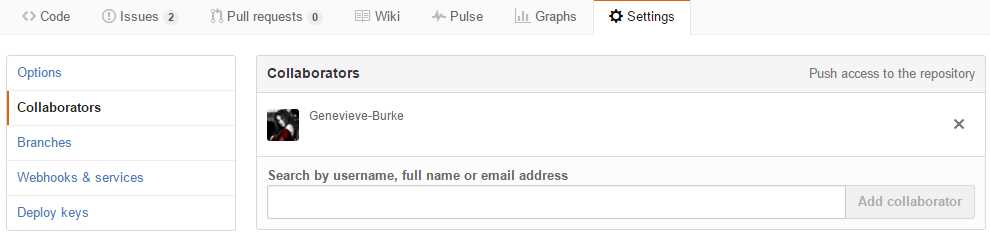
Figure 80: Adding a collaborator
At this point, Genevieve can create a fork from the Dev branch of the repository. She creates the fork and now has her own copy to work from.

Figure 81: Forked copy of repository
At this point, Genevieve can start making her changes to implement French holidays in the SQL user-defined function.
Assigning Genevieve to the issue
Joe now goes to the Issue screen and assigns the issue to Genevieve.
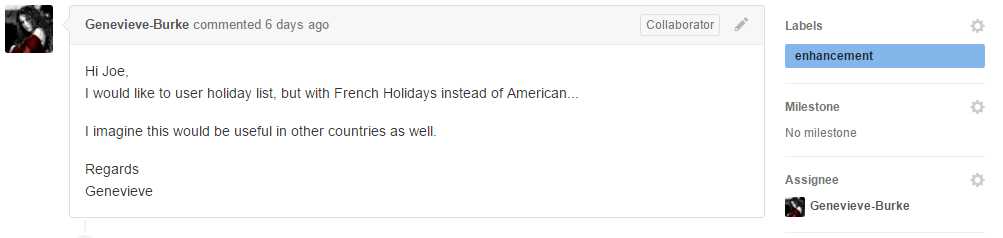
Figure 82: Assigning the issue
Summary
At this point, an issue has been submitted and the user agrees to collaborate on fixing the issue. The repository owner (Joe) has taken three steps: created a branch, made Genevieve a collaborator, and assigned the issue to her.
The collaborator (Genevieve) has created her own fork so she can make code updates.
And time passes…


- 1800+ high-performance UI components.
- Includes popular controls such as Grid, Chart, Scheduler, and more.
- 24x5 unlimited support by developers.