
GIS Succinctly®

CHAPTER 2
The Software
Having a well-designed GIS database is great, but what software do you need aside from that?
Unless you're doing everything from scratch, you'll need some kind of editing application, some way to load your data, and most likely some kind of real-time data too.
The major problem is expense. You will quickly find that GIS software is probably one of the most expensive software markets on the planet. Dollar for dollar, the overall cost for most of these applications vastly outweighs your typical yearly operating system site license costs for a small office—often for just one user in one app for 6 months.
Fortunately for us, there is also a huge open source and free software movement around GIS mostly operated and managed by the Open Source Geospatial Foundation (OSGeo).
The OSGeo website at www.osgeo.org is the main hub for finding links to all the open source and spatial tools available in the market today, as well as many links to tutorials, news, and paid-for providers. They are a sponsor funded organization, and rely on groups using the software to improve it and feed it back into system.
For those companies that don't like open source and require service and support contracts, many of the open source offerings available do have such packages available for a small cost.
Let's look at some of the choices available.
Database Software
Postgres and PostGIS
This combination is to the open-source GIS scene what the godfather is to the mafia. It's the granddaddy of all GIS databases. It's fully OGC compliant, absolutely rock solid, time tested, and is supported by every bit of GIS software on the planet.
Those who know their databases will know that Postgres has been around for a very long time. It was originally a University of California, Berkley product started in 1986 by a computer science professor named Michael Stonebraker. In 1995, two of Stonebraker's students extended Postgres to SQL, and in 1996 their innovation left the classroom for the world of open source.
Refractions Research realized that Postgres had enormous potential, and in 2001 set about making an open source add-on for servers to give them full geographic and spatial capabilities, ultimately producing PostGIS. From there, it's grown into a top-class database system for enterprise and shows no signs of slowing down.
MySQL
Originally developed as a simple-to-use open source database from the beginning, MySQL has included basic geometry types since at least v3.23. They may have been present earlier, but there is no documentation for them prior to 3.23, and no mention of them in the history of the database.
Version 3.23 documentation clearly states that the database is not fully OGC compliant. In particular, the geometry_columns metadata table is not supported, and many of the standard functions are renamed to be prefixed with a G—GLength, for example, so as not to cause issues with the standard Length function. The level of support for GIS across different versions of MySQL is questionable.
In more recent versions—I'm reading the version 5.6 documentation as I type this—the core engine does seem to be more OGC compliant, and I certainly know of people who use it as the central component in some complex GIS. Given that this is one of the few systems that ships with support for GIS operations, there's no need to install third-party components to spatially enable it.
MySQL is a very capable and fast system. It's also incredibly easy to administrate and has enormous support in the community despite having been recently acquired by Oracle as part of its buyout of Sun Microsystems. Its future is still a little uncertain, but one thing is sure: it will remain at the center of most LAMP and WAMP open source web stack installations for some time to come. You can learn more about MySQL at www.mysql.com.
SQL Server
Since this book is intended for .NET and Microsoft developers, I'm not going to delve into SQL Server too much as most readers will know a lot of the capabilities of the system already.
GIS functionality in the core product is a relatively new thing that was not fully introduced until SQL Server 2008. Prior to this, there were a few unofficial third party add-ons that spatially enabled SQL Server 2003 and SQL Server 2005, but these never really delivered. I remember trying an add-on for SQL Server 2005 that repeatedly crashed the server only when certain functions were called!
Even though SQL Server 2008 has GIS functionality baked in, it is probably the most non-OGC compliant OGC compliancy I've seen in any product.
Let me explain: SQL Server 2008 implements all the functionality required in the OGC specifications, functions such as ST_GeomFromText or ST_Polygonize and so on. But because SQL Server is a CLR-based assembly, it doesn't allow functions to be accessed in the same way. I'll discuss the SQL more in-depth later; for now, consider the following:
Standard OGC-compliant SQL
SELECT id,name,ST_AsText(geometry) FROM myspatialtable |
SQL Server 2008 OGC-compliant SQL
SELECT id,name,geometry.astext() FROM myspatialtable |
This minor difference causes all sorts of issues. In particular, it means that any software using SQL Server 2008 as its backend needs specialized data adapters (usually based around ODBC) to translate calls to the server in an OGC-compliant way. In fact, most GIS software has only just recently started to provide built-in support via ODBC.
One positive aspect for .NET developers using SQL Server is direct support in .NET via the Entity Framework and its Geometry and Spatial classes. If you’re working solely on the .NET platform, there is a strong argument for not needing to use anything other than SQL Server. If, however, you need access to GIS in general and the underlying SQL to manipulate it, SQL Server is not the best choice.
The official SQL Server website is www.microsoft.com/sqlserver/en/us/default.aspx.
SQLite and SpatiaLite
SQLite is not strictly a database server, but one of the new generation single-file database engines designed to be embedded directly into your application. SQLite has amazing support on a massive number of platforms, and is possibly one of the most cross-platform kits I've had the pleasure to use.
Compared to the big three already mentioned, SQLite is a relative newcomer to the scene, but it runs remarkably well and is incredibly efficient, especially on mobile platforms. In fact, it's so good on mobile platforms that it's been chosen as the database engine of choice on Android devices and Apple's iOS, as well as featuring full support on Windows Phone through the use of a fully managed .NET interface.
SpatiaLite, the spatial extension for the SQLite engine, is not so lucky. Its sources are available, but built binaries are only provided for the Windows platform. For any other platform you'll need to download the source and then port it to your platform of choice. While this is not difficult, the sources are all in standard ANSI C and can be a little tricky to get working, especially if you have very little native C or C++ experience.
There are binary builds available for platforms other than Windows, but these are very fragmented and often out of date. Bear in mind also that SpatiaLite, like much of the open source GIS-based software available, depends on Proj.4, GEOS, and other libraries to provide many of its advanced features. If you have to custom build SpatiaLite for your platform, you'll likely have to custom build the dependent libraries as well.
Does this put SQLite and SpatiaLite out of the picture? Not really. I have yet to find anything else that works on so many different mobile platforms with such a consistent API. While there is some work involved, building for your platform is quite simple in most cases, and certainly no more complex than the work that needs to be performed when installing Postgres/PostGIS, MySQL, or SQL Server. However, unless you need spatial capabilities that are universally mobile, SQLite and SpatiaLite are probably not worth the effort.
The SQLite website is sqlite.org. Its .NET interface is available at http://system.data.sqlite.org/index.html/doc/trunk/www/index.wiki.
The SpatiaLite website can be found at www.gaia-gis.it/gaia-sins/index.html.
Oracle Spatial
Unless you're a multimillion dollar enterprise, it's very unlikely you are going to have access to Oracle Spatial. Oracle Spatial is to the commercial world what Postgres is to the open source world.
It's big, it's hungry, it costs an arm and a leg to license, and the learning curve is probably steeper than climbing Mount Everest.
Many government agencies in the U.K. use it for their mapping and planning work, and larger companies such as oil and gas giants deploy multibillion-dollar infrastructures based around it to support their survey work. If you're in a position where you are using this, then you most likely won't be talking to the system directly; you'll already have software set up for you that manages everything the database can do. Systems built around Oracle are generally designed specifically by Oracle's consultants for a specific purpose, and have an entire toolkit built around them at the same time. Most of the software I mention in this book does not—to the best of my knowledge—have the ability to connect to Oracle Spatial; or if it does, the setup and operation of doing so is tremendously complex.
The official Oracle Spatial website can be found at www.oracle.com/us/products/database/options/spatial/overview/index.html.
What about the rest?
There are many more database packages available out there. Some support GIS out of the box, and some don't. Some of them need third-party add-ons or involve a complicated setup.
The reason for leaving others out is because there is simply not enough room in this book. If you decide to explore additional databases, you may want to check out the following:
- MongoDB at www.mongodb.org
- SpaceBase at paralleluniverse.co
- CouchDB at couchdb.apache.org
- CartoDB at cartodb.com
SpaceBase in particular looks like it could be a lot of fun. Its primary goal is to track and store online MMO-based game characters and assets in a near real-time 3-D world for multiplayer games.
GIS Desktop Software
In order to manipulate your GIS assets you need a good desktop application—preferably one that not only allows you to view and manipulate your data, but also allows you to import and export data with relative ease.
The latter point is also important because the sole purpose of some applications is to move data into and out of your system, and other applications are made only for viewing data. Applications for moving data are commonly known as ETL (Extract, Transform, and Load) packages. ETL packages are available for many database engines in general, not just for those designed to manipulate geospatial data.
Fortunately, most software allows you to do both. Starting with these packages, here are some of the more well-known ones:
ESRI ArcGIS
One of the big players in the market, ESRI, has been providing GIS and mapping software now for over 20 years. The software is like many GIS packages: quite expensive, and certainly outside the price range for most hobbyists and small and medium enterprises. ESRI does, however, offer a free product called ArcGIS Explorer Desktop that can be used to make basic maps and produce your own mapping data.
One thing to note about ArcGIS Explorer Desktop is that it can be used to look at imagery from Bing's and Google's mapping services. As you can see in the following screenshot, I've marked some features in the City Centre of Newcastle-upon-Tyne, England:
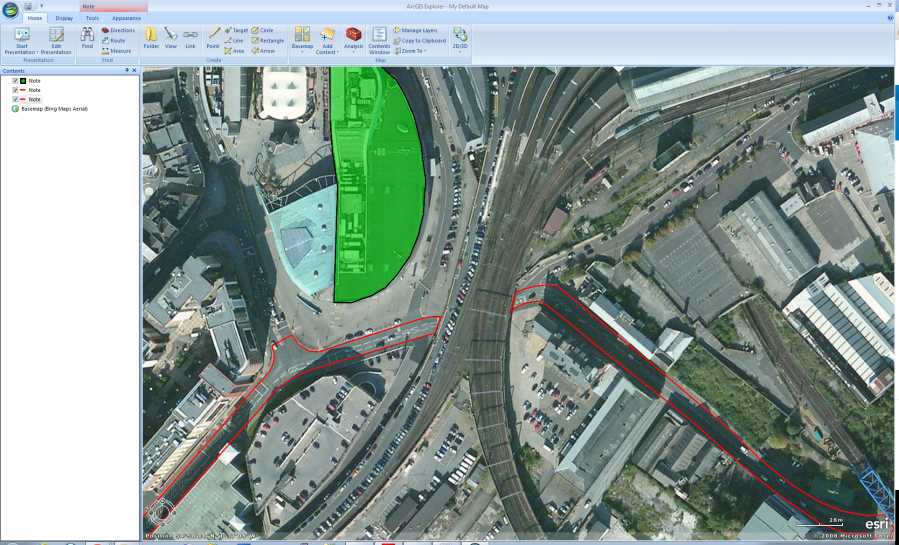
Figure 5: A Modified Existing Map in ArcGIS Explorer Desktop
You can find out more about ArcGIS Desktop Explorer and other ESRI software at www.esri.com/software/arcgis/explorer.
Pitney Bowes MapInfo
MapInfo, like the ESRI suite, is a large commercial package designed with the enterprise in mind. I know from my own experience that it's used by a lot of utilities companies such as mobile phone operators for managing their network map assets. Like Oracle Spatial, you'll rarely come across this package unless you have a very specialized management system for your geospatial data.
While it can load and work with all the common map formats and services like Bing, Google, and others, MapInfo's primary design is to handle non-standard data in large, heavily customized GIS databases. Its strength lies in its ability to be extended using its own programming language called MapBasic that is often deployed in many custom configurations. For instance, it may be deployed in a wireless service's operator consoles for showing where network faults are located, or at a delivery service for keeping track of its vehicles.
You can find more info about Pitney Bowes MapInfo at www.pbsoftware.eu/uk/products/location-intelligence/.
OpenJUMP
Now we come to the first of the open source desktop offerings, OpenJUMP. Designed from the start to be open source, it's built using the Java platform, and as expected can talk to most of the GIS databases in use today.
It allows you to load and view your own spatial data, handle shapefiles and GML files, and export maps as SVG for display on the web.
Its primary purpose is to edit mapping data in preparation for creating vector maps for web use. I've personally never used OpenJUMP, but it seems like a very capable package for creating web maps from scratch.
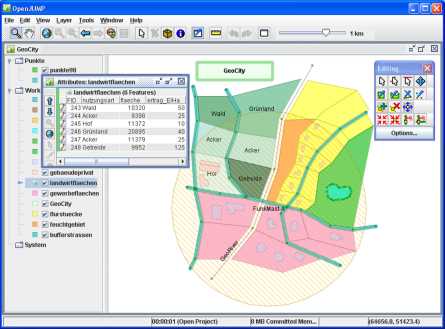
Figure 6: Using OpenJUMP
You can find more out about OpenJUMP at www.openjump.org.
Quantum GIS
There's nothing I can say that does Quantum GIS (QGIS) justice. This package can do just about anything. It's on par with applications such as ESRI and MapInfo, fully open source, and officially supported by the OSGeo Foundation.
The main application is written using Python, and as a result will run on Linux, Mac OS, Windows, and anything else that supports Python in a desktop environment.
Now on version 1.8.0, the development of Quantum GIS has built strength upon strength in the relatively short time it's been available. The extension API exposed by the system is simply amazing, and can be customized at every level—from re-engineering the main UI, to plug-ins that expose things like live GPS tracking, to the creation of brand new vector layers by applying algorithms to different layers in a package.
It comes standard in OSGeo4W, a collection of open-source geospatial software for Windows, along with Grass, MSYS, OpenEV, and many others. Backed by tools such as GDAL, pg2mysql, and many others, the only limit I've found to this package is your imagination.
Quantum is my desktop tool of choice when dealing with all the different types of data available. It can handle Postgres and all other major databases with the same ease that it imports and exports just about every known GIS file format on the planet.
It's also one of the few packages that can import and export Google Earth (KML) files for direct use with projects that make use of Google's mapping API. The current version now also includes a handy geospatial file explorer, which means you can browse and view your local file system resources without needing to fire up the full-blown GUI.
In the following screenshot, you can see QGIS loaded with a multilayer vector map (an Ordnance Survey Strategi map of the U.K.) zoomed in on Newcastle upon Tyne City Centre:
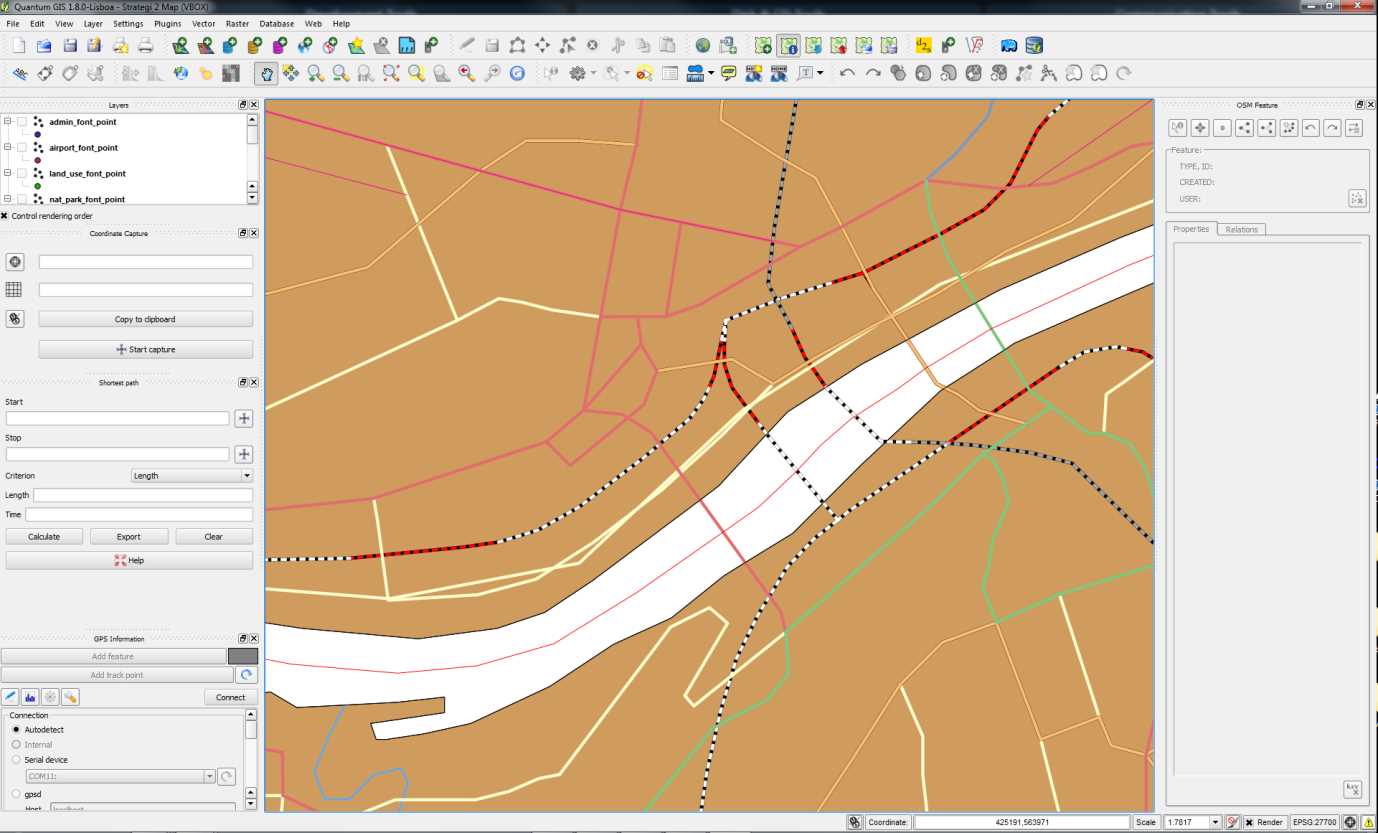
Figure 7: Multilayer Vector Map in QGIS
In this figure you can clearly see the path of the river Tyne, the local road and rail links, and even utilities such as power cables. The loaded map set, even though zoomed in, includes this data for the entire United Kingdom.
I could write an entire book about QGIS alone, but for now if you want to find out more you can do so at the official QGIS website at www.qgis.org.
MapWindow
MapWindow is designed very much to be used in a similar way to QGIS. Its main purpose is to do everything a desktop GIS application can do, with a variety of functionality.
It's also the only one written specifically for the Windows platform, designed to encompass the Windows developer community with its rich developer API and toolsets.
MapWindow is available in two versions: MapWindow 4 and MapWindow 6. MapWindow 4 is the original, first-generation C++ version, and MapWindow 6 is the latest, state-of-the-art rewrite, written entirely using C# and the standard .NET runtime.
Currently, both releases are updated and released in tandem, according to the Codeplex page for the application. This is because MapWindow 6 has yet to reach the same level of functionality as MapWindow 4. As you can see in the following screenshot, it's very similar to QGIS:
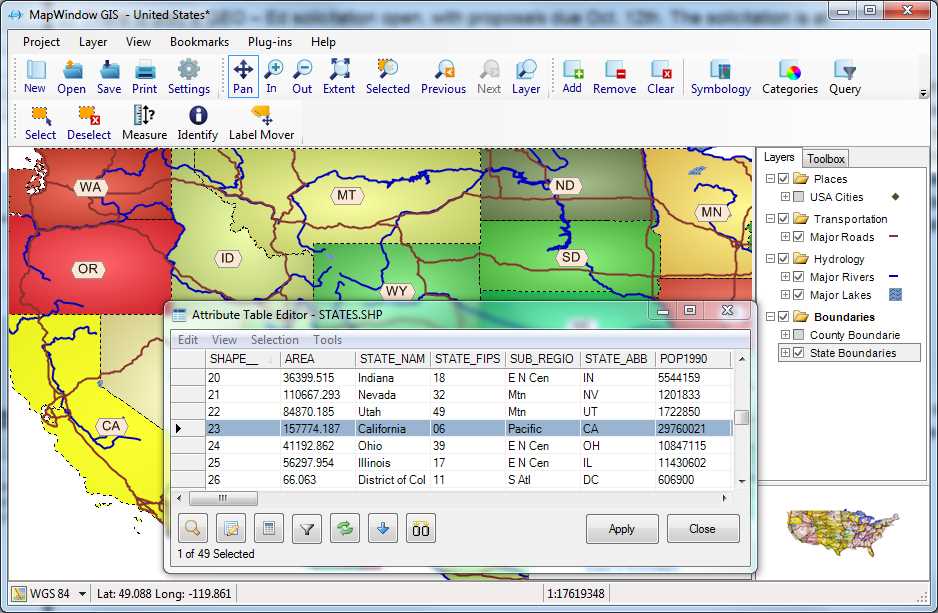
Figure 8: MapWindow GIS Interface
To find out more, visit the project home page at mapwindow4.codeplex.com or mapwindow6.codeplex.com.
GeoKettle
One more application that deserves mention is GeoKettle. While this is not a desktop GIS application in the same sense as the others, it's just as important.
GeoKettle is an ETL tool. Its primary purpose is to transform and then load data between many formats and many types of database. Originating from a package called Pentaho data suite, GeoKettle was enhanced to support industry-standard shapefiles, KML files, and the spatial characteristics of all the previously mentioned databases.
A shining example of how well done a simple-to-use open source application can be is my experience seeing many people replace highly priced applications such as Safe FME with solutions based on GeoKettle.
Written in Java, it has a plug-in architecture that is very easy to extend, making it easy to work with future file formats and databases. It can handle normal data in databases and files too, not just geospatial data. If you've ever used Microsoft Business Intelligence Development Studio, you'll feel right at home using GeoKettle as you'll notice in the following screenshot:
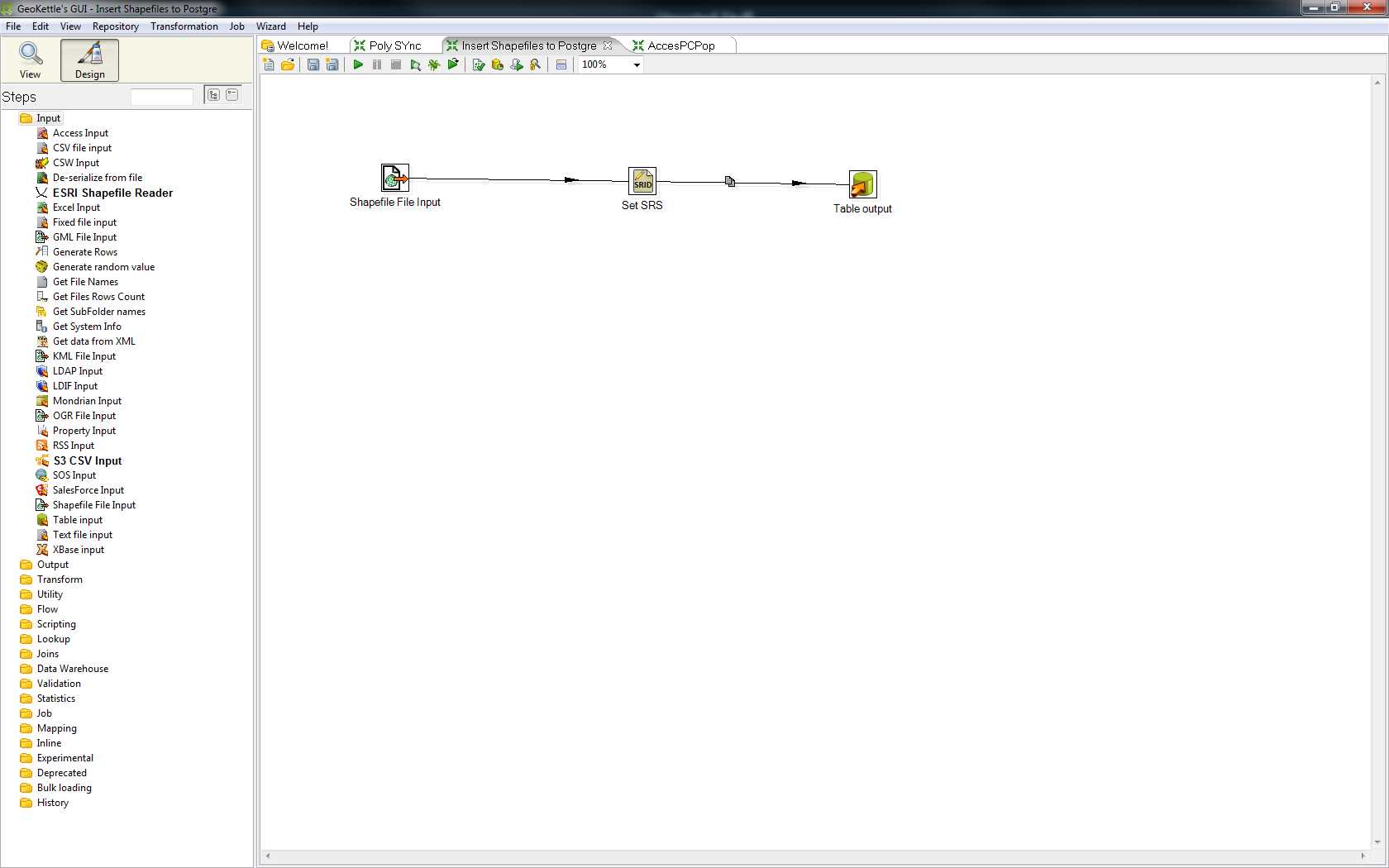
Figure 9: GeoKettle Interface
If you want to find out more, you can visit the GeoKettle website at www.spatialytics.org/projects/geokettle.
The Remaining Packages
As with database engines, there are simply too many GIS desktop packages for me to list them all. Wikipedia has a good list of geospatial and GIS software, ranging from pricey to free, at en.wikipedia.org/wiki/List_of_GIS_software, including those that I've covered here.
My two personal favorites are QGIS and GeoKettle, but I encourage you to try all that you are able to. Over the years, I've used many desktop GIS packages; some have very steep learning curves, and some you can pick up in less than five minutes. As with anything, you should pick the tool that does the job you need to perform in the best and easiest way possible.
Please also note that the applications I've listed are used predominantly in the U.K. and Europe. The popularity of applications varies all over the world. For instance, I believe that IDRISI is a popular package used in Canada. The applications listed in this section are the ones I use in my day-to-day GIS work.
As I've already mentioned, you have a ton of other stuff to take care of besides your choice of software.
Development Kits
Since this book is aimed at the .NET developer, it's only right that we include a section on the kits available for using geospatial data in your own .NET applications.
We'll cover a few practical examples later on, but for now I'll list the kits I've used or seen in use. Please note, however, that this is not an exhaustive list. The toolkits I describe are all designed for use under .NET on the Windows platform. As I've mentioned, applications like QGIS can be vastly extended, and there are many toolkits available under Linux and Mac systems that I've not yet and likely won't cover. If you're starting a project where you know you're going to be writing custom user interfaces, do your research beforehand. Instead of writing them from scratch, there's every chance you can modify an existing application to suit your needs.
MapWinGis
MapWinGis is the central GUI component behind MapWindow 4 and MapWindow 6. It's an OCX control written in C++ that can be used in any language that supports OCX on the Windows platform.
In the past, I used the original version of this component. It's been some time now since I've done any development using it. As with many of these components, it has a permanent home on Codeplex at mapwingis.codeplex.com.
It is designed to do most of the heavy lifting for you, leaving you free to concentrate on the GUI aspects of your application. Please note that it's designed for use in desktop applications, not web-based applications, and as far as I'm aware cannot be used in WPF or Silverlight.
DotSpatial
DotSpatial is a sister project of the MapWindow stable, and actually forms most of the core of the new MapWindow 6 .NET rewrite. DotSpatial also incorporates a few other Codeplex projects under its hood too, most notably GPS.Net and GeoFramework. Both are still available separately.
One thing that's worth noting about DotSpatial is that like QGIS, this toolkit has the backing of the OSGeo Foundation. As part of its kit, it also has the entire open source GIS developer library (including GEOS, Proj.4, GDAL, and many more) packaged as ready-to-use Windows DLLs for direct inclusion in your projects.
The project home page can be found on Codeplex at dotspatial.codeplex.com/.
SharpMap
SharpMap is one of the older toolkits for .NET. It has been around a little longer than DotSpatial.
It can handle most types of vector and raster data, including the NASA Blue Marble tile set for the entire globe.
According to its documentation, the SharpMap library supports both desktop and web-based projects (the later via the use of the AJAX Map control). It can also create custom thematic map styles by combining many different types of overlay.
The project home page can be found at sharpmap.codeplex.com.
BruTile
While not a full GIS library in the same sense as others, BruTile does one thing, and does it very well: it serves raster tiles cut up and reorganized on the fly to allow smooth scrolling and zooming of any input that the library handles.
BruTile is actually used by both SharpMap and DotSpatial to provide output support on their raster tile components. It's also used to display open street map data running inside a Silverlight map at brutiledemo.appspot.com.
BruTile can be used in any type of project, from web and Silverlight, to high-end desktop apps. It also has an adapter that allows it to be used in custom ArcGIS deployments.
The project home page is located at brutile.codeplex.com.
And There's More...
As with the other bits of software mentioned previously, there are simply many, many more available. What I've not even begun to cover here is the fact that all the major players such as ESRI and Pitney Bowes offer their own SDKs as well. In fact, a large chunk of ESRI's profit comes from the provision of GUI toolkits that are used in much the same way as MapWindow. Unfortunately, as much as I would like to, there are simply too many to cover in this short book.
The Demos
So now we get to that all-important question: what will I be using for the demos in this book?
I already have a setup of PostgreSQL with PostGIS, and most of my spatial SQL examples will be done using this. Any database management tool you have that can connect to Postgres will work. However, I will be using the one that comes provided with the server: pgAdmin.
In addition to this, I'll be using Quantum GIS to manage and display data along with a demonstration of using GeoKettle to load some data.
For the programming examples, I'll be using SharpMap in Visual Studio 2010 Professional in the C# language. The samples can be downloaded from bitbucket.org/syncfusion/gis-succinctly.
Please note that I won't be covering how to install and initially set up any of these applications. This is a fairly simple operation in most cases, and one that I'm going assume the reader of the book is familiar with. If you have any issues with installing the software, all the applications mentioned in this book have very active communities and help forums.
For those of you who are familiar with Stack Overflow, its GIS-specific site can be found at gis.stackexchange.com.
Many of the regulars there are expert GIS users who have a very deep understanding. Some parts of this book wouldn't have been possible without the help provided and replies to the questions I've asked there. I strongly recommend that anyone playing with GIS in .NET add a bookmark to the site right alongside a bookmark to the main Stack Overflow page.


- 1800+ high-performance UI components.
- Includes popular controls such as Grid, Chart, Scheduler, and more.
- 24x5 unlimited support by developers.