
Elixir Succinctly®

CHAPTER 4
Sample Application
So far, we’ve had a quick look at most of the features of Elixir, we built some examples and played with the REPL to learn the language, and we wrote a sample application using mix and the supervisors.
The best way to learn a new language is to use it in a real-world application. In this chapter we will see how to build a complete web app, starting from scratch and using some libraries from the Elixir community.
Most of us probably know the Mars Rover Kata. It is an exercise that asks the developer to build a simulator of a simple rover that receives commands to move around the planet (Mars, in this case). The rover receives the commands in the form of characters and returns its position according to the execution of the commands.
The rules are:
You are given the initial starting point (x, y) of a rover and the direction (N, S, E, W) it is facing. The rover receives a character array of commands. Implement commands that move the rover forward/backward (f, b) and turn the rover left/right (l, r). Implement wrapping from one edge of the grid to another (planets are spheres, after all). Implement obstacle detection before each move to a new square. If a given sequence of commands encounters an obstacle, the rover moves up to the last possible point and reports the obstacle.
We start from this idea and expand it a little bit to create an online, multiplayer, real-time game!
What we want to create is a multiplayer game that runs in the browser. When a new user connects to the website and chooses the name for the rover, they can move it around the planet. The goal is to crash against another rover to destroy it, and the more rovers the user destroys, the more points they receive.
We will start architecting the application in terms of GenServers and supervisors, and will start from the core rover component. Then we will add the web server to interact with the rover, and a web socket to notify the users.
The user interface is not part of the project; even in the repository of the project, we can see the full working example with the complete Javascript/HTML/CSS user interface.
Let’s start create a new project called rovex:
$ ~/dev/> mix new rovex |
As we already seen, this command creates the project structure needed to develop a full working project.
The application must be multiplayer, meaning we must have multiple live rovers on the planet, and for every new user that tries to connect and use the application, we need to create a new living rover.
In terms of Elixir, this means that every rover is a GenServer that is created as soon as a new user arrives, and it will receive the commands from this user.
These servers will have a private state: the position x and y, and the facing direction. This state can be changed by applying commands received from the user.
The first test
We’ll start from the rover server, and since we are real developers, we start with a test. Let’s edit the file rover_test.exs inside the folder test:
defmodule RoverTest do use ExUnit.Case test "get_state should return current state" do {:ok, _} = Rover.start_link({9, 9, :N, "rover0"}) {:ok, state} = Rover.get_state("rover0") assert state == {9, 9, :N, 0} end end |
This is the first test we’ve seen in Elixir, but the syntax is the same as other testing tools, so it shouldn’t scare you.
We include the ExUnit.Case library to be able to use its functions. We start the Rover server by calling the start_link function, passing the initial state, which is a tuple that contains two coordinates: the facing direction and the rover name.
{x, y, direction, name} = {9, 9, :N, "rover0"} |
The test states that if we start a server with that initial state and we don’t send commands, the state of the server is retrieved using the function get_state, and should not change. These tests are used to design the interface of the Rover module.
If we run the test now, we obtain an error, since the Rover module doesn’t exist:
$ mix test Compiling 2 files (.ex) Generated rovex app == Compilation error in file test/rover_test.exs == ** (CompileError) test/rover_test.exs:3: module Rover is not loaded and could not be found (ex_unit) expanding macro: ExUnit.DocTest.doctest/1 test/rover_test.exs:3: RoverTest (module) (elixir) lib/code.ex:767: Code.require_file/2 (elixir) lib/kernel/parallel_compiler.ex:209: anonymous fn/4 in Kernel.ParallelCompiler.spawn_workers/6 |
We have to make this test green. We add the Rover module:
defmodule Rover do end |
Run the test again:
$ mix test Compiling 1 file (.ex) Generated rovex app .. 1) test get_state should return current state (RoverTest) test/rover_test.exs:5 ** (UndefinedFunctionError) function Rover.start_link/1 is undefined or private code: {:ok, _} = Rover.start_link({9, 9, :N, "rover0"}) stacktrace: (rovex) Rover.start_link({9, 9, :N, "rover0"}) test/rover_test.exs:6: (test) Finished in 0.09 seconds 1 doctest, 2 tests, 1 failure Randomized with seed 200712 |
Now it says that the start_link function does not exist. We must convert this module to a GenServer with its own callbacks:
defmodule Rover do use GenServer def start_link({x, y, d, name}) do GenServer.start_link(__MODULE__, {x, y, d, name}, name: String.to_atom(name)) end def init({x, y, d, name}) do {:ok, %{}} end end |
The GenServer has the start_link function that deconstruct the tuple that receive and calls the Genserver.start_link function to run the server.
The third parameter of the start_link function is the server name. For now, we convert the name passed (a string) into an atom. GenServer names can be an atom or a special tuple that we will see later.
In this call we are using the RegistryHelper module to have a unique name for the server. For now, consider the RegistryHelper a sort of map of all the active rovers, where the key of the map is the rover name. The create_key function returns a special tuple that can be used as the server name.
The init function should return the initial state; for now we have used an empty map.
Let’s run the test again:
$ mix test Compiling 1 file (.ex) .. 1) test get_state should return current state (RoverTest) test/rover_test.exs:5 ** (UndefinedFunctionError) function RegistryHelper.create_key/1 is undefined (module RegistryHelper is not available) code: {:ok, _} = Rover.start_link({9, 9, :N, "rover0"}) stacktrace: RegistryHelper.create_key("rover0") (rovex) lib/rover.ex:7: Rover.start_link/1 test/rover_test.exs:6: (test) Finished in 0.03 seconds 1 doctest, 2 tests, 1 failure Randomized with seed 222211 |
Now the problem is that the get_state function is missing. Let’s change the server to add the get_state function and modify the init function to return the initial state:
defmodule Rover do use GenServer
defstruct [:x, :y, :direction, :name] def start_link({x, y, d, name}) do GenServer.start_link(__MODULE__, {x, y, d, name}, name: String.to_atom(name)) end def init({x, y, d, name}) do {:ok, %Rover{x: x, y: y, direction: d, name: name }} end def get_state(name) do GenServer.call(String.to_atom(name), :get_state) end def handle_call(:get_state, _from, state) do {:reply, {:ok, {state.x, state.y, state.direction}}, state} end end |
There are a few new things here. First of all, we defined a struct to contains the state of the server; using a struct is a better way to manage the type and to enforce the shape of the state.
The init function now returns a struct with the values it receives from the caller, so the state is correctly initialized and passed to the callbacks that need the state.
The get_state function receives the name of the rover whose state is requested. Remember that we are in a context where multiple instances of this rover are live, and since Elixir is a functional language, the way to specify which rover is asked is to pass the name to the functions.
The get_state simply sends a call to the server, and handle_call is called. As we’ve already seen, the handle_call callback receives the state of the server, and it can use this state to create the response:
|
{:reply, {:ok, {state.x, state.y, state.direction}}, state} |
Now the first test should be green:
$ mix test ... Finished in 0.04 seconds 1 doctest, 2 tests, 0 failures Randomized with seed 246068 |
We have now created a module that runs the rover process and is able to return its state. It’s not much, but it’s a start.
Control the rover
Now that we’ve created a rover, let’s add more features, like movement and rotation. We’ll start with the movement, adding a go_forward function to move the rover. We are opting for high-level function; something else will manage the conversion from letters to actions (such as F for moving forward, and L to turn left).
The test could be:
test "handle_cast :go_forward should return updated state" do {:noreply, state} = Rover.handle_cast(:go_forward, %Rover{x: 1, y: 3, direction: :N}) assert state.x == 1 assert state.y == 4 assert state.direction == :N end |
Now that we know our rover is a GenServer, we can directly test the server function. This gives us the ability to write simple unit tests that don’t need a real running server to be executed.
The previous test directly calls the handle_cast (the asynchronous version of handle_call), passing the action to be called (:go_forward) and the current state (second parameter). The result of this call should be the new state (position).
To make it pass, we can just add the handle_cast function, but for completeness, we will also add the public function go_forward.
# inside rover.ex # [...previous code] @world_width 100 @world_height 100 def go_forward(name) do GenServer.cast(RegistryHelper.create_key(name), :go_forward) end new_state = case state.direction do :N -> %Rover{ state | x: state.x, y: mod(state.y + 1, @world_height) } :S -> %Rover{ state | x: state.x, y: mod(state.y - 1, @world_height) } :E -> %Rover{ state | x: mod(state.x + 1, @world_width), y: state.y } :W -> %Rover{ state | x: mod(state.x - 1, @world_width), y: state.y } end {:noreply, new_state} end |
The implementation is quite easy, thanks to pattern matching. Based on the rover direction, we decide how to move the rover. The case switchs over the direction of the rover and, depending on the direction, builds the new state.
In the previous code, @world_height and @world_width are constants, and their values are declared at the beginning of the snippet. The mod function returns the module, and it is used to consider the wrap around the planet.
The use of pipe operators in structs and maps is a shortcut to merge the right side with the left side. The following operation returns a new Rover structure that brings state and changes the x and y to the new specified values.
%Rover{ state | x: state.x, y: mod(state.y + 1, @world_height) } |
The go_backward operation is very similar to this one, and we omit the code for brevity.
The rotation functions are also quite similar; we’ll use the same pattern.
Starting from the test:
test "handle_cast :rotate_left should return updated state (N)" do {:noreply, state} = Rover.handle_cast(:rotate_left, %Rover{x: 1, y: 3, direction: :N}) assert state.x == 1 assert state.y == 3 assert state.direction == :W end |
If the robot direction is north (N) and we rotate left, the new direction must be west (W), while the coordinates should be the same.
Now we know how to implement this:
def rotate_left(name) do GenServer.cast(RegistryHelper.create_key(name), :rotate_left) end def handle_cast(:rotate_left, state) do new_state = case state.direction do :N -> %Rover{state | direction: :W} :S -> %Rover{state | direction: :E} :E -> %Rover{state | direction: :N} :W -> %Rover{state | direction: :S} end {:noreply, new_state} end |
What changes after a rotation is just the direction.
We now have all the logic needed to move the rover around the planet.
Rover supervisor
The application requires a new robot to be created when a new user starts to play. The role of creating new rovers is the task for a supervisor.
We already see that supervisor acts as a life controller for a GenServer, and we saw that we must specify the list of children to create when the supervisor starts.
This case is a little bit different. We don’t know how many GenServers the supervisor will have to create at the beginning, since rovers come to life by request and die when a crash occurs. The component to do such things is a DynamicSupervisor, a supervisor that doesn’t have a predefined list of children. Instead, children can be added or removed when it is necessary.
This means that this supervisor starts empty (with no children), and when a new user connects to the application, the supervisor will be called to create a new rover:
defmodule RoverSupervisor do use DynamicSupervisor def start_link(_) do DynamicSupervisor.start_link(__MODULE__, [], name: __MODULE__) end def init(_) do DynamicSupervisor.init(strategy: :one_for_one) end def create_rover(name, x, y, direction) do DynamicSupervisor.start_child(__MODULE__, {Rover, {x, y, direction, name}}) end def kill(rover) do pid = RegistryHelper.get_pid(rover.name) DynamicSupervisor.terminate_child(__MODULE__, pid) end end |
The two interesting functions here are create_rover and kill. The first is used to create a new rover and add it to the list. This function calls the start_child on the base DynamicSupervisor, passing the reference to the supervisor itself ( the __MODULE__ macro) and the specifications to define the new process: the Rover module and the initial state (x,y, direction and name).
The second function is kill, and it is used to terminate a process. This function will be called when a crash occurs. It gets the pid of the process (using the Registry) and calls terminate_child to kill the process.
With just these few modules, we have what we need to start the rovers.
Open the REPL using this command:
$ > iex -S mix |
This command starts the REPL and loads the application defined in the mix file so that we can use the modules defined in the app.
We can run the supervisor and create new rovers:
Erlang/OTP 21 [erts-10.1] [source] [64-bit] [smp:8:8] [ds:8:8:10] [async-threads:1] [hipe] [dtrace] Compiling 1 file (.ex) Generated rovex app Interactive Elixir (1.7.3) - press Ctrl+C to exit (type h() ENTER for help) iex(1)> RoverSupervisor.start_link([]) {:ok, #PID<0.146.0>} iex(2)> RoverSupervisor.create_rover("foo", 1, 2, :N) {:ok, #PID<0.148.0>} iex(3)> RoverSupervisor.create_rover("bar", 1, 2, :N) {:ok, #PID<0.5127.0>} iex(4)> Rover.go_forwar("foo") :ok iex(4)> Rover.get_state("foo") {:ok, {1, 3, :N}} |
We must change the mix file to inform the runtime, which is the application that it has to start.
Let's add this line to mix.exs:
def application do [ extra_applications: [:logger], mod: {Rover.Application, []} ] end |
The application function returns the list of applications to execute and the main module to start. For now, we just return the Rover.Application module (which we’ll see shortly) and the default logger.
The Application module is this:
defmodule Rover.Application do use Application def start(_type, _args) do children = [ Supervisor.child_spec({Registry, [keys: :unique, name: Rover.Registry]}, id: :rover_registry), Supervisor.child_spec({RoverSupervisor, []}, id: RoverSupervisor), ] opts = [strategy: :one_for_one, name: Application.Supervisor] Supervisor.start_link(children, opts) end end |
The application.ex module is the entry point for your application. It is a supervisor, and starts the children defined in the list. For now, we just have a couple of processes: the Registry that stores the running rovers, and the RoverSupervisor used to create and kill rovers.
When we start the REPL with this file in place, the application module is executed automatically and Registry and RoverSupervisor start at the beginning.
Now we can start creating the new rover.
If we run Observer, we can start viewing our three processes:

Figure 5 – Rovex processes
Notice the three rovers created using the create_rover function in the REPL, the two supervisors, and the Application supervisor.
The basic blocks of our application are now ready, and we can start adding some API to interact with the rover using the HTTP protocol.
This is when Plug comes in.
Introducing Plug and Cowboy
According to the Plug website, Plug is defined as:
- A specification for composable modules between web applications
- Connection adapters for different web servers in the Erlang VM
In practice we can consider it a sort of library used to write web API. Plug is not a fully web-based framework; it needs a web server to run (usually Cowboy), and is very simple to set up and use.
The web server Cowboy is an implementation (in Erlang) of the HTTP protocol, and is used by Plug as the lower layer.
To understand how it works, we will start using it in our application to accept commands via HTTP. First of all, we add the dependencies to our mix file:
{:plug, "~> 1.5"}, {:cowboy, "~> 1.0"}, |
Then in the same file, we add two extra applications: :cowboy and :plug. We already see that Elixir applications are composed of different applications, and Cowboy with Plug are two of them. They are not libraries in the common sense (like a NPM package); they run on their own, with their own processes.
Finally, we have to add to our list of main supervisor children the Plug/Cowboy supervisor that starts and listens to HTTP requests. It takes a few parameters: the protocol (:http in this case), the module that will receive the requests, a set of Cowboy options (empty array), and the port to listen to (3000):
defmodule Rover.Application do use Application def start(_type, _args) do children = [ Supervisor.child_spec({Registry, [keys: :unique, name: Rover.Registry]}, id: :rover_registry), Supervisor.child_spec({RoverSupervisor, []}, id: RoverSupervisor), Plug.Adapters.Cowboy.child_spec(:http, Rover.Web.Router, [], port: 3000), ] opts = [strategy: :one_for_one, name: Application.Supervisor] Supervisor.start_link(children, opts) end end |
This is what we need to configure the application to start a web server on port 3000 and start waiting for an incoming connection.
Now we need to add a module to manage these connections.
defmodule Rover.Web.Router do use Plug.Router plug(Plug.Parsers, parsers: [:json], json_decoder: Poison) plug(:match) plug(:dispatch) get "/ping" do send_resp(conn, 200, Poison.encode!(%{message: "pong"})) end match(_) do send_resp(conn, 404, "") end end |
This is a minimal implementation of a web module. First of all, it defines a couple of plugs. (Plugs are a kind of middleware, in node terms.)
The first plug is used to parse JSON content, and is based on the Poison library. What it does is simply transform JSON content into Elixir maps so that we can use them in the request handlers.
The second plug is used to determine which route (and then which function) matches the requested route. The last plug is used to tell plug to dispatch the request to the specified function.
Our handler get matches against the route /ping and the HTTP method GET, and what it does is to send the response {"message": "pong"} with status code 200. To convert the response into JSON, it uses the encode function of the Poison library.
The match function at the end of the file is used to respond 404 Not Found to every other request.
We can see if everything works by running the server using mix run --no-halt and using curl or another HTTP client to open the URL http://localhost:3000/ping and verify the response.
If everything is correct, we continue by adding some more route handlers. We will start with the route that creates a new rover. It will be a POST to the route /rover:
post "/rover" do rover_name = conn.body_params["name"] x = conn.body_params["x"] y = conn.body_params["y"] d = String.to_atom(conn.body_params["d"]) case RoverSupervisor.create_rover(name, x, y, d) do {:ok, _} -> send_resp(conn, 201, encode(%{message: "created rover #{rover_name}"})) {:error, {:already_started, _}} -> send_resp(conn, 400, encode(%{message: "rover already exists"})) _ -> send_resp(conn, 500, encode(%{message: "generic error"})) end end |
Let's analyze the code. The post function declares a new route that respond to /rover. Then it reads data from the body request: name, x, y, d. The request is supposed to be in JSON, and conn.body_params is a sort of map of the posted JSON.
This is possible because at the beginning of the module, we add a plug module to parse the application/JSON request. Poison is the library used for parsing and generating JSON responses.
When the data needed to create a new rover is available, all we have to do is to call RoverSupervisor.create_rover to start the server, and based on the result, we build a correct response: 201 if the rover is correctly created, and an error in other cases.
If the result of create_rover is okay, the rover process is alive and ready to receive commands.
Now we can implement the route that receive commands:
post "/command" do rover_name = conn.body_params["name"] command = String.to_atom(conn.body_params["command"]) Rover.send_command(rover_name, command) send_resp(conn, 204, encode(%{})) end |
As with the previous route, it is a post method. In the body, the client posts the rover name and the command (F, B, L, R). We send this command directly to the living rover.
Note: We are using a helper function on the rover to simplify the client, and using pattern matching to identify which real command we need to call.
# in Rover.ex def send_command(name, :F) do Rover.go_forward(name) end def send_command(name, :B) do Rover.go_backward(name) end def send_command(name, :L) do Rover.rotate_left(name) end def send_command(name, :R) do Rover.rotate_right(name) end |
We now have a real application that can control rovers using HTTP commands. Nice, but not yet very useful.
At the beginning of this chapter, we said that we would going to build a multiplayer game where players should destroy other players’ rovers by crashing against them.
Now every player can create a new rover and can move it, but there is not yet the possibility to know where the other rovers are and to crash against them.
To implement this feature, we start by creating a new type of GenServer that has the task of keeping track of currently created rovers and their positions. Every time a rover changes its position, this new GenServer checks for rovers overlapping, and if necessary, kills the rover.
Here is the source code of this GenServer, which we will call WorldMap:
defmodule WorldMap do use GenServer def start_link(_) do GenServer.start_link(__MODULE__, [], name: WorldMap) end def init([]) do {:ok, %{rovers: []}} end def update_rover(name, x, y) do GenServer.call(__MODULE__, {:update_rover, name, x, y}) end defp update_rover_list(rovers, name, x, y) do case Enum.find_index(rovers, fn r -> r.name == name end) do nil -> rovers ++ [%{name: name, x: x, y: y}] index -> List.replace_at(rovers, index, %{name: name, x: x, y: y}) end end def handle_call({:update_rover, name, x, y}, _from, state) do rover_list = update_rover_list(state.rovers, name, x, y) case Enum.find(rover_list, fn r -> r.name != name && r.x == x && r.y == y end) do nil -> {:reply, :ok, %{state | rovers: rover_list}} rover_to_kill -> RoverSupervisor.kill(rover_to_kill) new_rovers = List.delete(rover_list, rover_to_kill) {:reply, :ok, %{state | rovers: new_rovers}} end end end |
The implementation is quite easy now; during the init phase, it prepares the rover list to an empty list. The only public function is update_rover, which every rover should call when its state changes. This function checks the WorldMap state if the rover is present. In this case it updates its position; otherwise, it adds the rover to the list.
Then it checks for collision if finding other rovers in the same position. If it finds one, it kills the rover using the RoverSupervisor.kill function, and removes the rover from the state.
We already saw the implementation of the kill function, which now has a real meaning in this context.
The WorldMap GenServer must be started when the application starts, so we have to go back to our application file and add the declaration of WorldMap to the children:
children = [ Supervisor.child_spec({Registry, [keys: :unique, name: Rover.Registry]}, id: :rover_registry), Supervisor.child_spec({Registry, [keys: :duplicate, name: Socket.Registry]}, id: :socket_registry), Plug.Adapters.Cowboy.child_spec(:http, Rover.Web.Router, [], port: 3000), Supervisor.child_spec({RoverSupervisor, []}, id: RoverSupervisor), Supervisor.child_spec({WorldMap, []}, []), ] |
We also need to change the rover GenServer code to notify WorldMap every time something changes. It is straightforward to implement; we just need to add this line to the handle_cast function for :go_forward and :go_backword:
WorldMap.update_rover(state.name, state.x, state.y) |
Now everything is more connected; rovers can destroy other rovers and they will be killed accordingly, but we still haven’t notified players.
At this point, players don't know if their rover is about to die or to destroy another rover because communication are one-way only: players can control the rovers, but they are not notified about what happening on the server.
The best way to do this is to implement a WebSocket channel to notify the clients. Plug and Cowboy are already configured; we just need to add a module to manage the web socket communication, and then we will be ready to use it for notifying clients.
children = [ # ... Plug.Adapters.Cowboy.child_spec(:http, Rover.Web.Router, [], port: 3000, dispatch: dispatch()), # ... ] defp dispatch do [ {:_, [ {"/ws", Rover.Web.WsServer, []}, {:_, Plug.Adapters.Cowboy.Handler, {Rover.Web.Router, []}} ]} ] end |
First, we need to configure Cowboy to use WebSockets. Back in the application file where we are starting the Plug/Cowboy process we need to change the configuration: The dispatch option is where we are telling cowboy that a new handler exists and it is in the WsServer module.
The WsServer module is the module that manage the WebSocket connections:
defmodule Rover.Web.WsServer do @behaviour :cowboy_websocket_handler @timeout 5 * 60_000 @registration_key "ws_server" def init(_, _req, _opts) do {:upgrade, :protocol, :cowboy_websocket} end def send_message_to_client(_rover, message) do Rover.Application.dispatch("#{@registration_key}", message) end def websocket_init(_type, req, _opts) do #{rover, _} = :cowboy_req.qs_val(<<"rover">>, req) {:ok, _} = Registry.register(Socket.Registry, "#{@registration_key}", []) state = %{} {:ok, req, state, @timeout} end def websocket_terminate(_reason, _req, _state) do :ok end end |
This piece of code is quite dense—Elixir doesn't have yet a library that manage web sockets, so Cowboy from Erlang must be used.
The two main functions here are websocket_init, which adds in the registry, the client connection using the rover name in the query string to identify the rover, and send_message_to_client, a function used to notify the connected clients.
This last function is used inside the rover process to notify the clients about the rover’s position:
Rover.Web.WsServer.send_message_to_client(state.name, state) |
The name is used to identify the sender, and the state will be used by the client to update the position.
This is all we need to create a WebSocket connection that notifies clients about changes to the rovers.
The UI of the application is out of scope of this book (since it will be written in Javascript and HTML), but if you want to see the full application you can find it on my GitHub at this address: GitHub.
There is also a completely functional version of this application, where we can play with our friends, available here. The backend code is exactly what you find on GitHub.
For a recap of the architecture, have a look at the following figure:
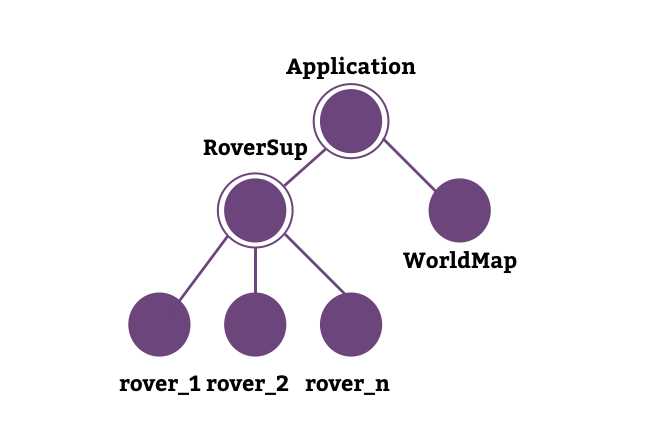 Figure 6 – Application servers and supervisors
The Application is the main supervisor that runs the WorldMap GenServer, and a second-level supervisor that supervises the rover processes. There can be many rover processes—on my machine (a MacBook pro with 16MB RAM) I simulated a world with more than 2,000 rovers, and everything worked like a charm, without any problems.
Rover communicates with WorldMap, sending status updates so that WorldMap is able to check for collisions and keep its map aligned with reality.
We omitted the schema from infrastructure but Cowboy, Plug, and the registries are just another set of processes or supervisors.
We can look at them using Observer. Start the application using the command iex -S mix, and use the RoverSupervisor to create some rovers:
iex(1) > RoverSupervisor.create_rover("one", 1, 2, :N) iex(2) > RoverSupervisor.create_rover("two", 4, 9, :N) iex(3) > RoverSupervisor.create_rover("three", 24, 73, :N) iex(4) > :observer.start |
Using the Applications tab, we will see something like this:
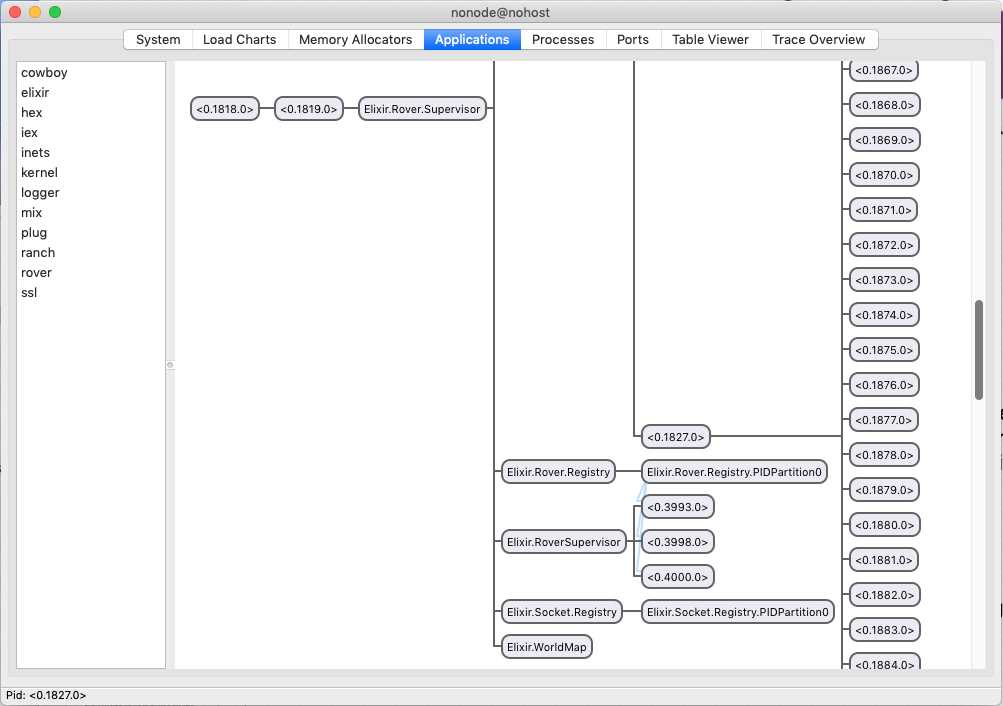 Figure 7 – Rovex process tree
We can see Elixir.RoverSupervisor with three children: the three rovers that we have created from the REPL.
There are the two registries: one for the rovers, and one for the web socket connection. The rover’s registry is connected to the rover’s instances with blue lines.
There is also the WorldMap that we can inspect double clicking on it to view its state:
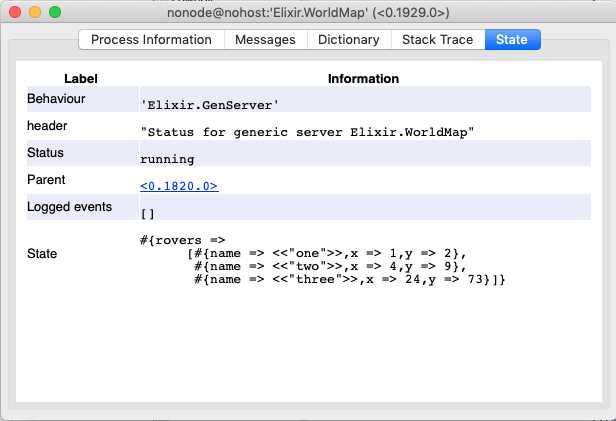 Figure 8 – Rovex WorldMap state
All other processes on the right (the long list) are processes owned by Cowboy, and most of them are HTTP connections ready to be used from the clients.
Our logical structure exactly matches the physical one shown by Observer.


- 1800+ high-performance UI components.
- Includes popular controls such as Grid, Chart, Scheduler, and more.
- 24x5 unlimited support by developers.