
Direct3D Succinctly®

CHAPTER 10
Putting it all Together
In the final chapter, we will look at putting many of the concepts we have seen in both this book and the previous book (Direct2D Succinctly). At the moment we are seemingly very far away from having anything even remotely resembling a game, but actually we are quite close to having an engine that can create many simple 3-D games. The aim of this book and the previous one has been to introduce general techniques for graphics programming. I have, so far, ignored almost all aspects that would lead us down a path of programming some specific game genre. At this point, I think it would be best to illustrate a game and show that we have examined enough concepts to create 3-D games. We will make something that resembles a space shooter like Space Invaders.
In the following code tables, I’ve neglected to go into any details because it is all either basic C++ programming or DirectX code, which we have been through in this book and the previous book.
Baddies and Bullets
The first thing we need to do is load some more models, one for a baddie and one for a bullet. These are extremely simple models only to save space in the text of this book. The following code table is the object file for the baddie.obj.
# Blender v2.66 (sub 0) OBJ File: 'baddie.blend' # www.blender.org o Cube v -1.000000 -1.000000 1.000000 v -1.000000 -1.000000 -1.000000 v 1.000000 -1.000000 -1.000000 v 1.000000 -1.000000 1.000000 v -0.231813 1.000000 0.231813 v -0.231813 1.000000 -0.231813 v 0.231813 1.000000 -0.231813 v 0.231813 1.000000 0.231813 vt 0.976658 0.674214 vt 0.651396 0.674214 vt 0.651396 0.348953 vt 0.075574 0.424353 vt 0.000175 0.424353 vt 0.000175 0.348953 vt 0.325436 0.000175 vt 0.200505 0.348604 vt 0.000175 0.000175 vt 0.651047 0.000175 vt 0.526116 0.348604 vt 0.450716 0.348604 vt 0.325786 0.697382 vt 0.450716 0.348953 vt 0.526116 0.348953 vt 0.999825 0.200505 vt 0.651396 0.325436 vt 0.999825 0.125106 vt 0.976658 0.348953 vt 0.075574 0.348953 vt 0.125106 0.348604 vt 0.325786 0.000175 vt 0.651047 0.697382 vt 0.651396 0.000175 vn -0.000000 -1.000000 0.000000 vn 0.000000 1.000000 0.000000 vn -0.933509 0.358555 0.000000 vn 0.000000 0.358554 -0.933509 vn 0.933509 0.358555 0.000000 vn -0.000000 0.358555 0.933509 vn 0.000000 0.358555 -0.933509 s off f 1/1/1 2/2/1 3/3/1 f 5/4/2 8/5/2 7/6/2 f 1/7/3 5/8/3 2/9/3 f 2/10/4 6/11/4 7/12/4 f 3/13/5 7/14/5 8/15/5 f 5/16/6 1/17/6 8/18/6 f 4/19/1 1/1/1 3/3/1 f 6/20/2 5/4/2 7/6/2 f 5/8/3 6/21/3 2/9/3 f 3/22/7 2/10/7 7/12/7 f 4/23/5 3/13/5 8/15/5 f 1/17/6 4/24/6 8/18/6 |
The texture to this object, called baddie.png, is the following UV map (Figure 10.1).

Figure 10.1: baddie.png
The object file and texture should be saved as baddie.obj and baddie.png, and imported into the Visual Studio project the same way we added the spacehip.obj and spaceship.png files. We are about to change the way these models are loaded by the application, but the import of the files is the same. Don’t forget to change the file type of the obj file from object to text.
The bullet model object file is presented as the following code table.
# Blender v2.67 (sub 0) OBJ File: '' # www.blender.org v 0.086050 -0.086050 -0.086050 v 0.086050 -0.086050 0.086050 v -0.086050 -0.086050 0.086050 v -0.086050 -0.086050 -0.086050 v 0.086050 0.086050 -0.086050 v 0.086050 0.086050 0.086050 v -0.086050 0.086050 0.086050 v -0.086050 0.086050 -0.086050 vt 0.666467 0.666467 vt 0.333533 0.666467 vt 0.333533 0.333533 vt 0.333134 0.333133 vt 0.000200 0.333134 vt 0.000200 0.000200 vt 0.666467 0.000200 vt 0.666467 0.333133 vt 0.333533 0.333134 vt 0.999800 0.333533 vt 0.999800 0.666467 vt 0.666867 0.666467 vt 0.000200 0.999800 vt 0.000200 0.666867 vt 0.333134 0.999800 vt 0.333134 0.333533 vt 0.333134 0.666467 vt 0.000200 0.666467 vt 0.666467 0.333533 vt 0.333133 0.000200 vt 0.333533 0.000200 vt 0.666867 0.333533 vt 0.333134 0.666867 vt 0.000200 0.333533 vn 0.000000 -1.000000 0.000000 vn -0.000000 1.000000 0.000000 vn 1.000000 -0.000000 0.000001 vn -0.000000 -0.000000 1.000000 vn -1.000000 -0.000000 -0.000000 vn 0.000000 0.000000 -1.000000 vn 1.000000 0.000000 -0.000000 s off f 1/1/1 2/2/1 3/3/1 f 5/4/2 8/5/2 7/6/2 f 1/7/3 5/8/3 6/9/3 f 2/10/4 6/11/4 7/12/4 f 3/13/5 7/14/5 4/15/5 f 5/16/6 1/17/6 4/18/6 f 4/19/1 1/1/1 3/3/1 f 6/20/2 5/4/2 7/6/2 f 2/21/7 1/7/7 6/9/7 f 3/22/4 2/10/4 7/12/4 f 7/14/5 8/23/5 4/15/5 f 8/24/6 5/16/6 4/18/6 |
The bullet’s UV layout is the following image (Figure 10.2).

Figure 10.2: bullet.png
These two items can be saved and imported into the project in the same way as the spaceship and baddie. I called these two files bullet.obj and bullet.png; if you name them something different, be sure to change the filename references in the code.
GameObject Class
The GameObject class is a simple wrapper class. It holds the model and position of the objects (the player, the bullet, and the baddies) in our game. It is not required for a game engine, but it really helps to create a GameObject class or something similar to encapsulate all the complexities of the physical objects in our virtual world. The following class is specifically designed for exactly what the game will need, but usually the GameObject class should be flexible and contain a more uniform and complete set of methods for manipulating objects. Add two files to the project, GameObject.h and GameObject.cpp. The two following code tables show the code for these files.
// GameObject.h #pragma once #include "pch.h" #include "Model.h" #include "ModelReader.h" #include "Texture.h" using namespace DirectX; class GameObject { XMFLOAT3 m_objectPosition; // Object's position XMFLOAT3 m_objectMovement; // Object's movement Model *m_model; // Object's model Texture m_texture; // Object's texture float m_objectSize; // Object's size in units bool m_isActive; // Is the object active? public: GameObject(); // For use when multiple objects use the sme texture and model void SetModelAndTexture(Model* model, Texture* texture) { m_model = model; m_texture = *texture; } void SetObjectSize(float size) { this->m_objectSize = size; } void SetActive( bool active) { m_isActive = active; }
bool IsActive() { return m_isActive; } void LoadModelFileAndTexture(ID3D11Device* device, IWICImagingFactory2* wicFactory, char* modelFilename, LPCWSTR texturefilename, float objectSize); XMMATRIX GetTranslationMatrix() { return XMMatrixTranslation(m_objectPosition.x, m_objectPosition.y, m_objectPosition.z); } // Reverse the direction of the object's movement void ReverseDirection() { m_objectMovement.x = -m_objectMovement.x; m_objectMovement.y = -m_objectMovement.y; m_objectMovement.z = -m_objectMovement.z; } void SetPosition(float x, float y, float z) { m_objectPosition.x = x; m_objectPosition.y = y; m_objectPosition.z = z; } XMFLOAT3 GetPosition() { return m_objectPosition; } XMFLOAT3 GetSpeed() { return m_objectMovement; } void SetSpeed(float x, float y, float z) { m_objectMovement.x = x; m_objectMovement.y = y; m_objectMovement.z = z; } void SetPosition(XMFLOAT3 pos) { m_objectPosition = pos; } void SetYPosition(float y) { m_objectPosition.y = y; } void Move(); void Accelerate(float amountX, float amountY, float amountZ, float max); void Render(ID3D11DeviceContext1* context); bool Overlapping(GameObject *obj); }; |
// GameObject.cpp #include "pch.h" #include "GameObject.h" GameObject::GameObject() { m_objectPosition = XMFLOAT3(0.0f, 0.0f, 0.0f); m_objectMovement = XMFLOAT3(0.0f, 0.0f, 0.0f); } void GameObject::LoadModelFileAndTexture(ID3D11Device* device, IWICImagingFactory2* wicFactory, char* modelFilename, LPCWSTR texturefilename, float objectSize) { // Read the spaceship model m_model = ModelReader::ReadModel(device, modelFilename); // Read the texture: m_texture.ReadTexture(device, wicFactory, texturefilename); // Record the radius of the the object's bounding sphere m_objectSize = objectSize; } void GameObject::Render(ID3D11DeviceContext1* context) { if(!m_isActive) return; // If the object's not active, return
// Set to render triangles UINT stride = sizeof(Vertex); // Reset to the frist vertices in the buffer UINT offset = 0; // Set the vertex buffer context->IASetVertexBuffers(0, 1, m_model->GetAddressOfVertexBuffer(), &stride, &offset); // Set the resource view which points to the texture context->PSSetShaderResources(0, 1, m_texture.GetResourceView().GetAddressOf()); // Render the vertices context->Draw(m_model->GetVertexCount(), 0); } void GameObject::Move() { m_objectPosition.x += m_objectMovement.x; m_objectPosition.y += m_objectMovement.y; m_objectPosition.z += m_objectMovement.z; } void GameObject::Accelerate(float amountX, float amountY, float amountZ, float max) { m_objectMovement.x += amountX; m_objectMovement.y += amountY; m_objectMovement.z += amountZ; if(m_objectMovement.x > max) m_objectMovement.x = max; if(m_objectMovement.y > max) m_objectMovement.y = max; if(m_objectMovement.z > max) m_objectMovement.z = max; if(m_objectMovement.x < -max) m_objectMovement.x = -max; if(m_objectMovement.y < -max) m_objectMovement.y = -max; if(m_objectMovement.z < -max) m_objectMovement.z = -max; } bool GameObject::Overlapping(GameObject *obj) { // If either of the two objects are not active, return false if(!m_isActive) return false; if(!obj->m_isActive) return false; // Find distance in each axis float distX = m_objectPosition.x - obj->m_objectPosition.x; float distY = m_objectPosition.y - obj->m_objectPosition.y; float distZ = m_objectPosition.z - obj->m_objectPosition.z; // Find total distance from axis distances float dist = sqrt(distX*distX + distY*distY + distZ * distZ); // The models overlap if theie distance is less or equal // to either of the object's sizes return dist <= (m_objectSize + obj->m_objectSize); } |
The previous class holds the position, movement, active or inactive state, texture, and model for each object in the game. The collection of methods I have written for this class is very specific to the way this game will operate. They are methods for moving the objects around, assigning the texture and model, and testing if two objects collide.
Background
We will place our spaceship in the middle of space by rendering a 2-D image of a star field behind the 3-D objects. The following image (Figure 10.3) should be saved as starfieldbackground.png and imported to your project just as we did with the UV textures earlier. It will form the background of our game.
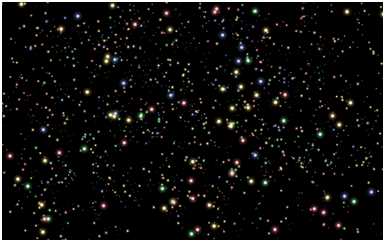
Figure 10.3: starfieldbackground.png
The following class, which loads and renders the background, is taken from the previous book, Direct2D Succinctly. It is included here for convenience, but for a description of the class please see the other book. Add two files for the BitmapBackground class, BitmapBackground.h and BitmapBackground.cpp. The two following code tables show the code for these files.
// BitmapBackground.h #pragma once #include "DirectXBase.h" // Defines a background consisting of a bitmap image class BitmapBackground { private: ID2D1Bitmap * m_bmp; // The image to draw D2D1_RECT_F m_screenRectangle; // Destination rectangle
public: // Constructor for bitmap backgrounds BitmapBackground();
// Release dynamic memory ~BitmapBackground(); void CreateDeviceDependentResources (Microsoft::WRL::ComPtr<ID2D1DeviceContext> context, IWICImagingFactory2 *wicFactory, LPCWSTR filename); void CreateWindowSizeDependentResources( Microsoft::WRL::ComPtr<ID2D1DeviceContext> context); void Render(Microsoft::WRL::ComPtr<ID2D1DeviceContext> context); }; |
// BitmapBackground.cpp #include "pch.h" #include "BitmapBackground.h" // This constructor must be called at some point after the // WIC factory is initialized! BitmapBackground::BitmapBackground() { } BitmapBackground::~BitmapBackground(){ m_bmp->Release(); } void BitmapBackground::CreateDeviceDependentResources (Microsoft::WRL::ComPtr<ID2D1DeviceContext> context, IWICImagingFactory2 *wicFactory, LPCWSTR filename) { // Create a WIC decoder IWICBitmapDecoder *pDecoder; // Decode a file, make sure you've added the file to the project first: DX::ThrowIfFailed(wicFactory->CreateDecoderFromFilename(filename, nullptr, GENERIC_READ, WICDecodeMetadataCacheOnDemand, &pDecoder)); // Read a frame from the file (png, jpg, bmp etc. images only have one frame so // the index is always 0): IWICBitmapFrameDecode *pFrame = nullptr; DX::ThrowIfFailed(pDecoder->GetFrame(0, &pFrame)); // Create format converter to ensure data is the correct format despite the // file's format. // It's likely the format is already perfect but we can't be sure: IWICFormatConverter *m_pConvertedSourceBitmap; DX::ThrowIfFailed(wicFactory->CreateFormatConverter(&m_pConvertedSourceBitmap)); DX::ThrowIfFailed(m_pConvertedSourceBitmap->Initialize( pFrame, GUID_WICPixelFormat32bppPRGBA, WICBitmapDitherTypeNone, nullptr, 0.0f, WICBitmapPaletteTypeCustom)); // Create a Direct2D bitmap from the converted source DX::ThrowIfFailed(context->CreateBitmapFromWicBitmap( m_pConvertedSourceBitmap, &m_bmp)); // Release the dx objects we used to create the bmp pDecoder->Release(); pFrame->Release(); m_pConvertedSourceBitmap->Release(); } void BitmapBackground::CreateWindowSizeDependentResources( Microsoft::WRL::ComPtr<ID2D1DeviceContext> context) { // Save a rectangle the same size as the area to draw the background m_screenRectangle = D2D1::RectF(0, 0, context->GetSize().width, context->GetSize().height); } void BitmapBackground::Render(Microsoft::WRL::ComPtr<ID2D1DeviceContext> context) { context->DrawBitmap(m_bmp, &m_screenRectangle); } |
Pixel Shader
The vertex shader can stay the same, but the lighting in the pixel shader should be a little darker to help the models look more like they are in the dark star field. The following code table is the main method from the pixelshader.hlsl file.
// Main entry point to the shader float4 main(PixelShaderInput input) : SV_TARGET { float4 emissive = float4(0.0f, 0.0f, 0.0f, 1.0f);
float materialReflection = 0.9f; float4 ambientLightColor = float4(0.1f, 0.1f, 0.1f, 1.0f); float4 ambient = ambientLightColor * materialReflection;
float diffuseIntensity = 0.9f; float4 diffuseLightColor = float4(1.0f, 1.0f, 1.0f, 1.0f); float4 diffuseLightDirection = float4(-1.0f, -1.0f, -1.0f, 1.0f); float4 materialColor = shaderTexture.Sample(samplerState, input.tex); float4 diffuse = diffuseIntensity * diffuseLightColor * saturate(dot(-diffuseLightDirection, input.normal)); diffuse = diffuse * materialColor; float4 finalColor = emissive + ambient + diffuse; finalColor = normalize(finalColor); return finalColor; } |
SimpleTextRenderer
Most of the changes to the game are in the SimpleTextRenderer class. The following code table shows the updated SimpleTextRenderer.h file. It now includes the GameObject.h file, the BitmapBackground.h file, and the string header. The member variables have also changed, since we no longer want a single spaceship model but several different models.
// SimpleTextRenderer.h #pragma once #include "DirectXBase.h" #include "VertexShader.h" #include "PixelShader.h" #include "Keyboard.h" #include "GameObject.h" #include "BitmapBackground.h" #include "Model.h" #include "ModelReader.h" #include "Texture.h" #include <string> // This class renders simple text with a colored background. ref class SimpleTextRenderer sealed : public DirectXBase { public: SimpleTextRenderer(); // DirectXBase methods. virtual void CreateDeviceIndependentResources() override; virtual void CreateDeviceResources() override; virtual void CreateWindowSizeDependentResources() override; virtual void Render() override; // Method for updating time-dependent objects. void Update(float timeTotal, float timeDelta); // Keyboard methods: void KeyDown(Windows::System::VirtualKey key); void KeyUp(Windows::System::VirtualKey key);
private: Microsoft::WRL::ComPtr<ID3D11Buffer> m_constantBufferGPU; ModelViewProjectionConstantBuffer m_constantBufferCPU; ID3D11SamplerState *m_samplerState; // Shaders VertexShader m_vertexShader; PixelShader m_pixelShader; Keyboard m_keyboard; // Game objects and background GameObject m_spaceship; GameObject m_baddies[5]; GameObject m_bullet; BitmapBackground m_bitmapbackground; Texture m_baddieTexture; // Variables for printing the user's score int m_playerScore; // The player's score Microsoft::WRL::ComPtr<IDWriteTextFormat> m_textFormat; Microsoft::WRL::ComPtr<ID2D1SolidColorBrush> m_scoreBrush; }; |
The remaining changes are to be made to the SimpleTextRenderer.cpp file. The CreateDeviceIndependent resources method can be used to initialize the m_textFormat object to store aspects of the text that will render the player’s score. We can also set the player’s score to 0 in this method. The following code table shows these changes.
void SimpleTextRenderer::CreateDeviceIndependentResources() { DirectXBase::CreateDeviceIndependentResources(); m_playerScore = 0; DX::ThrowIfFailed( m_dwriteFactory->CreateTextFormat(L"Segoe UI", nullptr, DWRITE_FONT_WEIGHT_NORMAL, DWRITE_FONT_STYLE_NORMAL, DWRITE_FONT_STRETCH_NORMAL, 42.0f,L"en-US", &m_textFormat)); } |
The CreateDeviceResources method loads all the models and textures into the GameObject member variables and sets their initial values. It also creates the brush (m_scoreBrush) with which we will render the player’s score. The altered code for this method is presented as the following code table.
void SimpleTextRenderer::CreateDeviceResources() { DirectXBase::CreateDeviceResources(); // Load the spaceship model and texture m_spaceship.LoadModelFileAndTexture(m_d3dDevice.Get(), m_wicFactory.Get(), "spaceship.obj", L"spaceship.png", 3.0f); m_spaceship.SetPosition(0.0f, 0.0f, 5.0f); m_spaceship.SetActive(true); // Load the bullet m_bullet.LoadModelFileAndTexture(m_d3dDevice.Get(), m_wicFactory.Get(), "bullet.obj", L"bullet.png", 0.09f); m_bullet.SetActive(false); // Read the baddie model and texture Model *baddieModel = ModelReader::ReadModel(m_d3dDevice.Get(), "baddie.obj"); m_baddieTexture.ReadTexture(m_d3dDevice.Get(), m_wicFactory.Get(), L"baddie.png"); for(int i = 0; i < 5; i++) { m_baddies[i].SetModelAndTexture(baddieModel, &m_baddieTexture); m_baddies[i].SetPosition((float)(i-2.5f)* 3.0f, 0.0f, -5.0f); m_baddies[i].SetObjectSize(1.0f); m_baddies[i].SetActive(true); } // Load the background file m_bitmapbackground.CreateDeviceDependentResources(m_d2dContext, m_wicFactory.Get(), L"starfieldbackground.png"); // Create the constant buffer on the device CD3D11_BUFFER_DESC constantBufferDesc(sizeof(ModelViewProjectionConstantBuffer), D3D11_BIND_CONSTANT_BUFFER); DX::ThrowIfFailed(m_d3dDevice->CreateBuffer(&constantBufferDesc, nullptr, &m_constantBufferGPU)); // Load the vertex and pixel shaders from their files (note the CSO extension, not hlsl!): m_vertexShader.LoadFromFile(m_d3dDevice.Get(), "VertexShader.cso"); m_pixelShader.LoadFromFile(m_d3dDevice.Get(), "PixelShader.cso"); // Create the sampler state D3D11_SAMPLER_DESC samplerDesc; ZeroMemory(&samplerDesc, sizeof(D3D11_SAMPLER_DESC)); samplerDesc.Filter = D3D11_FILTER_MIN_MAG_MIP_LINEAR; samplerDesc.AddressU = D3D11_TEXTURE_ADDRESS_WRAP; samplerDesc.AddressV = D3D11_TEXTURE_ADDRESS_WRAP; samplerDesc.AddressW = D3D11_TEXTURE_ADDRESS_WRAP; samplerDesc.MipLODBias = 0.0f; samplerDesc.MaxAnisotropy = 1; samplerDesc.ComparisonFunc = D3D11_COMPARISON_ALWAYS; samplerDesc.BorderColor[0] = 0; samplerDesc.BorderColor[1] = 0; samplerDesc.BorderColor[2] = 0; samplerDesc.BorderColor[3] = 0; samplerDesc.MinLOD = 0; samplerDesc.MaxLOD = D3D11_FLOAT32_MAX; DX::ThrowIfFailed(m_d3dDevice->CreateSamplerState(&samplerDesc, &m_samplerState));
// Create the solid brush for the text DX::ThrowIfFailed(m_d2dContext->CreateSolidColorBrush(ColorF(ColorF::Yellow),&m_scoreBrush)); } |
We should call CreateWindowSizeDependentResources for the m_bitmapbackground object in the SimpleTextRenderer::CreateWindowSizeDependentResources method. The bitmap background class relies on the size of the window, because it must stretch the image across the whole window. The following code table highlights this extra call.
void SimpleTextRenderer::CreateWindowSizeDependentResources() { DirectXBase::CreateWindowSizeDependentResources(); m_bitmapbackground.CreateWindowSizeDependentResources(m_d2dContext); // Store the projection matrix float aspectRatio = m_windowBounds.Width / m_windowBounds.Height; float fovAngleY = 70.0f * XM_PI / 180.0f; XMStoreFloat4x4(&m_constantBufferCPU.projection, XMMatrixTranspose(XMMatrixPerspectiveFovRH(fovAngleY,aspectRatio,0.01f,500.0f))); } |
There are many changes to make to the Update method of the SimpleTextRenderer to allow our models to move and interact with each other. It is this method that responds to the user input and moves all the objects around. It determines if the bullet has hit a baddie and it increases the player’s score. I have also moved the camera a little higher. The altered version of the update method is presented as the following code table. Note that I have removed the static positioning of our model from the end of this method.
void SimpleTextRenderer::Update(float timeTotal, float timeDelta) { // View matrix defines where the camera is and what direction it looks in XMStoreFloat4x4(&m_constantBufferCPU.view, XMMatrixTranspose( XMMatrixLookAtRH( XMVectorSet(0.0f, 10.0f, 0.01f, 0.0f), // Position XMVectorSet(0.0f, 0.0f, 0.0f, 0.0f), // Look at XMVectorSet(0.0f, 1.0f, 0.0f, 0.0f) // Up vector )));
// Accelerate player left and right when the keys are down if(m_keyboard.IsKeyDown(Windows::System::VirtualKey::Left)) m_spaceship.Accelerate(-2.0f * timeDelta, 0.0f, 0.0f, 0.25f); else if(m_keyboard.IsKeyDown(Windows::System::VirtualKey::Right)) m_spaceship.Accelerate(2.0f * timeDelta, 0.0f, 0.0f, 0.25f); // Check if the ship hit the side of the screen: if(m_spaceship.GetPosition().x < -10.0f && m_spaceship.GetSpeed().x < 0.0f) m_spaceship.ReverseDirection(); if(m_spaceship.GetPosition().x > 10.0f && m_spaceship.GetSpeed().x > 0.0f) m_spaceship.ReverseDirection();
// Move the spaceship m_spaceship.Move(); // Store the ship's model buffer XMStoreFloat4x4(&m_constantBufferCPU.model, XMMatrixTranspose(m_spaceship.GetTranslationMatrix())); // Check if the player is shooting: if( m_keyboard.IsKeyDown(Windows::System::VirtualKey::Up)) { // If the bullet's not active, fire it if(!m_bullet.IsActive()) { m_bullet.SetPosition(m_spaceship.GetPosition()); m_bullet.SetSpeed(0.0f, 0.0f, -20.0f * timeDelta); m_bullet.SetActive(true); } } // If the bullet's active, move it if(m_bullet.IsActive()) { m_bullet.SetSpeed(0.0f, 0.0f, -20.0f * timeDelta); m_bullet.Move();
// If the bullet goes out of the screen, deactivate it if(m_bullet.GetPosition().z < -10.0f) m_bullet.SetActive(false); }
// Move the baddies for(int i = 0; i < 5; i++) { // Make the baddies bob up and down like real aliens m_baddies[i].SetYPosition(1.0f * sin(timeTotal*5 + i)); if(m_baddies[i].GetSpeed().x == 0.0f) // Set the initial speed if the baddie is not moving m_baddies[i].SetSpeed(4.0f*timeDelta, 0.0f, 0.0f);
// If they hit the side of the screen, reverse their direction if(m_baddies[i].GetSpeed().x < 0.0f && m_baddies[i].GetPosition().x < -10.0f) m_baddies[i].ReverseDirection(); if(m_baddies[i].GetPosition().x > 10.0f && m_baddies[i].GetSpeed().x > 0.0f) m_baddies[i].ReverseDirection(); // Move this baddie m_baddies[i].Move(); // If the bullet hits a baddie, set it as inactive if(m_baddies[i].Overlapping(&m_bullet)) { m_baddies[i].SetActive(false); m_bullet.SetActive(false); m_playerScore += 100; } } } |
The previous code table sets the baddies’ speed relative to the first timeDelta value. This is not a uniform way to move models, since the first timeDelta value will probably be slower than subsequent ones; it will do for this demo code, but you would never normally do this.
The changes to the Render method are fairly extensive. Basically, we render the 2-D background, then the spaceship, the baddies, and the bullet. We then render the player’s score so it appears above the objects and background. I have not highlighted the changes in the following code table because almost all the code is changed from the last time we saw this method.
And finally, the most important step, hit F5 to debug. You should see a 3-D space shooter (Figure 10.3).
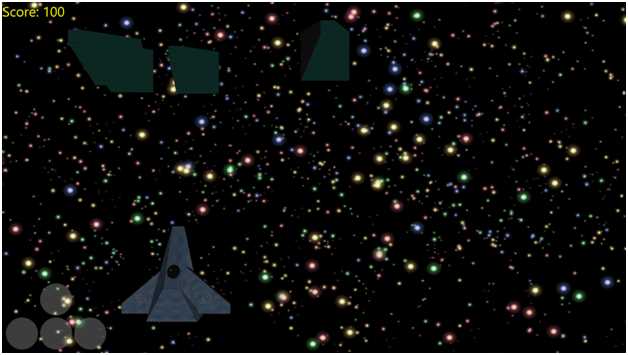
Figure 10.3: Space Shooter
Space shooter may have been an exaggeration, but we certainly have the rudiments of a 3-D shooter. Use the left and right keys to move the spaceship, and the up key to shoot. You can also use the mouse and click on the on-screen dpad or use the touchscreen if you have a Windows Surface or other WinRT device.


- 1800+ high-performance UI components.
- Includes popular controls such as Grid, Chart, Scheduler, and more.
- 24x5 unlimited support by developers.