
Database Design Succinctly®

CHAPTER 7
Sample Data Models
In this chapter, we will look at some sample data models for common business applications. We will provide conceptual and logical model examples and leave the physical modeling up to you, depending on your database management system.
Human resources
Human resource (HR) departments are generally responsible for keeping track of employees and departments, their roles, managers, and so on. Some HR systems also track job applicants, and others include training requirements. Often, the HR department also handles payroll and benefits. Figure 25 shows a simple conceptual model for an HR department to track employees, departments, and applicants.
Conceptual model
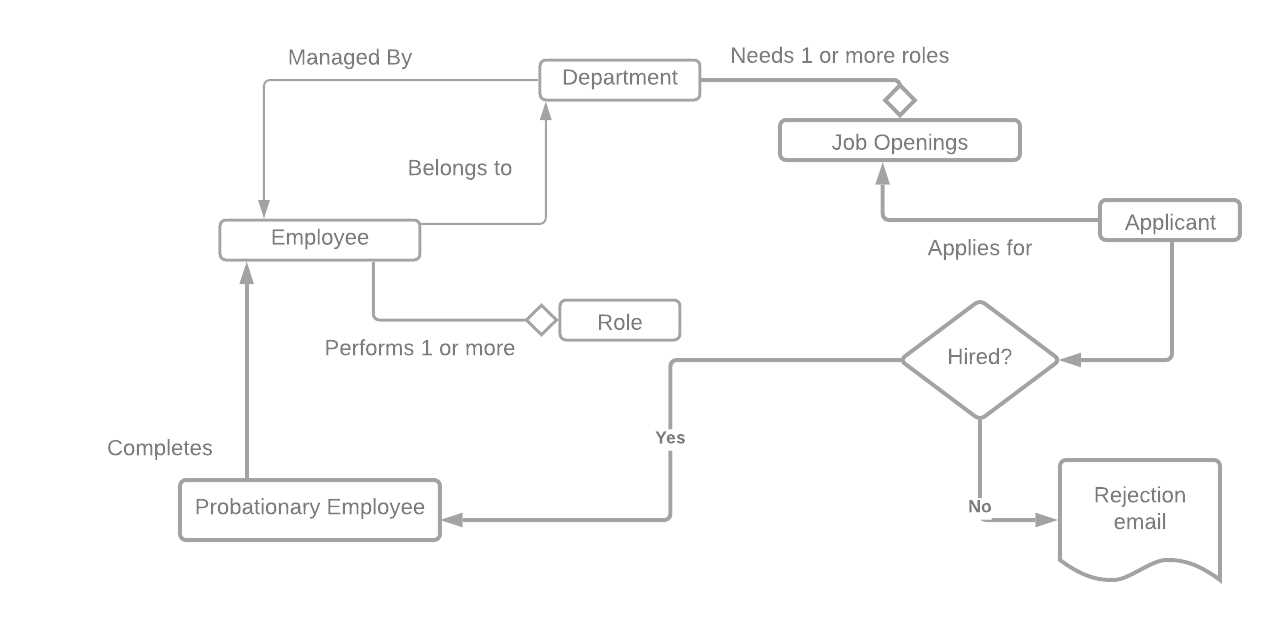
Figure 25: Human resources conceptual model
For this model, each employee belongs to one department, and each department is managed by one employee. The employee can perform multiple roles within the department. A department can have multiple job openings, which candidates can apply for. If the candidate is hired, they become a probationary employee, and after the probationary period, they become an employee. If the employee is not hired, a rejection email is sent.
While the model looks okay, after reviewing it with an HR employee, they asked what happens when an employee changes departments. This type of issue happens—something gets missed in the model. It is always a good practice to get as much review as possible of your conceptual model prior to starting the logical model. Based on this feedback from the user, we need to update the model some. Figure 26 shows the model update to the employee and departments.
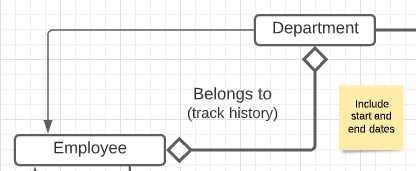
Figure 26: Update employee/department relationship
Logical model
Once you’ve got the approval for the conceptual model, you can begin to tackle the logical design phase. Figure 27 shows the logical model. Note that even after the logical model is designed, additional items (such as an applicant history table) might pop up.
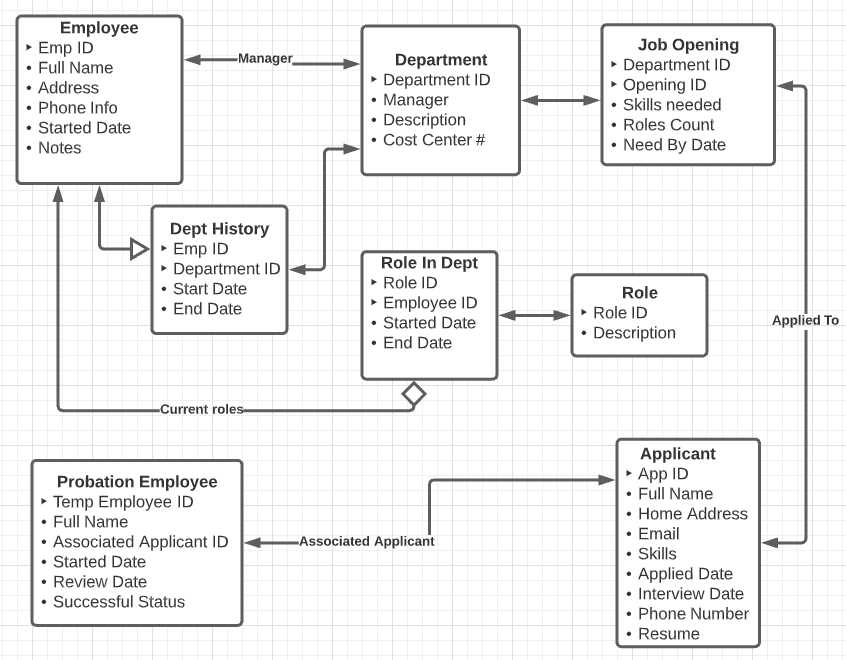
Figure 27: Human resource logical model
Accounting systems
A very common application for database systems is accounting. An accounting system consists of two key entities: accounts and transactions. The accounts list is referred to as the chart of accounts, while the transaction list is called the ledger.
Double entry accounting is a system where every transaction consists of debits and credits applied to different accounts. In each transaction, the total debits and credits must be equal. For some accounts, a debit represents an increase in the account balance, while in other accounts, the credit is the increase. Our database design must support debit/credit entries in a single transaction and a chart of accounts.
If you want to learn more about accounting systems, feel free to check out one of my previous books, Accounting Succinctly.
Conceptual model
The conceptual model for an accounting system is very simple, with only three primary entities, but frequently, a few associated entities (such as customers, vendors, and users). Figure 28 shows a sample accounting conceptual model.
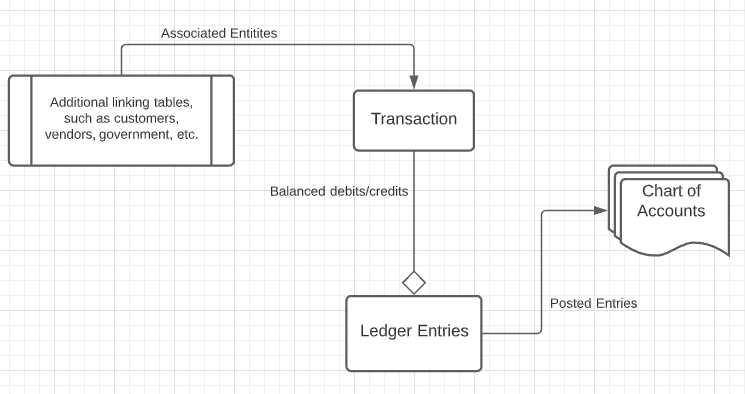
Figure 28: Accounting conceptual model
All standard financial reports will be generated from the chart of accounts. In addition, the transactions are typically placed in a journal, which specialized journals like cash receipts, cash disbursements, and a catch-all general journal. The transaction entity will likely have an attribute indicating the type of journal, although simple systems might place everything in the general journal.
Logical model
The logical model of the accounting entities is shown in Figure 29.
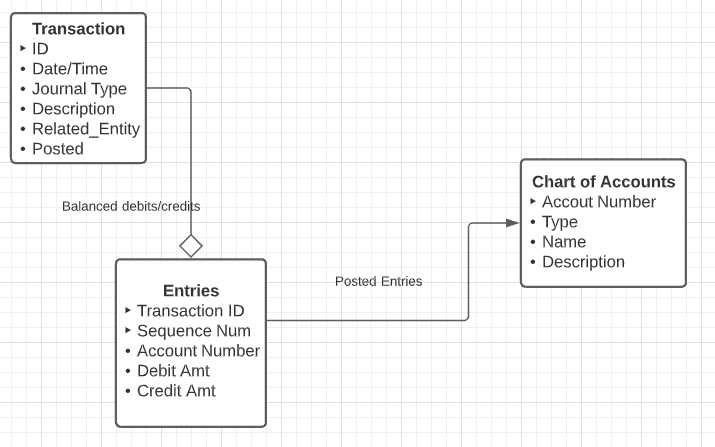
Figure 29: Logical accounting model
When a transaction is recorded, an ID and date and time are generated, and the user writes a description and possibly links the transaction to another entity. The transaction is the parent record to the child entries.
Each entry is associated with an account in the chart and will either debit or credit that account. It is a requirement of an accounting system that the total debit and credit entries for a transaction balance out.
For example, if a company were to buy a company car, they might create a transaction with a credit (reduces the balance) to the cash account and debit (increases the car inventory account) by the same amount.
While the business rules for transactions and accounting are complex, the data side is simple. The first book on double entry accounting was published in 1494 by Luca Pacioli, and for years was done manually.
Inventory
If a company sells or manufacturers a product, they likely will use a system to keep track of the inventory of product and/or materials. When a company only sells a product, they likely only need one entity to keep track of the inventory. However, if the company makes a product, they need different kinds of inventories for raw materials, works-in-progress, and finished goods.
Conceptual models
Figure 30 is a conceptual model for a manufacturing system.
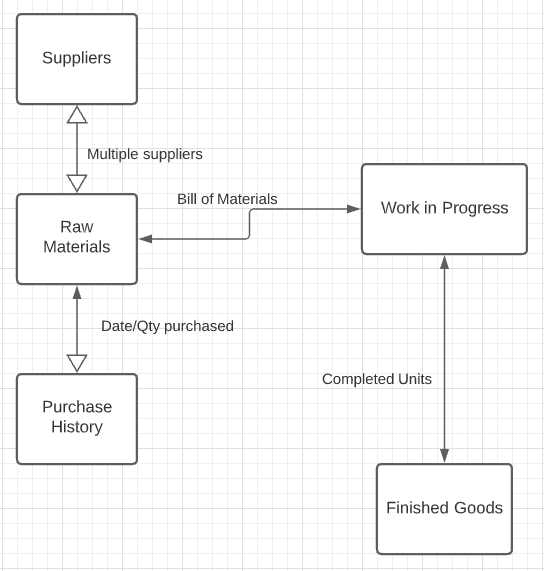
Figure 30: Conceptual manufacturing inventory
Material is purchased from suppliers and added to the raw materials needed to build the product. A bill of materials shows the raw inventory needed to create a product; while the work-in-progress inventory consists of the products that have been started, but not yet built. The finished goods inventory is the products that are ready to be sold to customers.
A very important consideration is that a date-sensitive purchase history is maintained, which we will discuss shortly.
Figure 31 shows an inventory conceptual model for a reseller (who purchases products and packages and ships them to customers).
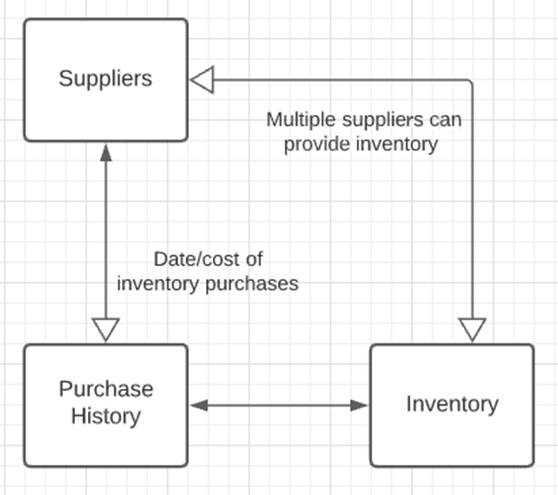
Figure 31: Reseller inventory model
Although there is only a single kind of inventory, the relationships between suppliers and inventory need to be tracked in a purchase history.
Cost of goods sold
In either inventory system, you must be able to determine how much an item in inventory costs (and hopefully was sold for more money). However, there are multiple approaches to determine the cost of the item.
Specific ID
In the case of rare or unique items (like cars or jewelry), each item has a serial number or some sort of identifier. The cost will be directly tied to this identifier.
LIFO (last in, first out)
In the LIFO costing method, the cost of your item is based on the last purchase price from your history. Since these prices are likely to be higher, this method reduces the amount of profit you show. While it is an allowed pricing method, it can also create some extra “profit” if your supply dwindles, and you sell some much older purchased items.
FIFO (first in, first out)
In this method, the first item purchased (the oldest one) is the first item sold. Assuming the first purchase prices are rising, this approach will show higher profit, since the earliest purchases likely have the lowest cost.
An example of the costing methods is shown in Table 21. In this table, we show how cost is computed when selling 32 products.
Table 21: Costing models
Date | Cost | Quantity | Using FIFO | Using LIFO |
|---|---|---|---|---|
1/22/2019 | $100 | 20 | 20*$100 | None |
3/4/2019 | $125 | 15 | 12*$125 | 12*$125 |
7/5/2019 | $150 | 20 | None | 20*$150 |
Cost | $3,500 | $4,500 |
Note that the costing model chosen (in U.S. accounting rules) must be consistently applied and might not actually reflect the actual units sold. What is curious is that LIFO is allowed in the United States (which uses GAAP, generally accepted accounting principles), but banned in other accounting systems based on IFRS, International Financial Reporting Standards. This is one thing to be aware of when designing most accounting related systems; there are rules and regulations that must be followed but vary based on the accounting system standards used.
Logical model
The key takeaway from the conceptual model is the required purchase tracking entity, regardless of whether purchasing raw materials or reselling items purchased from a vendor. Figure 32 shows a simplified logical mode of the key entities.
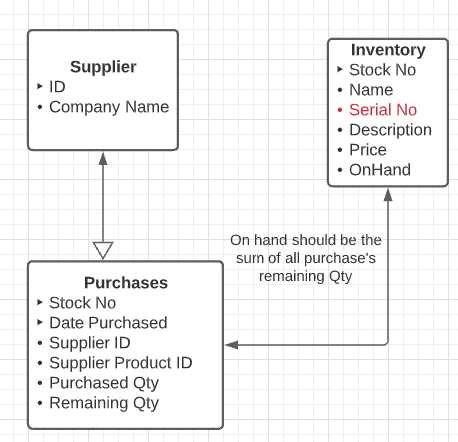
Figure 32: Inventory key entities
You may need additional fields, perhaps images of the inventory item, but it is most important to track the purchase history. The serial number attribute might not be required, unless the product carries some sort of identifier, such as a car’s VIN.
Customer orders
A very common business application is tracking customers and ordered products. Frequently, a component of customer orders is the inventory model we discussed previously. Order items will reference an item number from the inventory (regular inventory or finished goods).
Conceptual model
Figure 33 shows a conceptual model for the order and invoicing system.
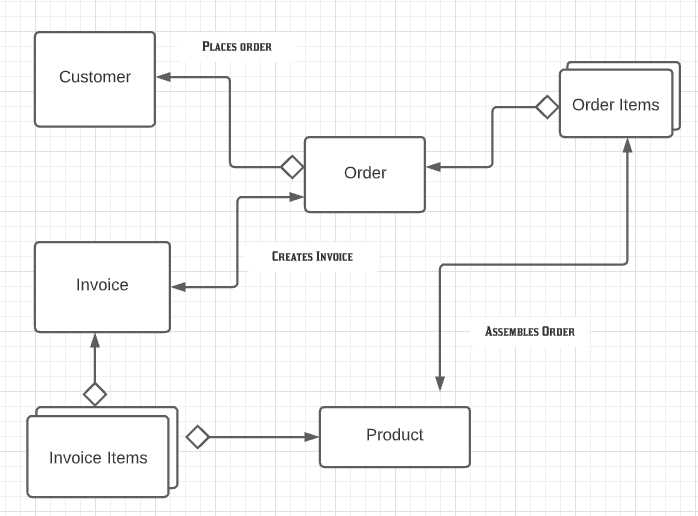
Figure 33: Customer orders
A customer places (hopefully many) orders with the company. Each order has a collection of items (pulled from inventory). The order also produces an invoice, which has a list of those same items, but with pricing information.
Logical model
The logical model is shown in Figure 34, adding attributes to the various entities.
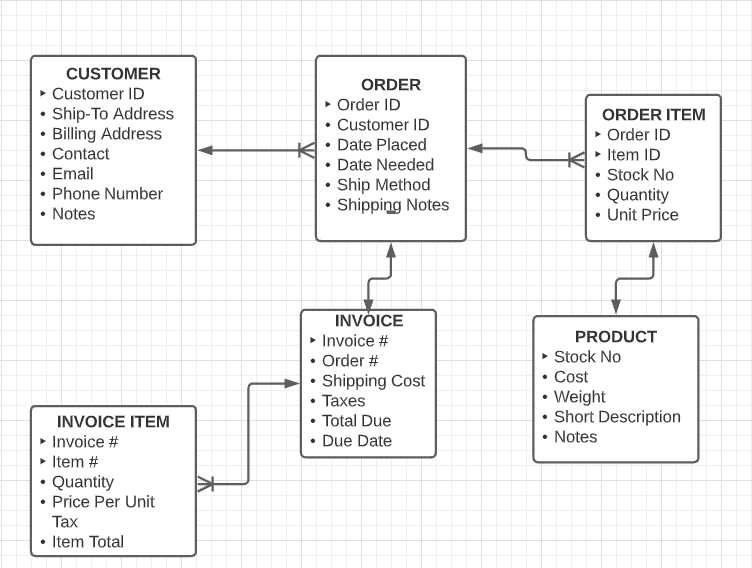
Figure 34: Customer order logical model
Reservations
A reservation system is a good type of application for computerization. The system tracks resources (hotel rooms, sports fields, conference rooms) for time periods. It should be able to indicate who is using a particular resource at a given time and to search for time slots where the resource is available.
Note that the entity types might change (hotel, sports club) as well as the resource (rooms, courts)—but not the concept, which is a group of resources available with a facility that needs to be reserved and searched for availability.
Conceptual model
Figure 35 shows the conceptual model for a general reservation system. The facility and resource entities will likely be named differently depending on the type of facility (hotel, sports cub, car rental, and so on).
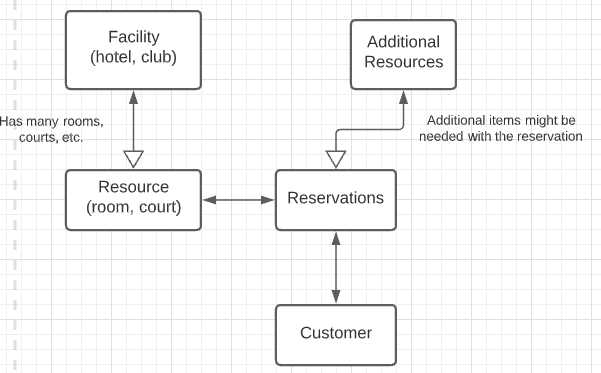
Figure 35: Reservation conceptual model
Logical model
The logical model will provide details to the various entities. The customer, resource name, etc., is likely to stay the same. The key differences are that the reservation length of time might vary (tennis courts rented by the hour, hotel rooms by the day) and the number of customers.
Figure 36 shows the reservation system logical model.
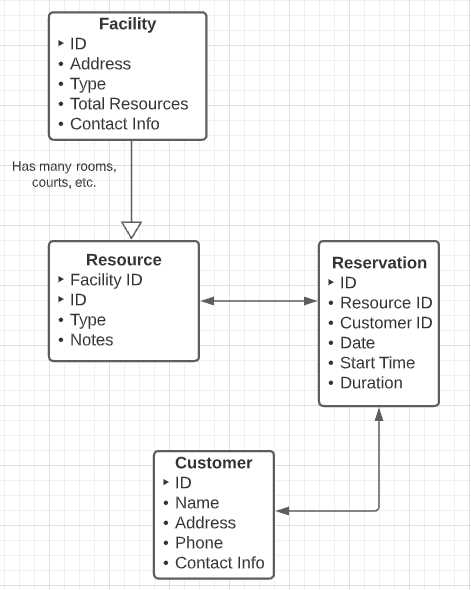
Figure 36: Reservation system logical model
The reservation entity will provide enough details, like date and customer, for the reservation. Searching for an open slot would require a date range and other parameters (such as length of stay and size of resources). It should then list open slots, depending on the search parameters.
Tip: If you want to annoy the person searching, don’t show all open slots, but make them click on the date, only to tell them there is nothing available. Sadly, many reservation systems do just that.
Sports
This conceptual and logical model can be used as the basis for a sports league (soccer, baseball, and so on). It tracks the teams and players, schedule, and results. It also tracks referees associated with the scheduled games and locations (fields, stadiums) where the games will be played.
Conceptual model
Figure 37 is the conceptual model. Each team has any number of players. Two teams will meet for each game, and one or more referees. We also link the playing field and the player from the team that played in the game.

Figure 37: Sports conceptual model
Logical model
Figure 38 shows the logical model, which only tracks game wins and losses. Depending on the sport, you might want to add additional player level statistics, such as goals scored or runs allowed.
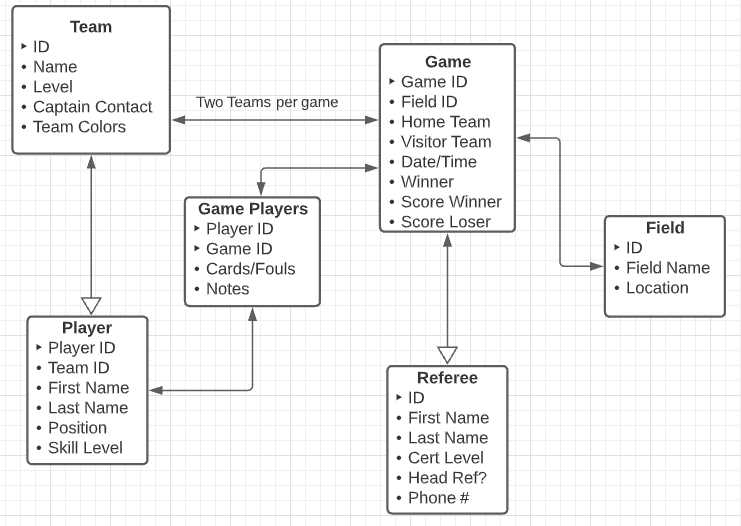
Figure 38: Sports logical model
The model might be adjusted based on the sport. For soccer, you might want to track red cards issued to a player. For American football, players can be ejected from the game.
You can also use the Game entity to determine standings. You could assign points per win or tie—the highest number of points would be first place in standings. Things get a bit more complex when ties occur, and you need to compute tiebreaker rules. The game table provides the information you’ll need to report standings.
Summary
In this chapter, we looked at some types of applications and the conceptual and logical models for them. These models are a starting point to give you some ideas. However, be sure to create your models after talking things over and hunting down requirements with the users. In the next chapter, we will take the logical model from the accounting application and create a physical model for it in Microsoft SQL Server.


- 1800+ high-performance UI components.
- Includes popular controls such as Grid, Chart, Scheduler, and more.
- 24x5 unlimited support by developers.