
Database Design Succinctly®

CHAPTER 8
Physical Model
In this chapter, we are going to take the logical accounting model and convert it to a physical model using Microsoft SQL Server. We will use constraints and foreign keys, and well as attribute descriptions, to create a well-designed and documented database system.
Figure 39 is the logical model we designed in Chapter 7.
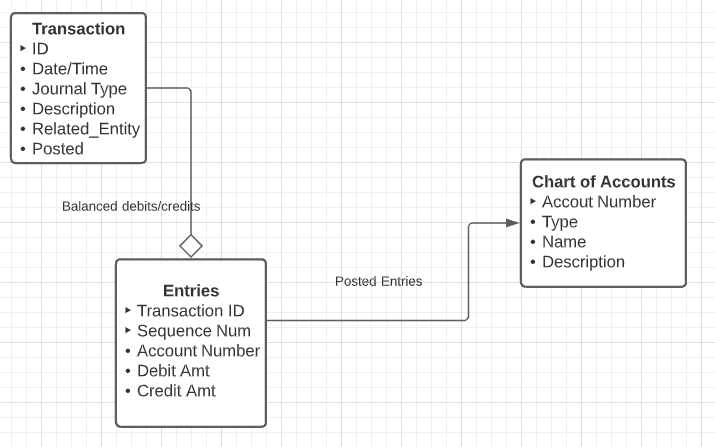
Figure 39: Accounting system logical model
Lookup tables
There are two lookup tables we can create: one for the journal type, and the second for the account type in the chart of accounts. Often the lookup tables might not be on the logical design, but their need will become evident as the physical model is built.
Journal type
The journal type lists the types of specialized journals the business wished to keep. Journal entries themselves are transaction records; the type is used to group related transactions together, based on the type of transaction.
Code Listing 3 shows the code to create the lookup table and populate it with some common journal types.
Code Listing 3: Journal type
create table dbo.JournalType ( ID char(2) PRIMARY KEY, ShortName varchar(32) NOT NULL UNIQUE ) INSERT INTO dbo.JournalType (ID,ShortName) values ('GJ','General Journal'), ('CR','Cash Receipts'), ('CD','Cash Disbursements'), ('SJ','Sales Journal'), ('PJ','Purchases Journal') |
Depending on the system design, you might want to add additional fields, possibly a list of required accounts (for example, the CR journal requires a debit to cash, or SJ must have a sales account). Generally, the specialized journals will always have certain accounts, where the general journal is the catchall for other entries.
Account type
There are five basic account types in the chart of accounts. These are shown in Table 22.
Table 22: Basic account types
Type | Debit | Description |
|---|---|---|
ASSETS | Increases | Things a business owns: cash, inventory, etc. |
LIABILITIES | Decreases | Debts of the business. |
EQUITY | Decreases | Portion of business assets owned by owners or shareholders. |
REVENUE | Decreases | Money brought in by the business. |
EXPENSES | Increases | Money spent to keep business running. |
There can be other types, but for most systems, those five are the parent types. Often, the account numbering scheme can be used to determine the account type. For example, if we use cash (an asset) to pay the phone bill (expense), we might create a transaction in the cash disbursement journal with the following entries, shown in Table 23.
Table 23: Transaction entries to pay phone bill
Account name | Debit | Credit | Notes |
|---|---|---|---|
PHONE_BILL | $500 | Record expense to pay phone bill. | |
CASH-Checking | $500 | Decrease cash in checking account. |
Our code to create and populate the account type table is shown in Code Listing 4.
Code Listing 4: Account types
create table dbo.AccountType ( ID varchar(12) PRIMARY KEY, ShortName varchar(32) NOT NULL UNIQUE, Category varchar(12) CHECK( Category in ('ASSET','LIABILITY','EQUITY','REVENUE','EXPENSES')) NOT NULL, ListOrder int NOT NULL ) INSERT INTO dbo.AccountType(ID,ShortName,Category,ListOrder) values ('CURASSET','Current Assets','ASSET',110), ('LTASSET','Long Term Assets','ASSET',120), ('CURLIAB','Current Liabilities','LIABILITY',210), ('LTLIAB','Long Term Liabilities','LIABILITY',220), ('OWNER','Owner Equity','EQUITY',310), ('RETAINED','Retained Earnings','EQUITY',320), ('REVENUE','Sales','REVENUE',410), ('INTEREST','Earned Interest','REVENUE',410), ('EXPENSES','Current Expenses','EXPENSES',510) |
With these two lookup tables, we can build out our base tables per the logical design.
Chart of accounts
The chart of accounts is the primary reporting source for an accounting system. In very simple terms, a balance sheet is a list of the assets, liabilities, and equity accounts. An income statement is a list of the revenue and expense accounts. (There is more detail needed for each report, but the source of the reports is the chart of accounts.)
Code Listing 5 shows the code and some accounts for the chart.
Code Listing 5: Chart of accounts creation
create table dbo.Chart_of_Accounts ( Account_Number varchar(8) PRIMARY KEY, AcctType varchar(12) FOREIGN KEY REFERENCES AccountType(ID) NOT NULL, AcctName varchar(50) NOT NULL, Balance money default 0 NOT NULL, [Description] varchar(max) ) INSERT INTO Chart_of_Accounts (Account_Number,AcctType,AcctName) VALUES ('1000','CURASSET','Cash-Checking'), ('1010','CURASSET','Cash-Savings'), ('1500','LTASSET','Company Truck'), ('1510','LTASSET','Forklift'), ('1520','LTASSET','Shipping Equipment'), ('1600','LTASSET','Warehouse/Office'), ('2000','CURLIAB','Vendor Payables'), ('2010','CURLIAB','Payroll Taxes'), ('2500','LTLIAB','Building Mortgage'), ('3000','OWNER','Owner Equity') |
If we were to view the chart of accounts initially, all the accounts would have a zero balance. Table 24 shows the initial balance sheet.
Table 24: Initial balance sheet
Account_Number | AcctType | AcctName | Balance |
|---|---|---|---|
1000 | CURASSET | Cash-Checking | 0.00 |
1010 | CURASSET | Cash-Savings | 0.00 |
1500 | LTASSET | Company Truck | 0.00 |
1510 | LTASSET | Forklift | 0.00 |
1520 | LTASSET | Shipping Equipment | 0.00 |
1600 | LTASSET | Warehouse/Office | 0.00 |
2000 | CURLIAB | Vendor Payables | 0.00 |
2010 | CURLIAB | Payroll Taxes | 0.00 |
2500 | LTLIAB | Building Mortgage | 0.00 |
3000 | OWNER | Owner Equity | 0.00 |
The account number is assigned, and the common approach is to use numbers in the thousands to represent the different account types. This numbering system is simple, typically for a small business. Larger businesses often break down the chart into much more detail, and the account numbers likely reflect cost centers, further breakdown of payroll taxes, and so on.
Transaction
The transaction table is a header record describing the entries that apply to the chart. Code Listing 6 shows the code to create the transaction table.
Code Listing 6: Create transaction table
create table dbo.[transactionDetail] ( ID INT identity(1,1) PRIMARY KEY, TransDate DATETIME DEFAULT getDate() NOT NULL, JournalType CHAR(2) DEFAULT 'GJ' FOREIGN KEY REFERENCES JournalType(ID) NOT NULL, ShortDesc varchar(100) NOT NULL, TransactionNotes varchar(max), Posted tinyint Default 0 NOT NULL, CONSTRAINT Check_Posted CHECK ( Posted=0 or dbo.SumTransactions(ID)=0) ) |
Note that we called the table TransactionDetail. Transaction would be a wonderful name, except that Transaction is a reserved word in almost all SQL database management systems. The Posted flag indicates whether this particular transaction has been applied to the chart of accounts. It defaults to zero (not yet posted) and has an interesting CHECK option.
CHECK constraints are usually based on columns within the current table. However, for a transaction to be valid (so it can be posted), it must check the linked Entries table. While this cannot be directly done, SQL Server allows you to create a SQL user-defined function that will perform the test for us. Code Listing 7 shows the code.
Code Listing 7: SumTransactions function
CREATE function dbo.SumTransactions(@ID int) RETURNS money AS BEGIN DECLARE @ans Money SELECT @ans =Sum(debitAmt)-Sum(CreditAmt) FROM Dbo.EntryDetail WHERE TransactionID=@id RETURN @ans END |
By moving the code to a UDF (user-defined function), we can work around the CHECK limitation to columns within the table. Other DBMS products might handle the situation differently, so you need to be comfortable with the nuances of your SQL database. If the Posted flag is 0, we don’t check the condition of balanced debits and credits. When we attempt to set the flag, the SumTransaction function gets called and will only return TRUE to the constraint if the linked entries balance out.
Entry
The EntryDetail table contains the accounts and debit/credit amounts that form the transaction. Code Listing 8 shows the code to create the EntryDetail table.
Code Listing 8: EntryDetail table
create table dbo.EntryDetail ( TransactionID INT FOREIGN KEY REFERENCES [TransactionDetails](ID), SequenceNumber INT NOT NULL, Account_Number VARCHAR(8) NOT NULL FOREIGN KEY REFERENCES [Chart_of_Accounts](Account_number), DebitAmt SmallMoney DEFAULT 0, CreditAmt SmallMoney DEFAULT 0, PRIMARY KEY (TransactionID,SequenceNumber), -- Require either a debit or credit, but not both CONSTRAINT Entry_check CHECK ( (DebitAmt<> 0 OR CreditAmt <> 0) AND (DebitAmt * CreditAmt = 0) ) ) |
This table collects all the chart of account entries needed to complete the transaction. It also prevents a user from having both the debit and credit amounts supplied and from both amounts being zero.
This constraint is important since the SQL user-defined function from earlier relies on these conditions.
Putting it together
Now, with all our tables created and populated, we need to open the business with the first transaction. The business owner is going to deposit $100,000 USD into the business, splitting it between the checking and savings accounts.
Our first transaction is shown in Code Listing 9.
Code Listing 9: Post initial deposit to business
DECLARE @transID int INSERT INTO transactionDetail (JournalType,ShortDesc,TransactionNotes,Posted) VALUES ('GJ','Owner added money to start business', 'The sole owner of the business deposited $100,000 '+ 'in cash to start the business',0) SET @transID = IDENT_CURRENT('transactionDetail') INSERT INTO EntryDetail VALUES (@transID,1,'1000',10000,0), (@transID,2,'1010',96000,0), (@transID,3,'3000',0,100000) UPDATE transactionDetail set posted=1 where ID = @transID |
The IDENT_CURRENT function is a Microsoft SQL Server function that gets the most recent identity key from the specified table.
If we run this code, we will get an error trying to set the posted flag to 1.
The UPDATE statement conflicted with the CHECK constraint "Check_Posted".
The issue is that the debit total is $106,000 and the credit total is $100,000. The second entry is an error; it should be $90,000. So, we fix that, and try again. This time, the Posted flag can be set to 1 since the debits and credits are in balance. Once the transaction is posted, our balance sheet from the chart of accounts looks like Table 25.
Table 25: Balance sheet view after first posted transaction
Account | AcctType | AcctName | Debit Bal | Credit Bal |
|---|---|---|---|---|
1000 | CURASSET | Cash-Checking | $10,000.00 | |
1010 | CURASSET | Cash-Savings | $90,000.00 | |
1500 | LTASSET | Company Truck | $0.00 | |
1510 | LTASSET | Forklift | $0.00 | |
1520 | LTASSET | Shipping Equipment | $0.00 | |
1600 | LTASSET | Warehouse/Office | $0.00 | |
2000 | CURLIAB | Vendor Payables | $0.00 | |
2010 | CURLIAB | Payroll Taxes | $0.00 | |
2500 | LTLIAB | Building Mortgage | $0.00 | |
3000 | OWNER | Owner Equity | $100,000.00 |
So, the owner equity account is $100,000 (their deposit) and the cash is split between checking and savings.
Summary
While the table structure of an accounting system is simple, you can see how we need to add constraints when converting our logical model to a physical model to be represented in the database system. Our normalized accounting model is robust enough to handle the rules of double entry accounting and provide a solid basis for the company’s financial reporting needs.


- 1800+ high-performance UI components.
- Includes popular controls such as Grid, Chart, Scheduler, and more.
- 24x5 unlimited support by developers.