
Database Design Succinctly®

CHAPTER 1
Introduction
Data processing, computer information systems, and information technology. They’re all phrases describing computer work, and they share a common theme—they work with data/information.
However, the way a user might perceive and use that information and the optimal way a computer system might store the information are often very different. In this book, we are going to discuss how to model the user’s information into data in a computer database system in such a way as to allow the system to produce useful results for the end user.
Index cards to database tables
Sandy’s antique store keeps its information stored in paper files or index cards. A computer would not fit the décor of her store. So, her store is a small business that relies on colored index cards: green for customers, yellow for orders, and red for products. Figure 1 shows the business filing system.

Figure 1: Manual filing system
The cards get updated for new customers and orders. This approach is very flexible for adding or updating information but makes it very difficult to retrieve information. When the business was told taxes needed to be retroactively collected for all Colorado orders, either sent to Colorado (yellow cards) or billed to Colorado (green cards), it was quite a task to determine the orders that should have taxes paid.
It was a slow process to go through all yellow (order) cards and put them aside if the address was in Colorado. For all the non-Colorado orders, she had to find the corresponding green (customer) card and check to see if the billing address was in Colorado.
Spreadsheets
Blaire’s dental clinic decided that spreadsheets were a good solution, since one of their assistants knew Microsoft Excel well. Figure 2 shows part of the spreadsheet used to track patients.

Figure 2: Dental tracking spreadsheet
Due to a recent grant, the clinic was told to give a $200 credit to any family with more than two children. This required a few changes and a formula to update the billed amount.
The following formulas were added.
=IF(COUNTA(F2:I2)>2,200,0) Determine families with more than two children.
=+D2-(E2+J2) Compute balance after credit.
The revised spreadsheet is shown in Figure 3.

Figure 3: Revised spreadsheet
When the next patient came for a visit, with six children, the spreadsheet was revised even more. Soon, the clinic had to offer a refund to those families with a negative balance. The simple spreadsheet got more complex to handle the additional changes made at the clinic.
The use of formulas made it difficult for the average user to determine what the Credit column meant. So, in addition to the spreadsheet, sticky notes were added to the computer, telling people what some of the columns meant.
Note: In 1986, Lotus Development Corp. was sued because a construction company underbid a contract that they claimed was caused by improper formula handing in one of the Lotus products. The company dropped the lawsuit and Lotus claimed the deficiency was actually a feature.
Small databases
Chris’s EAP (employee assistance program) company provides counseling services for employees of several different companies. They have chosen to track the appointments in a Microsoft Access database, shown in Figure 4.

Figure 4: Access event tracking
The system was easy for people to use for scheduling, and the counselor billing was handled by a third-party supplier. However, after a while, some client companies became concerned with privacy issues. They didn’t want two people from the same company crossing paths on the way to and from counseling sessions.
At first glance, Chris felt it would be easy for the person doing the schedule. However, since the system did not force the schedule restrictions, it was up to the person doing the scheduling to get it right. And when the CEO of ABC company said “hello” to one of his employees on the way out, Chris realized he needed a better solution. He hired a developer to create a macro for his event table. Figure 5 shows the VBA editor and the start of the code that needed to be written.

Figure 5: VBA Editor
Chris realized that as the company grew, more macros such as this were likely to be needed for his scheduling table. He debated whether he should bring a full-time developer on or rely on contractors to handle these ongoing fixes to his Access database.
SQL database
Christy’s tennis club was doing well, and as it grew, she decided to store her records in a SQL database system. Her brother-in-law, John, took some database courses, so she asked him to create the database. He added a table to track members, as shown in Figure 6.
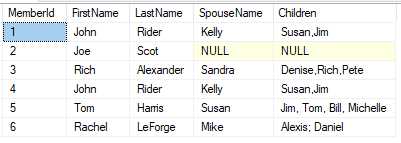
Figure 6: Tennis club members
A bit later, Christy wanted to determine how much money she could potentially make with a one-time offer of a $20 membership fee for each family member. Since the club had over 1,000 members, she asked John to find out the total number of family members (kids and spouses) within the club. John eagerly took to the task, but soon found it was very difficult to count the family members. He came up with the following code (partly borrowed from the internet).
-- Count spouses
select 'Spouses' as Whom, count(*) as SpouseCount
from dbo.Members
union
-- Count children
select 'Children',
sum(len(children)-len(replace(children,',',''))+1)
from dbo.Members
He happily showed the results (Figure 7) to Christy.

Figure 7: Number of family members
Christy took the numbers and made her offer to club members. Unfortunately, the numbers from his query are wrong.
Tip: As an exercise, see if you can identify the problem with the query John wrote.
Summary
The examples here show some information systems that, while flexible, begin to run into real difficulties for reporting and custom programming. While index cards can always hold more information, Excel columns can be added, and Access macros can be written, designing the database properly with a good database management system can offer much more robust reporting and control.
Even if the data is stored in a database system, it still can be difficult to work with and possibly inaccurate when the design is wrong.
In the next few chapters, we will cover how to design a database system to allow businesses to get better reporting and control over their information. We will also address how to improve the data that is put into the system, to make sure it is as accurate as possible.


- 1800+ high-performance UI components.
- Includes popular controls such as Grid, Chart, Scheduler, and more.
- 24x5 unlimited support by developers.