
Data Capture and Extraction with C# Succinctly®

CHAPTER 3
Extracting Data from the Web
Introduction
The web has emerged as the world’s online knowledge base—a seemingly unlimited pool of data and information. The rise of Google as the world’s top search engine attests to the public’s desire for access to the Internet’s resources, and knowing how to extract data from the web is now a powerful asset for both individuals and businesses.
Whether you are a software developer looking for new skills or a business leader looking for a competitive advantage, you will find the data extraction instruction in this chapter helpful in creating new opportunities that you might have never thought possible.
We can extract data from a site using one of two methods: by using an API provided by the site or by scraping the HTML contents of the site. I recommend using a site’s API, when it is provided, as the preferred method of data extraction. Scraping data can work if the site does not provide an API, but be aware that in some cases scraping is not allowed because the desired information is protected by copyright.
Furthermore, extracting data from the web using the scraping method might require creating code (WebBot) that acts like an automated browser. We should note here that, from a technical point of view, there is little difference between a “good” and a “bad” (harmful) WebBot. However, the intentions of developers can vary. It is your responsibility to use the code you write and the data you extract in ethical, lawful ways. You should never use the information here to violate copyright law, engage in illegal activities, or disrupt networks. If you do engage in unethical conduct, you alone are responsible for your actions.
Both the ethical and technical considerations of scraping go beyond the scope of this book, but some of those issues are worth noting here before we move forward—for example, using stealth to simulate human patterns, being kind to your information resource providers, avoiding the operation of your WebBot at the same time each day, stopping your WebBot on holidays and weekends, using random fetch delays, and taking no actions that lead to your IP address being banned.
This chapter will focus on working with RestSharp and understanding the concepts behind extracting data by using a site’s API.
When a site provides its API, it is acknowledging that the data provided through that API can be consumed following its API terms. In other words, if you do not violate the API guidelines, you may use the data. By contrast, scraping means that you are parsing the HTML and extracting text from a site that does not provide an API, which in turn means you are going into unchartered territory, as the data may or may not be protected by copyright law. Typically, when a site doesn’t provide an API, it is because it does not want to share its information.
Understanding REST & HTTP requests
Most sites that provide an API use REST, which allows third party apps and developers to consume their data through HTTP(S).
When using C#, there are several ways to connect to an HTTP(S) end point and make a GET or POST request We will be using a library called RestSharp, which makes working with any REST API extremely easy.
Figure 7 shows how RestSharp can be installed as a NuGet package.

Figure 7: Installing RestSharp as a NuGet Package with Visual Studio 2015
Once RestSharp is installed, a reference is added to the Visual Studio project. Let’s now see how to use RestSharp with C#.
Code Listing 12: Creating and Using a RestSharp WebClient
// WebParser: Web extraction using RestSharp. using System; using RestSharp; namespace WebProcessing { public class WebParser : IDisposable { protected RestClient WebClient = null; protected string response = String.Empty;
public string Response { get { return response; } } public string Request(string resource, Method type, string param, string value) { string res = String.Empty; if (WebClient != null) { var request = new RestRequest(resource, type); request.AddParameter(param, value); IRestResponse htmlRes = WebClient.Execute(request); res = htmlRes.Content; if (res != String.Empty) response = res; } return res; } protected bool disposed; public WebParser() { WebClient = null; response = String.Empty; } public WebParser(string baseUrl) { WebClient = new RestClient(baseUrl); } ~WebParser() { this.Dispose(false); } public virtual void Dispose(bool disposing) { if (!this.disposed) { if (disposing) WebClient = null; } this.disposed = true; } public void Dispose() { this.Dispose(true); GC.SuppressFinalize(this); } } } |
Let’s examine the code using The New York Times (NYT) APIs as our examples. Inside the WebParser constructor an instance of a RestClient is created by passing the baseUrl of the site’s API address. By looking at the Books Best Sellers API documentation, we can see that the baseUrl of this API is http://api.nytimes.com/svc/books.
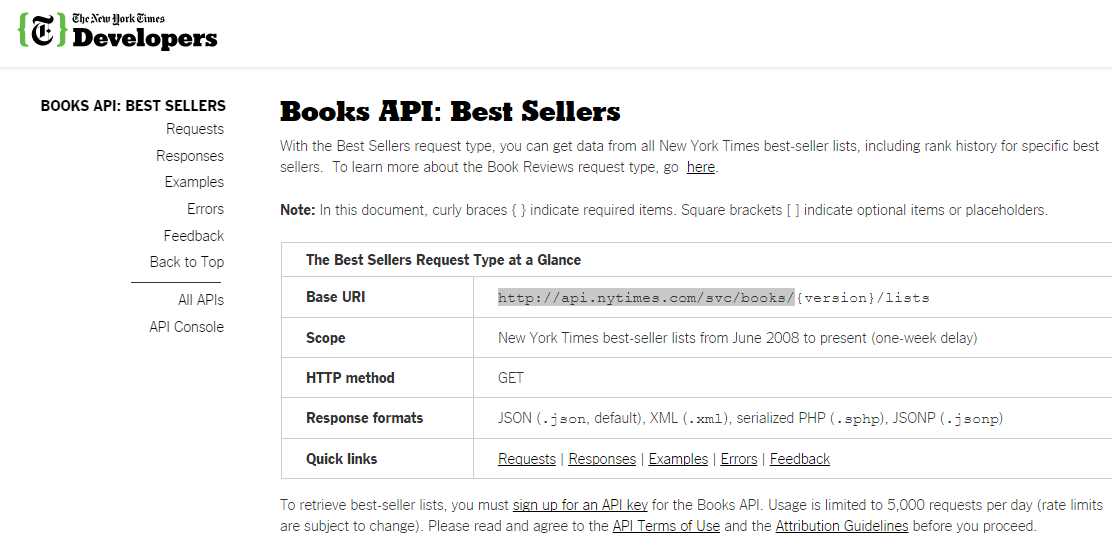
Figure 8: The New York Times Books API baseUrl for Best Sellers
This RestClient instance, called WebClient, will later be used inside the Request method in order to execute an HTTP(S) request to a specified API resource.
In order to understand how RestSharp works, we first need to understand how the Request method of the WebParser class works and what kinds of parameters it deals with. Inside the Request method, an instance of RestRequest is created. This instance receives two parameters: a resource and a type. In this case, the resource will be {version}/lists/names.json (i.e. v3/lists/names.json), where {version}, according to the documentation at the time of writing, is v3, and the type is GET (Method.GET). Notice that the resource v3/lists/names.json returns the names of the Books Best Seller lists in JavaScript Object Notation (JSON) format, which we will examine later in this chapter.
You will better understand APIs if you have a look around and experiment with the API Console. 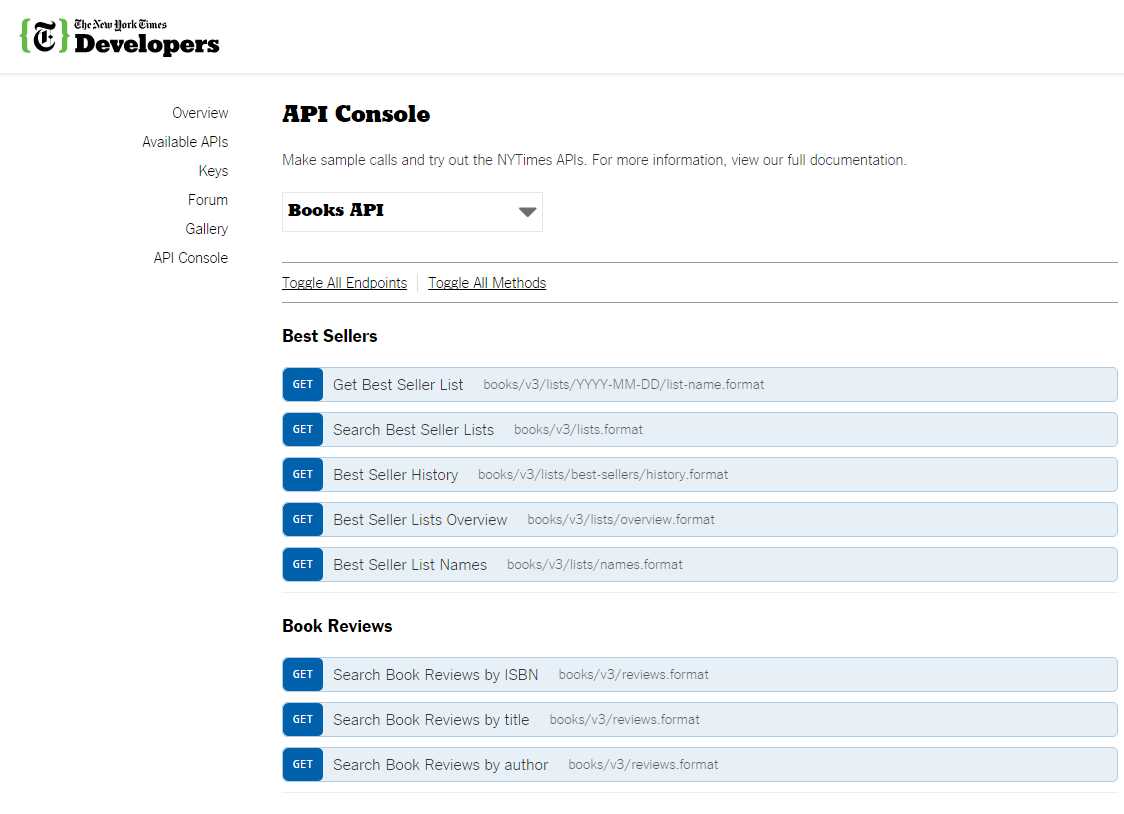
Figure 9: The New York Times Books API Console
With the RestRequest instance created, a call to the AddParameter method is necessary because the API requires an API key be passed. The API key corresponds to variables param and value, which are respectively “api-key” and the API key value you receive when registering on http://developer.nytimes.com for a specific NYT API.
Invoking the Execute method from the RestClient instance returns an IRestResponse, which is by default in JSON format (and will need to be parsed). For now, we will consider the JSON response a raw string result. Later we will learn how to parse JSON responses properly with another handy .NET library.
Registering for any of the NYT APIs (in order to get an API key) is a straightforward process—you simply need to provide an email address and a password.
Each of The New York Times APIs has its own API keys. This means that the Books API key is not the same as Top Stories or Congress API keys. Keep this in mind. The New York Times has done a great job making their developer site easy to follow, navigate, and understand.
Having examined how the WebParser class works, let’s see how it can be invoked and used in order to obtain a raw JSON response using the Books Best Sellers API.
Code Listing 13: Invoking the WebParser Class for the NYT Best Seller Books List Names.
// WebExample: A wrapper around WebParser. using RestSharp; using System; namespace WebProcessing { public class WebExample { public const string cStrNYTBooksBaseUrl = "http://api.nytimes.com/svc/books/"; public const string cStrNYTBooksResource = "v3/lists/names.json"; public const string cStrNYTApiKeyStr = "api-key"; public const string cStrNYTApiKeyVal = "<<Your NYT Books API key>>"; public static string GetRawNYTBestSellersListNames() { string res = String.Empty; using (WebParser wp = new WebParser(cStrNYTBooksBaseUrl)) { res = wp.Request(cStrNYTBooksResource, Method.GET, cStrNYTApiKeyStr, cStrNYTApiKeyVal); Console.WriteLine(res); } return res; } } } |
Code Listing 14: Main Program Invoking NYT Best Seller Books List Names
// Main Program: Web extraction using the NYT API. using System; using WebProcessing; namespace DataCaptureExtraction { class Program { static void Main(string[] args) { WebExample.GetRawNYTBestSellersListNames(); Console.ReadLine(); } } } |
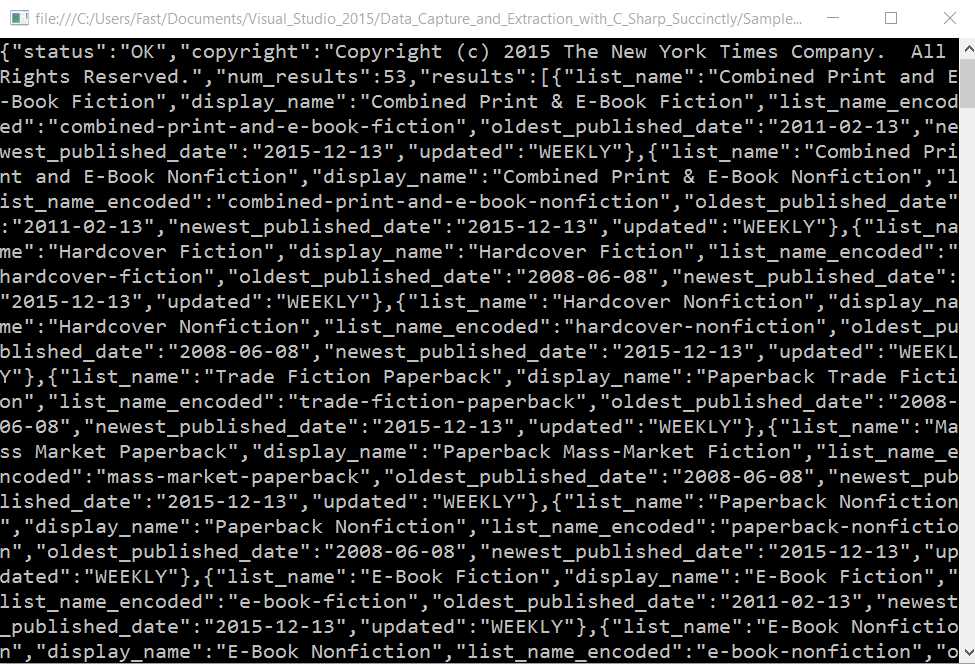
Figure 10: The NYT Best Seller Books List Names Result in Raw JSON.
Parsing JSON responses
Now that we have seen how to obtain to obtain raw JSON results, we can best make sense of the JSON data by serializing and structuring it into an object with specific fields. Keep in mind that JSON data is already an object representation of the response, but it is returned as a string, which means it can be serialized to a class with specific properties. An easy way to achieve this is by using the popular JSON.NET library. JSON.NET can be installed via NuGet.

Figure 11: JSON.NET Installed via NuGet.
Instead of treating the returned JSON data as a raw string, let’s add specific functionality to the previous code. But first, let’s make sure we understand how the actual JSON object is structured.
The raw JSON result returned by GetRawNYTBestSellersListNames as a string is actually the JSON object in Figure 12. This can be also inspected by checking the API Console.
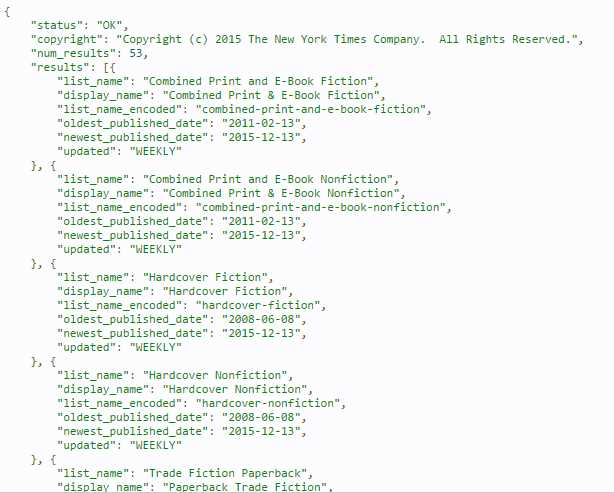
Figure 12: JSON Object Returned by NYT Best Seller Books List Names.
We can quickly see that list_name, display_name, list_name_encoded, oldest_published_date, newest_published_date, and update are actual properties we are interested in.
Let’s deserialize this JSON response into a C# object with JSON.NET.
Code Listing 15: Using JSON.NET to Deserialize a JSON Object into a C# Class
public T DeserializeJson<T>(string res) { return JsonConvert.DeserializeObject<T>(res); } |
Code Listing 15 shows that JsonConvert is a JSON.NET class that de-serializes a JSON object into a C# class. The C# class is represented by T in the preceding code.
T is a generic class type, but in order for JSON.NET to be able to de-serialize it properly, it needs to be defined with the same properties as contained in the JSON object response. Let’s see how this can be done.
Code Listing 16: C# Classes Required for Deserializing the JSON Response
public class BestSellersListNames { public string status; public string copyright; public int num_results; public BestSellerListNamesItem[] results; } public class BestSellerListNamesItem { public string list_name; public string display_name; public string list_name_encoded; public DateTime oldest_published_date; public DateTime newest_published_date; public string updated; } |
Based on Code Listing 16, method GetRawNYTBestSellersListNames will next be adapted to parse the JSON response.
Code Listing 17: GetRawNYTBestSellersListNames Re-adapted to Parse JSON
public static BestSellersListNames GetNYTBestSellersListNames() { BestSellersListNames bs = null; using (WebParser wp = new WebParser(cStrNYTBooksBaseUrl)) { string res = wp.Request(cStrNYTBooksResource, Method.GET, cStrNYTApiKeyStr, cStrNYTApiKeyVal); bs = wp.DeserializeJson<BestSellersListNames>(res); } return bs; } |
The key to being able to parse JSON responses successfully with JSON.NET is to have a C# equivalent (defined as one or more classes) with the same properties that are returned within the JSON response object. Be sure to use the same property names and the same data types, although you can name the C# class itself anything that suits. Notice that the names of the properties of the returned JSON object and the properties of the equivalent C# class are the same. Also notice that the data types are the same.
A JSON string property requires a string C# string property, while a JSON date property requires a C# datetime equivalent. A JSON array property with sub-properties (i.e. results) requires a C# array equivalent (i.e. BestSellerListNamesItem) with the same subproperties names and data types.
Demo program
Now that we have addressed how to parse JSON responses, let’s create a quick program to clearly display the obtained results.
Listing 18: Displaying Deserialized JSON Response Properties
// WebExample – A wrapper around WebParser. using RestSharp; using System; using System.Collections.Generic; using System.Linq; using System.Text; using System.Threading.Tasks; namespace WebProcessing { public class BestSellersListNames { public string status; public string copyright; public int num_results; public BestSellerListNamesItem[] results; } public class BestSellerListNamesItem { public string list_name; public string display_name; public string list_name_encoded; public DateTime oldest_published_date; public DateTime newest_published_date; public string updated; } public class WebExample { public const string cStrNYTBooksBaseUrl = "http://api.nytimes.com/svc/books/"; public const string cStrNYTBooksResource = "v3/lists/names.json"; public const string cStrNYTApiKeyStr = "api-key"; public const string cStrNYTApiKeyVal = "<<Your NYT Books API key>>"; public static void DisplayNYTBestSellersListNames() { BestSellersListNames b = GetNYTBestSellersListNames(); if (b != null && b.results.Length > 0) { foreach (BestSellerListNamesItem i in b.results) { Console.WriteLine("Name: " + i.display_name); Console.WriteLine("Oldest Published Date: " + i.oldest_published_date.ToString()); Console.WriteLine("Newest Published Date: " + i.newest_published_date.ToString()); } } } public static BestSellersListNames GetNYTBestSellersListNames() { BestSellersListNames bs = null; using (WebParser wp = new WebParser(cStrNYTBooksBaseUrl)) { string res = wp.Request(cStrNYTBooksResource, Method.GET, cStrNYTApiKeyStr, cStrNYTApiKeyVal); bs = wp.DeserializeJson<BestSellersListNames>(res); } return bs; } } } // Main Program: Web extraction using the NYT API. using System; using WebProcessing; namespace DataCaptureExtraction { class Program { static void Main(string[] args) { WebExample. DisplayNYTBestSellersListNames(); Console.ReadLine(); } } } |
The method DisplayNYTBestSellersListNames calls GetNYTBestSellersListNames, which gets the deserialized JSON response as a BestSellersListNames object. It is through this BestSellersListNames object that the results property is iterated. For each object within results, the subproperties display_name, oldest_published_date, and newest_published_date are displayed.
Summary
APIs can be accessed on hundreds of sites, and they can perform a wide variety of functions that go far beyond retrieving information. A great resource for finding other sites that offer APIs is Programmable Web.
We’ve seen how RestSharp can be used to invoke an online source of information such as the NYT Books API and also on any other platform that provides a REST API that can be queried using HTTP(S).
A final word on scraping: this subject deserves its own book, but if you are interested in learning more, I strongly advise you to first look into retrieving information via legitimate APIs rather than attempting to extract raw HTML contents from any site.
Complete demo program source code
Code Listing 19 contains the entire source code for all the examples we have addressed using RestSharp.
Code Listing 19: Complete Demo Program Source Code Using RestSharp
// Main Program: Web extraction using the NYT API. using System; using WebProcessing; namespace DataCaptureExtraction { class Program { static void Main(string[] args) { WebExample.DisplayNYTBestSellersListNames(); Console.ReadLine(); } } } // WebExample – A wrapper around WebParser. using RestSharp; using System; namespace WebProcessing { public class BestSellersListNames { public string status; public string copyright; public int num_results; public BestSellerListNamesItem[] results; } public class BestSellerListNamesItem { public string list_name; public string display_name; public string list_name_encoded; public DateTime oldest_published_date; public DateTime newest_published_date; public string updated; } public class WebExample { public const string cStrNYTBooksBaseUrl = "http://api.nytimes.com/svc/books/"; public const string cStrNYTBooksResource = "v3/lists/names.json"; public const string cStrNYTApiKeyStr = "api-key"; public const string cStrNYTApiKeyVal = "<<Your NYT Books API key>>"; public static string GetRawNYTBestSellersListNames() { string res = String.Empty; using (WebParser wp = new WebParser(cStrNYTBooksBaseUrl)) { res = wp.Request(cStrNYTBooksResource, Method.GET, cStrNYTApiKeyStr, cStrNYTApiKeyVal); Console.WriteLine(res); } return res; } public static void DisplayNYTBestSellersListNames() { BestSellersListNames b = GetNYTBestSellersListNames(); if (b != null && b.results.Length > 0) { foreach (BestSellerListNamesItem i in b.results) { Console.WriteLine("Name: " + i.display_name); Console.WriteLine("Oldest Published Date: " + i.oldest_published_date.ToString()); Console.WriteLine("Newest Published Date: " + i.newest_published_date.ToString()); } } } public static BestSellersListNames GetNYTBestSellersListNames() { BestSellersListNames bs = null; using (WebParser wp = new WebParser(cStrNYTBooksBaseUrl)) { string res = wp.Request(cStrNYTBooksResource, Method.GET, cStrNYTApiKeyStr, cStrNYTApiKeyVal); bs = wp.DeserializeJson<BestSellersListNames>(res); } return bs; } } } // WebParser: Web extraction using RestSharp. using System; using RestSharp; using Newtonsoft.Json; namespace WebProcessing { public class WebParser : IDisposable { protected RestClient WebClient = null; protected string response = String.Empty; public string Response { get { return response; } } public string Request(string resource, Method type, string param, string value) { string res = String.Empty; if (WebClient != null) { var request = new RestRequest(resource, type); request.AddParameter(param, value); IRestResponse htmlRes = WebClient.Execute(request); res = htmlRes.Content; if (res != String.Empty) response = res; } return res; } public T DeserializeJson<T>(string res) { return JsonConvert.DeserializeObject<T>(res); } protected bool disposed; public WebParser() { WebClient = null; response = String.Empty; } public WebParser(string baseUrl) { WebClient = new RestClient(baseUrl); } ~WebParser() { this.Dispose(false); } public virtual void Dispose(bool disposing) { if (!this.disposed) { if (disposing) { WebClient = null; } } this.disposed = true; } public void Dispose() { this.Dispose(true); GC.SuppressFinalize(this); } } } |
The complete Visual Studio project source code can be downloaded from this URL:
https://bitbucket.org/syncfusiontech/data-capture-and-extraction-with-c-succinctly


- 1800+ high-performance UI components.
- Includes popular controls such as Grid, Chart, Scheduler, and more.
- 24x5 unlimited support by developers.