
Custom Blazor Oqtane Modules Succinctly®

CHAPTER 8
Help Desk Ticket Administration
In this final chapter, we will create an administration page that implements an important function of the Syncfusion DataGrid: the ability to provide server-side paging and sorting.
The existing data grid (implemented on the Existing Tickets tab) provides paging and sorting, but all records for the module instance, for the user, are retrieved in a single request.
This would be problematic for the administration page because there could potentially be thousands of records, as the administrator can see all help desk tickets, for all users, for the module instance.
In addition, we will demonstrate how to create controls in Oqtane that are only available to users in specified (and configurable) roles.
Server project
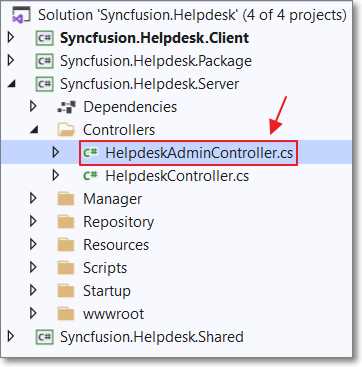
Figure 71: HelpdeskAdminController.cs
We will first create a new controller that will be paired with new services we will create in the Client project.
Create a new file in the Controllers folder of the Server project, called HelpdeskAdminController.cs, using the following code.
Code Listing 54: HelpDeskController.cs
using Microsoft.AspNetCore.Mvc; using Microsoft.AspNetCore.Authorization; using Microsoft.Extensions.Primitives; using System.Collections.Generic; using Microsoft.AspNetCore.Http; using Oqtane.Shared; using Oqtane.Enums; using Oqtane.Infrastructure; using Syncfusion.Helpdesk.Models; using Syncfusion.Helpdesk.Repository; using System.Linq; using System.Threading.Tasks; using Oqtane.Repository; using System.Linq.Expressions; using System; namespace Syncfusion.Helpdesk.Controllers { [Route(ControllerRoutes.Default)] public class HelpdeskAdminController : Controller { private readonly IHelpdeskRepository _HelpDeskRepository; private readonly IUserRepository _users; private readonly ILogManager _logger; protected int _entityId = -1; public HelpdeskAdminController( IHelpdeskRepository HelpDeskRepository, IUserRepository users, ILogManager logger, IHttpContextAccessor accessor) { try { _HelpDeskRepository = HelpDeskRepository; _users = users; _logger = logger; if (accessor.HttpContext .Request.Query.ContainsKey("entityid")) { _entityId = int.Parse( accessor.HttpContext .Request.Query["entityid"]); } } catch (System.Exception ex) { string error = ex.Message; } } } } |
Add the following method to the namespace, in the file (but outside of the HelpdeskAdminController class), that will support the sorting functionality in the method that will be implemented next.
Code Listing 55: IQueryableExtensions
// From: https://bit.ly/30ypMCp public static class IQueryableExtensions { public static IOrderedQueryable<T> OrderBy<T>( this IQueryable<T> source, string propertyName) { return source.OrderBy(ToLambda<T>(propertyName)); } public static IOrderedQueryable<T> OrderByDescending<T>( this IQueryable<T> source, string propertyName) { return source.OrderByDescending(ToLambda<T>(propertyName)); } private static Expression<Func<T, object>> ToLambda<T>( string propertyName) { var parameter = Expression.Parameter(typeof(T)); var property = Expression.Property(parameter, propertyName); var propAsObject = Expression.Convert(property, typeof(object)); return Expression.Lambda<Func<T, object>>(propAsObject, parameter); } } |
Add the following method that will be called by the Syncfusion DataGrid (we will add it later) and will allow paging and sorting.
Also note that because this method will be called directly by the Syncfusion DataGrid, it will not have a method to call it in the service methods we will add later to the Client project.
Code Listing 56: Get Method for Data Grid
// Only an Administrator can query all Tickets. // GET: api/<controller>?entityid=x [HttpGet] [Authorize(Policy = PolicyNames.EditModule)] public object Get(string entityid) { StringValues Skip; StringValues Take; StringValues OrderBy; // Filter the data. var TotalRecordCount = _HelpDeskRepository.GetSyncfusionHelpDeskTickets( int.Parse(entityid)).Count(); int skip = (Request.Query.TryGetValue("$skip", out Skip)) ? Convert.ToInt32(Skip[0]) : 0; int top = (Request.Query.TryGetValue("$top", out Take)) ? Convert.ToInt32(Take[0]) : TotalRecordCount; string orderby = (Request.Query.TryGetValue("$orderby", out OrderBy)) ? OrderBy.ToString() : "TicketDate"; // Handle OrderBy direction. if (orderby.EndsWith(" desc")) { orderby = orderby.Replace(" desc", ""); return new { Items = _HelpDeskRepository.GetSyncfusionHelpDeskTickets( int.Parse(entityid)) .OrderByDescending(orderby) .Skip(skip) .Take(top), Count = TotalRecordCount }; } else { System.Reflection.PropertyInfo prop = typeof(SyncfusionHelpDeskTickets).GetProperty(orderby); return new { Items = _HelpDeskRepository.GetSyncfusionHelpDeskTickets( int.Parse(entityid)) .OrderBy(orderby) .Skip(skip) .Take(top), Count = TotalRecordCount }; } } |
Add the following code for the method that will allow the details for a single help desk ticket to be retrieved.
Code Listing 57: Get Method
// Only an Administrator can call this method. // GET: api/<controller>/1?entityid=z [HttpGet("{HelpDeskTicketId}")] [Authorize(Policy = PolicyNames.EditModule)] public SyncfusionHelpDeskTickets Get( string HelpDeskTicketId, string entityid) { return _HelpDeskRepository.GetSyncfusionHelpDeskTicket (int.Parse(HelpDeskTicketId)); } |
Add the following code for the method that will allow a help desk ticket to be updated.
Code Listing 58: Put Method
// Only an Administrator can update using this method. // PUT api/<controller>/5 [HttpPut("{id}")] [Authorize(Policy = PolicyNames.EditModule)] public Models.SyncfusionHelpDeskTickets Put( int id, [FromBody] Models.SyncfusionHelpDeskTickets updatedSyncfusionHelpDeskTickets) { if (ModelState.IsValid && updatedSyncfusionHelpDeskTickets.ModuleId == _entityId) { updatedSyncfusionHelpDeskTickets = _HelpDeskRepository.UpdateSyncfusionHelpDeskTickets( "Admin", updatedSyncfusionHelpDeskTickets); _logger.Log(LogLevel.Information, this, LogFunction.Update, "HelpDesk Updated {updatedSyncfusionHelpDeskTickets}", updatedSyncfusionHelpDeskTickets); } return updatedSyncfusionHelpDeskTickets; } |
Add the following code for the method that will allow a help desk ticket to be deleted.
Code Listing 59: Delete Method
// DELETE api/<controller>/5 [HttpDelete("{id}")] [Authorize(Policy = PolicyNames.EditModule)] public void Delete(int id) { Models.SyncfusionHelpDeskTickets deletedSyncfusionHelpDeskTickets = _HelpDeskRepository.GetSyncfusionHelpDeskTicket(id); if (deletedSyncfusionHelpDeskTickets != null && deletedSyncfusionHelpDeskTickets.ModuleId == _entityId) { _HelpDeskRepository.DeleteSyncfusionHelpDeskTickets(id); _logger.Log(LogLevel.Information, this, LogFunction.Delete, "HelpDesk Deleted {HelpDeskId}", id); } } |
Client project
We will now create the code in the Client project. We will first add additional Services layer code and then complete the module by updating the code in the Edit.razor control.
Services
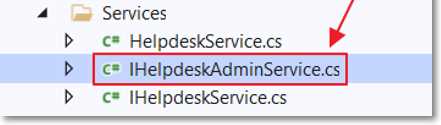
Figure 72: IHelpdeskAdminService.cs
The code we will now create will communicate with code in the HelpdeskAdminController.cs file in the Server project.
The first step is to define the interface for our new service methods. Add a new file called IHelpdeskAdminService.cs using the following code.
Code Listing 60: IHelpdeskAdminService.cs
using Syncfusion.Helpdesk.Models; using System.Threading.Tasks; namespace Syncfusion.Helpdesk.Services { public interface IHelpdeskAdminService { // Admin Methods. Task<SyncfusionHelpDeskTickets> GetSyncfusionHelpDeskTicketAdminAsync( int HelpDeskTicketId, int ModuleId); Task<SyncfusionHelpDeskTickets> UpdateSyncfusionHelpDeskTicketsAdminAsync( SyncfusionHelpDeskTickets objSyncfusionHelpDeskTicket); Task DeleteSyncfusionHelpDeskTicketsAsync( int Id, int ModuleId); } } |
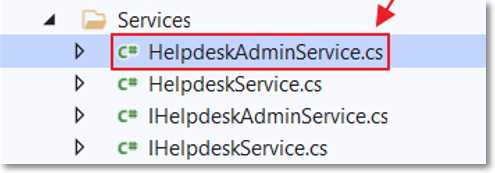
Figure 73: HelpdeskAdminService.cs
The next step is to implement the methods defined in the interface. Add a new file called HelpdeskAdminService.cs using the following code.
Code Listing 61: HelpDeskAdminService.cs
using Oqtane.Modules; using Oqtane.Services; using Oqtane.Shared; using System.Net.Http; using System.Threading.Tasks; using Syncfusion.Helpdesk.Models; namespace Syncfusion.Helpdesk.Services { public class HelpdeskAdminService : ServiceBase, IHelpdeskAdminService, IService { private readonly SiteState _siteState; public HelpdeskAdminService( HttpClient http, SiteState siteState) : base(http) { _siteState = siteState; } private string Apiurl => CreateApiUrl( _siteState.Alias, "HelpdeskAdmin"); public async Task<SyncfusionHelpDeskTickets> GetSyncfusionHelpDeskTicketAdminAsync( int HelpDeskTicketId, int ModuleId) { return await GetJsonAsync<SyncfusionHelpDeskTickets>( CreateAuthorizationPolicyUrl( $"{Apiurl}/{HelpDeskTicketId}", ModuleId)); } public async Task<SyncfusionHelpDeskTickets> UpdateSyncfusionHelpDeskTicketsAdminAsync( Models.SyncfusionHelpDeskTickets objSyncfusionHelpDeskTicket) { return await PutJsonAsync<SyncfusionHelpDeskTickets>( CreateAuthorizationPolicyUrl( $"{Apiurl}/{objSyncfusionHelpDeskTicket.HelpDeskTicketId}", objSyncfusionHelpDeskTicket.ModuleId), objSyncfusionHelpDeskTicket); } public async Task DeleteSyncfusionHelpDeskTicketsAsync( int HelpDeskId, int ModuleId) { await DeleteAsync(CreateAuthorizationPolicyUrl( $"{Apiurl}/{HelpDeskId}", ModuleId)); } } } |
Edit.razor control
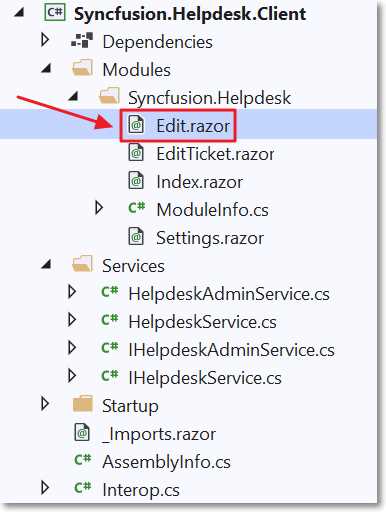
Figure 74: Edit.Razor
To complete the module, the next control to code is the Edit.razor control. Previously, we removed the code that was created for us automatically by the module creation wizard, because it would no longer compile when we altered the service methods.
Replace all the code with the following code.
Code Listing 62: Edit.razor
@using Oqtane.Modules.Controls @using Syncfusion.Helpdesk.Services @using Syncfusion.Helpdesk.Models @using Syncfusion.Helpdesk.Client.Modules.Syncfusion_Helpdesk @namespace Syncfusion.Helpdesk @inherits ModuleBase @inject IHelpdeskAdminService HelpdeskAdminService @inject NavigationManager NavigationManager @code { // This ensures only users with the security level Edit // can open this control. public override SecurityAccessLevel SecurityAccessLevel => SecurityAccessLevel.Edit; public override string Actions => "Add,Edit"; public override string Title => "Manage HelpDesk"; public override List<Resource> Resources => new List<Resource>() { new Resource { ResourceType = ResourceType.Stylesheet, Url = ModulePath() + "Module.css" } }; // Global property for the selected Help Desk Ticket. private SyncfusionHelpDeskTickets SelectedTicket = new SyncfusionHelpDeskTickets(); SfGrid<SyncfusionHelpDeskTickets> gridObj; public List<SyncfusionHelpDeskTickets> colHelpDeskTickets { get; set; } string SfDataManagerURL = ""; protected override async Task OnInitializedAsync() { try { SfDataManagerURL = $"{ModuleState.SiteId}/api/HelpdeskAdmin?" + $"entityid={ModuleState.ModuleId}"; } catch (Exception ex) { await logger.LogError(ex, "Error Loading HelpDesk {Error}", ex.Message); AddModuleMessage("Error Loading HelpDesk", MessageType.Error); } } public bool EditDialogVisibility { get; set; } = false; // Property to control the delete dialog. public bool DeleteRecordConfirmVisibility { get; set; } = false; } |
Data grid
We will now add the Syncfusion DataGrid. This is similar to the Syncfusion DataGrid we added earlier, in the Index.razor control. However, this data grid has the SfDataManager property configured to point directly to the HelpdeskAdminController that we added previously. This will allow the data grid to perform server-side paging and sorting automatically.
Add the following markup for the DataGrid.
Code Listing 63: DataGrid
<div id="admintarget" style="height: 500px;" class="col-lg-12 control-section"> <SfGrid ID="Grid" @ref="gridObj" DataSource="@colHelpDeskTickets" AllowPaging="true" AllowSorting="true" AllowResizing="true" AllowReordering="true"> <SfDataManager Url="@SfDataManagerURL" Adaptor="Adaptors.WebApiAdaptor"> </SfDataManager> <GridPageSettings PageSize="10"></GridPageSettings> <GridEvents CommandClicked="OnCommandClicked" TValue="SyncfusionHelpDeskTickets"> </GridEvents> <GridColumns> <GridColumn HeaderText="" TextAlign="TextAlign.Left" Width="100"> <GridCommandColumns> <GridCommandColumn Type=CommandButtonType.Edit ButtonOption="@(new CommandButtonOptions() { Content = "Edit" })"> </GridCommandColumn> <GridCommandColumn Type=CommandButtonType.Delete ButtonOption="@(new CommandButtonOptions() { Content = "Delete" })"> </GridCommandColumn> </GridCommandColumns> </GridColumn> <GridColumn IsPrimaryKey="true" Field=@nameof(SyncfusionHelpDeskTickets.HelpDeskTicketId) HeaderText="ID #" TextAlign="@TextAlign.Left" Width="70"> </GridColumn> <GridColumn Field=@nameof(SyncfusionHelpDeskTickets.TicketStatus) HeaderText="Status" TextAlign="@TextAlign.Left" Width="80"> </GridColumn> <GridColumn Field=@nameof(SyncfusionHelpDeskTickets.TicketDate) HeaderText="Date" TextAlign="@TextAlign.Left" Format="d" Type="ColumnType.Date" Width="80"> </GridColumn> <GridColumn Field=@nameof(SyncfusionHelpDeskTickets.TicketDescription) HeaderText="Description" TextAlign="@TextAlign.Left" Width="150"> </GridColumn> </GridColumns> </SfGrid> </div> |
Edit ticket
The data grid contains an Edit button that opens the selected ticket in a Syncfusion Dialog control. This control will display the selected ticket in the EditTicket.razor control, which was added earlier (and also used in the Index.razor control).
Add the following markup code to support this functionality. Notice that this version passes the value of true to the isAdmin property. This will cause the EditTicket.razor control to enable all fields to be editable.
Code Listing 64: Edit Ticket Dialog (Admin)
<SfDialog Target="#admintarget" Width="500px" Height="500px" IsModal="true" ShowCloseIcon="true" @bind-Visible="EditDialogVisibility"> <DialogTemplates> <Header> EDIT TICKET # @SelectedTicket.HelpDeskTicketId</Header> <Content> <EditTicket SelectedTicket="@SelectedTicket" isAdmin="true" /> </Content> <FooterTemplate> <div class="button-container"> <button type="submit" class="e-btn e-normal e-primary" @onclick="SaveTicket"> Save </button> </div> </FooterTemplate> </DialogTemplates> </SfDialog> |
Add the following method to the code section that opens the dialog when a help desk ticket is selected in the data grid.
Code Listing 65: OnCommandClicked
public async void OnCommandClicked( CommandClickEventArgs<SyncfusionHelpDeskTickets> args) { if (args.CommandColumn.ButtonOption.Content == "Edit") { // Get the selected Help Desk Ticket. var HelpDeskTicket = (SyncfusionHelpDeskTickets)args.RowData; SelectedTicket = await HelpdeskAdminService.GetSyncfusionHelpDeskTicketAdminAsync (HelpDeskTicket.HelpDeskTicketId, ModuleState.ModuleId); // Open the Edit dialog. this.EditDialogVisibility = true; StateHasChanged(); } } |
Add the SaveTicket method, which will be called when a user clicks the Submit button on the dialog control.
Code Listing 66: SaveTicket Method
public async Task SaveTicket() { // Update the selected Help Desk Ticket. await HelpdeskAdminService. UpdateSyncfusionHelpDeskTicketsAdminAsync(SelectedTicket); // Close the Edit dialog. this.EditDialogVisibility = false; // Refresh the SfGrid // so the changes to the selected // Help Desk Ticket are reflected. gridObj.Refresh(); } |
Delete ticket
The data grid contains a Delete button that opens a Syncfusion Dialog control that asks the user to confirm they want to delete the selected record.
Add the following markup code to support this functionality.
Code Listing 67: Delete Confirmation Dialog
<SfDialog Target="#admintarget" Width="100px" Height="130px" IsModal="true" ShowCloseIcon="false" @bind-Visible="DeleteRecordConfirmVisibility"> <DialogTemplates> <Header> DELETE RECORD ? </Header> <Content> <div class="button-container"> <button type="submit" class="e-btn e-normal e-primary" @onclick="ConfirmDeleteYes"> Yes </button> <button type="submit" class="e-btn e-normal" @onclick="ConfirmDeleteNo"> No </button> </div> </Content> </DialogTemplates> </SfDialog> |
Add the following code to the OnCommandClicked method in the code section that opens the dialog when the Delete button next to a record in the data grid is clicked.
Code Listing 68: Delete Button Clicked
if (args.CommandColumn.ButtonOption.Content == "Delete") { SelectedTicket = new SyncfusionHelpDeskTickets(); SelectedTicket.HelpDeskTicketId = args.RowData.HelpDeskTicketId; // Open Delete confirmation dialog. this.DeleteRecordConfirmVisibility = true; StateHasChanged(); } |
The Delete confirmation dialog contains two buttons, labeled Yes and No. If the user selects No (to cancel the delete), add the following code to simply close the dialog.
Code Listing 69: ConfirmDeleteNo
public void ConfirmDeleteNo() { this.DeleteRecordConfirmVisibility = false; } |
If the user selects Yes (to delete the record), add the following code to delete the record and close the dialog.
Code Listing 70: ConfirmDeleteYes
public async void ConfirmDeleteYes() { // The user selected Yes to delete the // selected Help Desk Ticket. // Delete the record. await HelpdeskAdminService. DeleteSyncfusionHelpDeskTicketsAsync( SelectedTicket.HelpDeskTicketId, ModuleState.ModuleId); // Close the dialog. this.DeleteRecordConfirmVisibility = false; StateHasChanged(); // Refresh the SfGrid // so the deleted record will not show. gridObj.Refresh(); } |
Add the Administration button
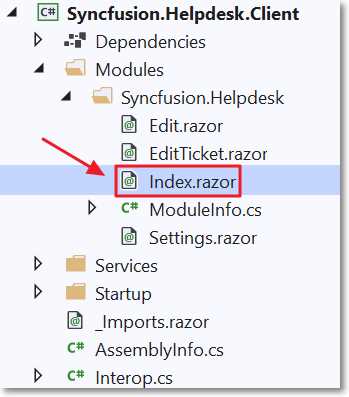
Figure 75: Open Index.razor
The final code needed to complete the module is to add an Administration button that will only be visible to users who have Edit access to the module. It will navigate to the Edit.razor control we have just completed.
Open the Index.razor control and add the following markup.
Code Listing 71: Administration Button
<ActionLink Action="Edit" Security="SecurityAccessLevel.Edit" Text="Administration" /> |
Test the final module
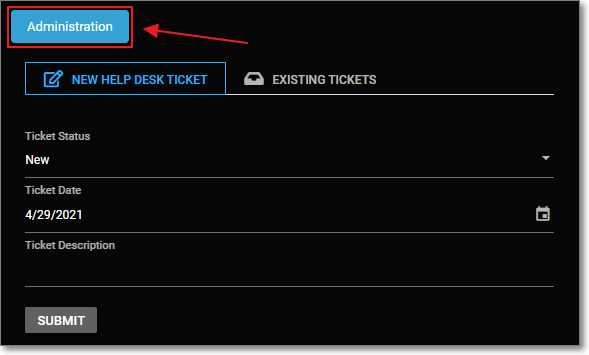
Figure 76: Administration Button
When we run the module in Oqtane and log in as the host account, we will now see the Administration button.
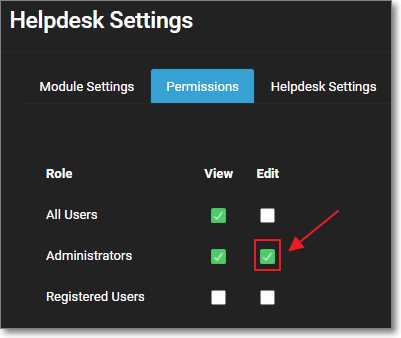
Figure 77: Edit Permissions
The Administration button shows because the host account is in the Administrators role. The module instance is configured to allow access to the Edit control to users in the Administration role.
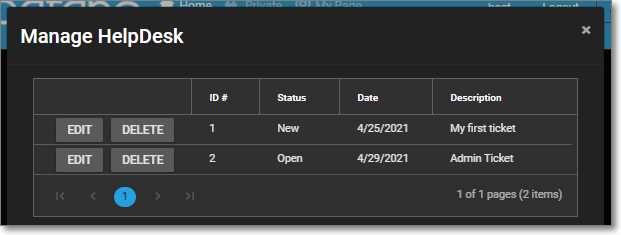
Figure 78: Administration
The Administration button will navigate to the Edit.razor control that will display the data grid allowing you to edit and delete records, sort, and page.
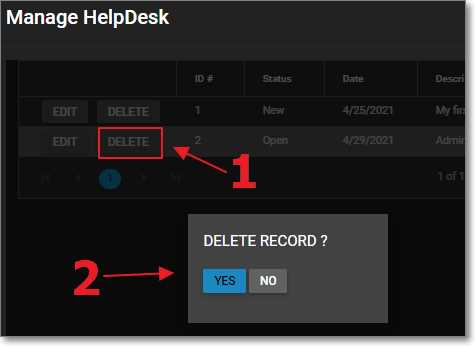
Figure 79: Confirm Delete
If the user clicks the Delete button next to a record in the data grid, the delete confirmation is opened. If the user clicks Yes, the record will be deleted, and if the user clicks No, the action is cancelled.
We've now seen how Blazor technology, together with Oqtane and Syncfusion controls, enables you to create sophisticated, manageable, and extensible single-page applications using C# and Razor syntax. Try it for yourself!


- 80+ high performance Blazor components.
- Lightweight and user friendly.
- Stunning Built-in themes with customization.