
Cryptography in .NET Succinctly®

CHAPTER 7
Using SecureString
There is another and often overlooked part of the .NET Framework that provides an additional bit of security to variables that contain sensitive information as it moves throughout your code. SecureString is a .NET class that provides a more secure alternative to the String class because it maintains a single copy in memory.
Please note that SecureString is part of the System.Security namespace.
It is a fact that string is quite an insecure way to keep sensitive information such as passwords, usernames, and credit card numbers. This is because string is not pinned in RAM, which means:
- It can be moved or copied by the Garbage Collector.
- It can leave multiple traces in RAM and multiple copies can exist in memory.
- RAM can be swapped to disk.
- The value of a string variable is stored in plain text.
- You can’t easily zero it out.
- Because strings are immutable, the value of the string variable in memory is never modified. An extra copy of the string variable is created in memory with the changed value.
To see the value of a string variable in memory, do the following: write the code in Code Listing 45 to a console application and add a class-scope variable to the console application.
Code Listing 45: Global Variable
In the static void Main, create a variable called stringPassword and assign it a value. Also place a breakpoint on the call to PlainStringExample() method.
Code Listing 46: Create Password Variable
string stringPassword = "This is a password"; PlainStringExample(stringPassword); |
Inside the method, assign a different value to the stringPassword variable. Place another breakpoint where the method exits.
Code Listing 47: Change Password Variable
private static void PlainStringExample(string stringPassword) { stringPassword = stringPassword + $"_{loop}"; } |
Now run the application and wait until it hits the first breakpoint.

Figure 33: Code Breakpoint 1
With the code execution pauses at the first breakpoint, open the Memory 1 window by going to Debug, Windows, Memory.
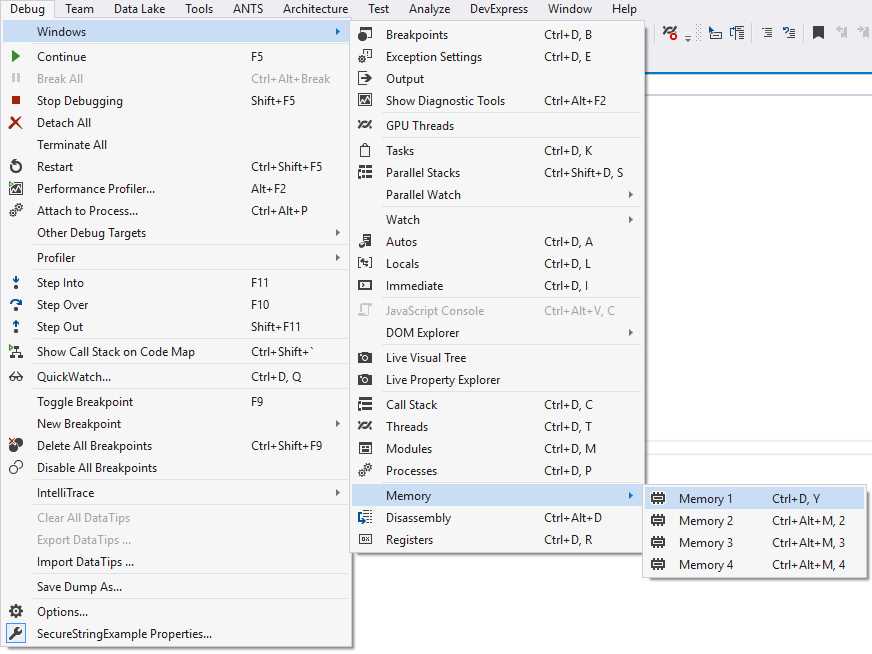
Figure 34: Open Memory Window
In the Memory 1 window, change the value in the Address text box to the name of the variable stringPassword and click Enter. You will immediately see the memory window jump to the memory location of the stringPassword variable.
Note: The memory address locations will be different on your machine.
The address is 0x02CA24D0 and the plain text password is displayed to the right.
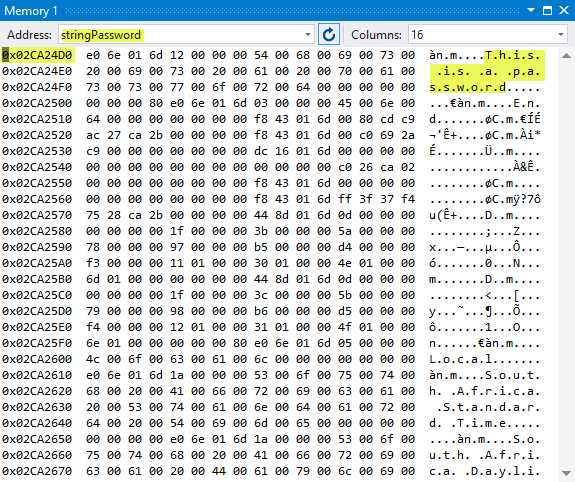
Figure 35: stringPassword Variable Memory Location 1
Continue the code execution and wait for the second breakpoint to be reached.

Figure 36: Code Breakpoint 2
You will immediately see the memory address for stringPassword change to a different address. In this example, the memory address has changed to 0x02CA65F8 with the updated text that is still visible in plain text.
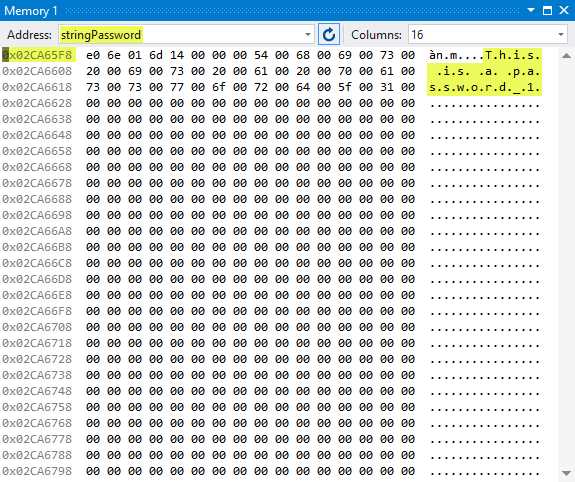
Figure 37: stringPassword Variable Memory Location 2
The benefits of using SecureString include:
- A single copy in memory.
- The value is not visible as plain text in memory.
- Implementation of IDisposable and a Clear() method.
- Changes to the value can be made by calling the MakeReadOnly() method.
To see how this works, let’s look at a practical code example using SecureString. Start by adding the following using statements to the console application.
Code Listing 48: Using Statements
using static System.Console; using System.Runtime.InteropServices; using System.Security; |
Next, add a class called ExtensionMethods().
Code Listing 49: Extension Methods Class
public static class ExtensionMethods { } |
Add an extension method called Secure() that will act on a string variable and return a SecureString value for the entered value. Notice how the SecureString value is created by adding the individual char values of the string to the SecureString object. This makes it easy to use a SecureString object with the individual key characters typed in on a keyboard.
Code Listing 50: Convert to SecureString
Now we add a second extension method that will convert the SecureString value back to a string. It does this by allocating a read-only pointer, then it copies the SecureString value to the pointer. Finally, the method converts it to a managed string variable. After this, it frees the pointer.
Code Listing 51: Convert to Unsecure String
public static string Unsecure(this SecureString value) { // Read-only field representing a pointer initialized to zero. var unsecuredString = IntPtr.Zero; try { // Copies the value of SecureString to unmanaged memory. unsecuredString = Marshal.SecureStringToGlobalAllocUnicode(value); return Marshal.PtrToStringUni(unsecuredString); } finally { // Frees unmanaged string pointer. Marshal.ZeroFreeGlobalAllocUnicode(unsecuredString); } } |
To the console application static void Main, change the code to look like Code Listing 52. Put a breakpoint on securePassword.Clear() and another one on securePassword.Dispose().
Code Listing 52: Calling Code
string stringPassword = "This is a password"; PlainStringExample(stringPassword); SecureString securePassword = stringPassword.Secure(); string unsecuredPassword = securePassword.Unsecure(); securePassword.Clear(); securePassword.Dispose(); |
Run your application and have a look at the securePassword variable.
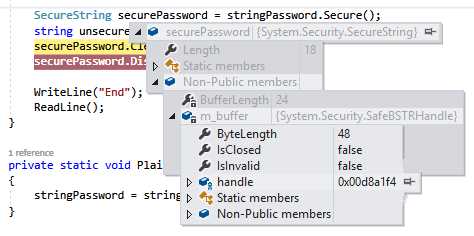
Figure 38: SecureString Handle
When you drill down far enough, you will see the handle for the securePassword variable. In this example, it is 0x00D8A1F4.
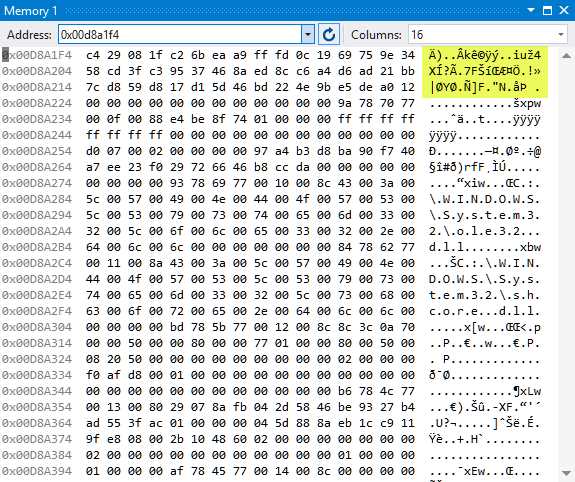
Figure 39: SecureString Encrypted Value
If you open the memory window, you will notice that the value of the SecureString variable in memory is encrypted.
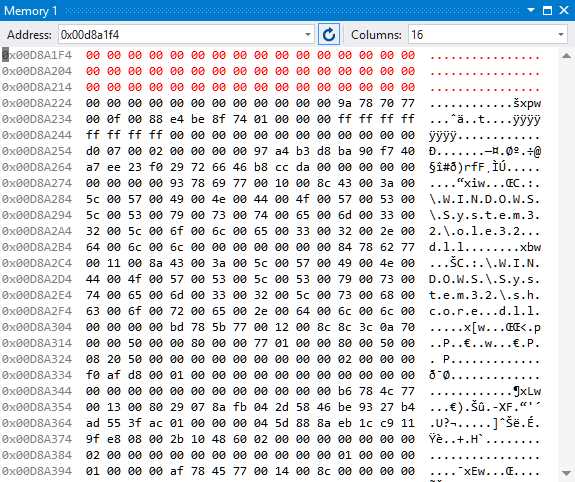
Figure 40: SecureString Variable Cleared
If you advance the breakpoint, you will see that the value of the SecureString object is cleared from memory.
Note that the SecureString object is not a replacement for keeping passwords stored inside a database. It is intended to keep the value of sensitive information obscured from prying eyes while in memory. There is a school of thought that says the benefit of using SecureString is so minimal that it does not warrant being implemented at all. If an attacker really wanted to, they could intercept the value of a string as it is being set to a SecureString object (on each keystroke—for example, by a key logger).
Personally, I feel that it is better to reduce the amount of attack vectors in an application and, in doing so, minimize the attack surface (sum of attack vectors). Combining this with solid cryptographic principles in the way you store and work with your user’s data will help build more secure software.
Conclusion
Cryptography is something developers need to consider when developing world-class applications. There is always a place for it in any app. Thank you for reading this book. I hope that the examples illustrated in it will enable you to take the concept of securing your applications further.


- 1800+ high-performance UI components.
- Includes popular controls such as Grid, Chart, Scheduler, and more.
- 24x5 unlimited support by developers.