
C# Features Succinctly®

CHAPTER 4
The Future of C# and C# 9
There are some nice features planned for C# 9. While all these planned features might not make it into the final release—and some things that do make it in might change between the writing of this book and then—they still give a nice overview of the direction the C# team is taking.
Top-level programs
Code Listing 68 illustrates the code that we have all seen, with a Program class followed by the Main method.
Code Listing 68: Classes implementing IShape interface
using static System.Console; class Triangle : IShape |
In C# 9, developers will be allowed to simply omit the Program class and the Main method. The code will look as illustrated in Code Listing 69.
Code Listing 69: Omitting the static void Main
using static System.Console; |
This means you can just write top-level statements at the top of your file. The top-level statements remain part of your Main method, and the DisplayArea local function remains a local function; it’s just called from the top-level statements.
Top-level statements must precede namespaces and type declarations, and can only appear in one file.
Another great feature is that if you place your await statements as top-level statements, then the Main becomes an async Task Main. At this point, I bet you are wondering what will become of the args argument in the Main method.
This is not in any of the previews just yet, but there is a possibility that args will become a magic keyword. This means the C# team will make a variable available in the top-level statements called args. The magic variable makes me think of value in a property setter.
Relational and logical patterns
C# 9.0 will introduce patterns that correspond to relational operators, such as < and <=. You will also be able to combine patterns with logical operators such as and, or, and not. Consider the code in Code Listing 70.
Code Listing 70: Method with switch expression
public AreaSize DoSomething<T>(T shape, int numberOfShapes) where T : IShape |
We have checked for null in the switch expression, and if the shape is null, we throw an ArgumentNullException. We can move the null => to the top of the switch expression if we want to (because if it is null, why carry on?). The position here doesn’t matter, but what is clear is that if we reach the discard _ =>, we know that the shape is not null.
Consider the code in Code Listing 71. At this point in the switch expression, we can be certain that shape is not null.
Code Listing 71: The discard in the switch expression
_ => throw new ArgumentException(message: $"Unknown shape: {shape}", paramName: nameof(shape)) |
This means we can make our intent clearer by using the not logical operator, as illustrated in Code Listing 72.
Code Listing 72: Using the not logical operator
not null => throw new ArgumentException(message: $"Unknown shape: {shape}", paramName: nameof(shape)) |
Secondly, because C# 9.0 will add relational patterns, we can modify the if/else statement, as illustrated in Code Listing 73.
Code Listing 73: The if else statement to convert
if (area < 3.0) |
Interestingly enough, Visual Studio 2019 version 16.7.0 Preview 4.0 supports converting this statement to a switch expression using relational patterns, as seen in Figure 10.
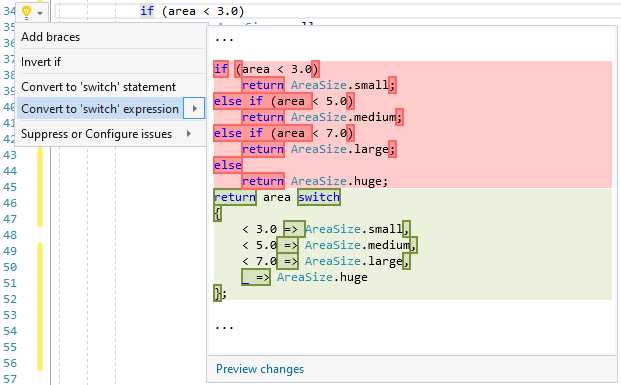
Figure 10: Convert to switch expression
The converted switch expression looks nice and succinct, as illustrated in Code Listing 74.
Code Listing 74: A switch expression using a relational pattern
public AreaSize DoSomething<T>(T shape, int numberOfShapes) where T : IShape |
Taking logical patterns further, we can now get rid of unwieldy double parentheses for if conditions. Consider the code in Code Listing 75.
Code Listing 75: Standard if not condition
if (!(shape is Circle)) { } |
We can now replace this with the code in Code Listing 76.
Code Listing 76: New if not condition using a logical pattern
if (shape is not Circle) { } |
If a shape can be a Circle or a Square, we can do the following:
Code Listing 77: Logical or pattern
if (shape is Circle or Square) { } |
This will give developers a fantastic way to express the intent of their code clearly and succinctly.
Target-typed new expressions
Before C# 9.0, whenever you wrote a new expression in C#, you were required to specify the type. The only exception was implicitly typed arrays, where you would create the following array:
Code Listing 78: Implicitly typed array
In C# 9.0, you will be allowed to omit the type when it’s clear what type the expression is being assigned to. Consider the following code.
Code Listing 79: The new expression for creating a Circle
Circle c = new Circle(5); |
In C# 9.0, this code can simply be written as follows.
Code Listing 80: The target-typed new expression
This code looks neater and conveys exactly what it should. I do, however, think that those of us using var will probably not use target-typed new expressions too often.
Init-only properties
C# allows developers to use object initialization, which is a very convenient and flexible way of creating a new object. Consider the SalesOrder class in Code Listing 81. It currently uses an auto-property for OrderNumber.
Code Listing 81: The SalesOrder class
public class SalesOrder |
One limitation is that the properties have to be mutable for object initializers to work. The object’s default, parameterless constructor is called, and then the property is assigned. But you can set the property to a different value after initialization because it is mutable, as seen in Code Listing 82.
Code Listing 82: Initializing the SalesOrder class
var salesOrder = new SalesOrder |
With init-only properties, this mutability is fixed. The init accessor is a variant of the set accessor, and can only be called during object initialization. If you modify your property to use init, as seen in Code Listing 83, then any subsequent assignments to the OrderNumber property will result in a compile-time error.
Code Listing 83: Setting init-only property on SalesOrder class
public class SalesOrder |
Visual Studio will tell you that your assignment after object initialization is not allowed.
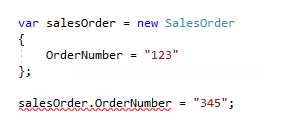
Figure 11: Subsequent assignment results in a compile-time error
This is because the OrderNumber property is not mutable.
Init accessors and readonly fields
Consider the same SalesOrder class we had a look at earlier. Modifying it as illustrated in Code Listing 84, you will notice the following.
Code Listing 84: Init accessor on the readonly field
public class SalesOrder |
This is possible because init accessors can only be called during initialization. This means that they can mutate readonly fields in the enclosing class.
Records
In the previous code listings, we saw that we can make individual properties immutable by using the init accessor. As seen in Code Listing 85, we can make the whole SalesOrder class become immutable and behave like a value by adding the data keyword.
Code Listing 85: Creating a record
public data class SalesOrder |
Adding the data keyword to the class declaration marks the class as a record. This means records are seen more as values, and less as objects—they don’t have a mutable encapsulated state. To represent any change over time, you must create a new record that represents the new state, meaning they are defined by their contents.
More C# 9.0 goodies
These are only some of the planned features for C# 9.0. While I know a lot could change before its release, the code illustrated in the previous examples gives us a nice glimpse of where the C# team is headed. If you want to keep up to date on what is happening around C# 9.0, swing over to the Language Feature Status page on GitHub. This allows you to see planned C# 9.0 features and their current states.


- 1800+ high-performance UI components.
- Includes popular controls such as Grid, Chart, Scheduler, and more.
- 24x5 unlimited support by developers.