
C# Features Succinctly®

CHAPTER 3
C# 8.0 Features
With the release of C# 8.0, developers have been given more features and enhancements to improve their codebases with, such as pattern matching enhancements. This will become evident when we look at switch expressions later on in this book.
C# 8.0 is supported on .NET Core 3.x and .NET Standard 2.1.
Default interface methods
This change to interfaces in C# 8.0 might be somewhat controversial for some, depending on your views. The logic, however, behind the feature in C# 8.0 is welcome. To understand the change, we need to explain a scenario.
An application creates orders. For this scenario, an interface called IOrder has been created, and is implemented by your application. This interface is also used in an external codebase maintained by a different team of developers. The interface and implementation look as illustrated in Code Listing 30.
Code Listing 30: The IOrder Interface
public class SalesOrder : IOrder |
Changes to some logic in the program require developers to be able to default the order date. The change, therefore, needs to be made in the interface to provide the ability to create an order without specifying a date. This will then simply default to the current date.
The problem with this approach is that once interfaces are released, they are considered immutable. Adding logic to the IOrder interface is a breaking change, as seen in Figure 1.
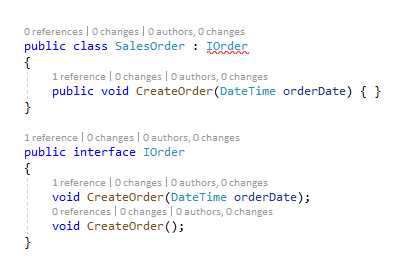
Figure 1: Modifying the interface introduces a breaking change
This is because the addition of the CreateOrder() method requires implementation in all classes that use the interface. In C# 8.0, however, we can provide a default implementation when upgrading an interface.
Code Listing 31: Default Interface method
public class SalesOrder : IOrder |
Now, implementors of the interface that do not know about the new member are not affected. The default implementation is ignored.
Nullable reference types
One of the biggest changes with regards to developer impact is one that probably has the smallest syntactic impact. Developers can now express whether or not a specific reference can be null.
Note: Did you know that null has been around in OOP programming for over 50 years?
The question now is: what happens if the list of students is null? Consider the following code.
Code Listing 32: The ListStudents method
private void ListStudents(IEnumerable<Student> students) |
There is no way we can tell the compiler that the Student object might be null. With nullable reference types, we can express this more clearly. To enable this feature, you need to add <Nullable>enable</Nullable> to your .csproj file, as shown in Code Listing 33.
Code Listing 33: Enabling nullable reference types
<Project Sdk="Microsoft.NET.Sdk"> <PropertyGroup> <OutputType>Exe</OutputType> <TargetFramework>netcoreapp3.1</TargetFramework> <Nullable>enable</Nullable> </PropertyGroup> </Project> |
This will now enable more concise compiler feedback to allow you to get the code right the first time. A nullable reference type is indicated by using the same syntax as nullable value types: by adding a ? to the type of the variable, as seen in the method signature of the ListStudents method in Code Listing 34.
Code Listing 34: Specifying that Student can be null
private void ListStudents(IEnumerable<Student?> students) |
Once you do that, the compiler generates more concise warnings regarding the use of the Student variable, as seen in Figure 2.
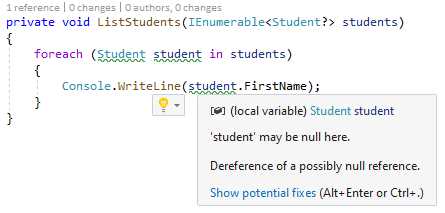
Figure 2: Compiler warnings for null reference
You are now in a better position to code defensively against null reference exceptions.
The null-forgiving operator
Those of you who have worked with the Swift programming language might be familiar with the following syntax. In C# 8.0 we call it the null-forgiving operator, and it is implemented using the ! operator.
Consider the Student class example used in Code Listing 34. To ensure that we have a valid Student class, I have created an extension method that ensures my Student class is not null, and that the FirstName property will have a value. This is illustrated in Code Listing 35.
Code Listing 35: The IsValid extension method
public static class ExtensionMethods |
If I now had to use this in a method that gets the FirstName property of the Student class, I would see that I still receive the warning when accessing the FirstName property.
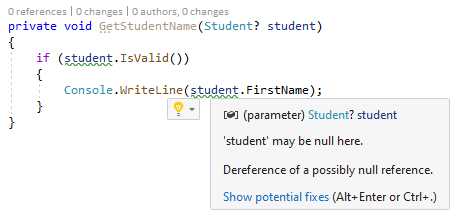
Figure 3: Applying the IsNull extension method
But I am confident that in this instance, because I am calling the IsValid extension method on my Student class, the FirstName property will not be null. I can therefore safely add the null-forgiving operator to my code that reads the FirstName property, as seen in Code Listing 36.
Code Listing 36: Applying the null-forgiving operator
private void GetStudentName(Student? student) |
The warning is removed and the intent of my code is quite clear.
Asynchronous streams
The introduction of asynchronous programming has forever changed the way developers write code. With the addition of async and await in .NET, C# developers could leverage asynchrony easily. Developers could not, however, consume streams of data asynchronously. That is, not until C# 8.0 introduced IAsyncEnumerable<T>.
If this looks familiar, that’s because it is. IAsyncEnumerable<T> is similar to IEnumerable<T>, which is used to iterate over collections. The only difference is that IAsyncEnumerable<T> allows developers to iterate through a collection asynchronously. This means our code can wait for the next element in a collection without blocking a thread.
Methods that return asynchronous streams have three properties:
- They must be declared with the async modifier.
- They return an IAsyncEnumerable<T>.
- They contain yield return statements to return successive elements in the asynchronous stream.
It is also worth noting that the stream elements are processed in the captured context. To disable this behavior, you need to use the TaskAsyncEnumerableExtensions.ConfigureAwait extension method.
For more on this, see Microsoft Docs.
To illustrate IAsyncEnumerable<T>, let us assume that you need to return some data from a data store. It’s great if you can get all that data in a single call. You can just perform asynchronous calls to get the data, and return it to the calling code.
The challenge, however, exists when you can’t get all that data at once. Sometimes the data needs to be returned in pages as it becomes available.
It is here that asynchronous streams shine. You can now send the data back to the calling code as soon as that data is available. To appreciate IAsyncEnumerable<T>, let’s try to illustrate the problem we are faced with by creating an asynchronous method that mimics the behavior of getting data that is paged.
Consider the following code.
Code Listing 37: Read a stream of data asynchronously
static async Task<IEnumerable<int>> GetSomethingAsync() |
When you call this method, as shown in Code Listing 38, the application will wait 10 seconds and then display all the numbers at once in the console window.
Code Listing 38: Iterate asynchronously
foreach (var item in await GetSomethingAsync()) |
To display the numbers on by one as they are generated, let’s modify the GetSomethingAsync method by changing the Task<IEnumerable<int>> to IAsycEnumerable<int> and adding yield, as seen in Code Listing 39.
Code Listing 39: Using IAsyncEnumerable<T>
static async IAsyncEnumerable<int> GetSomethingAsync() |
The yield keyword performs a stateful iteration and returns the values of a collection one by one. To consume the asynchronous stream, move the await keyword before the foreach so that your code looks as illustrated in Code Listing 40.
Code Listing 40: Consuming the asynchronous stream
Running this code will display the numbers in the console window one by one, as they are available.
Asynchronous disposable
If you have a .NET class that makes use of unmanaged resources, then you should see the IDisposable interface implemented in that class. This is to allow for the release of unmanaged resources synchronously.
In C# 8.0 you can now do this asynchronously by using IAsyncDisposable. This gives you a mechanism for performing resource-intensive dispose operations without blocking the main UI thread.
Having a look at the IAsyncDisposable.DisposeAsync method, we see that it returns a ValueTask representing the asynchronous dispose operation. You can see more on this here.
When you implement IAsyncDisposable on an object in your application, you should call DisposeAsync when you are finished using that object. A good practice is to put the code implementing IAsyncDisposable in a using statement. This ensures that the code releasing the resources will still do so in the event of an exception being thrown.
Indices and ranges
Indices and ranges provide a better and concise way, using bracket notation, to look at a single element from the start or end of an array. They can also be used to look at a range inside of an array.
Note: I use an array as an example here, but it can refer to any sequence of elements.
Consider the code illustrated in Code Listing 41. (Notice that I am using static System.Console.)
Code Listing 41: Reading months using indices
string[] months = |
We know that C# is zero-based, meaning that the first item in the array starts at 0. Have a look at the ^ operator (some call it the hat operator). Quite controversially, this starts at ^1. The reason for this is that ^0 denotes the length of the array. Consider the code illustrated in Code Listing 42.
Code Listing 42: Get items to the end of the array
var slice = months[^4..^0]; |
It reads as follows: get me the months, starting from the fourth element from the end (^4) for the length (^0) of the array. Therefore, ^0 is one past the end, and points to the very end of the array.
We also see that the code in Code Listing 43 output the same element in the array.
Code Listing 43: Using Length - 1 and ^1
WriteLine(months[months.Length - 1]); |
You can also pull out a range of values, as illustrated in Code Listing 44.
Code Listing 44: Find a range of values
var year = months[..]; |
Let’s recap some of the rules for indexes:
- Index 0 = months[0]
- Index ^0 = months.Length
- Typing months[^n] is the same as months[months.Length - n] where n is any number.
- A range specifies the start and end of a range with the start of the range being inclusive, and the end of the range being exclusive. Therefore:
- The range months[..3] excludes April.
- The range months[3..] includes April.
- The range months[0..^0] represents January to December.
You can also assign variables, as illustrated in Code Listing 45.
Code Listing 45: Assign variables to index and range
var july = ^6; |
As noted earlier, ranges and indices work with any sequence of elements. You can use them with string, Span<T>, or ReadOnlySpan<T>.
Switch expressions
I have always disliked using switch statements. Personally, the switch statement always felt so cumbersome and unnecessarily clunky. Now with C# 8.0, we can be much more concise in the way we express ourselves by using switch expressions. Consider the traditional switch statement that returns a string from a method called GetBirthStone, as illustrated in Code Listing 46.
Code Listing 46: Traditional switch statement
private string GetBirthstone(Months month) |
Compare this with the more concise switch expression returned from the modified GetBirthStone method illustrated in Code Listing 47.
Code Listing 47: The new switch expression
private string GetBirthstone(Months month) => |
We should note a few things here:
- Because the GetBirthStone method just returns the value from the switch, it can be changed to use an expression body.
- In the switch expression, the need for case and break keywords are removed.
- The switch expression puts the variable month before the switch keyword.
- The case and : have been replaced with a single =>, which (for me anyway) looks much nicer.
- The default case has been replaced with the _ discard.
This expression body makes for cleaner, better-looking, and more readable code. To change a switch statement to a switch expression, place your cursor on the switch keyword and press Ctrl+. and select Convert switch statement to expression.
Readonly members
You can now add readonly modifiers to struct members. This is helpful if you need to indicate that a member does not modify state, and gives you a more fine-tuned approach than simply applying the readonly modifier to a struct declaration.
Consider the mutable struct in Code Listing 48.
Code Listing 48: Struct to calculate days since a given date
public struct DaysSince |
We can see that the ToString method will not change the state, and you can indicate this by adding the readonly modifier to the ToString declaration. When you do this, however, you will receive a compiler warning, as seen in Figure 4.

Figure 4: Compiler warning
This happens because the Number property is not marked as readonly, and the compiler will display this warning when it needs to create a defensive copy. We know that the Number property will not change the state, so we can safely add a readonly modifier to the declaration.
Code Listing 49: Add readonly modifier to a struct member
public struct DaysSince |
Be aware that the readonly modifier is only necessary on read-only properties. The compiler will not assume that get accessors don’t modify state, so you must specify that. The only exception is with auto-implemented properties where all auto-implemented getters are regarded as readonly by default. This is the reason that the GivenDate property didn’t generate a compiler warning.
Using declarations
You should be familiar with the using statement in C#. It provides a way to ensure that your code adheres to the correct usage of IDisposable objects; when the code execution moves past the using statement’s scope, the objects in that scope are properly disposed of.
Consider the using statement in Code Listing 50.
Code Listing 50: Using statement to read a file
private void ReadFile() |
With C# 8.0, you can now make use of using declarations instead, as illustrated in Code Listing 51.
Code Listing 51: Using declaration to read a file
private void ReadFile() |
What we notice about the using declaration is that the using keyword precedes the var keyword. This tells the compiler that the variable called reader that is being declared must be disposed of at the end of the enclosing scope.
Static local functions
Local functions are another one of my favorite language features. First appearing in C# 7, you can now add the static modifier to a local function in C# 8.0. When we see a static local function, we know that it does not use any of the arguments contained in its outer scope. This means that the compiler can optimize the code accordingly.
Consider the following code.
Code Listing 52: Static local functions
You will notice that this is the same method we used in the Local Functions demo when discussing C# 7 earlier in the book. The only difference is that now it uses a switch expression, as allowed in C# 8.0.
The local function called CalculateVolume has been marked as static. The compiler knows that it does not use any of the arguments in the outer scope. To see what this means, add the following static local function to the TotalObjectVolume method.
Code Listing 53: Static local function with a compiler error
static double GetCylinderRadius() |
The code for the TotalObjectVolume method should now look like Code Listing 54.
Code Listing 54: The TotalObjectVolume method
private double TotalObjectVolume((Cylinder c, Sphere s, Pyramid p) volumeShapes) |
You will notice that the code we added for the GetCylinderRadius local function will generate a compiler error, as illustrated in Figure 5.
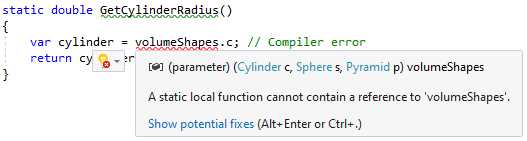
Figure 5: The compiler error on a static local function
This is because the local function is marked as static, but it references volumeShapes, which is contained in the outer scope.
Disposable ref structs
In C# 7 we were allowed to declare a struct with the ref modifier. What we couldn’t do, however, was implement any interfaces on such structs. This means that the code in Code Listing 55 will generate a compiler error.
Code Listing 55: A ref struct implementing an interface
ref struct StudentScores : IDisposable |
As seen in Figure 6, the compiler is telling us that we can’t implement an interface on our struct.
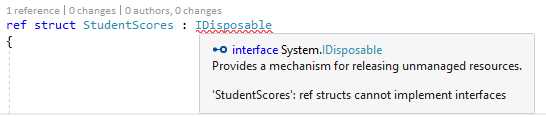
Figure 6: Compiler error on ref struct
This leaves us in a bit of a predicament. What if we needed to perform some cleanup for our struct? In C# 8.0 we can now do just that by adding a publicly accessible void Dispose method, as seen in Code Listing 56.
Code Listing 56: A ref struct with a Dispose method
ref struct StudentScores |
We can use it in our code in a using declaration, as illustrated in Code Listing 57.
Code Listing 57: Using declaration for struct
You can also use disposable ref structs with readonly ref struct declarations.
Null-coalescing assignment
C# 8.0 also introduced the null-coalescing assignment operator: ??=. This operator can now be used to assign the value of its right-hand operand to its left-hand operand only in the event of the left-hand operand evaluating to null.
How often have you seen code like the following?
Code Listing 58: Checking for null and assigning
private void AddUpdateScores(List<int> lstScores) |
In C# 8.0 the null-coalescing assignment operator makes this check almost negligible, as seen in Code Listing 59.
Code Listing 59: Checking for null using null-coalescing assignment
private void AddUpdateScores(List<int> lstScores) |
If you read through the code too fast, you might miss it. It’s such a small change, but it has quite a big impact. It is also important to note that if the lstScores variable is not null; the assignment is simply skipped.
Unmanaged constructed types
Unmanaged types are not types defined in unmanaged code. It is a type that is not a reference type, and does not contain reference type fields at any level of nesting. Therefore, with C# 8.0, a constructed value type is unmanaged if it contains fields of unmanaged types only.
Consider the code in Code Listing 60.
Code Listing 60: A generic struct
public struct MyStruct<T> |
In Code Listing 61, we have an extension method with the unmanaged constraint on T.
Code Listing 61: A generic extension method with an unmanaged constraint
public unsafe static PropertyInfo[] GetProps<T>(this T obj) where T : unmanaged |
This means that if we create our struct as illustrated in Code Listing 62, we can call the extension method on the instance of that struct because it is an unmanaged constructed type.
Code Listing 62: Calling the extension method
var mystruct = new MyStruct<int> { One = 1, Two = 2 }; |
This is because int is an unmanaged type. If we had to use string, then we would no longer have an unmanaged constructed type, because string is not an unmanaged type, and mystruct2 would violate the unmanaged constraint on the extension method.
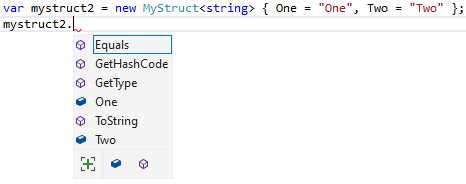
Figure 7: Not-unmanaged constructed type
The following types are unmanaged types:
- sbyte, byte, short, ushort, int, uint, long, ulong, char, float, double, decimal, or bool.
- Any enum type.
- Any pointer type.
- Any user-defined struct type containing only unmanaged type fields and is not a constructed type pre-C# 7.3.
C# 7.3 introduced the unmanaged constraint, as seen in the extension method in Code Listing 61. This means we can use the unmanaged constraint directly in the definition of the generic struct, as seen in Code Listing 63.
Code Listing 63: The unmanaged constraint on the generic struct
public struct MyStruct<T> where T : unmanaged |
This would generate a compiler error, as seen in Figure 8, because the creation of mystruct2 violates the unmanaged constraint on the generic struct definition.

Figure 8: The MyStruct<string> violates the constraint
We can see that a generic struct can be the source of both unmanaged and not unmanaged constructed types. Where you place the constraint is up to you and what you need to achieve.
Enhancement of interpolated verbatim strings
In C# 8.0 the $ and @ tokens used with interpolated strings can be either $@”..” or @$”..”, and both are now valid interpolated verbatim strings. Before C# 8.0, the $ token had to appear before the @ token.
This means var msg = $@"The \t student is {studentName}"; will produce the exact same output as var msg = @$"The \t student is {studentName}"; in the console window.
Enabling C# 8 in any .NET project
It is possible to enable C# 8.0 in any .NET project. There are a few provisos, but I will get to those in a minute. To see this in action, create a .NET console application using the .NET Framework, as seen in Figure 9.
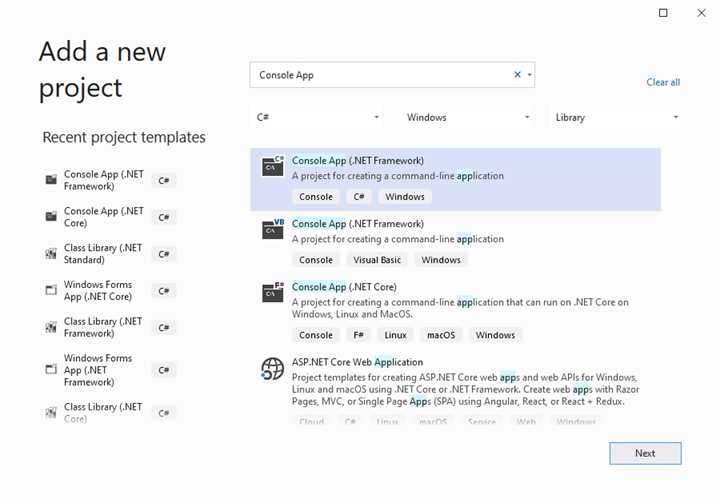
Figure 9: A console app using .NET Framework
When this project is created, add the shape classes seen in Code Listing 64 to your console application. These are the same classes that we used earlier in the book, but I’m presenting them here again for convenience.
Code Listing 64: Shape classes
public class Cylinder |
Let’s add our TotalObjectVolume method to our project that uses a static local function, which also uses a switch expression. The code is illustrated in Code Listing 65.
Code Listing 65: A static local function using a switch expression
private double TotalObjectVolume((Cylinder c, Sphere s, Pyramid p) volumeShapes) |
At this point, you will see a whole bunch of compiler errors in your static local function. The compiler errors will most likely tell you that you are trying to use C# 8.0 language features in an earlier version of C# (probably C# 7.3, depending on the .NET Framework you are using).
To use C# 8.0 in your console application on the .NET Framework (not .NET Core—remember, we created a regular console app using the .NET Framework), you need to modify your .csproj file as seen in Code Listing 66.
Change the <LangVersion> to 8.0 in your .csproj file. If there isn’t a <LangVersion>, just add one.
Code Listing 66: Add LangVersion to .csproj file
<PropertyGroup> |
Save your .csproj file and reload your project if needed. That’s all there is to it. There are some provisos to this, though.
Not all types are included
Some types, such as IAsyncEnumerable, are not included. There is a workaround, though—you can install the Microsoft.Bcl.AsyncInterfaces and Microsoft.Bcl.HashCode NuGet packages.
Indexes and ranges
By using C# 8.0 in non-.NET Core 3 or non-.NET Standard 2.1 projects, you will not be able to use indexes and ranges. This is because these are runtime features, and your code simply will not compile.
Using Directory.Build.props
If you want each project in your solution to target C# 8.0, or if you need to add any custom property to all your projects, you can create a file called Directory.Build.props in the root of your solution and add the <LangVersion> in there.
This is illustrated in Code Listing 67.
Code Listing 67: The Directory.Build.props file
<Project> <PropertyGroup> </PropertyGroup> |
I am not so sure that I would necessarily enable C# 8.0 on any .NET project. I would probably take the time to create a .NET Core application from the get-go, but this solution isn’t without its merits. This could be useful in situations where you are dealing with an existing .NET project that has had a lot of development effort invested, and that can’t easily be rewritten from scratch in .NET Core.
In this situation, jimmying the .csproj file to enable C# 8.0 makes sense.


- 1800+ high-performance UI components.
- Includes popular controls such as Grid, Chart, Scheduler, and more.
- 24x5 unlimited support by developers.