
Blazor WebAssembly Succinctly®

CHAPTER 9
Sending Emails
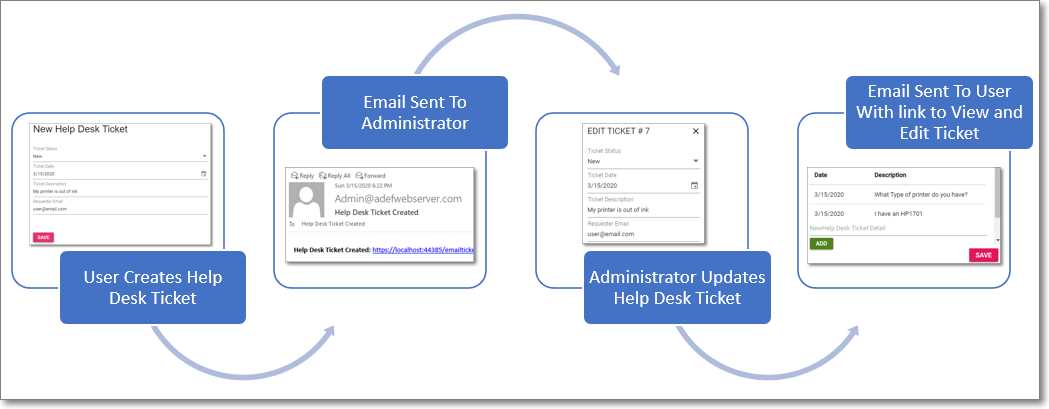
Figure 74: Email Process
In this chapter, we will create code that will allow ticket creators and administrators to update help desk tickets by simply clicking a link in an email.
We will create the code that will email the administrators when a new help desk ticket has been created, as well as email help desk ticket creators and administrators when help desk tickets are updated.
Email using SendGrid
To enable emails, create a free account here and obtain an email API key.
Open the appsettings.json file and add the following two lines below the opening curly bracket (above the "ConnectionStrings": line), entering your SendGrid key for the SENDGRID_APIKEY property and your email address for the SenderEmail property.
Code Listing 65: appsettings.json
"SENDGRID_APIKEY": "enter your key from app.sendgrid.com", "SenderEmail": "enter your email address", |

Figure 75: SendGrid NuGet Package
Install the SendGrid NuGet package in the Server project.
EmailSender class
We will update the EmailController.cs class to read the settings from the appsettings.json file and send emails.
Send emails—new help desk ticket
We will need a class to pass the information needed to send emails from the Client project to code in the Server project.
Add a new class to the Shared project named HelpDeskEmail.cs using the following code.
Code Listing 66: HelpDeskEmail.cs
#nullable disable using System; using System.Collections.Generic; using System.Text; namespace SyncfusionHelpDeskClient.Shared { public class HelpDeskEmail { public string EmailType { get; set; } public string EmailAddress { get; set; } public string TicketGuid { get; set; } } } |
To actually send the email, open the EmailController.cs file in the Controllers folder of the Server project and add the following using statements.
Code Listing 67: EmailController Using Statements
using SendGrid; using SendGrid.Helpers.Mail; |
Add the following method to read the SENDGRID_APIKEY from the appsettings.json file and send the emails.
Code Listing 68: EmailController Send Email Code
[HttpPost] [AllowAnonymous] public Task Post(HelpDeskEmail objHelpDeskEmail) { try { // Email settings. SendGridMessage msg = new SendGridMessage(); var apiKey = configuration["SENDGRID_APIKEY"]; var senderEmail = configuration["SenderEmail"]; var client = new SendGridClient(apiKey); var FromEmail = new EmailAddress( senderEmail, senderEmail ); // Format Email contents. string strPlainTextContent = $"{objHelpDeskEmail.EmailType}: " + $"{GetHelpDeskTicketUrl(objHelpDeskEmail.TicketGuid)}"; string strHtmlContent = $"<b>{objHelpDeskEmail.EmailType}:</b> "; strHtmlContent = strHtmlContent + $"<a href='" + $"{GetHelpDeskTicketUrl(objHelpDeskEmail.TicketGuid)}" + $"'>"; strHtmlContent = strHtmlContent + $"{GetHelpDeskTicketUrl(objHelpDeskEmail.TicketGuid)}</a>"; if (objHelpDeskEmail.EmailType == "Help Desk Ticket Created") { msg = new SendGridMessage() { From = FromEmail, Subject = objHelpDeskEmail.EmailType, PlainTextContent = strPlainTextContent, HtmlContent = strHtmlContent }; // Created email always goes to Administrator. // Send to senderEmail configured in appsettings.json msg.AddTo( new EmailAddress(senderEmail, objHelpDeskEmail.EmailType) ); } if (objHelpDeskEmail.EmailType == "Help Desk Ticket Updated") { // Must pass a valid GUID. // Get the existing record. if (_context.HelpDeskTickets .Where(x => x.TicketGuid == objHelpDeskEmail.TicketGuid) .FirstOrDefault() != null) { // See if the user is the Administrator. if (!this.User.IsInRole("Administrators")) { // Always send email to Administrator. objHelpDeskEmail.EmailAddress = senderEmail; } msg = new SendGridMessage() { From = FromEmail, Subject = objHelpDeskEmail.EmailType, PlainTextContent = strPlainTextContent, HtmlContent = strHtmlContent }; // Send email. msg.AddTo(new EmailAddress( objHelpDeskEmail.EmailAddress, objHelpDeskEmail.EmailType) ); } else { Task.FromResult("Error - Bad TicketGuid"); } } client.SendEmailAsync(msg); } catch { // Could not send email. // Perhaps SENDGRID_APIKEY not set in // appsettings.json } return Task.FromResult(""); } // Utility #region private string GetHelpDeskTicketUrl(string TicketGuid) private string GetHelpDeskTicketUrl(string TicketGuid) { var request = httpContextAccessor.HttpContext.Request; var host = request.Host.ToUriComponent(); var pathBase = request.PathBase.ToUriComponent(); var url = $@"{request.Scheme}://" + $@"{host}{pathBase}/emailticketedit/" + $@"{TicketGuid}"; return url; } #endregion |
Next, open the Index.razor file in the Client project and add the following code to the end of the HandleValidSubmit method (under the PostAsJsonAsync line).
Code Listing 69: HandleValidSubmit method
// Send email HelpDeskEmail objHelpDeskEmail = new HelpDeskEmail(); objHelpDeskEmail.EmailType = "Help Desk Ticket Created"; objHelpDeskEmail.EmailAddress = ""; objHelpDeskEmail.TicketGuid = objHelpDeskTicket.TicketGuid; await NoAuthenticationClient.PostAsJsonAsync( "Email", objHelpDeskEmail); |
This code will use PostAsJsonAsync to call the Post method of the EmailController.cs file to send the emails. This code will be called when a user creates a new help desk ticket.
Send emails—updated help desk ticket
To send an email to the help desk ticket creator when the help desk ticket is updated, open the Administration.razor control and add the following code to the end of the SaveTicket method (under the await gridObj.Refresh(); line).
Code Listing 70: Sending Emails in the Administration Control
// Send email HelpDeskEmail objHelpDeskEmail = new HelpDeskEmail(); objHelpDeskEmail.EmailType = "Help Desk Ticket Updated"; objHelpDeskEmail.EmailAddress = SelectedTicket.TicketRequesterEmail; objHelpDeskEmail.TicketGuid = SelectedTicket.TicketGuid; await Http.PostAsJsonAsync( "Email", objHelpDeskEmail); |
Route parameters
When a help desk ticket is initially created and saved to the database, it is assigned a unique GUID value. When an email is sent to notify the help desk ticket creator and administrator, the email will contain a link that passes this GUID to the Blazor control that we will create. This control will be decorated with an @page directive that contains a route parameter.
In the Pages folder of the Client project, create a new control called EmailTicketEdit.razor with the following code.
Code Listing 71: EmailTicketEdit Route
@page "/emailticketedit/{TicketGuid}" |
This line, together with a field in the @code section called TicketGuid (of type string), will allow this control to be loaded and passed a value for TicketGuid from a link in the email.
Enter the following code as the remaining code for the file.
Code Listing 72: EmailTicketEdit Code
@using SyncfusionHelpDeskClient.Shared @inject HttpClient Http @inject IHttpClientFactory ClientFactory <div id="target" style="height: 500px;"> @if (!EditDialogVisibility) { <h2>Your response has been saved</h2> <h4>Thank You!</h4> } </div> <SfDialog Target="#target" Width="500px" Height="500px" IsModal="true" ShowCloseIcon="false" @bind-Visible="EditDialogVisibility"> <DialogTemplates> <Header> EDIT TICKET # @SelectedTicket.Id</Header> <Content> <EditTicket SelectedTicket="@SelectedTicket" /> </Content> <FooterTemplate> <div class="button-container"> <button type="submit" class="e-btn e-normal e-primary" @onclick="SaveTicket"> Save </button> </div> </FooterTemplate> </DialogTemplates> </SfDialog> @code { #nullable disable [Parameter] public string TicketGuid { get; set; } HttpClient NoAuthenticationClient; private HelpDeskTicket SelectedTicket = new HelpDeskTicket(); private bool EditDialogVisibility = true; protected override async Task OnAfterRenderAsync(bool firstRender) { if (firstRender) { // Create an httpClient to use for non-authenticated calls. NoAuthenticationClient = ClientFactory.CreateClient("ServerAPI.NoAuthenticationClient"); // Get the Help Desk Ticket associated with // the GUID that was passed to the control. SelectedTicket = await NoAuthenticationClient.GetFromJsonAsync<HelpDeskTicket>( "Email?HelpDeskTicketGuid=" + TicketGuid); StateHasChanged(); } } public async Task SaveTicket() { // Save the Help Desk Ticket. await NoAuthenticationClient.PutAsJsonAsync( "SyncfusionHelpDesk", SelectedTicket); // Close the Dialog. EditDialogVisibility = false; // Send email. HelpDeskEmail objHelpDeskEmail = new HelpDeskEmail(); objHelpDeskEmail.EmailType = "Help Desk Ticket Updated"; objHelpDeskEmail.EmailAddress = SelectedTicket.TicketRequesterEmail; objHelpDeskEmail.TicketGuid = SelectedTicket.TicketGuid; await NoAuthenticationClient.PostAsJsonAsync( "Email", objHelpDeskEmail); return; } } |
Notice that this page also includes the EditTicket control, effectively reusing that control in both this page and the Administration page.
Email link

Figure 76: Email Link
When we run the application and create a new help desk ticket, the administrator is sent an email with a link that will take the administrator directly to the help desk ticket.


- 80+ high performance Blazor components.
- Lightweight and user friendly.
- Stunning Built-in themes with customization.