
Blazor WebAssembly Succinctly®

CHAPTER 6
Creating a Data Layer
We will now add additional tables to the database to support the custom code we plan to write. To allow our code to communicate with these tables, we require a data layer. This data layer will also allow us to organize and reuse code efficiently.
Create the database tables
The first step is to add the database tables we will need.
In the SQL Server Object Explorer, right-click the database and select New Query.
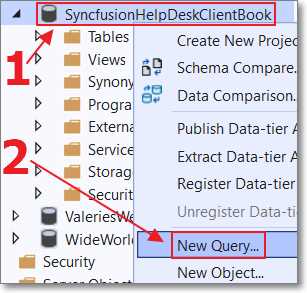
Figure 46: New Query
Enter the following script.
Code Listing 35: SQL Script
SET ANSI_NULLS ON GO SET QUOTED_IDENTIFIER ON GO CREATE TABLE [dbo].[HelpDeskTicketDetails]( [Id] [int] IDENTITY(1,1) NOT NULL, [HelpDeskTicketId] [int] NOT NULL, [TicketDetailDate] [datetime] NOT NULL, [TicketDescription] [nvarchar](max) NOT NULL, CONSTRAINT [PK_HelpDeskTicketDetails] PRIMARY KEY CLUSTERED ( [Id] ASC )WITH (PAD_INDEX = OFF, STATISTICS_NORECOMPUTE = OFF, IGNORE_DUP_KEY = OFF, ALLOW_ROW_LOCKS = ON, ALLOW_PAGE_LOCKS = ON) ON [PRIMARY] ) ON [PRIMARY] TEXTIMAGE_ON [PRIMARY] GO SET ANSI_NULLS ON GO SET QUOTED_IDENTIFIER ON GO CREATE TABLE [dbo].[HelpDeskTickets]( [Id] [int] IDENTITY(1,1) NOT NULL, [TicketStatus] [nvarchar](50) NOT NULL, [TicketDate] [datetime] NOT NULL, [TicketDescription] [nvarchar](max) NOT NULL, [TicketRequesterEmail] [nvarchar](500) NOT NULL, [TicketGUID] [nvarchar](500) NOT NULL, CONSTRAINT [PK_HelpDeskTickets] PRIMARY KEY CLUSTERED ( [Id] ASC )WITH (PAD_INDEX = OFF, STATISTICS_NORECOMPUTE = OFF, IGNORE_DUP_KEY = OFF, ALLOW_ROW_LOCKS = ON, ALLOW_PAGE_LOCKS = ON) ON [PRIMARY] ) ON [PRIMARY] TEXTIMAGE_ON [PRIMARY] GO ALTER TABLE [dbo].[HelpDeskTicketDetails] WITH CHECK ADD CONSTRAINT [FK_HelpDeskTicketDetails_HelpDeskTickets] FOREIGN KEY([HelpDeskTicketId]) REFERENCES [dbo].[HelpDeskTickets] ([Id]) ON DELETE CASCADE GO ALTER TABLE [dbo].[HelpDeskTicketDetails] CHECK CONSTRAINT [FK_HelpDeskTicketDetails_HelpDeskTickets] GO |
Click the Execute icon.

Figure 47: Click Execute
Close the SQLQuery1.sql window and refresh the view of the tables in the database.

Figure 48: Refresh Database
You will see that the new tables have been added.

Figure 49: Database Diagram
The preceding diagram shows the relationship between the newly added tables. A HelpDeskTickets record is created first. As the issue is processed, multiple associated HelpDeskTicketDetails records are added in a one-to-many relationship.
Create the DataContext (using EF Core Power Tools)
We will now create the DataContext code that will allow the server-side controller class, created in the following steps, to communicate with the database tables we just added.

Figure 50: EF Core Power Tools
Install EF Core Power Tools from the VS Marketplace.

Figure 51: EF Core Power Tools
In the Server project, right-click the project node in the Solution Explorer and select EF Core Power Tools > Reverse Engineer.

Figure 52: Create Connection
Click Add to create a connection to the database if one does not already exist in the dropdown list.
After you do that, or if the connection to the database is already in the dropdown list, select the database connection in the dropdown and click OK.

Figure 53: Select Tables
Select the HelpDeskTicketDetails and HelpDeskTickets tables and click OK.

Figure 54: Configure DataContext
Set the following values:
- Context name: SyncfusionHelpDeskContext
- Namespace: SyncfusionHelpDesk
- EntityTypes path: Data
- DbContext path: Data
Click OK.

Figure 55: DataContext Created
In the Solution Explorer, you will see the DataContext has been created.
Set the database connection
The DataContext code needs the connection to the database to be set.
In the Server project, open the Program.cs file and add the following using statement.
Code Listing 36: Data Using Statement
using SyncfusionHelpDesk.Data; |
Add the following code above the builder.Services.AddDatabaseDeveloperPageExceptionFilter() line.
Code Listing 37: Database Connection
// To access HelpDesk tables. builder.Services.AddDbContext<SyncfusionHelpDeskContext>(options => options.UseSqlServer( builder.Configuration.GetConnectionString("DefaultConnection"))); |
Save the file. Select Build > Rebuild Solution.
The application should build without any errors.
Create the Syncfusion help desk controller
We will now create the server-side controller that will provide all the remaining data access methods we will need for the application. The code in the Client project, created in later steps, will call this code to communicate with the database.
In the Controllers folder of the Server project, add a new file called SyncfusionHelpDeskController.cs with the following code.
Code Listing 38: SyncfusionHelpDeskController.cs
#nullable disable using Microsoft.AspNetCore.Authorization; using Microsoft.AspNetCore.Mvc; using Microsoft.EntityFrameworkCore; using Microsoft.Extensions.Primitives; using System; using System.Collections.Generic; using System.Linq; using System.Linq.Expressions; using System.Threading.Tasks; namespace SyncfusionHelpDesk.Data { [ApiController] [Route("[controller]")] public class SyncfusionHelpDeskController : ControllerBase { private readonly SyncfusionHelpDeskContext _context; public SyncfusionHelpDeskController( SyncfusionHelpDeskContext context) { _context = context; } // Only an Administrator can query. [Authorize(Roles = "Administrators")] [HttpGet] public object Get() { StringValues Skip; StringValues Take; StringValues OrderBy; // Filter the data. var TotalRecordCount = _context.HelpDeskTickets.Count(); int skip = (Request.Query.TryGetValue("$skip", out Skip)) ? Convert.ToInt32(Skip[0]) : 0; int top = (Request.Query.TryGetValue("$top", out Take)) ? Convert.ToInt32(Take[0]) : TotalRecordCount; string orderby = (Request.Query.TryGetValue("$orderby", out OrderBy)) ? OrderBy.ToString() : "TicketDate"; // Handle OrderBy direction. if (orderby.EndsWith(" desc")) { orderby = orderby.Replace(" desc", ""); return new { Items = _context.HelpDeskTickets .OrderByDescending(orderby) .Skip(skip) .Take(top), Count = TotalRecordCount }; } else { System.Reflection.PropertyInfo prop = typeof(HelpDeskTickets).GetProperty(orderby); return new { Items = _context.HelpDeskTickets .OrderBy(orderby) .Skip(skip) .Take(top), Count = TotalRecordCount }; } } [HttpPost] [AllowAnonymous] public Task Post(HelpDeskTickets newHelpDeskTickets) { // Add a new Help Desk Ticket. _context.HelpDeskTickets.Add(newHelpDeskTickets); _context.SaveChanges(); return Task.FromResult(newHelpDeskTickets); } [HttpPut] [AllowAnonymous] public Task PutAsync(HelpDeskTickets UpdatedHelpDeskTickets) { // Get the existing record. // Note: Caller must have the TicketGuid. var ExistingTicket = _context.HelpDeskTickets .Where(x => x.TicketGuid == UpdatedHelpDeskTickets.TicketGuid) .FirstOrDefault(); if (ExistingTicket != null) { ExistingTicket.TicketDate = UpdatedHelpDeskTickets.TicketDate; ExistingTicket.TicketDescription = UpdatedHelpDeskTickets.TicketDescription; ExistingTicket.TicketGuid = UpdatedHelpDeskTickets.TicketGuid; ExistingTicket.TicketRequesterEmail = UpdatedHelpDeskTickets.TicketRequesterEmail; ExistingTicket.TicketStatus = UpdatedHelpDeskTickets.TicketStatus; // Insert any new TicketDetails. if (UpdatedHelpDeskTickets.HelpDeskTicketDetails != null) { foreach (var item in UpdatedHelpDeskTickets.HelpDeskTicketDetails) { if (item.Id == 0) { // Create new HelpDeskTicketDetails record. HelpDeskTicketDetails newHelpDeskTicketDetails = new HelpDeskTicketDetails(); newHelpDeskTicketDetails.HelpDeskTicketId = UpdatedHelpDeskTickets.Id; newHelpDeskTicketDetails.TicketDetailDate = DateTime.Now; newHelpDeskTicketDetails.TicketDescription = item.TicketDescription; _context.HelpDeskTicketDetails .Add(newHelpDeskTicketDetails); } } } _context.SaveChanges(); } else { return Task.FromResult(false); } return Task.FromResult(true); } // Only an Administrator can delete. [Authorize(Roles = "Administrators")] [HttpDelete] public Task Delete( string HelpDeskTicketGuid) { // Get the existing record. var ExistingTicket = _context.HelpDeskTickets .Include(x => x.HelpDeskTicketDetails) .Where(x => x.TicketGuid == HelpDeskTicketGuid) .FirstOrDefault(); if (ExistingTicket != null) { // Delete the Help Desk Ticket. _context.HelpDeskTickets.Remove(ExistingTicket); _context.SaveChanges(); } else { return Task.FromResult(false); } return Task.FromResult(true); } } // From: https://bit.ly/30ypMCp public static class IQueryableExtensions { public static IOrderedQueryable<T> OrderBy<T>( this IQueryable<T> source, string propertyName) { return source.OrderBy(ToLambda<T>(propertyName)); } public static IOrderedQueryable<T> OrderByDescending<T>( this IQueryable<T> source, string propertyName) { return source.OrderByDescending(ToLambda<T>(propertyName)); } private static Expression<Func<T, object>> ToLambda<T>( string propertyName) { var parameter = Expression.Parameter(typeof(T)); var property = Expression.Property(parameter, propertyName); var propAsObject = Expression.Convert(property, typeof(object)); return Expression.Lambda<Func<T, object>>(propAsObject, parameter); } } } |
Handling multiple database contexts
Finally, we need to adjust the ApplicationDbContext class to use the generic options type. This is required because we have added the SyncfusionHelpDeskContext, and without using the generic constructor, the wrong class may be initialized.
In the Server project, open the ApplicationDbContext.cs file in the Data folder, and delete this code.
Code Listing 39: Old ApplicationDbContext Code
public ApplicationDbContext( DbContextOptions options, IOptions<OperationalStoreOptions> operationalStoreOptions) : base(options, operationalStoreOptions) { } |
Replace it with the following code.
Code Listing 40: New ApplicationDbContext Code
public ApplicationDbContext( DbContextOptions<ApplicationDbContext> options, IOptions<OperationalStoreOptions> operationalStoreOptions) : base(options, operationalStoreOptions) { } |


- 80+ high performance Blazor components.
- Lightweight and user friendly.
- Stunning Built-in themes with customization.