
Blazor Succinctly®

CHAPTER 4
Explore the Project
In this chapter, we will explore the Blazor project we just created.
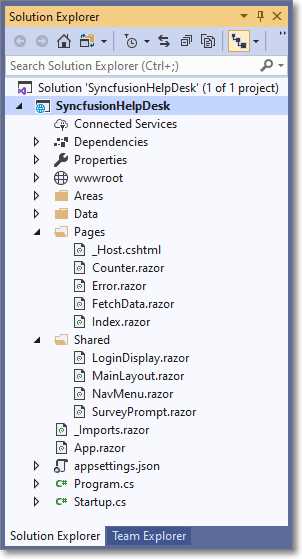
Figure 36: Explore the Project
Startup
The Program.cs file is the entry point for the application and invokes the Startup class that is defined in the Startup.cs file.
Code Listing 12: Program.cs
public static IHostBuilder CreateHostBuilder(string[] args) => Host.CreateDefaultBuilder(args) .ConfigureWebHostDefaults(webBuilder => { webBuilder.UseStartup<Startup>(); }); |
The Startup class calls the MapBlazorHub method that configures the SignalR endpoint required for server-side Blazor operation. It also calls the method MapFallbackToPage("/_Host") that sets up the _Host.cshtml page as the root page of the application.
Code Listing 13: Startup.cs
app.UseEndpoints(endpoints => { endpoints.MapControllers(); endpoints.MapBlazorHub(); endpoints.MapFallbackToPage("/_Host"); }); |
The _Host.cshtml page specifies that the App component, contained in the App.razor file, is to be rendered as the root component of the application.
Code Listing 14: _Host.cshtml Page
<body> <app> <component type="typeof(App)" render-mode="ServerPrerendered" /> </app> ... <script src="_framework/blazor.server.js"></script> </body> </html> |
The page also loads the blazor.webassembly.js file, which sets up the SignalR connection between the user’s web browser and the server-side code.
Routing
The routing of page requests in the application is configured in the App.razor control.
Code Listing 15: App.razor
<CascadingAuthenticationState> <Router AppAssembly="@typeof(Program).Assembly"> <Found Context="routeData"> <AuthorizeRouteView RouteData="@routeData" DefaultLayout="@typeof(MainLayout)" /> </Found> <NotFound> <LayoutView Layout="@typeof(MainLayout)"> <p>Sorry, there's nothing at this address.</p> </LayoutView> </NotFound> </Router> </CascadingAuthenticationState> |
This component intercepts web browser navigation and renders the page and the layout after applying any configured authorization rules.
Layouts
The App.razor control specifies MainLayout (contained in the MainLayout.razor file) as the application’s default layout component.
Code Listing 16: MainLayout.razor
@inherits LayoutComponentBase <div class="sidebar"> <NavMenu /> </div> <div class="main"> <div class="top-row px-4 auth"> <LoginDisplay /> <a href="https://docs.microsoft.com/aspnet/" target="_blank">About</a> </div> <div class="content px-4"> @Body </div> </div> |
The MainLayout control inherits from LayoutComponentBase and will inject the content of the Razor page to which the user is navigating at the location of the @Body parameter in the template.
The remaining page markup, including the NavMenu control (located in the NavMenu.razor file), and the LoginDisplay control (located in the LoginDisplay.razor file), will be displayed around the content, creating a consistent page layout.


- 80+ high performance Blazor components.
- Lightweight and user friendly.
- Stunning Built-in themes with customization.