
Beyond Public Speaking for Geeks Succinctly®

CHAPTER 2
The NEW Normal
At the beginning of 2020, the world changed due to a pandemic that impacted all sectors, that required social distancing, and that changed the world of public speaking for the coming months (or years, who knows?).
Most conferences changed their format and went online-only, and many others decided to accept a small number of people in person and stream the content for other attendees.
Video conferences became the norm for people who worked from home, and business travels were blocked or reduced.
Working from home
Most people (author included) who were working remotely before COVID-19 were able to choose what to do, where to do it, and when to do it, because their work allowed for independence and being measured by objectives rather than worked hours.
When children were at home, a truly remote worker could go to a café, to a co-working space, or to the office, or could simply decide to spend time with them and work later in the day.
Working from home became a necessity when offices closed, and people were forced to adapt, in most cases without the proper space or setup, and with family with them.
Public speaking when working from home is more difficult. The internet is full of videos of conference calls interrupted by family members and children, but you have to consider that it’s now normal to listen to crying babies while doing a conference call, or when presenting.
When working from home and delivering or attending virtual sessions, you need to think about the breaks that you need, not only for you, but to respect the timings and the needs of other members of your family. When planning for a virtual event, reduce sessions’ duration and take longer breaks. Or divide sessions into multiple days.
Don’t be afraid of interruptions
You’re taking your work to your home, not vice versa. That means your children could interrupt you during conference calls or, even worse, live events.
Of course, you should remember to lock your door if possible, but if you have problems at home, like crying children or a partner needing help, you can apologize a bit, solve the problem, and come back. People will understand the situation, especially if your office is still closed, or if the situation mandates that you stay at home.

Figure 2: BBC interviewee interrupted by his children live on air. Some days after the show, BBC interviewed the whole family, and it became famous worldwide.
Note: It happened also to the author that, during a full-day virtual course, he heard his wife calling him because their house was in the path of a small storm. She needed help with their child, and she was trying to rescue things in the garden. A 15-minute break saved both the family and the course.

Figure 3: Even a Scottish MP was photobombed by his cat during a virtual meeting (source: Global News). If you want to see the cat’s face, you can take a look on Twitter.
Reserve time for your kids, even during courses, and set up boundaries
If your kids are used to spending time with you during the day, they’ll search for you. Always schedule some time with them, especially during full-day courses, and then enjoy that time focused on them.
You’ll be more productive and focused if you know that you’ll spend some time with them when planned.
Try to signal that you’re busy, perhaps with a sign on the door, or even a red light outside of it. Teach them to respect the sign, and that you’ll spend time with them later, and do as you promise.
Sessions’ duration
When planning for a virtual conference, a long conference call, or a video course, please keep in mind that people’s attention when working from home is lower and shorter. Try to reduce sessions’ duration, removing less important parts, eventually using the Pareto Principle.
Note: The Pareto Principle, also known as the 80/20 rule, says that most of the time, 80% of the effect comes from 20% of the causes. As an example, most salespeople agree that 80% of their sales come from 20% of their customers.
You can apply the Pareto Principle to your presentations, even recursively. If you have a course that lasts six hours, estimated to be deliverable in one day, with breaks, you can convey 80% of its value with a 75-minute presentation if you select the right materials, slides, and stories from the original course.
If you then have only 15 minutes to deliver your session, by again selecting the right content, you can still deliver approximately 64% of the value (80% of 80%). And again, and again.
Tip: The difficult part, of course, is selecting the right content to be delivered in less time. Focus on VALUE. Always ask yourself, can I remove this part without sacrificing value? When in doubt, remove it.
Meeting fatigue
Another reason to reduce virtual sessions’ duration is the meeting fatigue, also known as zoom fatigue, where zoom is used as a generic word instead of meaning the brand Zoom, like you can use kleenex to indicate a generic tissue. Meeting fatigue applies to Zoom, Teams, Skype, Hangouts, or whatever software you’re using.
Meeting fatigue is driven by your perception that other people in the meeting aren’t physically there. They’re flat images on the screen, and their voices are coming all from the same point.
Part of your brain knows that you’re having a conversation with multiple people, or that you’re listening to a speaker, while other parts of your brain disagree. This kind of cognitive dissonance can be problematic after some hours.
Here are two articles if you want to understand more about the issue:
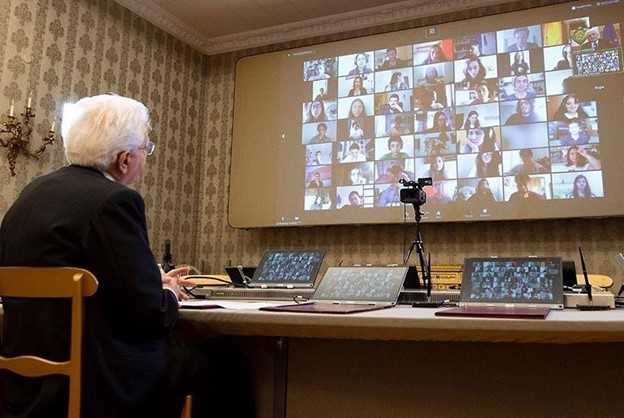
Figure 4: Imagine the meeting fatigue of the attendees of this meeting with the president of the Italian Republic.
Note: To reduce meeting fatigue, some Microsoft engineers have developed new ways of showing meeting participants “all together” using AI techniques, such as segmentation of images and others, to separate participants from their surroundings and place them together in the same virtual environment.
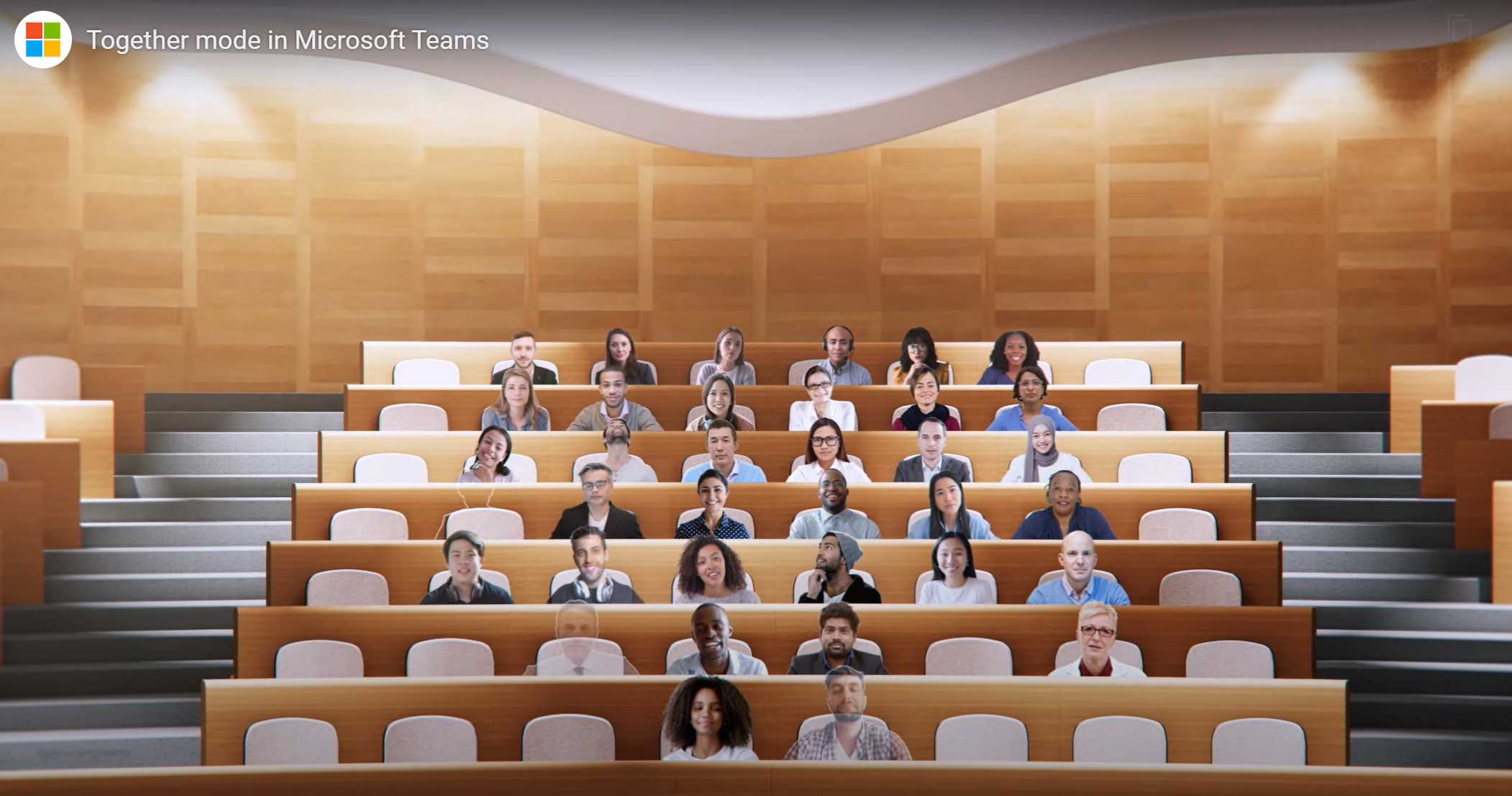
Figure 5: Together mode in Microsoft Teams.
Public speaking while wearing a mask
It could also happen that you need to wear a mask while delivering a session, because social distance cannot be kept.
Be aware of reduced body language while wearing a mask. People cannot see you smile or make other facial expressions, and this can reduce the effectiveness of some parts of your presentation.

Figure 6: Masks that are suitable for lip reading, from Justine DB post.
Tip: You can also try a mask that’s suitable for lip reading, like https://www.boredpanda.com/deaf-mother-makes-face-masks-with-mouth-window-for-lip-reading/. There are also commercial products available, like this one.
Always try to find other ways to express the same feelings, perhaps adding emojis or other images to your presentations (if the context allows that). Or use some props, like printed emojis that you can show to the public.
Hybrid environments
Hybrid environments will probably be common for the next few years, now that some companies have discovered that they can reduce costs by reducing travel without too much impact on the employees. And most people are still uncomfortable with traveling. Most conferences are adopting a hybrid model, where small numbers of attendees are in-person, and many others are connected online. This was already present before the pandemic, but the trend has drastically increased.
In hybrid environments, you have to understand your space on stage. But you also have to deal with the camera, so you should limit your movements, especially if it’s a fixed camera without a camera operator.
Even when there’s a camera operator, know your space, and know how the presentation will be displayed on the screen.
I did a great session (in Italian) at Codemotion Rome 2016, with practically no slides, but I didn’t think about the recording. I moved too much, and when I looked at how the session was published on YouTube, I was disappointed. Of course, it was my fault, because I didn’t talk with the operator. More than 60% of the screen was dedicated to my slides (that were just a placeholder) and 40% was dedicated to me, but I was moving too much, and the effect was terrible. Always know where to stay and limit your movements if the session is recorded or streamed online.
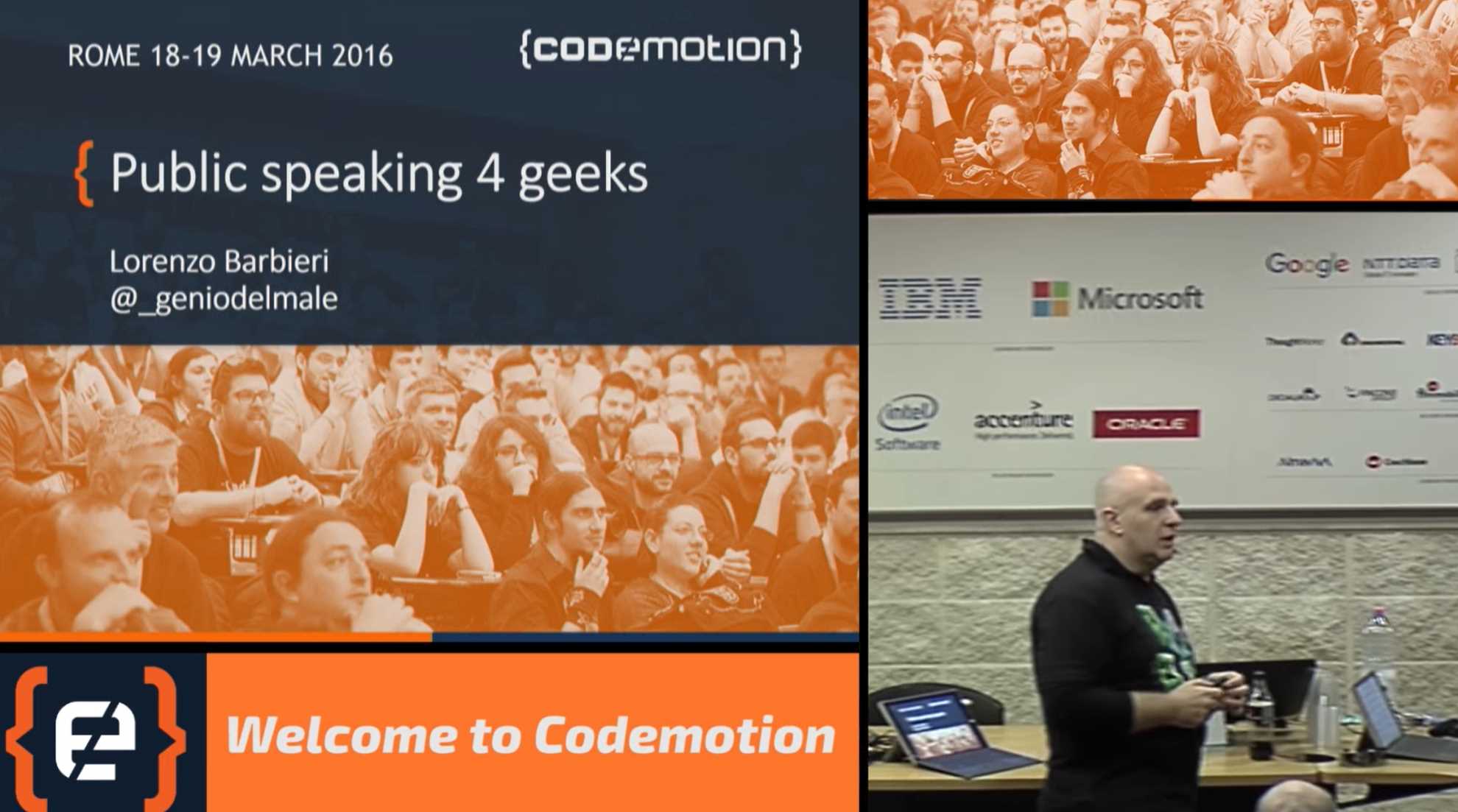
Figure 7: Great session in-person, unpleasant experience online.
Eye contact is essential in person, but don’t forget to look directly in the camera from time to time to have virtual eye contact with remote people. They will enjoy it.


- 1800+ high-performance UI components.
- Includes popular controls such as Grid, Chart, Scheduler, and more.
- 24x5 unlimited support by developers.