
Beyond Public Speaking for Geeks Succinctly®

CHAPTER 1
Introduction
Did you already read Public Speaking for Geeks Succinctly? Then you can skip this introduction, apart from the last section that holds an interesting tip for PowerPoint users. If you didn’t read it, this introduction will familiarize you with the main concepts of public speaking.
Start with value
We started Public Speaking for Geeks Succinctly with the essential concept of the book, a mantra that should be repeated by every speaker:
Public speaking is not about me, the speaker! Public speaking is about the value that I want to send to the public.
People are investing their time to listen to your presentation, course, podcast, webinar, etc. Don’t waste it!
What’s the value of your presentation? Are you just giving information, or are you delivering value?
Always think in terms of value when proposing a session and deliver that value. Don’t waste important time at the beginning of a session introducing yourself. Find a way to start directly with value, and then introduce yourself, if needed. You can always add your contact information at the end of the presentation, where people need that info, if they liked your content and your style.
There are many ways to start with value, and the most used are:
- Tell a story that shows value.
- Ask a question that uncovers value.
- Tell the audience why you’re there, not just your title.
- Go around the table (if you’re in a small room), but always keep control.
- Arouse curiosity:
- Bill Gates released mosquitoes in his world-famous TED Talk about malaria.
The beginning of your session is the most important moment, followed by the session’s end. Make it memorable!
The power of stories
Stories (real or invented, your brain doesn’t care if the invented stories are plausible) are one of the most useful tools that you can use to improve your presentations.
You can use stories even in a technical presentation to explain why you’re using a specific technique, why you’re optimizing the performance of some code, why it’s important to focus on usability, etc. Most geeks tend to directly present the technology, but without a relevant story, their audience will miss the reason why that technology is relevant for them.
Stories vs. facts
Facts don’t stick in our brain if we don’t already have a place for them. You can throw a lot of facts at your audience, but if people won’t remember them after some time, the effectiveness of your presentation was very minimal.
Emotions are a powerful way to recall facts stored in your memory. Stories are often used to create or associate emotions to the facts that will follow.
As a geek, you’re normally tempted to use facts as your only weapon to impress your audience: slides, demos, all created to show how good your work is, how well you know a specific technology, and so on. That doesn’t stick.
Where do you find stories?
Stories are everywhere, all around us. Just pay attention to people, to strangers in the metro while you go to work, at a park, anywhere. A story can be genuine, or you can change it in some way to support your point. Just be sure to tell the truth if asked by some attendees.
Do you need help? The Storyteller’s Spellbook by James Whittaker is a terrific book that helps you craft your stories.
If you need a story and can’t find one, The Hero’s Journey is a good template to create a new story. Many movies and books follow that path: Star Wars, Harry Potter, Indiana Jones, and hundreds of others.
Stage fright, introverts vs. extroverts, and saber-toothed tigers
You can’t avoid stage fright, but you can handle it. Different people have different responses to it, but nobody feels safe on stage in front of a lot of people. Even experienced speakers and performers suffer stage fright.
That’s natural because our brain was trained over the course of ten thousand years to pay attention to risks, and to choose between fight or flight. Did you ever hear stories of saber-toothed tigers that were the natural enemies of our ancestors, the cave people? To keep our feline-inspired metaphor, we need to think about our public like kittens that need to be fed with stories and knowledge, not saber-toothed tigers ready to eat us.
Introverts and extroverts can both be excellent public speakers. The only difference between them is that introverts need time by themselves to charge their batteries before the session and recharge them after it. Extroverts can charge their batteries being with the public, and after a session, they have a high level of energy.
“Public speaking for quiet people” is a great talk to watch to understand better how to be a great speaker while being an introvert. Conferences for Introverts is a great book for introvert readers, with a lot of practical advice.
Be a better version of you!
How many times have people told you: “Just be yourself and everything will be fine!”
It’s one of the most-used phrases, something that everybody tends to say to someone before letting them enter the lions’ den. And it’s wrong!
“Don’t try to be somebody else” could be better advice, but our brains prefer to receive a positive order instead of a negative one.
“Be a better version of you” should be the advice to give to someone before a presentation! It’s excellent advice because it pushes you out of your comfort zone. It says that you can always improve, even after many years as a public speaker.
To be a better version of you, you need rituals, like following a checklist of all the things you need to do before a session. You need to know the environment, so arrive early and look at the stage. Set up your environment and do the video and sound check before the session, or know your tools in detail if doing a remote live session.
Power posing is one of the best ways to get in your best state. Studies have shown that adopting a power pose can put you in a better state. One of the best power poses is the so-called Wonder Woman power pose, with your hands on your hips, feet wide apart, and shoulders back.
For more detail, you can watch Amy Cuddy’s TED Talk about power posing, and then you can read a recent Q&A with her with updates on the subject.
Even the best presentation can be ruined by lack of eye contact, because you’ll lose most people’s attention in a few minutes. Work on it, and when doing virtual sessions, look at the camera.
Never learn a presentation by heart! Learning a presentation by heart makes it prone to errors, pauses, and filler words that give your audience the wrong impression. Only learn by heart the beginning and the end of your presentation, if needed, so you can rock those (short) parts.
Never finish a presentation by immediately starting the Q&A. You should close the session by delivering your final messages, take the applause (if any), and only then should you start the Q&A. People have to know that the session is finished and that the Q&A is something extra.
What about the slides?
Chapters 3, 4, and Appendix B in the previous book were related to preparing your slides with PowerPoint and Keynote.
In this book, you won’t find many tricks for the tools, apart from this one.
Use Ctrl+Shift+C and Ctrl+Shift+V to copy and paste text styles from one PowerPoint (or another Microsoft Office) document to another.
Of course, you can use Format Painter to copy the style of a text segment or other items inside PowerPoint, but that is an interactive tool that can be too limited sometimes, especially when working among multiple slides or multiple documents.
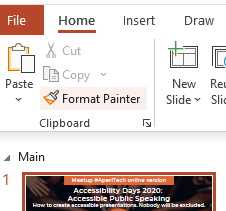
Figure 1: Format Painter in PowerPoint (and other Microsoft Office tools, too).
A faster alternative is to select the item that has the style you want to copy and use Ctrl+Shift+C and Ctrl+Shift+V to paste it where needed. It works perfectly cross-slides and cross-documents.


- 1800+ high-performance UI components.
- Includes popular controls such as Grid, Chart, Scheduler, and more.
- 24x5 unlimited support by developers.