
Asynchronous Programming Succinctly®

CHAPTER 4
Use SemaphoreSlim to Access Shared Data
Sometimes you need to access shared data safely because other areas in your application (or other applications) might read that data asynchronously.
We need to ensure that no other area of code is reading or writing to the specific section of code we are working on. Here we use the SemaphoreSlim object that has been extended in the .NET Framework 4.5 in order to include asynchronous methods.
The following example illustrates how existing code that does not implement SemaphoreSlim reads a shared data source and returns incorrect results. We will then add SemaphoreSlim to the code to ensure that no other code accesses the data source while we are busy with it.
Let’s create a new Windows Form containing a multiline textbox to display output.

Figure 31: SemaphoreSlim Example Form Designer
Add a global variable to the code-behind that initializes the records to process.
Code Listing 71
This form’s constructor will need to be modified in order to accept two arguments. The first argument is formNumber, which displays the sequence of this form’s creation. The second argument is an integer of the records to read. We are going to open two instances of this Windows Form. Next, each instance will call the same shared data source that is nothing more than a static class.
Code Listing 72
public SemaphoreSlimExample(int formNumber, int readRecords) { InitializeComponent(); recordsToProcess = readRecords; this.Text += $" {formNumber}"; } |
In the form load, add the code to write the output to the textbox on the form and to call the static class called SharedClass. We pass the record count we want to read to the static method AccessSharedResource().
Code Listing 73
Now, we need to create the shared resource that is the static class. Ensure that the System.Data and System.Threading.Tasks namespaces have been imported.
Code Listing 74
At the very top of the class, add an auto-implemented property called RecordsProcessed. Set the default value to 0.
Code Listing 75
We now need to create the public static async Task AccessSharedResource() method. This reads a data table and sets the RecordsProcessed property to the records returned.
Code Listing 76
public static async Task AccessSharedResource(int readRecords) { DataTable dtResults = await ReadData(readRecords); RecordsProcessed += dtResults.Rows.Count; } |
The last method is simply setup code that creates a data table with the number of rows returned and a delay. You can simply return an integer value here if you don’t want to go through all the effort of creating the data table. My purpose here is illustrate that some data work is being performed and awaited on.
Code Listing 77
private static async Task<DataTable> ReadData(int readRecords) { DataTable dtResults = new DataTable(); dtResults.Columns.Add("ID"); try { for (int row = 0; row <= readRecords - 1; row++) { DataRow dr = dtResults.NewRow(); dtResults.Rows.Add(dr); } } catch (Exception ex) { throw; } await Task.Delay(3000); return dtResults; } |
Lastly, we need to add two calls to the SemaphoreSlimExample form. We pass it the number from which the form was created and the number of records to be read from the database.
Code Listing 78
private void btnSemiphoreSlim_LinkClicked(object sender, LinkLabelLinkClickedEventArgs e) { SemaphoreSlimExample sslm = new SemaphoreSlimExample(1, 100); sslm.Show(); SemaphoreSlimExample sslm2 = new SemaphoreSlimExample(2, 25); sslm2.Show(); } |
Build your application and run it. Two instances of the same form are displayed and the form load methods are called. You will notice that both forms begin writing text to the output immediately. The first form reports that there are 0 records read. We can assume that it next updates a flag in the database with that value. Then the form reads the next 100 records and writes the records read to the output.
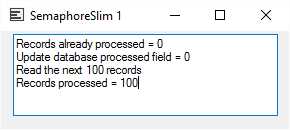
Figure 32: Form 1 Accessing Shared Resource
The second instance of the form does the same thing, but this time it reports that there are still 0 records already processed. This is incorrect, and this incorrect value is written back to the database. The form then reads the next 25 records. By the time the process completes, the first form has updated the static class’s RecordsProcessed property.
This means that the correct total value of records processed is written to the database. However, for the second instance of the form, the values returned are totally out of sync. Imagine looking at this data in a database table and trying to figure out where the error is (because 0 + 25 is not 125).
While we can identify the issue, keep in mind that we are dealing with only two forms here. Imagine several forms accessing the same shared resource.
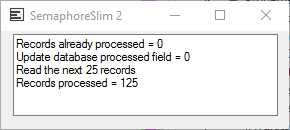
Figure 33: Form 2 Accessing Shared Resource
In fact, it might look something like Figure 34.
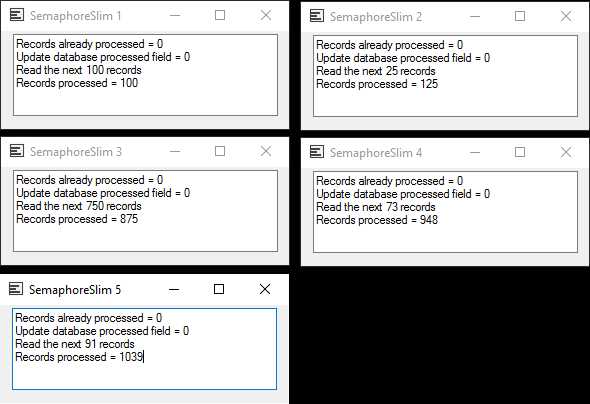
Figure 34: Several Forms Accessing the Same Data Source
This can get quite confusing because none of the data (other than on the first instance of the form) makes any sense. So let us implement the SemaphoreSlim object.
Note: SemaphoreSlim is a “lighter” version of the Semaphore class and is intended for use in a single app because it can be used only as a local Semaphore.
Start by adding the System.Threading namespace to your Windows Form.
Code Listing 79
Now, add the SemaphoreSlim object to the form with global scope within the form as a private readonly object.
Code Listing 80
public partial class SemaphoreSlimExample : Form { private static readonly SemaphoreSlim sem = new SemaphoreSlim(1); int recordsToProcess = 0; |
Next, modify the form load event and add a try catch to the code. This is very important because the next line of code we add is await sem.WaitAsync(), which locks the code that follows.
If an exception occurs somewhere during the processing, the sem.Release() line will never be reached and the code will not be released. We therefore add the sem.Release() method to the finally of the try catch block in order to ensure that the lock is released.
Code Listing 81
private async void SemaphoreSlimExample_Load(object sender, EventArgs e) { await sem.WaitAsync(); try { txtOutput.AppendText($"Records processed = {SharedClass.RecordsProcessed}"); txtOutput.AppendText($"\r\nRead the next {recordsToProcess} records"); await SharedClass.AccessSharedResource(recordsToProcess); txtOutput.AppendText($"\r\nRecords processed = {SharedClass.RecordsProcessed}"); } catch (Exception ex) { throw; } finally { sem.Release(); } } |
Build your application and run it a second time. As usual, the first instance of the form performs as expected.
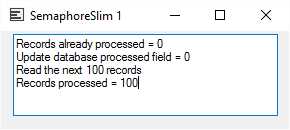
Figure 35: Form Implements SemaphoreSlim
The second instance of the form now waits for the first form to finish, then it carries on after the lock is released. As you can see, the output is correct and the values are correctly output to the database.
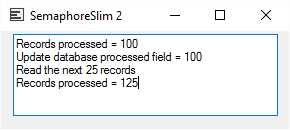
Figure 36: Form 2 Accessing Shared Resource


- 1800+ high-performance UI components.
- Includes popular controls such as Grid, Chart, Scheduler, and more.
- 24x5 unlimited support by developers.