
ASP.NET WebHooks Succinctly®

CHAPTER 1
Introduction
Today we live in a world where we try to have automation make it simpler for us to live and do the hard part for us in less time with greater efficiency. We cook using machines, which reminds me of the robot chefs becoming the old news already
Now, imagine a scenario where we are working on an Enterprise application with millions of activities and events being registered as a result of dynamic actions. And many of these activities resulting in a cascading set of database actions with events already scheduled upon the new data being generated. As an architect or the lead of the team working on this – I am already being bombarded with thoughts whether to take care of the event first or the data which is yet to be generated. Let’s simplify.
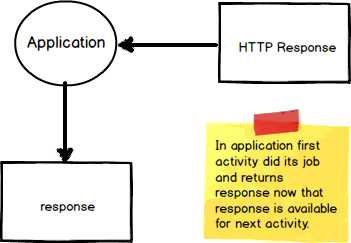
Figure 1: Pictorial view
Figure 1 depicts the story for us to simplify. In our application, the first activity completed its job and returns response, which is available for next activity. This response becomes an input for the next activity. Let us call this Callback for the first step towards simplification of this scenario.
Callback function
In the preceding section, we discussed Callback in a layman language. Let’s now understand what a callback function is, in our bid to further simplify this as our next step.
Simply defined, a callback function is:
- A function with a prospect of generating a “callback” that can be passed to another function, which can further wait on this function to finish processing before beginning its own execution
- Called by being passed as an argument to another function (that is, a function would be an argument of another function)
- Invoked with an event (for example, an HTTP post)
The following is a graphical representation of the last bullet:
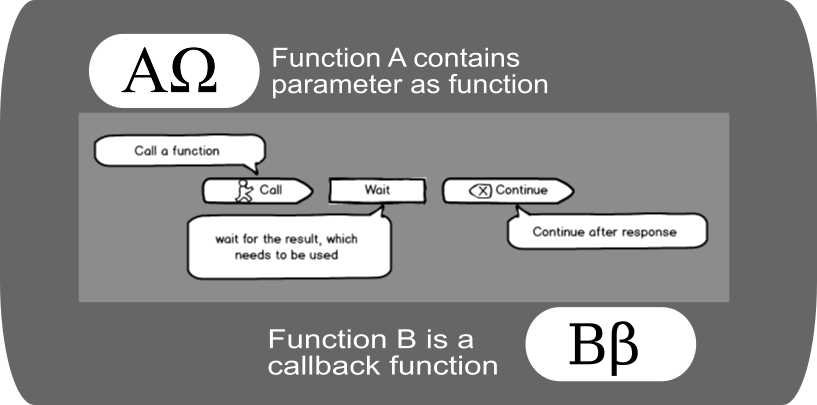
Figure 2: Pictorial view of callback flow
Here we are depicting function A being called with a parameter, which happens to be function B. Before starting its own execution, function A decides to check out the result expected from function B by making a call to it. Voila—B is our callback function.
Code Listing 1 Simple callback function
<!DOCTYPE html> <html> <head> <script src="https://ajax.googleapis.com/ajax/libs/jquery/1.12.4/jquery.min.js"></script> <script> $(document).ready(function(){ $("button").click(function(){ $("div").hide("drop", function(){ alert("Hi! I called, callback."); }); }); }); </script> </head> <body> <button>Callback</button> <div>Contents in this area will be hide using callback function.</div> </body> </html> |
In Code Listing 1, we used jQuery’s hide method, which simply hides the div. So, here first, the click function of the button waits until div gets hidden, and then shows alert.
Note: A complete discussion of the callback function is beyond the scope of this book.
Publisher/subscriber model (aka pub/sub model)
In the last section we introduced you to the callback function. Let’s look at another aspect of our original challenge associated with events and their subscription.
“How an application can send the notifications/messages to applications who are interested in receiving without knowing the identities of receivers”
You guessed it right—this is the pub/sub model. Many of you would already be aware of this. Without going into the complexities and vast possibilities of this model, let us dive in and see how this is done in WebHooks. The publisher/subscriber (or pub/sub) model is one of the solutions applied commonly to this challenge.
As an example, consider a scenario where a few applications need to receive a message from an application that is not in their scope (that is, it is not subscribed to for any events). In this scenario, we need at least one mediator to facilitate communication between both of the applications.
It’s easy to think of more complex scenarios where an application requires messages from more than one applications (or vice-versa).
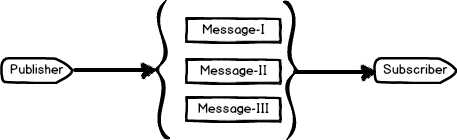
Figure 3: Pictorial view of pub/sub
In Figure 3, there is one publisher (application) and one subscriber (or receiver), which is receiving three types of messages. The Microsoft Biztalk Server, which uses the publisher/subscriber pattern internally, is one example of this model.
WebHooks
Simply put, WebHooks are user-defined HTTP Callbacks, which are configured with an event and will invoke an event trigger (callback). The magic about it is that the source of the event could lie in the same application or be external. Callbacks can be configured and managed by users of the applications and developers.
Tip: WebHook presence means intention to perform an action. In other words, WebHooks are primarily the wiring of the right events containing the actual code that is intended to be executed.
How it works
Consider working with REST API, where the API is called when the triggering event occurs (say, HTTP POST). In simple words, end users are subscribing to a specific trigger, which will be notified via an HTTP POST by the developers. WebHooks gives you a great deal of power with minimal setup because notification over HTTP opens up a vast and thriving ecosystem of Web applications.
As per Wikipedia: “A webhook in web development is a method of augmenting or altering the behavior of a web page, or web application, with custom callbacks. These callbacks may be maintained, modified, and managed by third-party users and developers who may not necessarily be affiliated with the originating website or application.”
Note: The term “WebHook” was introduced by Jeff Lindsay in 2007.
Real-life scenarios from a developer’s perspective could be like pushing code in repository, continuous build, and posting a data over HTTP POST. A WebHook could indicate that a file has changed in Dropbox, a code change has been committed in GitHub, a payment has been initiated in PayPal, or a card has been created in Trello, for example.
ASP.NET WebHooks
ASP.NET WebHooks are the implementation of WebHooks in ASP.NET. Currently, ASP.NET WebHooks are in preview (not available for ASP.NET Core). Implementation in ASP.NET supports both sender and receiver. Under the hood, it uses ASP.NET Web API to send and receive notifications.
How it works
The complete cycle of publishing and subscribing in ASP.NET WebHook goes like this:
- Sender exposes events for client to subscribe
- Receiver subscribes by registering a WebHook
Yes, it’s that simple. If this doesn’t make sense yet, just try to stay along for a few more chapters, and it will be worth it.
Conclusion
In this chapter we have explored WebHooks and the publisher/subscriber model.


- 1800+ high-performance UI components.
- Includes popular controls such as Grid, Chart, Scheduler, and more.
- 24x5 unlimited support by developers.