
ASP.NET Web API Succinctly®

CHAPTER 5
The Controller
Controller basics
The Controller is the main element in the resource management since it represents the operations on the resource exposed to the client. All the Web API controllers must implement the IHttpController interface, and in general they inherit from ApiController. ApiController is an abstract class that exposes some basic functionality to all the controllers, and implements IHttpController.
The ApiController interface is reported here:
public class ApiController { HttpRequestMessage Request { /* */ } HttpConfiguration Configuration { /* */ } HttpControllerContext ControllerContext { /* */} ModelStateDictionary ModelState { /* */} UrlHelper Url { /* */} IPrincipal User { /* */ } Task<HttpResponseMessage> ExecuteAsync(HttpControllerContext controllerContext, CancellationToken cancellationToken){ /* */ } void Dispose() {/* */ } } |
As mentioned previously, the entry point for the controller is the ExecuteAsync method that is in charge of selecting the action and executing it. The action selection is based on the HTTP method, so if there is a GET request, the controller will search for a public instance method that starts with Get, or for those with the HttpGet attribute.
When executing the selected action, the controller executes the filters pipeline; if there is any filter it will be executed before the action itself.
Considering a blog post resource, the controller that will manage it will be something like this:
It exposes the five typical methods used to do the CRUD operations. Each method has its own signature, and other than reading and persisting data using the repository, it enriches the response with headers and other things where necessary.
In the previous example, we omitted the error-checking to keep the code focused on the REST API. We will see how to manage the errors later in this chapter.
Let’s go deeper in every method to understand what happens.
Actions
Get()
Actually, there are two overloads of Get: one that returns the entire collection of posts, and one that returns a single post. The first one will simply build an IQueryable collection of posts (we will return to the meaning of IQueryable later).
public IQueryable<Post> Get() { return _repository.GetAll(); } |
This method is quite easy; it simply asks the repository to return a collection of available Posts without filters or other selection clauses, and then returns the collection (IQueryable<Post>) to the caller.
As we said before, the result of the controller should be an HttpResponseMessage. What happens when the action returns a model object like Post?
The method in the base ApiController that calls the Get method wraps the result in an HttpResponseMessage, putting the Post object inside the content. So we have two ways of returning results to the client:
- Build the HttpResponseMessage directly.
- Return an object and let the ASP.NET Web API create the HttpResponseMessage response for us.
Typically, if there is no need to manipulate the response (headers, statuses, etc.), the easiest way to return results is to return the objects directly, as we did in the previous code example.
To call this method, we have to issue a GET request to the URI /api/Posts without any other parameters.
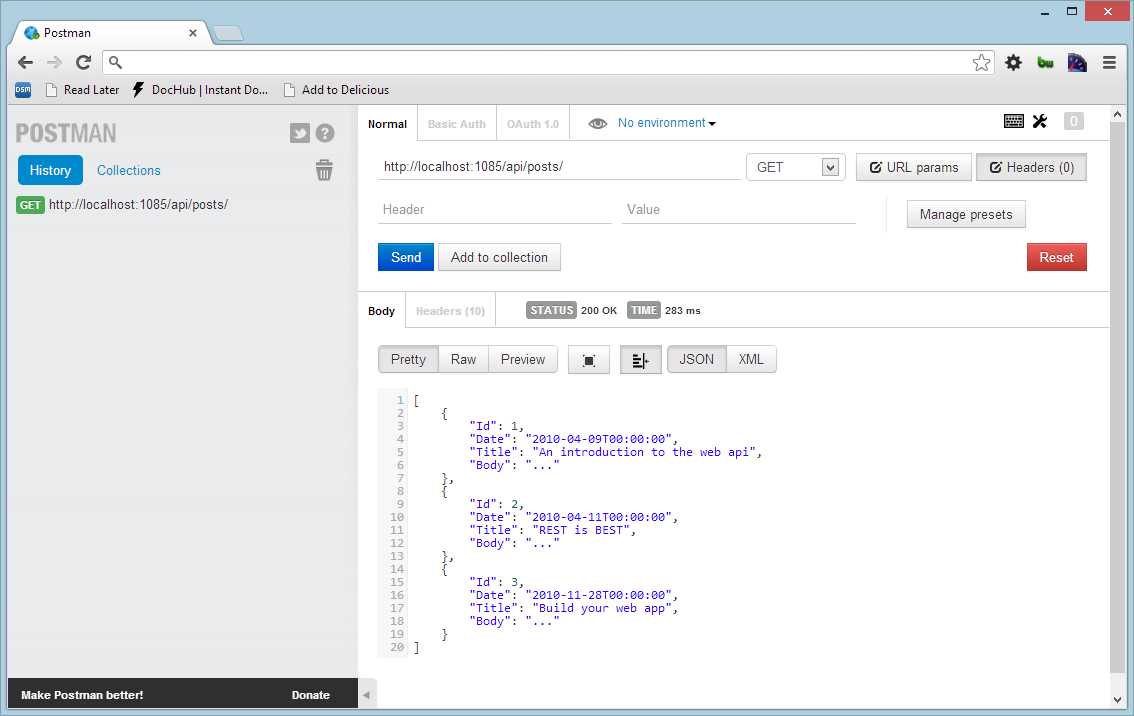
A simple get
Postman |
With the help of Postman we can inspect the response. The status is 200 OK. If everything is okay, the ASP.NET Web API pipeline adds the HTTP status for us, and in this case 200 OK is what we expect. In the body we can see the list of the Post objects returned by the controller. As we can see, the format is JSON; this is the default format if no header is specified in the request.
Get(int id)
This is the second type of GET where we specify the Id of the resource that we want.
public Post Get(int id) { return _repository.Get(id); } |
The code is quite similar to the previous case, and the only difference is that here the action returns a single Post rather than a collection. Here again is the ApiController that wraps the returned post into an HttpResponseMessage and sets the headers and status codes (in this case, 200 OK as in the previous case).
Post (Post post)
Here is where things get interesting. The Post() method has the aim to create a new Post in the storage and to return the correct status code to the caller.
public HttpResponseMessage Post(Post post) { _repository.Create(post); HttpResponseMessage response = Request.CreateResponse(HttpStatusCode.Created); response.StatusCode = HttpStatusCode.Created; string uri = Url.Link("DefaultApi", new { id = post.Id }); response.Headers.Location = new URI(uri);
return response; } |
To store the Post, we use the Create() method of the PostRepository, which will save the post to the defined storage. In this case, the response message has to be created manually in order to be able to set some attributes and to build the correct response from a REST point of view.
To create the response message we use the method CreateResponse(), passing the status code for this kind of request (201 Created).
Then we add the location header that will contain the URI of the newly created resource. To do this, we simply need to set the value of the response.Headers.Location attribute with the URI of the new Post. To build the URI, instead of writing it manually, we use the URL helper and we pass the route name (DefaultApi) and the Post.Id to the Link method. This method will return something like /api/Posts/42, where 42 is the id of the newly created Post.
With Postman, we create a new HTTP POST request specifying the information about the Post object in the request body.
The response body will be empty since we don’t return any value, only the status (201 Created) and the new location of the object. The interesting part is the headers.
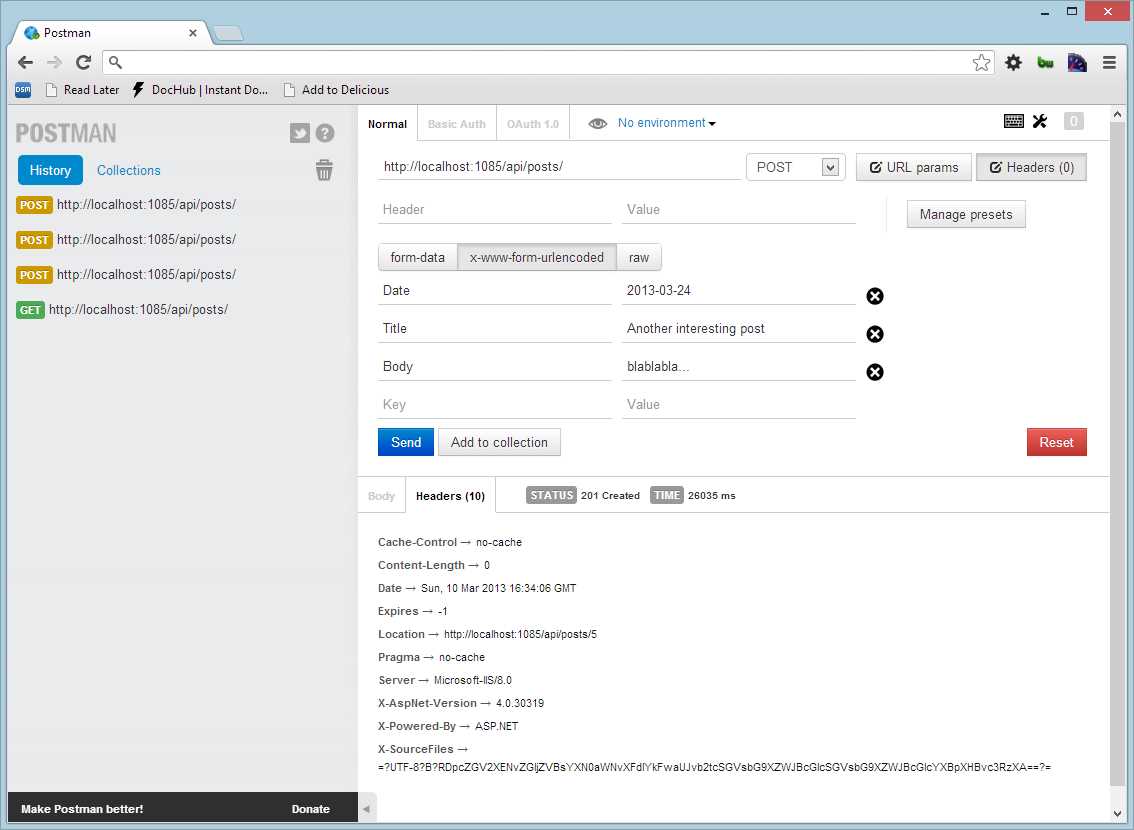
A POST
In Figure 6, we can see that the header location points to the newly created Post with an id equal to 5. By specifying the new location, the client application will be automatically informed about the location of the new object rather than guessing and manually constructing the URI; that is exactly what we need to build a real Hypermedia API.
If we want to see how the newly created Post looks, we just need to issue a GET request to the location URI /api/posts/5:
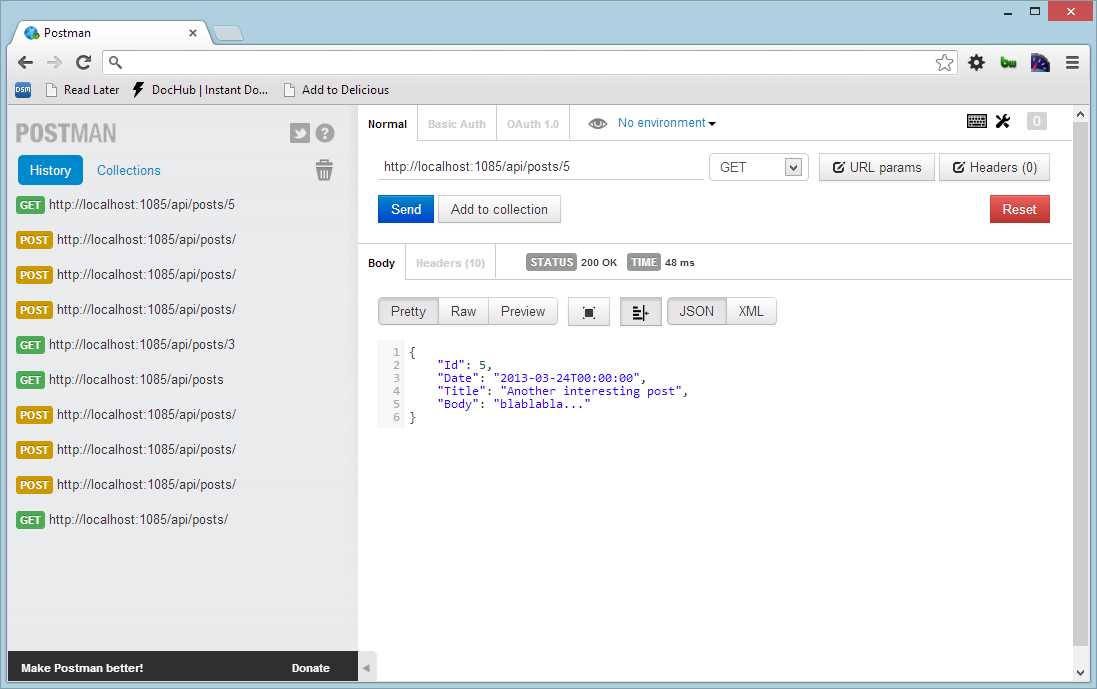
A GET request to the newly created resource
Put (int id, Post post)
The Put() action is used to change the resource. This method takes two parameters: one that comes from the URI (the id) and the second that is specified in the request body (the Post object itself). As the Put() method acts against a resource, we need to have the Id in the URI (as when we used the GET method /api/posts/5). The Id will represent the resource to be modified, and the request body will contain the new content of the Post to be stored.
public HttpResponseMessage Put(int id, Post post) { post.Id = id; _repository.Update(post); var response = Request.CreateResponse(HttpStatusCode.OK, post); string uri = Url.Link("DefaultApi", new { id = post.Id }); response.Headers.Location = new URI(uri); return response; } |
The implementation of the Put() method is similar to the Post() method. The difference is in the response status code: it is 200 OK, and the response contains the updated post (the call to CreateResponse takes the status and the content).
Putting the updated Post object inside the response is a matter of preference. Sometimes PUT has an empty body and contains only the location header to the updated resource. In this case, we decided to include the updated Post even if not strictly necessary.
To include the post inside the response we use an overload of the CreateResponse() method, passing the instance of a Post in addition to the status code.
When we try to call the resource with a PUT, by HTTP standards we need to pass the full content of a resource that needs to be modified. If we were to do partial updates the preferred way is to use either PATCH (more information about PATCH can be found at http://www.rfc-editor.org/rfc/rfc5789.txt) or POST verbs.
Therefore, if we pass in the body the new title, the response will contain the full post with the new title, and the location header we specified in the action will be in the headers.
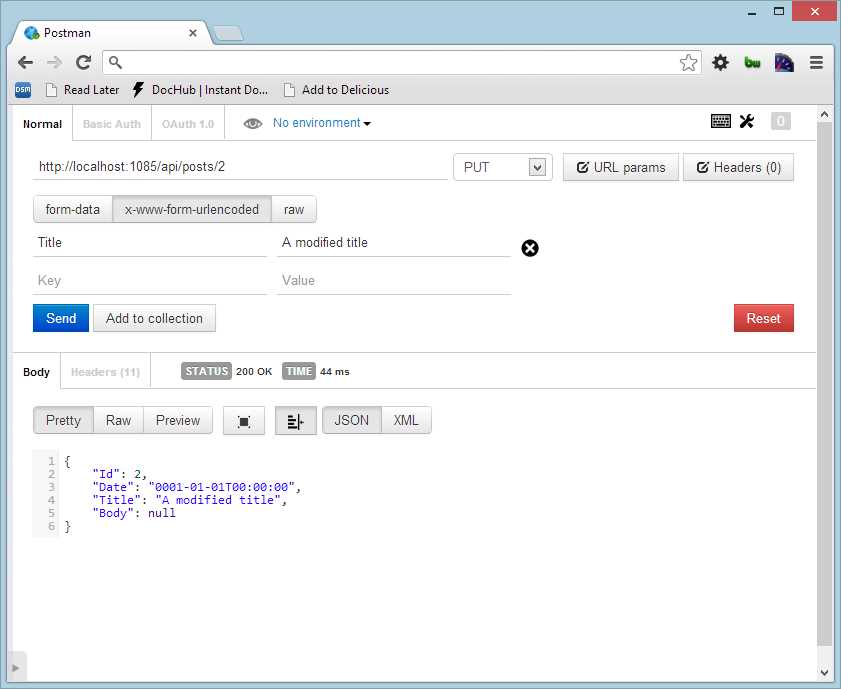
A PUT
Delete(int id)
The last action is the DELETE method.
public HttpResponseMessage Delete(int id) { _repository.Delete(id); HttpResponseMessage response = Request.CreateResponse(HttpStatusCode.NoContent); return response; } |
We simply delete the given post using the repository and return an empty response to the client. No specific header has to be specified. We have used the 203 No Content HTTP status to specify that the response has no body.
Custom Actions
Until now we saw the classic five actions that perform the CRUD operations, and each method begins with the HTTP method name. What if we need other methods?
We can use the action attributes to specify the HTTP method that matches the request.
Consider the following example: We would like to add an action to view the posts using a date, and we’d like to have a group of URIs like these:
URL and descriptions
/api/posts/archive/2010/04/11 | Returns all the posts of 11 April 2010 |
/api/posts/archive/2010/04 | Returns all the posts of April 2010 |
/api/posts/archive/2010 | Returns all the posts of 2010 |
We first need to define a new route for the archive action:
|
name: "Archive", routeTemplate: "api/posts/archive/{year}/{month}/{day}", defaults: new { controller = "Posts", month = RouteParameter.Optional, day = RouteParameter.Optional }, constraints: new { month = @"\d{0,2}", day = @"\d{0,2}"} ); |
This code defines a new route with three parameters: year, month, and day. It is assigned to the PostsController, and the month and day must be numbers.
With this route, we can define a new method in the PostsController class that responds to this route:
|
public IQueryable<Post> Archive(int year, int month = 0, int day = 0) { return _repository.Search(year, month, year); } |
This action simply takes the three parameters and issues a query using the repository. Note that month and day have a default value since they are not mandatory in the request.
This action is decorated with the HttpGetAttribute that is needed to route the request since the method name does not start with Get.
Note: Another solution would be to rename the method as GetArchive so that it matches the default convention.
Model Binding
In the previous example, we saw an action like this:
public HttpResponseMessage Post(Post post) { /* ...some code here... */ } |
How is the Post parameter built?
If we analyze the request, we will see something like this:
POST http://localhost:1085/api/posts HTTP/1.1 Host: localhost:1085 Connection: keep-alive Content-Length: 51 Cache-Control: no-cache User-Agent: Mozilla/5.0 (Windows NT 6.2; WOW64) AppleWebKit/537.22 (KHTML, like Gecko) Chrome/25.0.1364.152 Safari/537.22 Content-Type: application/x-www-form-urlencoded Accept: */* Accept-Encoding: gzip,deflate,sdch Accept-Language: en-US,en;q=0.8,it;q=0.6 Accept-Charset: ISO-8859-1,utf-8;q=0.7,*;q=0.3 Title=Hello+again&Date=2013-04-20&Body=hi+everybody! |
We could see at the end of the post request the collection of values (the body of the request):
Title=Hello+again&Date=2013-04-20&Body=hi+everybody! |
A parameter's so-called model binder converts this body to a Post object. The task of a model binder is to parse the request and extract from it the values that the action needs. By default, there are two model binders that operate in different ways: ModelBinderParameterBinding and FormatterParameterBinding.
These classes inherit from the abstract class HttpParameterBinding and implement their behavior in the method ExecuteBindingAsync. The ModelBinderParameterBinding is the preferred method since it extracts the values from the URI (route parameters or query string), while FormatterParameterBinding uses a MediaTypeFormatter (more on this in the next chapter) to parse the body and build complex objects.
Inside the class ModelBinderParameterBinding are the ValueProviders. These objects aggregate values from various elements of the incoming request (Header, QueryString, Body, and so on). The ModelBinder uses these ValueProviders to build the model.
To better understand how all this works, let us look at an example. Suppose that we need to extract an action parameter from a header. To do this, we need to implement an IValueProvider:
public class HeaderValueProvider : IValueProvider { public HttpRequestHeaders Headers { get; set; } public HeaderValueProvider(HttpRequestHeaders headers) { Headers = headers; } public bool ContainsPrefix(string prefix) { return Headers.Any(s => s.Key.StartsWith(prefix)); } public ValueProviderResult GetValue(string key) { KeyValuePair<string, IEnumerable<string>> header = Headers.FirstOrDefault(s => s.Key.StartsWith(key)); string headerValue = string.Join(",", header.Value); return new ValueProviderResult(headerValue, headerValue, CultureInfo.InvariantCulture); } } |
This class has two methods worth mentioning. The ContainsPrefix method is called to verify that the header contains the information that we need, where the prefix string is usually the name of the action parameter. The GetValue method is called to extract the information from the header and to return it in a form of ValueProviderResult.
To link this provider to our action, we need to use an attribute:
public HttpResponseMessage Post([ValueProvider(typeof(HeaderValueFactory))] String username) { //... } |
Since the ValueProviderAttribute needs a ValueProviderFactory, our last task is to implement a factory that builds our HeaderValueProvider:
This completes the necessary classes to build a binder that extracts the value from the header. As we can see it is not so easy and it requires a lot of tasks; fortunately, the default binders are usually smart enough in de-serializing the request and creating the correct parameters for your actions.
Remember that by default for the primitive types and DateTime, TimeSpan, Guid, Decimal, and String, the ASP.NET Web API uses model binding and extracts the values from the URI. If we need to, we can override the default behavior using the attribute FromBody to specify that the value came from the body:
public HttpResponseMessage Post([FromBody] String username) |
In other particular cases, we can use the ModelBinder attribute to specify that we need a specific implementation of ModelBinder:
public HttpResponseMessage Post([ModelBinder(typeof(UserModelBinder))] User username) |
With the ModelBinder attribute, we can specify the implementation of IModelBinder that builds the User parameter:
public interface IModelBinder { object BindModel(ControllerContext cc, ModelBindingContext mbc); } |
It’s the method BindModel that builds the instance of User that will be passed to the Post action.
Let us see the different ways in which the parameters are bound to our actions. By default, ASP.NET Web API tries to get simple values from the query string or the route parameters. So, for example, if the request URL is something like this:
/?tag=web&date=20130409
Both tag and date are taken from the URI so there is no need to specify custom binders or attributes.
If we force using the attribute to a parameter, the parameter is read from the body:
void Action([FromBody] string name);
Instead, if we do not specify other attributes and we have an action with one simple type and one complex type, the first is read from the URI while the complex type will be taken from the body:
void Action(int id, Post p)
id will be taken from the URI, and Post from the body, since it is a complex type.
If we have an action that takes two complex types, one must come from the body while the other must come from another source:
void Action([FromUri] Customer c1, Customer c2)
c1 is from the URI and c2 is from the body
In any case, we can define a custom model binder and use an attribute to specify that we want to use it:
void Action([ModelBinder(PostCustomBinder)] Post p)
The PostCustomModelBinder will be used to build a post instance.
Note: One important thing to remember is that the Web API reads the response body at most once, so only one parameter of an action can come from the request body. If you need to get multiple values from the request body, define a complex type. If your action needs multiple complex types, only one should come from the body.
This means that this action:
public HttpResponseMessage Post(Post post, User user) |
will raise an InvalidOperationException: Can't bind multiple parameters ('post' and 'user') to the request's content.
To make sure that this action works, we need to use an attribute to specify that Post (or User) comes from URI:
public HttpResponseMessage Post(Post post, [FromUri]User user) |
The FromUri attribute forces the parsing of the user from the URI instead of the body.
Summary
The controller is the heart of the ASP.NET Web API. It is where programmers spend most of their time, and it’s where the cooperation between the input and the models and services takes place.
In this chapter, we saw what a controller is and what kind of operations it exposes, from default actions to custom actions. Then we saw how the model binders operate to transform the request data into action parameters.


- 1800+ high-performance UI components.
- Includes popular controls such as Grid, Chart, Scheduler, and more.
- 24x5 unlimited support by developers.