
ASP.NET Web API Succinctly®

CHAPTER 9
Security
Even if our APIs are public, we almost surely need some mechanism to check who is using our application.
There are two aspects of security to consider: authentication and authorization.
Authentication is the process that identifies who is the user that is using our API. Generally, authentication is implemented by using a username and password, a personal token, or, in complex cases, an OpenID provider.
Since one of the REST service constraints is that it must be stateless, the server should never store the client context between requests (the server should not use Session variables or a similar mechanism). Therefore, the client is forced to provide the credentials on every request.
This also means that the credentials are passed to the server in an HTTP header, and to make the requests secure we need to use a secure transport like HTTPS. Using HTTPS is at the base of every REST API that needs to be secured.
Authorization is the function of specifying if the user has the permission (access rights) to perform a specific task on a resource. Once the user is authenticated, the framework has to know if the user can view the requested data or save the information that is being posted.
There are various ways to authenticate a user, from a simple username and password, to a more sophisticated token, to OpenID.
With the ASP.NET Web API we can choose which one we prefer, but we have to implement it since nothing is ready out-of-the-box.
Let us start with the basic authentication that we need in most cases.
Basic Authentication
The first and simpler way to secure our API is to implement basic authentication. Basic authentication is a standard defined in RFC 2617. With this schema, the client must provide credentials to the server, which verifies the match. The credentials, username, and password are sent to the server using the Authorization header, and they are prefixed with the keyword Basic and encoded in Base64.
Username and password should be in the format of username:password, using the colon as separator.
For example, a request using the basic authentication looks something like this:
GET http://localhost:1085/api/Values HTTP/1.1 Host: localhost:1085 Proxy-Connection: keep-alive User-Agent: Mozilla/5.0 (Windows NT 6.2; WOW64) AppleWebKit/537.31 (KHTML, like Gecko) Chrome/26.0.1410.43 Safari/537.31 Cache-Control: no-cache Authorization: Basic ZW1hOnB3ZA== Accept: */* Accept-Encoding: gzip,deflate,sdch Accept-Language: en-US,en;q=0.8,it;q=0.6 Accept-Charset: ISO-8859-1,utf-8;q=0.7,*;q=0.3 |
In bold we can see the Authorization header with the username and password that are encoded in Base64.
The server then receives the request and extracts the Authorization header to validate the credentials. It decodes the string and verifies whether the username and password are correct. If they are correct, it continues with the execution of the request. Otherwise, it returns an HTTP 401 Unauthorized response. In this example, the response contains the header WWW-Authenticate: Basic that instructs the client to provide the correct credentials using the Basic scheme. This header is the one that browsers use to show the username and password dialog box to the user.
That’s how the basic authentication works. Let us now see what this means to our ASP.NET Web API application.
To manage the authentication request, we need to implement a Message Handler that receives the request before it arrives to the controller and decides if the user has the rights to access the resource.
To implement a MessageHandler we have to implement the DelegatingHandler abstract class as we have already seen in previous chapters.
Let's see what happens. When a request arrives to the handler, it analyzes the header by searching for the Authentication value. If it is not present, it sends a 401 Unauthorized message to the client.
If the Authentication header is present, it decodes its value from Base64 and extracts the value of the username and password:
AuthenticationHeaderValue authHeader = request.Headers.Authorization; if (authHeader == null || authHeader.Scheme != "Basic") { return Unauthorized(request); } string encodedCredentials = authHeader.Parameter; byte[] credentialBytes = Convert.FromBase64String(encodedCredentials); string[] credentials = Encoding.ASCII.GetString(credentialBytes).split(':'); |
Now in credentials we have the two strings, username and password. We can now use a service (something that uses a database or other storage) to verify if the credentials are correct:
if (!_service.Authenticate(credentials[0], credentials[1])) { return Unauthorized(request); } |
The IAuthenticationService.Authenticate method is implemented as follows:
public interface IAuthenticationService { bool Authenticate(string user, string password); }
public class AuthenticationService: IAuthenticationService { public bool Authenticate(string user, string password) { //Do database calls and check if //the user and password matches. return true; } } |
If the service responds true, that means the user can access the resource, and if not, it sends an Unauthorized message to the client. The last part of the method is meant to build the Principal and Identity information that needs to be used in conjunction with the ASP.NET membership.
string[] roles = null; // TODO IIdentity identity = new GenericIdentity(credentials[0], "Basic"); IPrincipal user = new GenericPrincipal(identity, roles); HttpContext.Current.User = user; return base.SendAsync(request, cancellationToken); |
The part that generates the Unauthorized response is quite simple:
private Task<HttpResponseMessage> Unauthorized(HttpRequestMessage request) { var response = request.CreateResponse(HttpStatusCode.Unauthorized); response.Headers.Add("WWW-Authenticate", "Basic"); var task = new TaskCompletionSource<HttpResponseMessage>(); task.SetResult(response); return task.Task; } |
It simply builds the correct HttpResponseMessage with the status code 401 Unauthorized and adds the header WWW-Authenticate: basic to ask the client for the credentials.
Once implemented, this handler must be registered in the API configuration:
GlobalConfiguration.Configuration.MessageHandlers.Add(new BasicAuthenticationHandler(new AuthenticationService())); |
This can be done in the WebApiConfig class. It simply adds the handler to the collection of already configured handlers.
Now that everything is wired up we can try to call our API using Postman:
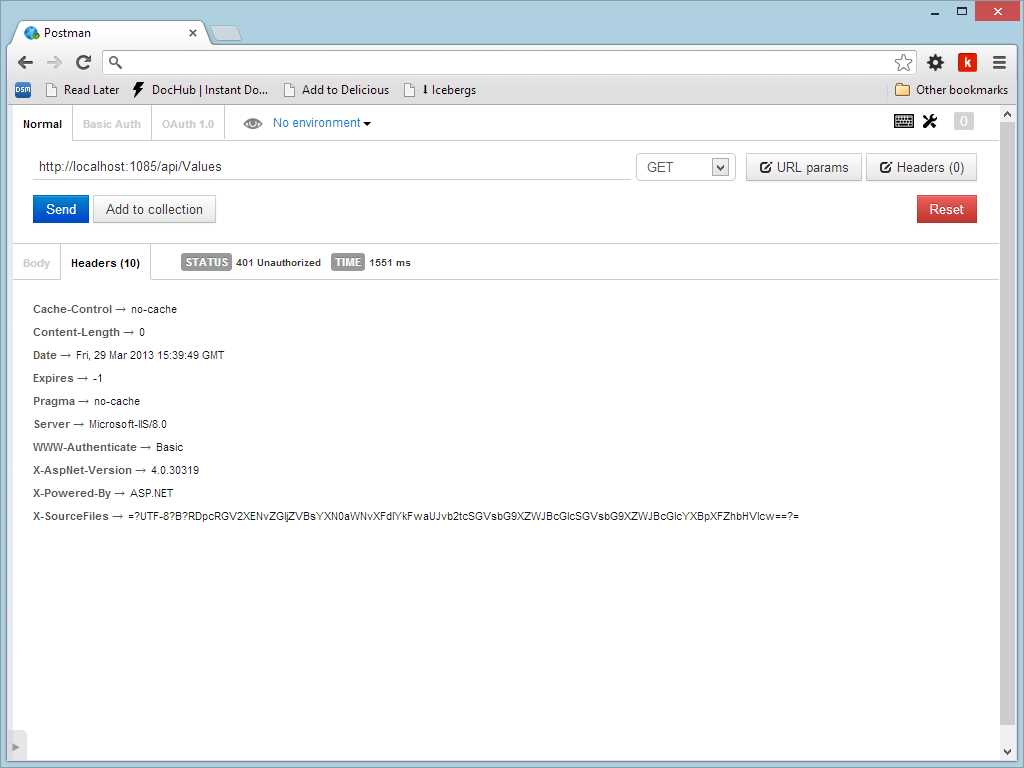
Calling a secure API without providing username and password
If we don’t provide the header, the server responds with a 401 Unauthorized status, but if we add the header with correct credentials, the server returns the requested resource.
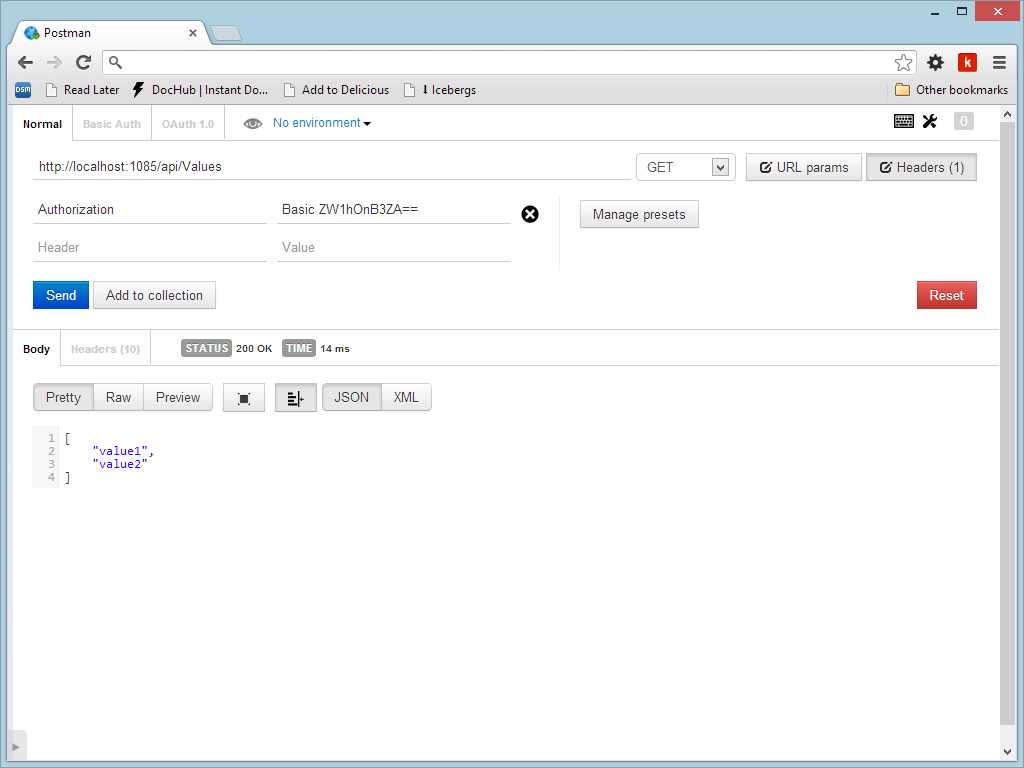
Issuing a request with basic authentication
Since basic authentication puts the credential in the header in clear text (even if it is encoded in Base64), we need to expose the API using a secure protocol like HTTPS.
Token Authentication
Token authentication is not a standard model even though it is widely used in the API implementation. Often the client is not a user but another application, in which case username and password are not relevant. In these cases, the API provider gives a token to the application that needs access. Depending on implementation, this token may or may not have a due date. Technically this process works the same way basic authentication does; it is based on the header Authorization and generally uses another schema (instead of Basic).
In reality, since there is not a standard, other custom headers could be used as well. The token in the header could be encrypted with a private/public key pair to obtain better security levels.
OpenID and OAuth
OpenID and OAuth are two different methods for managing application security.
OpenID is an open, decentralized, free framework for user-centric digital identity. It takes advantage of already existing internet technology and recognizes that people are already creating identities for themselves, whether through their blog, photo stream, profile page, etc. With OpenID we can easily transform one of these existing URIs into an account which can be used at sites that support OpenID logins. In this case, the OpenID provider authenticates the user and passes a credential token to the API that needs to know the identity of the user. To better understand how OpenID works, take a look at the foundation site at http://openid.net/, especially the “Getting Started” section.
OAuth is a little bit different in that it’s not meant to authenticate the user but to let the API act as if it is the user. With OAuth, the application can call other applications on the user’s behalf so that the calling applications are not obliged to store the user credentials.
The applications we can access using OAuth authentication can also revoke the permission.
More information on OAuth can be found on the site http://oauth.net/.
Note: ASP.NET Web API doesn’t have built-in support for OpenID and OAuth, so it’s up to us to implement them. Fortunately there are various NuGet packages that add support to our API. One of them is DotNetOpenAuth (http://www.dotnetopenauth.net/).
Summary
Security is a complex topic, and a single chapter is too short to be exhaustive. We just examined two basic techniques to secure our API, basic authentication and token authentication. Both are based on a custom message handler that requests to extract the header that contains security information.


- 1800+ high-performance UI components.
- Includes popular controls such as Grid, Chart, Scheduler, and more.
- 24x5 unlimited support by developers.