
ASP.NET MVC Succinctly®

CHAPTER 4
Don’t Trust Everything the World Says
Validations are defined once as attributes on the properties of our models. With a bit of JavaScript, these validations will run in the user’s browser. They will also run again back on the server as part of model binding. Running the validations in both locations may seem redundant, but in this day and age, validating the input supplied to a web app is not something that should be lightly undertaken. This approach is known as "defense in depth." For example, if a user skips our client-side validations and tries to directly post to the action, the server-side validations will still catch the bad input, preventing any harm from coming to our app.
Tip: Client-side validations are really just a convenience for users who are playing by the rules; they should not be viewed as the only part of your app security.
Note: Validations are important. Even more important is validating more than once. Even more important than validating more than once is not having to repeatedly define your validations. This sounds like a tall order, but the MVC framework covers us on all fronts.
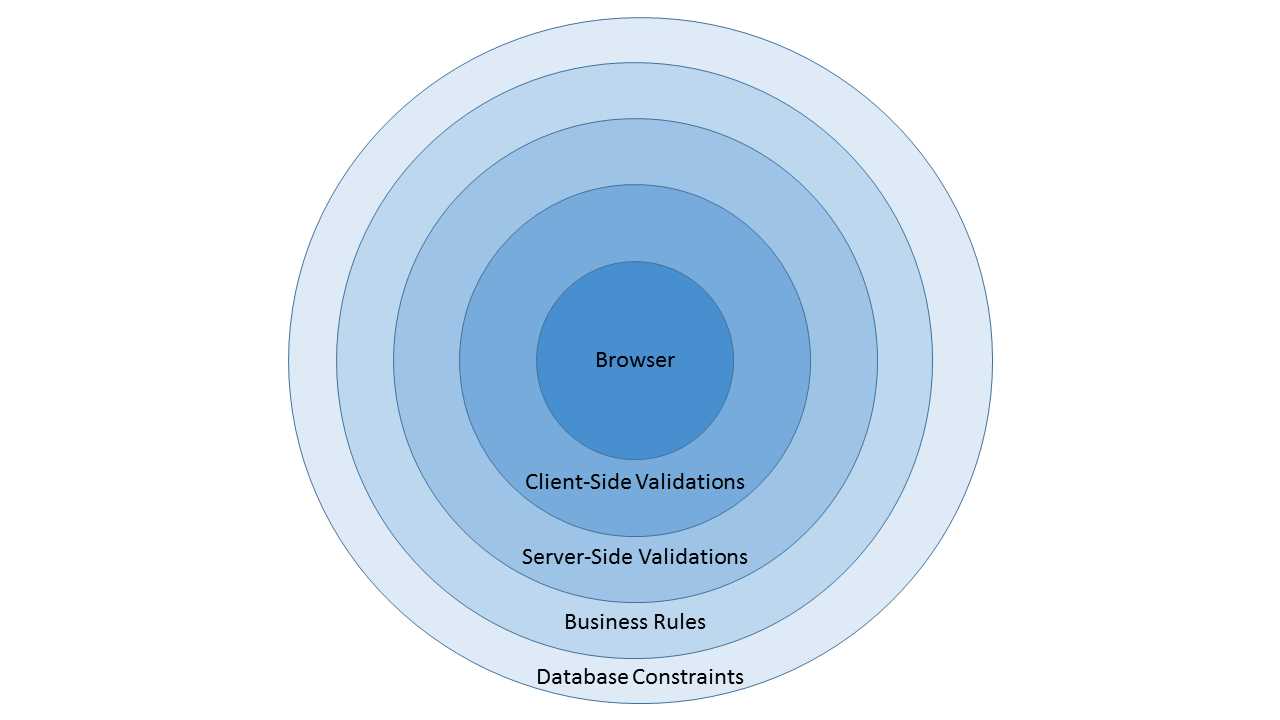
- Defense in depth
Essential Validators
So, what do these validation attributes look like? It turns out they look similar to the attributes we have already used to select the editor templates. Let’s go back to the ItineraryItem and add some appropriate validators.
public class ItineraryItem { [Required (ErrorMessage = "You must specify when the event will occur")] public DateTime? When { get; set; } [Required(ErrorMessage = "You must enter a description")] [MaxLength(140, ErrorMessage = "The description must be less than 140 characters.")] [DataType(DataType.MultilineText)] public string Description { get; set; } [Required (ErrorMessage = "You must specify how long the event will last")] [Range (1, 120, ErrorMessage = "Events should last between one minute and 2 hours")] public int? Duration { get; set; } public bool IsActive { get; set; } public bool? Confirmed { get; set; } } |
Code Listing 26: ItineraryItem view model with fundamental validation attributes
As you can see, we have added attributes to mark all of the properties as required. With this attribute added, the framework will add JavaScript client-side to ensure that the corresponding input field is not blank. We have also specified ranges for the Duration and set a MaxLength for the Description. All we have to worry about is adding these attributes. The framework will ensure that the appropriate JavaScript is added for us.
These are all generally standard validators to include. You should always have a smallest and a largest expected value for numeric input, even if you think a user will never exceed the range. Checking for them is still a sensible thing to do. You should also specify maximum lengths for string input.
Validating with Regular Expressions
Regular expression validators can play an important role in validating input. Explaining regular expressions in detail is outside the scope of this book as they are a powerful and complex technology. Fortunately, for examples in this book, we only need a subset of this power. We will only need to deal with short strings and fairly simple use cases, allowing us to avoid much of the complexity surrounding regular expressions.
Note: If you want to dig deeper and learn much more about regular expressions, Regular Expressions Succinctly is available as part of the Succinctly series.
public class ItineraryItem { [Required (ErrorMessage = "You must specify when this event will occur")] public DateTime? When { get; set; } [Required(ErrorMessage = "You must enter a description")] [MaxLength(140, ErrorMessage = "The description must be less than 140 characters.")] [DataType(DataType.MultilineText)] public string Description { get; set; } [Required (ErrorMessage = "You must specify how long the event will last")] [Range (1, 120, ErrorMessage = "Events should last between one minute and 2 hours")] [RegularExpression (@"\d{1,3}", ErrorMessage = "Only numbers are allowed in the duration")] public int? Duration { get; set; } public bool IsActive { get; set; } public bool? Confirmed { get; set; } } |
Code Listing 27: ItineraryItem view model with regular expression attributes
Here, we have defined a regular expression for the Duration property, specifying that it must consist of one to three numbers. While this validation is not 100 percent accurate, it will suffice in conjunction with the other attributes. Our regular expression should limit the first digit to 1 and our other digits to 0, 1, or 2 if there are two or more digits in total. We should specify that the first digit cannot be 0, but in conjunction with the other validators, this will suffice.
We could also add a regular expression validator for the When property, but regular expressions are not well-suited for validating values such as dates.
Dates can quickly become tricky to deal with. The best way to handle dates on the client side is to use a good editor (as we saw in the last chapter) that creates well-formatted date strings, and then use the better facilities for parsing the string as a Date that are available on the server.
Tip: Regular expressions are powerful but they are not always the right tool for the job. Used in the wrong places, they can cause many more problems than you are trying to solve. Always use them with care.
The following table provides a handy regular expression cheat sheet that should cover most of the scenarios you would need in your regular expression validators.
- Regular expression keywords
^ | Matches the beginning of a string. |
$ | Matches the end of a string. |
. | Matches any character except a new line. |
* | Matches zero or more instances of the previous expression. |
+ | Matches one or more instances of the previous expression. |
? | Matches zero or one instance of the previous expression. |
{,} | Explicit range quantifier; specifies the min and max number of occurrences of the previous expression. |
\w | Matches any word character. |
\d | Matches any digit. |
\s | Matches any white space. |
The following table provides some regular expressions that might come in handy for validating input data in your MVC app.
- Common regular expressions
Social Security Number | ^\d{3}-\d{2}-\d{4}$ |
Phone Number | ^(\(\d{3}\))|(\d{3}-?))\d{3}-?\d{4}$ |
Zip Code | ^\d{5}(-\d{4})?$] |
Month Names | ^(Jan|Feb|Mar|Apr|May|Jun|Jul|Aug|Sep|Oct|Nov|Dec)$ |
Password Complexity | ^(?=.*\d)(?=.*[a-z])(?=.*[A-Z]).{8,}$ // Just add whatever max length is appropriate |
Tip: As a rule of thumb, keep your regular expressions simple. Don’t rely on them to cover all scenarios by themselves as they can, and likely will, quickly grow out of hand and become hard to manage.
Use regular expressions in conjunction with other validators to properly constrain your input. Many people will make the mistake of trying to use regular expressions to cover all of the cases they can see in their validation task. Always keep in mind that similar to all client-side validations, these are only meant to be a convenience to users who are playing by the rules. Multiple validators will, collectively, cover the various scenarios for user input.
Remote Validators
Sometimes you may have validation logic that cannot be easily expressed with the attributes we have seen so far. Sometimes we might even need access to real-time data from the database or some other source that is not easily accessible from the client side. Sometimes the validation logic is already implemented in business logic and we do not have any desire to implement it again on the client side.
To help with this task, we have remote validators. This simple attribute allows us to associate an action with the property, which the framework will then use to asynchronously call an external action or invoke business logic elsewhere in the app.
Tip: Unlike the other attributes that we have seen so far in this chapter, this one is located in System.Web.MVC.
Following from previous examples, let’s return to our ItineraryItem view model, and add a remote validator to ensure that the When property is not already overbooked.
|
{ [Required (ErrorMessage = "You must specify when this event will occur")] [Remote("VerifyAvailability", "Itinerary")] public DateTime? When { get; set; } [Required(ErrorMessage = "You must enter a description")] [MaxLength(140, ErrorMessage = "The description must be less than 140 characters.")] public string Description { get; set; } [Required (ErrorMessage = "You must specify how long the event will last")] [Range (1, 120, ErrorMessage = "Events should last between one minute and 2 hours")] [RegularExpression (@"\d{1,3}", ErrorMessage = "Only numbers are allowed in the duration")] public int? Duration { get; set; } public bool IsActive { get; set; } public bool? Confirmed { get; set; } } |
Code Listing 28: ItineraryItem with a remote validator
There are a couple of subtle points worth mentioning with this attribute. The first parameter is the name of the action. The second parameter is the name of the controller. When we specify the controller, remove the word Controller from the name. Even though the controller will generally be the same controller associated with the view, you still must explicitly specify it.
Note: By convention, all controllers will have the word “Controller“ in their name but it is left out of the name when building up a route or referring to a URL. For example, the Remote attribute in Code Listing 28 will properly refer to the ItineraryController as Itinerary; references to ItinearyController would result in routing errors.
Now, let’s look at the action in the controller.
[HttpGet()] public JsonResult VerifyAvailability(DateTime When) { return Json(true, JsonRequestBehavior.AllowGet); } |
Code Listing 29: Remote validation action
Nothing beyond defining the action and configuring the attribute was required to enable the asynchronous callback. Without this support, we would have had to add JavaScript to make a remote call, track the return value, and hide or show the validation message based on the response. |
Here we have stripped out all of the business logic. You would retrieve the count of itinerary items for the logged-in user for this particular day and compare this against some configured threshold.
What you actually do in the action is entirely up to you.
Hard-coding a return value of true ensures that the method will pass all validations while returning false would fail all validations.
Sometimes we need more than one field to implement the remote validation. Perhaps we need both the Description and the When to handle the validation. We just need to make a couple of changes. The first change is to our model.
public class ItineraryItem { [Required (ErrorMessage = "You must specify when this event will occur")] [Remote("VerifyAvailability", "Itinerary", AdditionalFields = "Description")] public DateTime? When { get; set; } [Required(ErrorMessage = "You must enter a description")] [MaxLength(140, ErrorMessage = "The description must be less than 140 characters.")] public string Description { get; set; } [Required (ErrorMessage = "You must specify how long the event will last")] [Range (1, 120, ErrorMessage = "Events should last between one minute and 2 hours")] [RegularExpression (@"\d{1,3}", ErrorMessage = "Only numbers are allowed in the duration")] public int? Duration { get; set; } public bool IsActive { get; set; } public bool? Confirmed { get; set; } } |
Code Listing 30: Remote validator with additional fields
Next, we update the controller.
public JsonResult VerifyAvailability(DateTime When, string Description) { return Json(true, JsonRequestBehavior.AllowGet); } |
Code Listing 31: Remote validation action with multiple parameters
Tip: Any number of parameters can be specified; you just need to make sure they match the list specified in the AdditionalFields property of the attribute.
MetadataTypeAttribute
Having seen all of the attributes that can be added to the properties of a model, we can imagine that, after a while, definitions can get cluttered and become hard to read. All of the attributes can distract from any logic that you may have in your model. Worse still, these attributes are vulnerable to being unexpectedly changed if you are using any form of code generation such as Text Template Transformation Toolkit (T4). Often, we may not track enough metadata to generate all of the necessary attributes again, so it would be nice if we had a way to protect the attributes when we generate code.
This is where the MetadataTypeAttribute comes into play. This is a single attribute added to the class that tells the framework where to find the other attributes. If attributes are then added to this partnered metadata type, they will remain safe when the model is regenerated in any way.
By using a MetadataTypeAttribute, our model can be reduced to the following code.
[MetadataType (typeof (ItineraryItemAttributes))] public class ItineraryItem { public DateTime? When { get; set; } public string Description { get; set; } public int? Duration { get; set; } public bool IsActive { get; set; } public bool? Confirmed { get; set; } } |
Code Listing 32: Adding a MetadataType to the view model
And the partnered MetadataType will look like this:
public class ItineraryItemAttributes { [Required(ErrorMessage = "You must specify when this event will occur")] [Remote("VerifyAvailability", "Itinerary", AdditionalFields = "Description")] public object When { get; set; } [Required(ErrorMessage = "You must enter a description")] [MaxLength(140,ErrorMessage = "The description must be less than 140 characters.")] public object Description { get; set; } [Required(ErrorMessage = "You must specify how long the event will last")] [Range(1, 120, ErrorMessage = "Events should last between one minute and 2 hours")] [RegularExpression(@"\d{1,3}", ErrorMessage = "Only numbers are allowed in the duration")] public object Duration { get; set; } } |
Code Listing 33: MetadataType with attributes set
The data type of the properties in the MetadataType is not important; all that matters is that the framework is able to match the name. Also, understand that the MetadataType does not need to include all of the properties; it only needs to include the properties that have attributes associated with them.
Finally, while properties can be in the model but not in the partnered MetadataType, any property mentioned in the MetadataType must be in the associated model.
Tip: If you automatically generate your model, it's always a good practice to specify a MetadataType in the generated file and place any attributes that are not generated in this partnered type.
Summary
We have seen how validators can easily be added to the properties in our model. The most common validators include marking a property as required, setting a maximum length, and specifying an acceptable range of values. These are simple validations that should be specified for most properties.
More complex validations are possible with regular expressions, even though we will often only use a small subset of the full regular expression syntax. Even then, our regular expressions can be streamlined because they will rarely be used on their own, given that generally they would be used in conjunction with other validators to ensure clean input.
We have also seen that for the most complex validation requirements, we can easily add remote validation to instruct the framework to make an asynchronous callback to the server to handle the validations in our own custom, code-based logic.
Finally, we have seen how we can move all of these attributes to a separate class that uses a partnered MetadataType, allowing us to protect the attributes—something that's especially important if we are generating our classes by using automated code generation.


- 80+ high-performance ASP.NET MVC controls, including DataGrid, Charts, and Scheduler.
- Feature demos teach you how to make the most of the controls.
- Lightweight and user-friendly.
- Stunning built-in themes.