
ASP.NET Multitenant Applications Succinctly®

CHAPTER 11
Data Access
Introduction
Problem: each tenant needs to have, at least partially, separate data and even schema.
When it comes to accessing data in a multitenant application, there are three major techniques:
- Separate database: Each tenant’s data is kept in a separate database instance, with a different connection string for each; the multitenant system should pick automatically the one appropriate for the current tenant

- Separate databases
- Separate schema: The same database instance is used for all the tenants’ data, but each tenant will have a separate schema; not all RDBMSes support this properly, for example, SQL Server doesn’t, but Oracle does. When I say SQL Server doesn’t support this, I don’t mean to say that it doesn’t have schemas, it’s just that they do not offer an isolation mechanism as Oracle schemas do, and it isn’t possible to specify, per query or per connection, the schema to use by default.
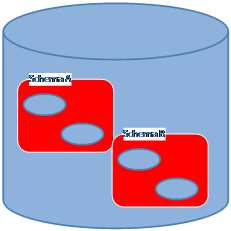
- Separate schemas
- Partitioned data: The data for all tenants is kept in the same physical instance and schema, and a partitioning column is used to differentiate tenants; it is up to the framework to issue proper SQL queries that filter data appropriately.
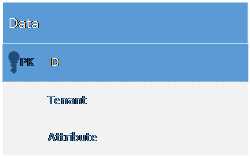
- Partitioned data
Note: If you are interested in learning more, this article presents some of the differences between Oracle and SQL Server regarding schemas.
As for actually retrieving and updating data in relational databases, two main approaches exist:
- Using ADO.NET, or some thin wrapper around it, like the Enterprise Library Data Access Block
- Using an Object-Relational Mapper (ORM), such as NHibernate or Entity Framework (Code First)
A discussion as to which of these approaches is better is outside the scope of this book, and personally, it feels pointless to me: both have pros and cons. ORMs, however, offer some configuration mechanisms that allow data to be filtered automatically based on some condition, such as the tenant’s name. Therefore, we will discuss how to use ORMs NHibernate and Entity Framework Code First for multitenant data access, and we will leave out SQL-based solutions.
NHibernate
Different Databases
In the NHibernate architecture, a connection string is tied to a session factory. It’s the session factory that builds sessions, which in turn encapsulate ADO.NET connections. In general, it is a good practice to have a single session factory; in our case, we will need one per tenant (and connection string).
To make session factories discoverable, we will use the same mechanism we used earlier in this book, and that is the Common Service Locator. Each tenant will have its own registration of ISessionFactory under its name, and each session factory will point to a likewise-named connection string. Consider the following bootstrap code that, again, uses Unity as the Inversion of Control (IoC) framework:
Code Sample 133
protected void Application_BeginRequest() { var tenant = TenantsConfiguration.GetCurrentTenant().Name; var sessionFactory = ServiceLocator.Current .TryResolve<ISessionFactory>(tenant); if (sessionFactory == null) { this.SetupSessionFactory(tenant); } }
private void SetupSessionFactory(String tenant) { var cfg = new Configuration().DataBaseIntegration(x => { x.ConnectionStringName = tenant; //rest goes here }); //etc //get the Unity instance from the Common Service Locator – another option would be to encapsulate this in some class or to use a custom connection provider var unity = ServiceLocator.Current.GetInstance<IUnityContainer>(); unity.RegisterInstance<ISessionFactory>(tenant,cfg.BuildSessionFactory()); } |
Here’s what it does: when a request is received, it gets the tenant name from it, and checks to see if there is already a registered session factory under that name in the Common Service Locator. If not, it starts the process of building and registering the session factory for the current tenant.
This code can either go in the Global.asax.cs file, as an instance method of the HttpApplication-derived class, or in a module, a class that implements IHttpModule. The latter is recommended to allow for code reuse and better maintainability, but if you are to follow this path, you will need to register the module yourself in the Web.config file, section system.webServer/modules:
Code Sample 134
<system.webServer> <modules> <add name="MyModule" type="MyNamespace.MyModule, MyAssembly"/> </modules> </system.webServer> |
So, whenever you wish to open a session, you first need to retrieve the appropriate session factory for the current tenant:
Code Sample 135
var tenant = TenantsConfiguration.GetCurrentTenant().Name; //lookup the session factory for the current tenant var sessionFactory = ServiceLocator.Current.GetInstance<ISessionFactory>(tenant); using (var session = sessionFactory.OpenSession()) { //... } |
Note: If you want to learn more about the NHibernate architecture, I suggest reading NHibernate Succinctly, also in the Succinctly series.
Different Schemas
The problem with NHibernate and mappings is that normally we only have one session factory and a configuration instance from which it originated. Because it’s the configuration instance that holds the mappings, which then passes to the session factory and in the end, to the sessions spawned from it, we need to have different configuration instances, one for each tenant.
Here’s how we can configure the schema for the current tenant:
Code Sample 136
public class MyMultitenantEntityClassMapping : ClassMapping<MyMultiTenanEntity> { public MyMultitenantEntityClassMapping() { var tenant = TenantsConfiguration.GetCurrentTenant().Name; this.Schema(tenant); //rest goes here } } |
Or, we can do it through conventions:
Code Sample 137
var mapper = new ConventionModelMapper(); var tenant = TenantsConfiguration.GetCurrentTenant().Name; mapper.BeforeMapClass += (modelInspector, type, classCustomizer) => { classCustomizer.Schema(tenant); }; |
Tip: Don’t forget that the schema name cannot take all characters, normally—only alphanumeric characters are allowed—so you may need to do some transformation on the tenant name.
Data partitioning
NHibernate has a nice feature by the name of filter which can be used to define arbitrary SQL restrictions at the entity level. A filter can be enabled or disabled and can take runtime parameters, something that plays very nicely with tenant names. For example, say our table has a tenant column that keeps the name of the tenant that it refers to. We would add a SQL restriction of “tenant = ’abc.com’”, except that we can’t hardcode the tenant name; we use parameters instead. A filter is defined in the entity’s mapping. Here’s an example using mapping by code:
Code Sample 138
public class MyMultitenantEntityClassMapping : ClassMapping<MyMultitenantEntity> { public MyMultitenantEntityClassMapping() { this.Filter("tenant", filter => { filter.Condition("tenant = :tenant"); }); //rest goes here } } |
Notice the “tenant = :tenant” part; this is a SQL restriction in disguise, where tenant is the name of a column and :tenant is a named parameter, which happens to have the same name. I omitted the most part of the mapping, because only the filtering part is relevant for our discussion. Similar code should be repeated in all the mappings of all the tenant-aware entities, and, of course, the proper column name should be specified.
Here’s another example using the conventional mapper:
Code Sample 139
var mapper = new ConventionModelMapper(); var tenant = TenantsConfiguration.GetCurrentTenant().Name; mapper.BeforeMapClass += (modelInspector, type, classCustomizer) => { classCustomizer.Filter("tenant", filter => { filter.Condition("tenant = :tenant"); }); }; |
Now, whenever we open a new session, we need to enable the tenant filter and assign a value to its tenant parameter:
Code Sample 140
var tenant = TenantsConfiguration.GetCurrentTenant().Name; session .EnableFilter("tenant") .SetParameter("tenant", tenant); |
The restriction and parameter value will last for the whole lifetime of the session, unless explicitly changed. You can see I am resorting to the static auxiliary method GetCurrentTenant that was defined earlier. Now, whenever you query for the MyMultitenantEntity class, the filter SQL will be appended to the generated SQL, with the parameter properly replaced by its actual value.
Generic Repository
To make life easier for the developer, we can encapsulate the creation of the sessions and the configuration of the filter behind a Repository Pattern (or Generic Repository) façade. This pattern dictates that the data access be hidden behind methods and collections that abstract the database operations and make them look just like in-memory.
Note: I won’t go into a discussion of whether the Repository/Generic Repository Pattern is a good thing or not. I personally understand its drawbacks, but I consider it useful in certain scenarios, such as this one.
A possible definition for a Generic Repository interface is:
Code Sample 141
public interface IRepository : IDisposable { T Find<T>(Object id); IQueryable<T> All<T>(params Expression<Func<T, Object>> [] expansions); void Delete(Object item); void Save(Object item); void Update(Object item); void Refresh(Object item); void SaveChanges(); } |
Most methods should be familiar to readers. We will not cover this interface in depth; instead, let’s move on to a possible implementation for NHibernate:
Code Sample 142
public sealed class SessionRepository : IRepository { private ISession session;
public SessionRepository() { var tenant = TenantsConfiguration.GetCurrentTenant().Name; //lookup the one and only session factory var sessionFactory = ServiceLocator.Current .GetInstance<ISessionFactory>(); this.session = sessionFactory.OpenSession(); //enable the filter with the current tenant this.session.EnableFilter("tenant") .SetParameter("tenant", tenant); this.session.BeginTransaction(); }
public T Find<T>(params Object[] ids) where T : class { return this.session.Get<T>(ids.Single()); }
public IQueryable<T> Query<T>(params Expression<Func<T, Object>>[] expansions) where T : class { var all = this.session.Query<T>() as IQueryable<T>; foreach (var expansion in expansions) { all = all.Include(expansion); } return all; }
public void Delete<T>(T item) where T : class { this.session.Delete(item); }
public void Save<T>(T item) where T : class { this.session.Save(item); }
public void Update<T>(T item) where T : class { this.session.Update(item); }
public void Refresh<T>(T item) where T : class { this.session.Refresh(item); }
public void Detach<T>(T item) where T : class { this.session.Evict(item); }
public void SaveChanges() { this.session.Flush(); try { this.session.Transaction.Commit(); } catch { this.session.Transaction.Rollback(); } this.session.BeginTransaction(); }
public void Dispose() { if (this.context != null) { this.session.Dispose(); this.session = null; } } } |
Remember that now there is only a single session factory, because there is also a single database. Now, all we have to do is register the IRepository interface with our IoC framework and always access it through the Common Service Locator:
Code Sample 143
//register our implementation under the IRepository interface unity.RegisterType<IRepository, SessionRepository>( new PerRequestLifetimeManager()); //get a reference to a new instance using (var repository = ServiceLocator.Current.GetInstance<IRepository>()) { //query some entity var items = repository.All<MyEntity>().ToList(); } |
Tip: The process of enabling the filter and setting the tenant parameter must always be done, so either make sure you use a repository or perform the initialization yourself, perhaps in some infrastructure code if possible.
Note: I used for the registration the PerRequestLifetimeManager presented in Chapter 9 Application Services chapter.
Entity Framework Code First
Different databases
The architecture of Entity Framework Code First is quite different from that of NHibernate. For one, there is no builder method that we can hook up to that can return a tenant-specific context with its own connection string. What we can do is build our own factory method that returns a proper connection string, for the current tenant:
Code Sample 144
public class MultitenantContext : DbContext { public MultitenantContext(): base(GetTenantConnection()) { }
private static String GetTenantConnection() { var tenant = TenantsConfiguration.GetCurrentTenant(); return String.Format("Name={0}", tenant.Name); } //rest goes here } |
It is important that you do not allow the creation of a context with any arbitrary connection string, because this defeats the purpose of transparent multitenancy through separate databases.
Different schemas
With Code First, it is very easy to apply our own conventions to a model:
Code Sample 145
protected override void OnModelCreating(DbModelBuilder modelBuilder) { var tenant = TenantsConfiguration.GetCurrentTenant(); //repeat for all multitenant entities modelBuilder.Types().Configure(x => x.ToTable(x.ClrType.Name, tenant.Name); //rest goes here base.OnModelCreating(modelBuilder); } |
Tip: Make sure the schema name is valid.
Data partitioning
Even if not quite as powerful, Entity Framework Code First allows us to map an entity with a discriminator column and value. This basically serves the purpose of allowing the Table Per Class Hierarchy / Single Table Inheritance strategy, where this column is used to tell to which entity a record maps to, in a table that is shared by a hierarchy of classes. The only out-of-the-box way to achieve this configuration is by overriding the OnModelCreating method and specifying a discriminator column and value:
Code Sample 146
protected override void OnModelCreating(DbModelBuilder modelBuilder) { var tenant = TenantsConfiguration.GetCurrentTenant(); //repeat for all multitenant entities modelBuilder.Entity<MyMultitenantEntity>().Map(m => m.Requires("Tenant") .HasValue(tenant.Name)); //rest goes here base.OnModelCreating(modelBuilder); } |
This tells Entity Framework that, whenever a DbContext is created, some entities should be mapped so that whenever they are inserted or retrieved, Entity Framework will always consider a Tenant discriminator column with a value identical to the current tenant, automatically.
Note: Again, for a more in-depth understanding of Entity Framework Code First, I suggest reading Entity Framework Code First Succinctly, also in the Succinctly series.
Generic Repository
For a more secure solution, here’s what an implementation of the Generic Repository Pattern for an Entity Framework Code First data context might be:
Code Sample 147
public sealed class MultitenantContextRepository : IRepository { private MultitenantContext context;
public MultitenantContextRepository() { //if you use the code from the previous example, this is not necessary, it is done there var tenant = TenantsConfiguration.GetCurrentTenant(); //set the connection string name from the current tenant this.context = new MultitenantContext(String.Format("Name={0}", tenant.Name)); } public T Find<T>(params Object[] ids) where T : class { return this.context.Set<T>().Find(ids); } public IQueryable<T> Query<T>(params Expression<Func<T, Object>>[] expansions) where T : class { var all = this.context.Set<T>() as IQueryable<T>; foreach (var expansion in expansions) { all = all.Include(expansion); } return all; }
public void Delete<T>(T item) where T : class { this.context.Set<T>().Remove(item); }
public void Save<T>(T item) where T : class { this.context.Set<T>().Add(item); }
public void Update<T>(T item) where T : class { this.context.Entry(item).State = EntityState.Modified; }
public void Refresh<T>(T item) where T : class { this.context.Entry(item).Reload(); }
public void Detach<T>(T item) where T : class { this.context.Entry(item).State = EntityState.Detached; }
public void SaveChanges() { this.context.SaveChanges(); }
public void Dispose() { if (this.context != null) { this.context.Dispose(); this.context = null; } } } |
Pretty straightforward, I think. Just store it in Unity (or any IoC container of your choice) and you’re done:
Code Sample 148
//register our implementation with Unity under the IRepository interface unity.RegisterType<IRepository, MultitenantContextRepository>( new PerRequestLifetimeManager()); //get a reference to a new instance using Common Service Locator using (var repository = ServiceLocator.Current.GetInstance<IRepository>()) { //query some entity var items = repository.All<MyEntity>().ToList(); } |
Note: Notice again the PerRequestLifetimeManager lifetime manager.


- 1800+ high-performance UI components.
- Includes popular controls such as Grid, Chart, Scheduler, and more.
- 24x5 unlimited support by developers.