
ASP.NET Multitenant Applications Succinctly®

CHAPTER 4
ASP.NET Web Forms
Introduction
ASP.NET Web Forms is the original framework introduced with .NET for web development. Probably the reason for its success lies in how easy it is to implement simple scenarios including data binding, AJAX functionality, keeping control state between postbacks, and performing user authentication and authorization. Its detractors point out that all the magic comes with a cost in terms of performance, excessive complexity, error-proneness of the page, and control lifecycle; and have been pushing newer technologies such as MVC. The truth, in my opinion, is that some complex requirements, such as those addressed by SharePoint (which is based on Web Forms) are too difficult, if not impossible, to implement with MVC.
In this chapter we will see which mechanisms ASP.NET Web Forms has to offer when it comes to writing multitenant applications—namely, when it comes to branding.
Note: Even though it may seem as though MVC is taking over, make no mistake—Web Forms will still be around for a long time. It is true that ASP.NET 5 will not support Web Forms, at least in its initial version, but the 4.x series will coexist with version 5 and will continue development of Web Forms. For pointers and discussions on MVC vs Web Forms, check out this Microsoft Curah and Dino Esposito’s view on the subject.
Table 5: Branding concepts
Concept | API |
|---|---|
Branding | Master Pages |
Themes and Skins | |
Authentication | ASP.NET Membership / ASP.NET Identity |
Workflow | Unity / Common Service Locator |
Data Model | Entity Framework Code First or NHibernate |
Branding
ASP.NET Web Forms offers primarily two techniques for branding:
- Master Pages: A shared layout (and possibly functionality) that defines the global look and feel to which individual pages can add contents to; it works by defining areas (content placeholders), possibly with default contents, which pages can override, while keeping the global layout.
- Themes and Skins: A named collection of control property settings and CSS stylesheet files that apply to all pages automatically. All .css files in a theme folder under App_Themes are automatically added to all pages; all control properties are applied to all controls declared in the markup, unless explicitly overridden there.
Master pages
In the master page, we can add the same markup—HTML and ASP.NET control declarations—as we would in a regular page, but we can also add content placeholders:
Code Sample 35
<%@ Master Language="C#" CodeBehind="Site.Master.cs" Inherits="WebForms.Site" %> <!DOCTYPE html> <html> <head runat="server"> <title> <asp:ContentPlaceHolder ID="title" runat="server"/> </title> <asp:ContentPlaceHolder ID="head" runat="server"> Default Head content </asp:ContentPlaceHolder> </head> <body> <form runat="server"> <asp:ContentPlaceHolder ID="header" runat="server" /> <div> <asp:ContentPlaceHolder ID="body" runat="server"/> </div> <asp:ContentPlaceHolder ID="footer" runat="server" /> </form> </body> </html> |
ContentPlaceholder elements represents the “extensible” areas, or holes, in the master page. Pages may include Content elements that supply content, thus overriding what is defined in the master page. The master page is normally assigned in the markup of a page:
Code Sample 36
<%@ Page Language="C#" MasterPageFile="~/Site.Master" CodeBehind="Default.aspx.cs" Inherits="WebForms.Default" %> <asp:Content ContentPlaceHolderID="title" runat="server"> This is the title </asp:Content> <asp:Content ContentPlaceHolderID="head" runat="server"> This is the overridden head </asp:Content> <asp:Content ContentPlaceHolderID="body" runat="server"> Body content goes here </asp:Content> |
You can see that not all content placeholders defined in the master page are being used in the page. Also, the content for the head placeholder is overridden in the page, which is perfectly normal.
A content placeholder takes the space of its containing HTML element, so, for example, two master pages could be defined as:
Code Sample 37
<!-- master page 1 --> <table> <tr> <td><asp:ContentPlaceHolder ID="first" runat="server" /></td> <td><asp:ContentPlaceHolder ID="second" runat="server" /></td> </tr> </table> |
And:
Code Sample 38
<!-- master page 2 --> <table> <tr> <td><asp:ContentPlaceHolder ID="first" runat="server" /></td> </tr> <tr> <td><asp:ContentPlaceHolder ID="second" runat="server" /></td> </tr> </table> |
I’m not saying that you should use HTML tables for layout; this is just to make a point: content will appear differently whether master page 1 or 2 is used.
If you recall, the tenant configuration interface that we specified earlier, ITenantConfiguration, included a MasterPage property. We will leverage this property in order to set automatically the master page to use for our pages, depending on the current tenant.
There are two ways by which a master page can be set:
- Declaratively in the page’s markup, using the MasterPageFile attribute of the @Page directive
- Programmatically, using the Page.MasterPageFile property
A master page can only be set programmatically before or during the Page.PreInit event of the page’s lifecycle; after that, any attempt to change it will result in an exception being thrown. If we want to set master pages automatically, without imposing a base page class, we should write a custom module for that purpose:
Code Sample 39
public sealed class MultiTenancyModule : IHttpModule { public void Dispose() { }
public void Init(HttpApplication context) { context.PreRequestHandlerExecute += OnPreRequestHandlerExecute; } public static String MasterPagesPath { get; set; } private void OnPreRequestHandlerExecute(Object sender, EventArgs e) { var tenant = TenantsConfiguration.GetCurrentTenant(); var app = sender as HttpApplication; if ((app != null) && (app.Context != null)) { var page = app.Context.CurrentHandler as Page; if (page != null) { page.PreInit += (s, args) => { var p = s as Page; if (!String.IsNullOrWhiteSpace (tenant.MasterPage)) { //set the master page p.MasterPageFile = String.Format("{0}/{1}.Master", MasterPagesPath, tenant.MasterPage); } }; } } } } |
The MasterPagesPath static property exists so that we can specify an alternative location for our master pages, in case we don’t want them located at the site’s root. It’s safe to leave it blank if your master pages are located there.
That this module hooks up to the current page’s PreInit event and, inside the event handler, checks if the MasterPage property for the current tenant is set, and, if so, sets it as the master page of the current page.
Themes and skins
For applying a theme or a skin, we need to create a folder under App_Themes:
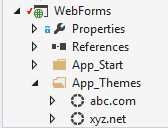
- Theme folders
We can have any number of folders, but only one can be set as the current theme.
Themes
A theme consists of one or more .css files located inside the theme folder; even inside other folders, ASP.NET makes sure all of them are added to the pages. There are three ways to set a theme:
- Through the styleSheetTheme attribute of the pages element of Web.config
- By setting the StyleSheetTheme attribute inside the Page directive of the .aspx file
- Assigning a value to the StyleSheetTheme property of the Page class
The first two don’t really play well with dynamic contents, but the final one does. It also takes precedence over the other two:
- The Web.config setting is the first one that will be applied to all pages, unless specified otherwise in other location.
- Then comes the .aspx attribute, which only applies to that specific page.
- Finally, the page property, if set until the Page.PreInit event, is the one to use.
Skins
A skin consists of one or more .skin files, also under a folder beneath App_Themes. Each file contains multiple control declarations, such as those we would find in an .aspx, .ascx, or .master markup file, with values for some of the control’s properties:
Code Sample 40
<asp:TextBox runat="server" SkinID="Email" placeholder="Email address"/> <asp:TextBox runat="server" Text="<enter value>"/> <asp:Button runat="server" SkinID="Dark" BackColor="DarkGray" ForeColor="Black"/> <asp:Button runat="server" SkinID="Light" BackColor="Cyan" ForeColor="Green"/> <asp:Image runat="server" onerror="this.src = 'missing.png'" /> |
Only properties having the ThemeableAttribute with a value of true (default if no attribute is set) and located in a control also having ThemeableAttribute set to true (or no attribute at all), or plain attributes that do not have a corresponding property (like placeholder in the first TextBox or onerror in the Image declaration in Code Sample 37) can be set through a .skin file.
Here we can see a few different options:
- Any TextBox with the SkinID property set to Email will get an HTML5 placeholder attribute, which is basically a watermark; notice that this is not a property of the TextBox control, or any of its base classes; instead, it will be translated to an identically named attribute in the generated HTML tag.
- All TextBox controls without a SkinID set will have text “<enter value>”
- Button controls with a SkinID of “Dark” will get a darker aspect than those with a SkinID of “Light”
- Any Image control that raises a JavaScript onerror event will have an alternative image set through a JavaScript event handler.
Note: I chose these examples so that it is clear that themed properties don’t necessarily mean only user interface settings.
The SkinID property is optional; if set, ASP.NET will try to find any declarations on the current theme’s .skin files that match its value. Otherwise, it will fall back to control declarations that do not contain a SkinID attribute.
Like with themes, there are three ways to set a skin folder:
- Through the Theme attribute of the Pages element of Web.config
- By setting the Theme attribute inside the Page directive of the .ASPX file
- Assigning a value to the Theme property of the Page class.
Skins and stylesheet themes, although different things, are closely related, so it is a good idea to use the same theme folder for both by setting just the Theme property. If you do, ASP.NET will parse all the .skin files and also include any .css files found inside the theme folder.
Setting themes automatically
Knowing this, let’s change our MultiTenancyModule so that, besides setting the master page, it also sets the theme for the current page. Let’s create a theme for each tenant, under its name, and set it automatically:
Code Sample 41
public sealed class MultiTenancyModule : IHttpModule { //rest goes here private void OnPreRequestHandlerExecute(Object sender, EventArgs e) { var tenant = TenantsConfiguration.GetCurrentTenant(); var app = sender as HttpApplication; if ((app != null) && (app.Context != null)) { var page = app.Context.CurrentHandler as Page; if (page != null) { page.PreInit += (s, args) => { var p = s as Page; if (!String.IsNullOrWhiteSpace(tenant)) { //set the theme p.Theme = tenant.Theme; p.MasterPageFile = String.Format("{0}/{1}.Master", MasterPagesPath, p.MasterPage); } }; } } } } |
Tenant-specific images
You can also keep other contents, such as images, inside the theme folder. This is nice if we want to have different images for each tenant with the same name. The problem is that you cannot reference those images directly in your pages, because you don’t know beforehand which theme—meaning, which tenant—will be accessing the page. For example, shall you point the image to “~/App_Themes/abc.com/logo.png” or “~/App_Themes/xyz.net/logo.png”?
Fortunately, ASP.NET Web Forms offers an extensibility mechanism by the name of Expression Builders, which comes in handy here. If you have used resources in Web Forms pages, you have already used the Resource expression builder. In a nutshell, an expression builder picks up a string passed as a parameter, tries to make sense of it, and then returns some content to the property to which it is bound (an expression builder always runs in the context of a property of a server-side control). How you parse the parameter and what you do with it is up to you.
Let’s write an expression builder that takes a partial URL and makes it relative to the current theme. Please consider the ThemeFileUrl expression builder:
Code Sample 42
[ExpressionPrefix("ThemeFileUrl")] public class ThemeFileUrlExpressionBuilder : ExpressionBuilder { public override Object EvaluateExpression(Object target, BoundPropertyEntry entry, Object parsedData, ExpressionBuilderContext context) { if (String.IsNullOrWhiteSpace(entry.Expression)) { return base.EvaluateExpression(target, entry, parsedData, context); } else { return GetThemeUrl(entry.Expression); } }
public override Boolean SupportsEvaluate { get { return true; } } public override CodeExpression GetCodeExpression(BoundPropertyEntry entry, Object parsedData, ExpressionBuilderContext context) { if (String.IsNullOrWhiteSpace(entry.Expression)) { return new CodePrimitiveExpression(String.Empty); } else { return new CodeMethodInvokeExpression( new CodeMethodReferenceExpression( new CodeTypeReferenceExpression(this.GetType()), "GetThemeUrl"), new CodePrimitiveExpression(entry.Expression)); } }
public static String GetThemeUrl(String fileName) { var page = HttpContext.Current.Handler as Page; //we can use the Page.Theme property because, at this point, the MultiTenancyModule has already run, and has set it properly var theme = page.Theme; var path = (page != null) ? String.Concat("/App_Themes/", theme, "/", fileName) : String.Empty; return path; } } |
Before we can use an expression builder, we need to register in the Web.config file in section system.web/compilation/expressionBuilders (do replace “MyNamespace” and “MyAssembly” with the proper values):
Code Sample 43
<system.web> <compilation debug="true" targetFramework="4.5"> <expressionBuilders> <add expressionPrefix="ThemeFileUrl" type="MyNamespace .ThemeFileUrlExpressionBuilder, MyAssembly"/> </expressionBuilders> </compilation> </system.web> |
Now, we can use it in our pages as:
Code Sample 44
<asp:Image runat="server" ImageUrl="<%$ ThemeFileUrl:/logo.jpg %>" /> |
The ThemeFileUrl expression builder will make sure that the right theme-specific path is used.
Showing or hiding tenant-specific contents
Another use of an expression builder is to show or hide contents directed to a specific tenant without writing code. We create the MatchTenant expression builder:
Code Sample 45
[ExpressionPrefix("MatchTenant")] public sealed class MatchTenantExpressionBuilder : ExpressionBuilder { public override Object EvaluateExpression(Object target, BoundPropertyEntry entry, Object parsedData, ExpressionBuilderContext context) { if (String.IsNullOrWhiteSpace(entry.Expression)) { return base.EvaluateExpression(target, entry, parsedData, context); } else { return MatchTenant(entry.Expression); } }
public override Boolean SupportsEvaluate { get { return true; } } public override CodeExpression GetCodeExpression(BoundPropertyEntry entry, Object parsedData, ExpressionBuilderContext context) { if (String.IsNullOrWhiteSpace(entry.Expression)) { return new CodePrimitiveExpression(String.Empty); } else { return new CodeMethodInvokeExpression( new CodeMethodReferenceExpression( new CodeTypeReferenceExpression( this.GetType()), "MatchTenant"), new CodePrimitiveExpression(entry.Expression)); } }
public static Boolean MatchTenant(String tenant) { var currentTenant = TenantsConfiguration.GetCurrentTenant();
if (tenant == currentTenant.Name) { return true; }
if (tenant.StartsWith("!")) { if (tenant.Substring(1) != currentTenant.Name) { return false; } }
return false; } } |
And we register it in the Web.config file:
Code Sample 46
<system.web> <compilation debug="true" targetFramework="4.5"> <expressionBuilders> <add expressionPrefix="ThemeFileUrl" type="MyNamespace .ThemeFileUrlExpressionBuilder, MyAssembly"/> <add expressionPrefix="MatchTenant" type="MyNamespace .MatchTenantExpressionBuilder, MyAssembly"/> </expressionBuilders> </compilation> </system.web> |
Two sample usages:
Code Sample 47
<asp:Label runat="server" Text="abc.com only" Visible="<%$ MatchTenant:abc.com %>"/> <asp:Label runat="server" Text="Anything but abc.com" Visible="<%$ MatchTenant:!abc.com %>"/> |
By adding the “!” symbol to the tenant name, we negate the rule.
Security
Authorization
Authorization in ASP.NET Web Forms is dealt with by the FileAuthorizationModule and the UrlAuthorizationModule modules. These modules weren’t really designed with extensibility in mind, so it isn’t exactly easy to make them do what we want.
It is based around two concepts: authenticated or unauthenticated users and user roles. The built-in authorization mechanisms allow us to define, per path, a page or a filesystem folder under our web application root, if the resource shall be accessed by:
- Anonymous (not authenticated) users
- Specific user names (e.g., “peter.jackson”, “johndoe”, etc.)
- One of a specific set of roles (e.g., “Admins”, “Developers”, etc.)
- Everyone (the default)
As you can see, there is no obvious mapping between these concepts and that of tenants, but we can use roles as tenants’ names to restrict access to certain resources. We do so in the Web.config file, in the location sections:
Code Sample 48
<location path="AbcComFolder"> <system.webServer> <security> <authorization> <add accessType="Deny" users="?"/> <add accessType="Allow" roles="abc.com"/> </authorization> </security> </system.webServer> </location> |
This example uses a role of “abc.com”, which is also a tenant’s name. Things get a little bit tricky, though, if we need to use both roles and tenants in access rules. Another option is to restrict calling certain methods by the current tenant. An example using .NET’s built-in declarative security might be:
Code Sample 49
[Serializable] public sealed class TenantPermission : IPermission { public TenantPermission(params String [] tenants) { this.Tenants = tenants; }
public IEnumerable<String> Tenants { get; private set; }
public IPermission Copy() { return new TenantPermission(this.Tenants.ToArray()); }
public void Demand() { var tenant = TenantsConfiguration.GetCurrentTenant();
if (!this.Tenants.Any(t => tenant.Name() == t)) { throw new SecurityException ("Current tenant is not allowed to access this resource."); } }
public IPermission Intersect(IPermission target) { var other = target as TenantPermission;
if (other == null) { throw new ArgumentException ("Invalid permission.", "target"); } return new TenantPermission (this.Tenants.Intersect(other.Tenants).ToArray()); }
public Boolean IsSubsetOf(IPermission target) { var other = target as TenantPermission;
if (other == null) { throw new ArgumentException ("Invalid permission.", "target"); }
return this.Tenants.All(t => other.Tenants.Contains(t)); }
public IPermission Union(IPermission target) { var other = target as TenantPermission;
if (other == null) { throw new ArgumentException ("Invalid permission.", "target"); }
return new TenantPermission (this.Tenants.Concat(other.Tenants).Distinct() .ToArray()); } public void FromXml(SecurityElement e) { if (e == null) { throw new ArgumentNullException("e"); }
var tenantTag = e.SearchForChildByTag("Tenants"); if (tenantTag == null) { throw new ArgumentException ("Element does not contain any tenants.", "e"); } var tenants = tenantTag.Text.Split(',').Select(t => t.Trim());
this.Tenants = tenants; }
public SecurityElement ToXml() { var xml = String .Concat("<IPermission class=\"", this.GetType().AssemblyQualifiedName, "\" version=\"1\" unrestricted=\"false\"><Tenants>", String.Join(", ", this.Tenants), "</Tenants></IPermission>"); return SecurityElement.FromString(xml); } } [Serializable] [AttributeUsage(AttributeTargets.Method | AttributeTargets.Class, AllowMultiple = true, Inherited = false)] public sealed class RequiredTenantPermissionAttribute : CodeAccessSecurityAttribute { public RequiredTenantPermissionAttribute(SecurityAction action) : base(action) {}
public override IPermission CreatePermission() { return new TenantPermission(this.Tenants.Split(',') .Select(t => t.Trim()).ToArray()); }
public String Tenants { get; set; } } |
The RequiredTenantPermissionAttribute attribute, when applied to a method, does a runtime check, which in this case checks the current tenant against a list of allowed tenants (the Tenants property). If there’s no match, then an exception is thrown. An example:
Code Sample 50
[RequiredTenantPermission(SecurityAction.Demand, Tenants = "abc.com")] public override void OnLoad(EventArgs e) { //nobody other than abc.com can access this method base.OnLoad(e); } |
In a later chapter, we will look at another technique that can also be used for restricting accesses.
Unit testing
Unit testing with Web Forms is very difficult because it’s hard to reproduce the event model that pages and controls use. It isn’t impossible, though, and tools such as WatiN make it possible. WatiN allows instrumenting web sites using our browser of choice. I won’t cover it in detail here, but have a look at this sample code, and I think you’ll get the picture:
Code Sample 51
using (var browser = new IE("http://abc.com")) { Assert.IsTrue(browser.ContainsText("ABC")); browser.Button(Find.ByName("btnGo")).Click(); } |
In order to use WatiN, just add a reference to it using NuGet:

- Adding the WatiN NuGet package


- 1800+ high-performance UI components.
- Includes popular controls such as Grid, Chart, Scheduler, and more.
- 24x5 unlimited support by developers.