
ASP.NET Multitenant Applications Succinctly®

CHAPTER 9
Application Services
Introduction
Any application that does something at least slightly elaborate depends on some services. Call them common concerns, application services, middleware, or whatever. The challenge here is that we cannot just use these services without providing them with some context, namely, the current tenant. For example, consider cache: you probably wouldn’t want something cached for a specific tenant to be accessible by other tenants. Here we will see some techniques for preventing this by leveraging what ASP.NET and the .NET framework already offer.
Inversion of Control
Throughout the code, I have been using the Common Service Locator to retrieve services regardless of the Inversion of Control container used to actually register them, but in the end, we are using Unity. When we do actually register them, we have a couple of options:
- Register static instances
- Register class implementations
- Register injection factories
For those services that need context (knowing the current tenant), injection factories are our friends, because this information can only be obtained when the service is actually requested. Using Unity, we register them using code such as this:
Code Sample 89
var container = UnityConfig.GetConfiguredContainer(); container.RegisterType<IContextfulService>(new PerRequestLifetimeManager(), new InjectionFactory(x => { var tenant = TenantsConfiguration.GetCurrentTenant(); return new ContextfulServiceImpl(tenant.Name); })); |
Noteworthy:
- The PerRequestLifetimeManager is a Unity lifetime manager implementation that provides a per-request lifetime for registered components, meaning components will only be created in the scope of the current HTTP request if they weren’t already created. Otherwise, the same instance will always be returned. Disposable components are dealt with appropriately at the end of the request.
- InjectionFactory takes a delegate that just returns a pre-created instance. In this example, we are building a bogus service implementation, ContextfulServiceImpl, which takes a constructor parameter that is the current tenant name.
Tip: It doesn’t make much sense using InjectionFactory with lifetime managers other than PerRequestLifetimeManager.
Note: Like I said previously, you are not tied to Unity—you can use whatever IoC container you like, provided that (for the purpose of the examples in this book) it offers an adapter for the Common Service Locator.
Remember the interface that represents a tenant’s configuration, ITenantConfiguration? If you do, you know that it features a general-purpose, indexed collection, Properties. We can implement a custom lifetime manager that stores items in the current tenant’s Properties collection in a transparent way:
Code Sample 90
public sealed class PerTenantLifetimeManager : LifetimeManager { private readonly Guid id = Guid.NewGuid(); private static readonly ConcurrentDictionary<String, ConcurrentDictionary<Guid, Object>> items = new ConcurrentDictionary<String, ConcurrentDictionary<Guid, Object>>();
public override Object GetValue() { var tenant = TenantsConfiguration.GetCurrentTenant(); ConcurrentDictionary<Guid, Object> registrations = null; Object value = null;
if (items.TryGetValue(tenant.Name, out registrations)) { registrations.TryGetValue(this.id, out value); }
return value; }
public override void RemoveValue() { var tenant = TenantsConfiguration.GetCurrentTenant(); ConcurrentDictionary<Guid, Object> registrations = null; if (items.TryGetValue(tenant.Name, out registrations)) { Object value; registrations.TryRemove(this.id, out value); } }
public override void SetValue(Object newValue) { var tenant = TenantsConfiguration.GetCurrentTenant(); var registrations = items.GetOrAdd(tenant.Name, new ConcurrentDictionary<Guid, Object>()); registrations[this.id] = newValue; } } |
Caching
Caching is one of those techniques that can dramatically improve the performance of an application, because it keeps in memory data that is potentially costly to acquire. We need to be able to store data against a key, where several tenants can use the same key. The trick here is to, behind the scenes, join the supplied key with a tenant-specific identifier. For instance, a typical caching service interface might be:
Code Sample 91
public interface ICache { void Remove(String key, String regionName = null); Object Get(String key, String regionName = null); void Add(String key, Object value, DateTime absoluteExpiration, String regionName = null); void Add(String key, Object value, TimeSpan slidingExpiration, String regionName = null); } |
And an implementation using the ASP.NET built-in cache:
Code Sample 92
public sealed class AspNetMultitenantCache : ICache, ITenantAwareService { public static readonly ICache Instance = new AspNetMultitenantCache();
private AspNetMultitenantCache() { //private constructor since this is meant to be used as a singleton }
private String GetTenantKey(String key, String regionName) { var tenant = TenantsConfiguration.GetCurrentTenant().Name; key = String.Concat(tenant, ":", regionName, ":", key); return key; }
public void Remove(String key, String regionName = null) { HttpContext.Current.Cache.Remove(this.GetTenantKey(key, regionName)); }
public Object Get(String key, String regionName = null) { return HttpContext.Current.Cache.Get(this.GetTenantKey(key, regionName)); } public void Add(String key, Object value, DateTime absoluteExpiration, String regionName = null) { HttpContext.Current.Cache.Add(this.GetTenantKey(key, regionName), value, null, absoluteExpiration, Cache.NoSlidingExpiration, CacheItemPriority.Default, null); } public void Add(String key, Object value, TimeSpan slidingExpiration, String regionName = null) { HttpContext.Current.Cache.Add(this.GetTenantKey(key, regionName), value, null, Cache.NoAbsoluteExpiration, slidingExpiration, CacheItemPriority.Default, null); } } |
Note: Do not worry about ITenantAwareService; it is just a marker interface I use for those services that know about the current tenant.
Nothing too fancy here—we just wrap the user-supplied key with the current tenant’s ID and region name. This is implemented as a singleton, because there’s only one ASP.NET cache, and there’s no point in having multiple instances of AspNetMultitenantCache, without any state and all pointing to the same cache. That’s what the ITenantAwareService interface states: it knows who we are addressing, so there’s no need to have different instances per tenant.
Note: Notice the AspNet prefix on the class name. It is an indication that this class requires ASP.NET to work.
Registering the cache service is easy, and we don’t need to use InjectionFactory, since we will be registering a singleton:
Code Sample 93
container.RegisterInstance<ICache>(AspNetMultitenantCache.Instance); |
Configuration
I am not aware of any mid-sized application that does not require some configuration of any kind. The problem here is the same: two tenants might share the same configuration keys, while at the same time they would expect different values. Let’s define a common interface for the basic configuration features:
Code Sample 94
public interface IConfiguration { Object GetValue(String key); void SetValue(String key, Object value); Object RemoveValue(String key); } |
Let’s also define a multitenant implementation that uses appSettings in a per-tenant configuration file as the backing store:
Code Sample 95
public class AppSettingsConfiguration : IConfiguration, ITenantAwareService { public static readonly IConfiguration Instance = new AppSettingsConfiguration();
private AppSettingsConfiguration() { }
private void Persist(Configuration configuration) { configuration.Save(); }
private Configuration Configuration { get { var tenant = TenantsConfiguration.GetCurrentTenant(); var configMap = new ExeConfigurationFileMap(); configMap.ExeConfigFilename = String.Format( AppDomain.CurrentDomain.BaseDirectory, tenant.Name, ".config");
var configuration = ConfigurationManager .OpenMappedExeConfiguration(configMap, ConfigurationUserLevel.None);
return configuration; } }
public Object GetValue(String key) { var entry = this.Configuration.AppSettings.Settings[key]; return (entry != null) ? entry.Value : null; }
public void SetValue(String key, Object value) { if (value == null) { this.RemoveValue(key); } else { var configuration = this.Configuration; configuration.AppSettings.Settings .Add(key, value.ToString()); this.Persist(configuration); } }
public Object RemoveValue(String key) { var configuration = this.Configuration; var entry = configuration.AppSettings.Settings[key];
if (entry != null) { configuration.AppSettings.Settings.Remove(key); this.Persist(configuration); return entry.Value; }
return null; } } |
Note: This class is totally agnostic as to web or non-web; it can be used in any kind of project. It also implements ITenantAwareService, for the same reason as before.
With this implementation, we can have one file per tenant, say, abc.com.config, or xyz.net.config, and the syntax is going to be identical to that of the ordinary .NET configuration files:
Code Sample 96
<configuration> <appSettings> <add key="Key" value="Value"/> </appSettings> <configuration> |
This approach is nice because we can even change the files at runtime, and we won’t cause the ASP.NET application to restart, which would happen if we were to change the Web.config file.
We’ll use the same pattern for registration:
Code Sample 97
container.RegisterInstance<IConfiguration>(AppSettingsConfiguration.Instance); |
Logging
It would be cumbersome and rather silly to implement another logging framework, when there are so many good ones to choose from. For this book, I have chosen the Enterprise Library Logging Application Block (ELLAB). You will probably want to add support for it through NuGet:

- Installing the Enterprise Library Logging Application Block
ELLAB offers a single API that you can use to send logs to a number of sources, as outlined in the following picture:
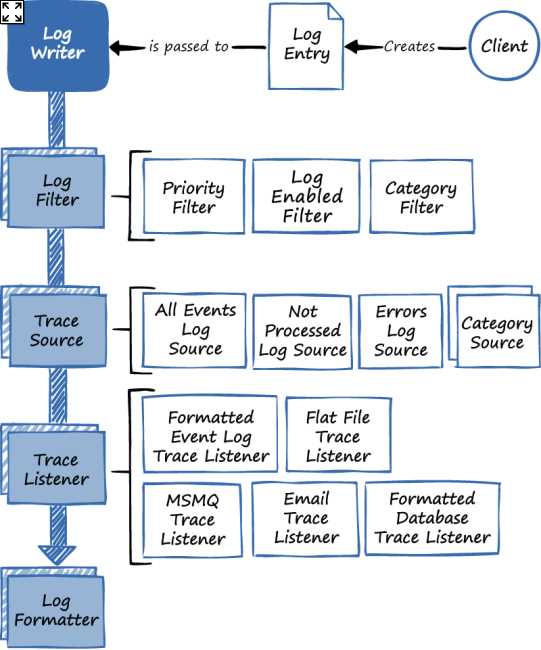
- Enterprise Library Logging Application Block architecture
These sources include:
- Text files (RollingFlatFileTraceListener, FlatFileTraceListener, XmlTraceListener)
- Windows Event Log (FormattedEventLogTraceListener)
- MSMQ (MsmqEventTraceListener)
- Email (EmailTraceListener)
- Database (FormattedDatabaseTraceListener)
- WMI (WmiTraceListener)
Now, our requirement is to send the output for each tenant to its own file. For example, output for tenant “abc.com” will go to “abc.com.log”, and so on. But first things first—here’s our basic contract for logging:
Code Sample 98
public interface ILog { void Write(Object message, Int32 priority, TraceEventType severity, Int32 eventId = 0); } |
I kept it simple, but, by all means, do add any auxiliary methods you find appropriate.
The ELLAB can log:
- An arbitrary message
- A string category: we will use it for the tenant name, so we will not expose it in the API
- An integer priority
- The event severity
- An event identifier, which is optional (eventId)
The implementation of it on top of the ELLAB could be:
Code Sample 99
public sealed class EntLibLog : ILog, ITenantAwareService { public static readonly ILog Instance = new EntLibLog();
private EntLibLog() { //private constructor since this is meant to be used as a singleton }
public void Write(Object message, Int32 priority, TraceEventType severity, Int32 eventId = 0) { var tenant = TenantsConfiguration.GetCurrentTenant(); Logger.Write(message, tenant.Name, priority, eventId, severity); } } |
The registration follows the same pattern as before:
Code Sample 100
container.RegisterInstance<ILog>(EntLibLog.Instance); |
This time, we also need to account for the ELLAB configuration. Because we need to setup each tenant individually, we have to run the following code upon startup:
Code Sample 101
private void CreateLogFactories(IEnumerable<ITenantConfiguration> tenants) { foreach (var tenant in tenants) { try { var configurationSource = new FileConfigurationSource(tenant.Name + ".config"); var logWriterFactory = new LogWriterFactory( configurationSource); Logger.SetLogWriter(logWriterFactory.Create()); } catch {} } } var tenants = TenantsConfiguration.GetTenants(); CreateLogFactories(tenants); |
Tip: The try…catch block surrounding the initialization code is there so that if we do not want to have a configuration file for a specific tenant, it doesn’t throw.
Note: There are lots of other options for providing this kind of information, such as with attributes.
This code, specifically the FileConfigurationSource class, requires that all tenants have their configuration in an individual file, named after the tenant (<tenant>.config). Next is an example of a logging configuration that uses a rolling flat file that rotates every week:
Code Sample 102
<configuration> <configSections> <section name="loggingConfiguration" type="Microsoft.Practices.EnterpriseLibrary.Logging. Configuration.LoggingSettings, Microsoft.Practices.EnterpriseLibrary.Logging" /> </configSections> <loggingConfiguration name="loggingConfiguration" tracingEnabled="true" defaultCategory="" logWarningsWhenNoCategoriesMatch="true"> <listeners> <add name="Rolling Flat File Trace Listener" type="Microsoft.Practices.EnterpriseLibrary .Logging.TraceListeners.RollingFlatFileTraceListener, Microsoft.Practices.EnterpriseLibrary.Logging" listenerDataType="Microsoft.Practices.EnterpriseLibrary .Logging.Configuration.RollingFlatFileTraceListenerData, Microsoft.Practices.EnterpriseLibrary.Logging" fileName="abc.com.log" footer="---------------------------" formatter="Text Formatter" header="---------------------------" rollFileExistsBehavior="Increment" rollInterval="Week" timeStampPattern="yyyy-MM-dd hh:mm:ss" traceOutputOptions="LogicalOperationStack, DateTime, Timestamp, ProcessId, ThreadId, Callstack" filter="All" /> </listeners> <formatters> <add type="Microsoft.Practices.EnterpriseLibrary.Logging. Formatters.TextFormatter, Microsoft.Practices.EnterpriseLibrary.Logging" template="Timestamp: {timestamp}
 Message: {message}
Category: {category}
 Priority: {priority}
EventId: {eventid}
 Severity: {severity}
Title:{title}
 Machine: {machine}
Process Id: {processId}
 Process Name: {processName}
" name="Text Formatter" /> </formatters> <categorySources> <add switchValue="All" name="General"> <listeners> <add name= "Rolling Flat File Trace Listener" /> </listeners> </add> </categorySources> <specialSources> <allEvents switchValue="All" name="All Events"> <listeners> <add name= "Rolling Flat File Trace Listener" /> </listeners> </allEvents> <notProcessed switchValue="All" name="Unprocessed Category"> <listeners> <add name= "Rolling Flat File Trace Listener" /> </listeners> </notProcessed> <errors switchValue="All" name="Logging Errors & Warnings"> <listeners> <add name= "Rolling Flat File Trace Listener" /> </listeners> </errors> </specialSources> </loggingConfiguration> </configuration> |
Note: For more information on the Enterprise Library Logging Application Block, check out the Enterprise Library site. For logging to a database, you need to install the Logging Application Block Database Provider NuGet package.
Monitoring
The classic APIs offered by ASP.NET and .NET applications for diagnostics and monitoring do not play well with multitenancy, namely:
- Tracing
- Performance counters
- Web events (Health Monitoring Provider)
In this chapter, we will look at some techniques for making these APIs multitenant. Before that, let’s define a unifying contract for all these different APIs:
Code Sample 103
public interface IDiagnostics { Int64 IncrementCounterInstance(String instanceName, Int32 value = 1); Guid RaiseWebEvent(Int32 eventCode, String message, Object data, Int32 eventDetailCode = 0); void Trace(Object value, String category); } |
An explanation of each of these methods is required:
- Trace: writes to the registered trace listeners
- IncrementCounterInstance: increments a performance counter specific to the current tenant
- RaiseWebEvent: raises a Web Event in the ASP.NET Health Monitoring infrastructure
In the following sections, we’ll see each in more detail.
Tracing
ASP.NET Tracing
The ASP.NET tracing service is very useful for profiling your ASP.NET Web Forms pages, and it can even help in sorting out some problems.
Before you can use tracing, it needs to be globally enabled, which is done on the Web.config file, through a trace element:
Code Sample 104
<system.web> <trace enabled="true" localOnly="true" writeToDiagnosticsTrace="true" pageOutput="true" traceMode="SortByTime" requestLimit="20"/> </system.web> |
What this declaration says is:
- Tracing is enabled.
- Trace output is only present to local users (localOnly).
- Standard diagnostics tracing listeners are notified (writeToDiagnosticsTrace).
- Output is sent to the bottom of each page instead of being displayed on the trace handler URL (pageOutput).
- Trace events are sorted by their timestamp (traceMode).
- Up to 20 requests are stored (requestLimit).
You also need to have it enabled on a page-by-page basis (the default is to be disabled):
Code Sample 105
<%@ Page Language="C#" CodeBehind="Default.aspx.cs" Inherits="WebForms.Default" Trace="true" %> |
We won’t go into details on ASP.NET tracing. Instead, let’s see a sample trace, for ASP.NET Web Forms:
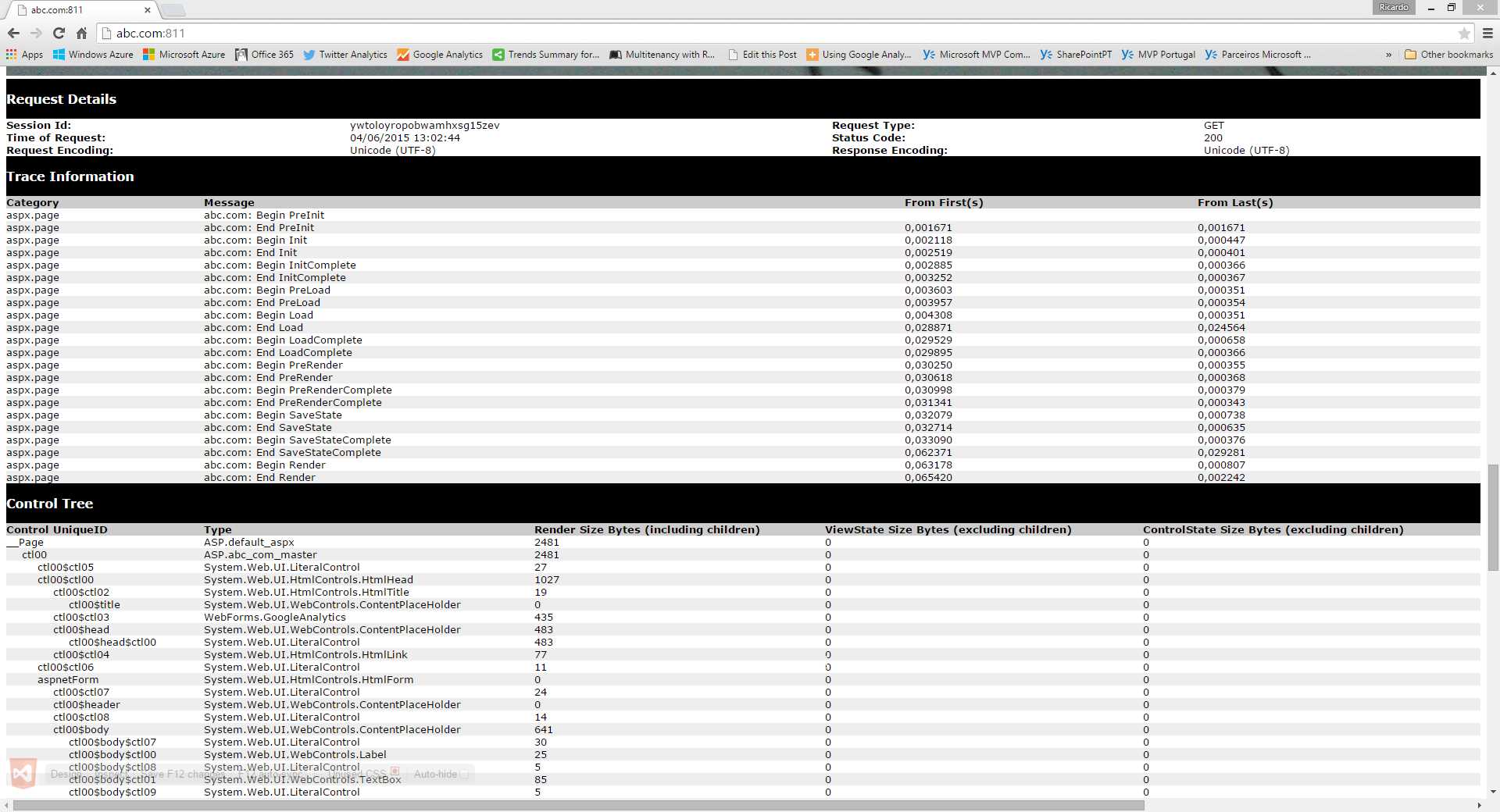
- Page trace for Web Forms
In MVC, the only difference is that the Control Tree table is empty, which is obvious, once you think of it.
This trace is being displayed on the page itself, as dictated by pageOutput; the other option is to have traces only showing on the trace handler page, Trace.axd, and leave the page alone. Either way, the output is the same.
A tracing entry corresponds to a request handled by the server. We can add our own trace messages to the entry by calling one of the trace methods in the TraceContext class, conveniently available as Page.Trace in Web Forms:
Code Sample 106
protected override void OnLoad(EventArgs e) { this.Trace.Write("On Page.Load"); base.OnLoad(e); } |
Or as static methods of the Trace class (for MVC or in general), which even has an overload for passing a condition:
Code Sample 107
public ActionResult Index() { Trace.WriteLine("Before presenting a view"); var tenant = TenantsConfiguration.GetCurrentTenant(); Trace.WriteLineIf(tenant.Name != "abc.com", "Not abc.com"); return this.View(); } |
Now, the tracing provider keeps a number of traces, up to the value specified by requestLimit—the default being 10, and the maximum, 10,000. This means that requests for all our tenants will be handled the same way, so if we go to the Trace.axd URL, we have no way of knowing which tenant for the request was for. But if you look closely to the Message column of the Trace Information table in Figure 20, you will notice a prefix that corresponds to the tenant for which the request was issued. In order to have that, we need to register a custom diagnostics listener on the Web.config file, in a system.diagnostics section:
Code Sample 108
<system.diagnostics> <trace autoflush="true"> <listeners> <add name="MultitenantTrace" type="WebForms.MultitenantTraceListener, WebForms" /> </listeners> </trace> </system.diagnostics> |
The code for MultitenantTraceListener is presented below:
Code Sample 109
public sealed class MultitenantTraceListener : WebPageTraceListener { private static readonly MethodInfo GetDataMethod = typeof(TraceContext) .GetMethod("GetData", BindingFlags.NonPublic | BindingFlags.Instance);
public override void WriteLine(String message, String category) { var ds = GetDataMethod.Invoke(HttpContext.Current.Trace, null) as DataSet; var dt = ds.Tables["Trace_Trace_Information"]; var dr = dt.Rows[dt.Rows.Count - 1]; var tenant = TenantsConfiguration.GetCurrentTenant(); dr["Trace_Message"] = String.Concat(tenant.Name, ": ", dr["Trace_Message"]);
base.WriteLine(message, category); } } |
What this does is, with a bit of reflection magic, gets a reference to the current dataset containing the last traces, and, on the last of them—the one for the current request—adds a prefix that is the current tenant’s name (for example, abc.com).
Web.config is not the only way by which a diagnostics listener can be registered; there’s also code: Trace.Listeners. Using this mechanism, you can add custom listeners that will do all kinds of things when a trace call is issued:
Code Sample 110
protected void Application_Start() { //unconditionally adding a listener Trace.Listeners.Add(new CustomTraceListener()); } protected void Application_BeginRequest() { //conditionally adding a listener var tenant = TenantsConfiguration.GetCurrentTenant(); if (tenant.Name == "abc.com") { Trace.Listeners.Add(new AbcComTraceListener()); } } |
Tracing Providers
Other tracing providers exist in the .NET base class library:
- EventLogTraceListener: writes to the Windows Event Log
- WebPageTraceListener: ASP.NET tracing
- IisTraceListener: IIS trace
- EventProviderTraceListener: Event Tracing for Windows (ETW)
- ConsoleTraceListener: console
- DefaultTraceListener: output window in Visual Studio
- TextWriterTraceListener: text file
- DelimitedListTraceListener: text file with custom field delimiter
- EventSchemaTraceListener: XML text file
- XmlWriterTraceListener: XML text file
- FileLogTraceListener: text file
All of these can be registered in system.diagnostics or Trace.Listeners. We will have a wrapper class for the Trace static methods, in which we implement the IDiagnostics interface’s Trace method:
Code Sample 111
public sealed class MultitenantDiagnostics : IDiagnostics, ITenantAwareService { public void Trace(Object value, String category) { var tenant = TenantsConfiguration.GetCurrentTenant(); System.Diagnostics.Trace.AutoFlush = true; System.Diagnostics.Trace.WriteLine(String.Concat(tenant.Name, ": ", value), category); } } |
Performance Counters
Performance Counters are a Windows feature that can be used to provide insights on running applications and services. It is even possible to have Windows react automatically to the situation where a performance counter’s value exceeds a given threshold. If we so desire, we can use performance counters to communicate to interested parties aspects of the state of our applications, where this state consists of integer values.
Performance Counters are organized in:
- Categories: a name
- Counters: a name and a type (let’s forget about the type for now)
- Instances: a name and a value of a given type (we’ll assume a long integer)
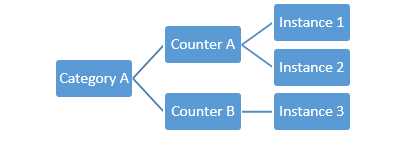
- Performance counters basic concepts
In the ITenantConfiguration interface, we added a Counters property, which, when implemented, is used to automatically create performance counter instances. We will follow this approach:
Table 6: Mapping performance counter concepts for multitenancy
Concept | Content |
Category | “Tenants” |
Counter | The tenant name (eg, abc.com or xyz.net) |
Instance | A tenant-specific name, coming from ITenantConfiguration.Counters |
The code for automatically creating each performance counter and instance in the TenantsConfiguration class is as follows:
Code Sample 112
public sealed class TenantsConfiguration : IDiagnostics, ITenantAwareService { private static void CreatePerformanceCounters( IEnumerable<ITenantConfiguration> tenants) { if (PerformanceCounterCategory.Exists("Tenants")) { PerformanceCounterCategory.Delete("Tenants"); }
var counterCreationDataCollection = new CounterCreationDataCollection( tenants.Select(tenant => new CounterCreationData( tenant.Name, String.Empty, PerformanceCounterType.NumberOfItems32)) .ToArray());
var category = PerformanceCounterCategory.Create("Tenants", "Tenants performance counters", PerformanceCounterCategoryType.MultiInstance, counterCreationDataCollection);
foreach (var tenant in tenants) { foreach (var instance in tenant.Counters) { var counter = new PerformanceCounter( category.CategoryName, tenant.Name, String.Concat(tenant.Name, ": ", instance.InstanceName), false); } } } } |
On the other side, the code for incrementing a performance counter instance is defined in the IDiagnostics interface (IncrementCounterInstance), and can we can implement it as:
Code Sample 113
public sealed class MultitenantDiagnostics : IDiagnostics, ITenantAwareService { public Int64 IncrementCounterInstance(String instanceName, Int32 value = 1) { var tenant = TenantsConfiguration.GetCurrentTenant(); using (var pc = new PerformanceCounter("Tenants", tenant.Name, String.Concat(tenant.Name, ":", instanceName), false)) { pc.RawValue += value; return pc.RawValue; } } } |
When the application is running, we can observe in real-time the values of counter instances through the Performance Monitor application:
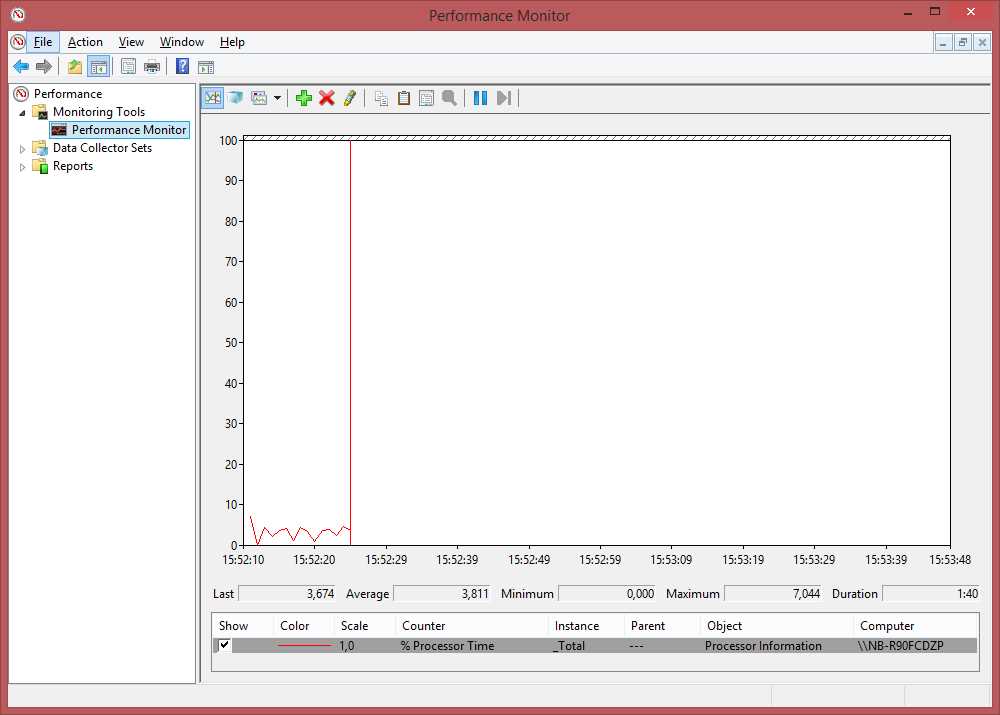
- Performance Monitor application displaying performance counters
We just need to add some counters to the display; ours will be available under Tenants - <tenant name> - <instance name>:
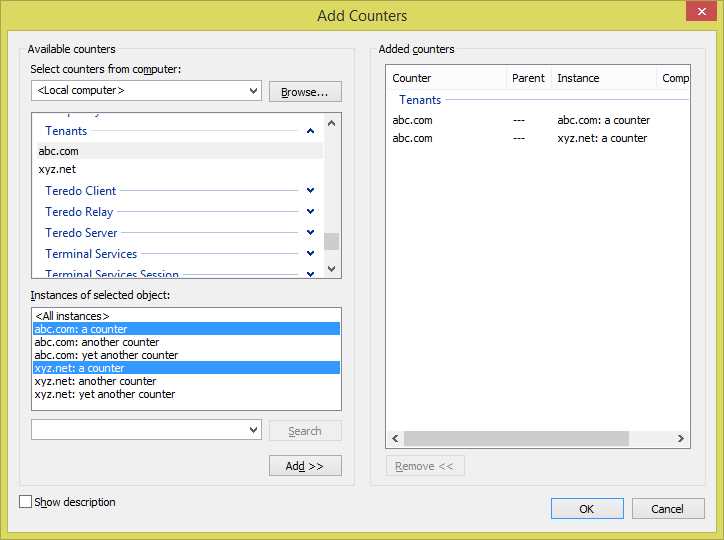
- Adding performance counters
In this example, it is perceivable that both tenants, abc.com and xyz.net, have identically named counter instances, but it doesn’t have to be the case.
There are other built-in ASP.NET-related performance counters that can be used to monitor your applications. For example, in Performance Monitor, add a new counter and select ASP.NET Applications:
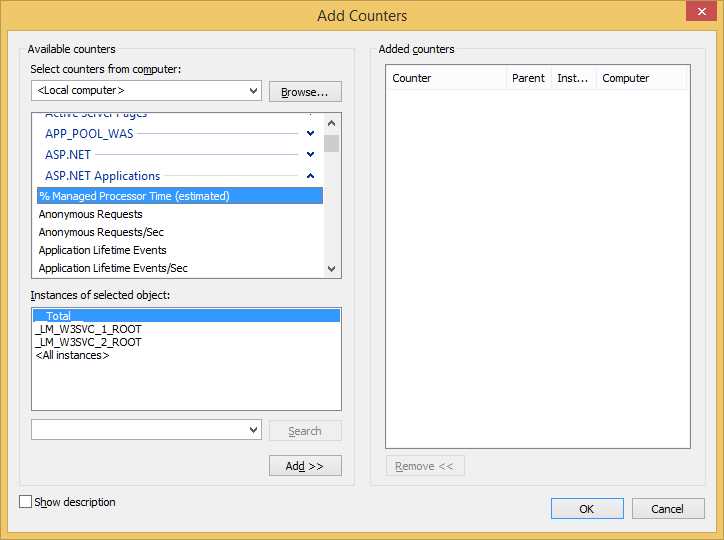
- ASP.NET Applications performance counters
You will notice that you have several instances, one for each site that is running. These instances are automatically named, but each number can be traced to an application. For instance, if you are using IIS Express, open the ApplicationHost.config file (C:\Users\<username>\Documents\IISExpress\Config) and go to the sites section, where you will find something like this (in case, of course, you are serving tenants abc.com and xyz.net):
Code Sample 114
<sites> <site name="abc.com" id="1"> <application path="/" applicationPool="Clr4IntegratedAppPool"> <virtualDirectory path="/" physicalPath="C:\InetPub\Multitenant" /> </application> <bindings> <binding protocol="http" bindingInformation="*:80:abc.com" /> </bindings> </site> <site name="xyz.net" id="2"> <application path="/" applicationPool="Clr4IntegratedAppPool"> <virtualDirectory path="/" physicalPath="C:\InetPub\Multitenant" /> </application> <bindings> <binding protocol="http" bindingInformation="*:80:xyz.net" /> </bindings> </site> </sites> |
Or using IIS:
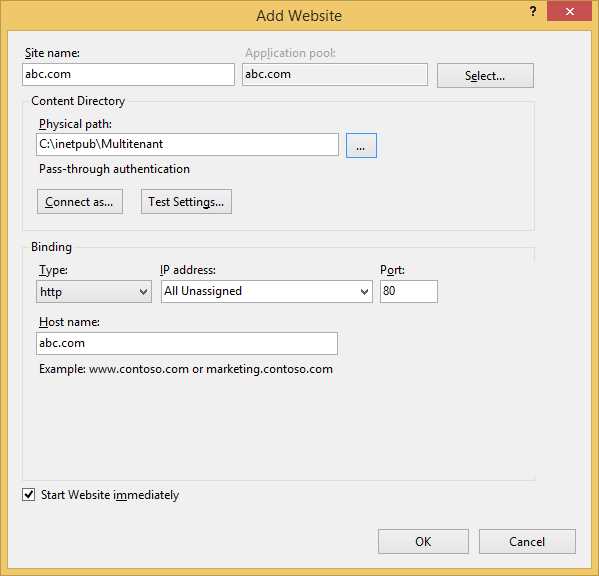
- Creating a separate site for abc.com
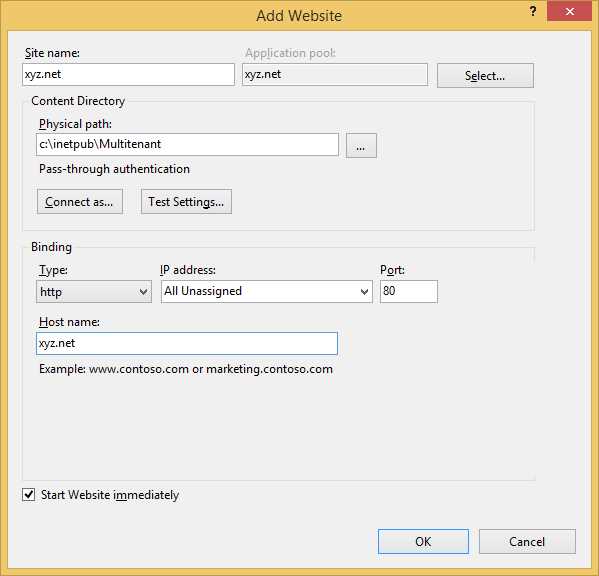
- Creating a separate site for xyz.net
In order to have more control, we separated the two sites; this is required for more accurately controlling each. The code base remains the same, though.
In the name of each instance (_LM_W3SVC_<n>_ROOT), <n> will match one of these numbers.
If, on the other hand, you want to use the full IIS, the appcmd command will give you this information:
Code Sample 115
C:\Windows\System32\inetsrv>appcmd list site SITE "abc.com" (id:1,bindings:http/abc.com:80:,state:Started) SITE "xyz.net" (id:2,bindings:http/xyz.net:80:,state:Started) C:\Windows\System32\inetsrv>appcmd list apppool APPPOOL "DefaultAppPool" (MgdVersion:v4.0,MgdMode:Integrated,state:Started) APPPOOL "Classic .NET AppPool" (MgdVersion:v2.0,MgdMode:Classic,state:Started) APPPOOL ".NET v2.0 Classic" (MgdVersion:v2.0,MgdMode:Classic,state:Started) APPPOOL ".NET v2.0" (MgdVersion:v2.0,MgdMode:Integrated,state:Started) APPPOOL ".NET v4.5 Classic" (MgdVersion:v4.0,MgdMode:Classic,state:Started) APPPOOL ".NET v4.5" (MgdVersion:v4.0,MgdMode:Integrated,state:Started) APPPOOL "abc.com" (MgdVersion:v4.0,MgdMode:Integrated,state:Started) APPPOOL "xyz.net" (MgdVersion:v4.0,MgdMode:Integrated,state:Started) |
I am listing all sites (first list) and then all application pools.
Health Monitoring
The Health Monitoring feature of ASP.NET enables the configuration of rules to respond to certain events that take place in an ASP.NET application. It uses a provided model to decide what to do when the rule conditions are met. An example might be sending out a notification mail when the number of failed login attempts reaches three in a minute’s time. So, very simply, the Health Monitoring feature allows us to:
- Register a number of providers that will perform actions
- Add named rules bound to specific providers
- Map event codes to the created rules
There are a number of out-of-the box events that are raised by the ASP.NET APIs internally, but we can define our own as well:

- Included Health Monitoring events
Events are grouped in classes and subclasses. There are specific classes for dealing with authentication events (WebAuditEvent, WebFailureAuditEvent, WebSuccessAuditEvent), request (WebRequestEvent, WebRequestErrorEvent) and application lifetime events (WebApplicationLifetimeEvent), view state failure events (WebViewStateFailureEvent), and others. Each of these events (and classes) is assigned a unique numeric identifier, which is listed in WebEventCodes fields. Custom events should start with the value in WebEventCodes.WebExtendedBase + 1.
A number of providers—for executing actions when rules are met—are also included, of course. We can implement our own too, by inheriting from WebEventProvider or one of its subclasses:

- Included Health Monitoring providers
Included providers cover a number of typical scenarios:
- Writing to a database (SQLWebEventProvider)
- Writing to WMI (WMIWebEventProvider)
- Writing to the Event Log (EventLogWebEventProvider)
- Sending mail (SimpleMailWebEventProvider)
Before we go into writing some rules, let’s look at our custom provider, MultitenantEventProvider, and its related classes MultitenantWebEvent and MultitenantEventArgs:
Code Sample 116
public sealed class MultitenantEventProvider : WebEventProvider { private static readonly IDictionary<String, MultiTenantEventProvider> providers = new ConcurrentDictionary<String, MultiTenantEventProvider>(); private const String TenantKey = "tenant"; public String Tenant { get; private set; }
public event EventHandler<MultiTenantEventArgs> Event; public static void RegisterEvent(String tenantId, EventHandler<MultiTenantEventArgs> handler) { var provider = FindProvider(tenantId); if (provider != null) { provider.Event += handler; } } public static MultiTenantEventProvider FindProvider(String tenantId) { var provider = null as MultiTenantEventProvider;
providers.TryGetValue(tenantId, out provider);
return provider; }
public override void Initialize(String name, NameValueCollection config) { var tenant = config.Get(TenantKey);
if (String.IsNullOrWhiteSpace(tenant)) { throw new InvalidOperationException( "Missing tenant name."); }
config.Remove(TenantKey);
this.Tenant = tenant; providers[tenant] = this; base.Initialize(name, config); }
public override void Flush() { }
public override void ProcessEvent(WebBaseEvent raisedEvent) { var evt = raisedEvent as MultitenantWebEvent; if (evt != null) { var tenant = TenantsConfiguration.GetCurrentTenant();
if (tenant.Name == evt.Tenant) { var handler = this.Event; if (handler != null) { handler(this, new MultitenantEventArgs( this, evt)); } } } }
public override void Shutdown() { } } [Serializable] public sealed class MultitenantEventArgs : EventArgs { public MultitenantEventArgs(MultitenantEventProvider provider, MultitenantWebEvent evt) { this.Provider = provider; this.Event = evt; }
public MultitenantEventProvider Provider { get; private set; } public MultitenantWebEvent Event { get; private set; } } public class MultitenantWebEvent : WebBaseEvent { public MultitenantWebEvent(String message, Object eventSource, Int32 eventCode, Object data) : this(message, eventSource, eventCode, data, 0) {} public MultitenantWebEvent(String message, Object eventSource, Int32 eventCode, Object data, Int32 eventDetailCode) : base(message, eventSource, eventCode, eventDetailCode) { var tenant = TenantsConfiguration.GetCurrentTenant(); this.Tenant = tenant.Name; this.Data = data; }
public String Tenant { get; private set; } public Object Data { get; private set; } } |
So, we have a provider class (MultitenantEventProvider), a provider event argument (MultitenantEventArgs), and a provider event (MultitenantWebEvent). We can always find the provider that was registered for the current tenant by calling the static method FindProvider, and from this provider we can register event handlers to the Event event. In a moment, we’ll see how we can wire this, but first, here is a possible implementation of the IDiagnostics interface RaiseWebEvent method:
Code Sample 117
public sealed class MultitenantDiagnostics : IDiagnostics, ITenantAwareService { public Guid RaiseWebEvent(Int32 eventCode, String message, Object data, Int32 eventDetailCode = 0) { var tenant = TenantsConfiguration.GetCurrentTenant(); var evt = new MultitenantWebEvent(message, tenant, eventCode, data, eventDetailCode); evt.Raise(); return evt.EventID; } } |
Now, let’s add some rules and see things moving. First, we need to add a couple of elements to the Web.config file’s healthMonitoring section:
Code Sample 118
<configuration> <system.web> <healthMonitoring enabled="true" heartbeatInterval="0"> <providers> <add name="abc.com" type="MultitenantEventProvider, MyAssembly" tenant="abc.com" /> <add name="xyz.net" type="MultiTenantEventProvider, MyAssembly" tenant="xyz.net" /> </providers> <rules> <add name="abc.com Custom Event" eventName="abc.com Custom Event" provider="abc.com" minInterval="00:01:00" minInstances="1" maxLimit="1" /> <add name="xyz.net Custom Event" eventName="xyz.net Custom Event" provider="xyz.net" minInterval="00:01:00" minInstances="2" maxLimit="2" /> </rules> <eventMappings> <add name="abc.com Custom Event" startEventCode="100001" endEventCode="100001" type="MultiTenantWebEvent, MyAssembly" /> <add name="xyz.net Custom Event" startEventCode="200001" endEventCode="200001" type="MultiTenantWebEvent, MyAssembly" /> </eventMappings> </healthMonitoring> </system.web> </configuration> |
So, what we have here is:
- Two providers registered of the same class (MultitenantEventProvider), one for each tenant, with an attribute tenant that states it
- Two rules, each which raises a custom event when a named event (eventName) is raised a number of times (minInstances, maxLimit) in a certain period of time (minInterval), for a given provider;
- Two event mappings (eventMappings) that translate event id intervals (startEventCode, endEventCode) to a certain event class (type).
We’ll also need to add an event handler for the MultitenantEventProvider class of the right tenant, maybe in Application_Start:
Code Sample 119
protected void Application_Start() { MultiTenantEventProvider.RegisterEvent("abc.com", (s, e) => { //do something when the event is raised }); } |
So, in the end, if a number of web events is raised in the period specified in any of the rules, an event is raised and hopefully something happens.
Analytics
Hands down, Google Analytics is the de facto standard when it comes to analyzing the traffic on your web site. No other service that I am aware of offers the same amount of information and features, so it ,makes sense to use it, also for multitenant sites.
If you don’t have a Google Analytics account, go create one, the process is pretty straightforward (yes, you do need a Google account for that).
After you have one, go to the Admin page and create as many properties as your tenants (Property drop down list):
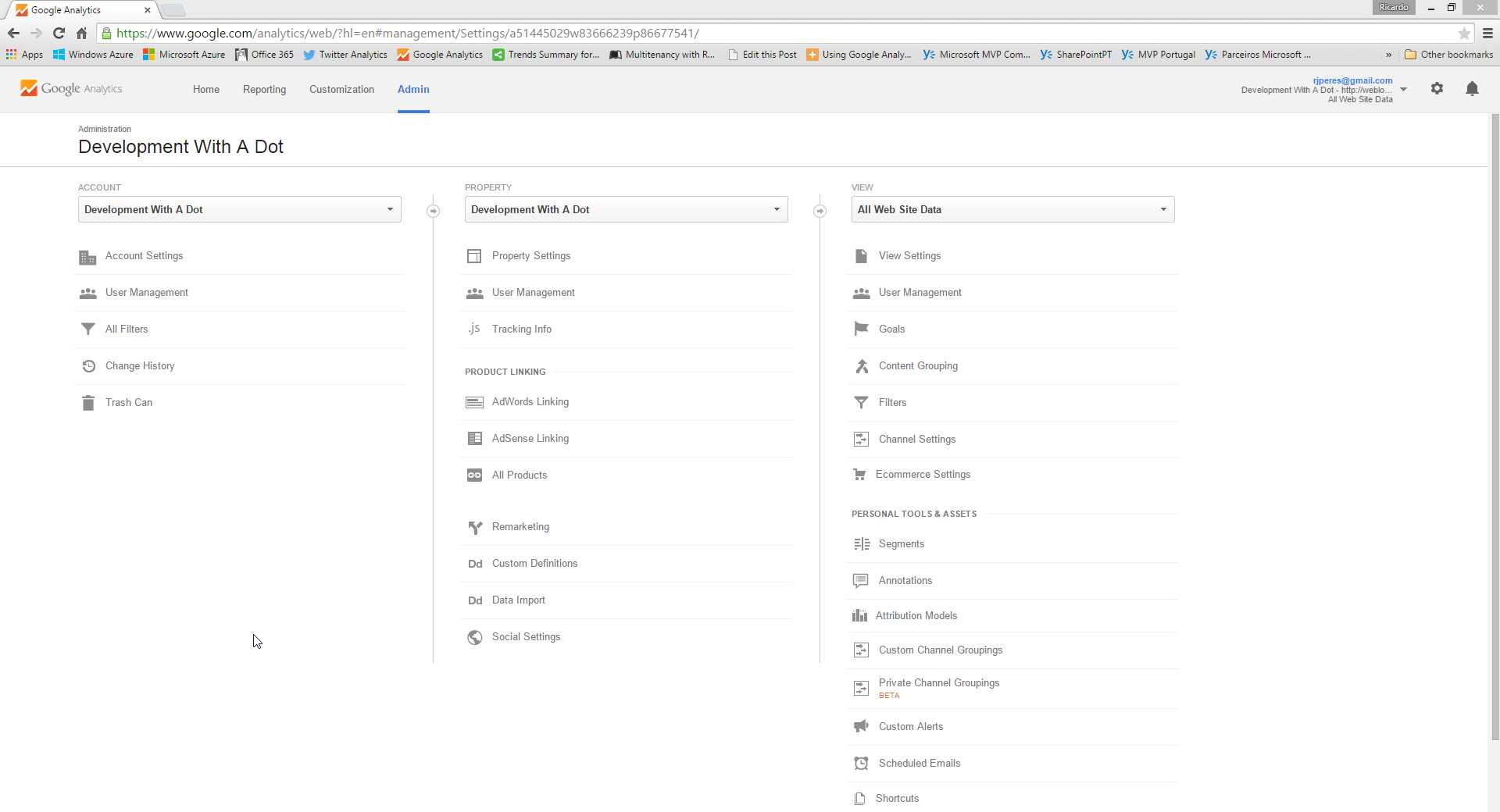
- Creating Google Analytics properties
Each tenant will be assigned a unique key in the form UA-<nnnnnnnn-n>, where n are numbers. If you followed the previous topic on the Configuration service, you will have a configuration file per tenant (abc.com.config) at the root of your web site, and this is where you will store this key:
Code Sample 120
<configuration> <appSettings> <add key="GoogleAnalyticsKey" value="UA-nnnnnnnn-n"/> </appSettings> </configuration> |
Of course, do replace UA-<nnnnnnnn-n> with the right key!
Now, we need to add some JavaScript to the page where we mention this key and tenant name. This script is where the actual call to the Google Analytics API is done, and it looks like this:
Code Sample 121
<script type="text/javascript">// <![CDATA[ (function(i,s,o,g,r,a,m){i['GoogleAnalyticsObject']=r;i[r]=i[r]||function(){ (i[r].q=i[r].q||[]).push(arguments)},i[r].l=1*new Date();a=s.createElement(o), m=s.getElementsByTagName(o)[0];a.async=1;a.src=g;m.parentNode.insertBefore(a,m) })(window,document,'script','//www.google-analytics.com/analytics.js','ga'); ga('create', '{0}', 'auto'); ga('send', 'pageview'); // ]]></script> |
If you are curious about where this came from, Google Analytics’ Admin page has this information ready for you to pick up—just click on Tracking Info for your property (tenant) of choice.
You might have noticed the {0} token—this is a standard .NET string formatting placeholder. What it means is, it needs to be replaced with the actual tenant key (UA-nnnnnnnn-n). Each tenant will have this key stored in its configuration, say, under the key GoogleAnalyticsKey. This way we can always retrieve it through the IConfiguration interface presented a while ago.
If we will be using ASP.NET Web Forms, a nice wrapper for this might be a control:
Code Sample 122
public sealed class GoogleAnalytics : Control { private const String Script = "<script type=\"text/javascript\">// <![CDATA[" + "(function(i,s,o,g,r,a,m){{i['GoogleAnalyticsObject']=r;i[r]=i[r]||function(){{" + " (i[r].q=i[r].q||[]).push(arguments)}},i[r].l=1*new Date();a=s.createElement(o)," + " m=s.getElementsByTagName(o)[0];a.async=1;a.src=g;m.parentNode.insertBefore(a,m)" + " }})(window,document,'script','//www.google-analytics.com/analytics.js','ga');" + " ga('create', '{0}', 'auto');" + " ga('send', 'pageview');" + "// ]]></script>";
protected override void Render(HtmlTextWriter writer) { var config = ServiceLocator.Current .GetInstance<IConfiguration>(); var key = config.GetValue("GoogleAnalyticsKey");
writer.Write(Script, key); } } |
Here is a sample declaration on a page or master page:
Code Sample 123
<%@ Register Assembly="Multitenancy.WebForms" Namespace="Multitenancy.WebForms" TagPrefix="mt" %> <mt:GoogleAnalytics runat="server" /> |
Otherwise, for MVC, the right place would be an extension method over HtmlHelper:
Code Sample 124
public static class HtmlHelperExtensions { private const String Script = "<script type=\"text/javascript\">// <![CDATA[" + "(function(i,s,o,g,r,a,m){{i['GoogleAnalyticsObject']=r;i[r]=i[r]||function(){{" + " (i[r].q=i[r].q||[]).push(arguments)}},i[r].l=1*new Date();a=s.createElement(o)," + " m=s.getElementsByTagName(o)[0];a.async=1;a.src=g;m.parentNode.insertBefore(a,m)" + " }})(window,document,'script','//www.google-analytics.com/analytics.js','ga');" + " ga('create', '{0}', 'auto');" + " ga('send', 'pageview');" + "// ]]></script>";
public static void GoogleAnalytics(this HtmlHelper html) { var config = ServiceLocator.Current .GetInstance<IConfiguration>(); var key = config.GetValue("GoogleAnalyticsKey"); html.Raw(String.Format(Script, key)); } } |
It would then be invoked as this, on a local or shared view:
Code Sample 125
@Html.GoogleAnalytics() |
And that’s it! Each tenant will get its own property page on Google Analytics, and you can start monitoring them.


- 1800+ high-performance UI components.
- Includes popular controls such as Grid, Chart, Scheduler, and more.
- 24x5 unlimited support by developers.