
ASP.NET Core APIs Succinctly®

CHAPTER 4
Versioning Your API
In this chapter, we will be discussing various topics, one of them being versioning your API. Versioning your API is usually a good idea because this lets consumers know what data they can expect, or that they can expect some changes in the data. There are four main types of versioning. They are:
- URI versioning
- Versioning with headers
- Accept header versioning
- Content-type versioning
It does not matter which versioning method you implement in your API; what matters more is that you provide a version. You might be used to seeing an API version in the URI path, as illustrated in Code Listing 52.
Code Listing 52: Example of URI path versioning
https://localhost:44371/api/v2/book |
You will also probably have seen an example of query string versioning, as illustrated in Code Listing 53.
Code Listing 53: Example of URI query string versioning
https://localhost:44371/api/book?v=2.0 |
Let’s see how we can implement versioning into our book repository API.
Implementing versioning
Versioning does not come out of the box. You need to install a NuGet package, as shown in Figure 38.

Figure 38: Adding ASP.NET Core versioning NuGet package
Ensure that you add the ASP.NET Core versioning package via NuGet, as this is built to be used with .NET Core, which our API is built on. To allow your API to use versioning, we need to make a change to the Startup class in the ConfigureServices method, as illustrated in Code Listing 54.
Code Listing 54: Add Versioning to configure services
services.AddApiVersioning(); |
With this in place, run your API and call one of your API endpoints. For example, just try to call https://localhost:44371/api/book and have a look at the return, as illustrated in Code Listing 55.
Code Listing 55: Versioning required
|
"error": { "code": "ApiVersionUnspecified", "message": "An API version is required, but was not specified.", "innerError": null } } |
You will receive a status 400 bad request error from the API. You must specify an API version, and this is the functionality we expect. Modify the URL that you call in Postman as follows and do the same call again: https://localhost:44371/api/book?api-version=1.0. This time, the call to your API will work because you specified the version in the query string, and .NET Core assumes that by default, the whole API is version 1.0.
Try and call https://localhost:44371/api/book?api-version=1.1, and you will see that you will receive an error again, as illustrated in Code Listing 56.
Code Listing 56: Default version 1.1 not supported
{ "error": { "code": "UnsupportedApiVersion", "message": "The HTTP resource that matches the request URI 'https://localhost:44371/api/book' does not support the API version '1.1'.", "innerError": null } } |
The reason for this is that ASP.NET Core expects the default version to be 1.0 because we have not specified a version for this API yet. As with almost anything in .NET Core, you can change this behavior by modifying the code we added in the ConfigureServices method in the Startup class.
As seen in Code Listing 57, modify AddApiVersioning() to include options and give it the default version that this API must accept.
Code Listing 57: Specify default API version
services.AddApiVersioning(o => { o.DefaultApiVersion = new ApiVersion(1, 1); }); |
If you call https://localhost:44371/api/book?api-version=1.1, you will see that the call will work. Calling https://localhost:44371/api/book?api-version=1.0 will now fail because we have changed the default version to 1.1 for the API.
Make another small change to AddApiVersioning(), as illustrated in Code Listing 58.
Code Listing 58: Report supported API versions
services.AddApiVersioning(o => { o.DefaultApiVersion = new ApiVersion(1, 1); o.ReportApiVersions = true; }); |
By adding ReportApiVersions, when you make a call to the API, the header information will return the supported API versions, as seen in Figure 39.
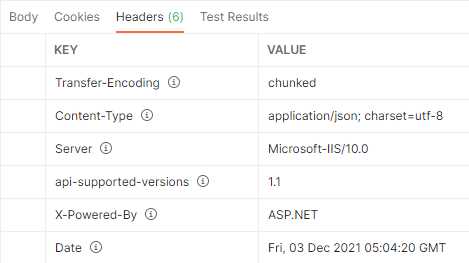
Figure 39: Supported API versions returned in header
We have just been tinkering with the default versioning behavior here. Let’s see how to version our actions in the next section.
Version actions
Starting at the BookController, I want to tell it something about the versions that it must use. I want it to support versions 1.0 and 1.1 of the API. Modify your BookController as illustrated in Code Listing 59.
Code Listing 59: Supporting versions 1.0 and 1.1
|
[ApiVersion("1.0")] [ApiVersion("1.1")] [ApiController] public class BookController : ControllerBase |
Next, I want to duplicate the GetBooks method. Make a copy of the GetBooks method and add the attribute [MapToApiVersion("1.0")] to the first one. Then, on the ISBN property of the BookModel being returned, append the text "- for version 1.0".
Do the same for the second GetBooks method, but rename the method to GetBooks_1_1 and give it the attribute [MapToApiVersion("1.1")]. Append the text "- for version 1.1" to the ISBN property of the BookModel being returned.
You can see the code for this change in Code Listing 60.
Code Listing 60: Version 1.0 and 1.1 of GET
[HttpGet] [MapToApiVersion("1.0")] public async Task<ActionResult<List<BookModel>>> GetBooks() { try { var books = await _service.ListBooksAsync(); return (from book in books let model = new BookModel() { Author = book.Author, Description = book.Description, Title = book.Title, Publisher = book.Publisher, ISBN = book.ISBN + " - for version 1.0" } select model).ToList(); } catch (Exception) { return StatusCode(StatusCodes.Status500InternalServerError, "There was a database failure"); } } [HttpGet] [MapToApiVersion("1.1")] public async Task<ActionResult<List<BookModel>>> GetBooks_1_1() { try { var books = await _service.ListBooksAsync(); return (from book in books let model = new BookModel() { Author = book.Author, Description = book.Description, Title = book.Title, Publisher = book.Publisher, ISBN = book.ISBN + " - for version 1.1" } select model).ToList(); } catch (Exception) { return StatusCode(StatusCodes.Status500InternalServerError, "There was a database failure"); } } |
Run your API and call version 1.0 by supplying the URL https://localhost:44371/api/book?api-version=1.0 in Postman. You will see the data returned is coming from version 1.0 of the GET method as illustrated in Code Listing 61.
Code Listing 61: Calling Version 1.0 of the GET
{ "isbn": "076790818X - for version 1.0", "title": "A Short History of Nearly Everything", "description": "Science has never been more involving or entertaining.", "publisher": "Crown", "author": "Bill Bryson" } |
Next, change the URL to call version 1.1 by calling https://localhost:44371/api/book?api-version=1.1 in Postman. The returned data will be coming from version 1.1 of the GET method, as seen in Code Listing 62.
Code Listing 62: Calling version 1.1 of the GET method
{ "isbn": "076790818X - for version 1.1", "title": "A Short History of Nearly Everything", "description": "Science has never been more involving or entertaining.", "publisher": "Crown", "author": "Bill Bryson" } |
But what will happen if you call the endpoint without a version, like this: https://localhost:44371/api/book?
Your API will return the same error as seen in Code Listing 55. We can tell our API to assume the default version (which is version 1.1 in this case) when no version is supplied by modifying the ConfigureServices method, as seen in Code Listing 63.
Code Listing 63: Assume a default version
services.AddApiVersioning(o => { o.AssumeDefaultVersionWhenUnspecified = true; o.DefaultApiVersion = new ApiVersion(1, 1); o.ReportApiVersions = true; }); |
If you call the URL https://localhost:44371/api/book again, you will see that the return data has returned version 1.1 of the GET method, as previously illustrated in Code Listing 62. This way you can finely control what data the consumers of the API will see when they call specific versions of your API. Next, we will look at supporting a new version of the API controller.
Versioning controllers
Create a copy of the BookController class and call it Book2Controller, as illustrated in Figure 40.
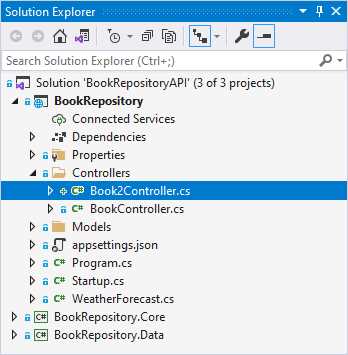
Figure 40: Adding version 2.0 of the BookController
Get rid of the GetBooks_1_1 method and focus on the GetBooks method. Remove the [MapToApiVersion("1.0")] attribute on the GetBooks() method.
Note: You can leave the rest of the class as is, since we will only be focusing on the GetBooks endpoint for this section.
Modify your Book2Controller as illustrated in Code Listing 64.
Code Listing 64: Version 2.0 of the BookController
[Route("api/[controller]")] [ApiVersion("2.0")] [ApiController] public class Book2Controller : ControllerBase { private readonly IBookData _service; private readonly LinkGenerator _linkGenerator; public Book2Controller(IBookData service, LinkGenerator linkGenerator) { _service = service; _linkGenerator = linkGenerator; } [HttpGet] public async Task<IActionResult> GetBooks() { try { var books = await _service.ListBooksAsync(); var results = new { Count = books.Count(), Books = books }; return Ok(results); } catch (Exception) { return StatusCode(StatusCodes.Status500InternalServerError, "There was a database failure"); } } |
From this code example, you can see that the API version on the controller has changed to version 2.0 by specifying the attribute [ApiVersion(“2.0”)]. I have modified the GetBooks() method to return an anonymous type that consists of the books returned and a count of how many books were returned. Because I am returning an anonymous type, I can just change the GetBooks method’s return type to Task<IActionResut>.
Run your API and make the following GET request using the URL https://localhost:44371/api/book?api-version=2.0. The data returned will be as illustrated in Code Listing 65.
Code Listing 65: GetBooks version 2.0
{ "count": 5, "books": [ { "id": 2, "isbn": "076790818X", "title": "A Short History of Nearly Everything", "description": "Science has never been more involving or entertaining.", "publisher": "Crown", "author": "Bill Bryson" }, { "id": 13, "isbn": "0380009145", "title": "Foundation (Book 1)", "description": "In a future century the Galactic Empire dies and one man creates a new force for civilized life.", "publisher": "Avon", "author": "Isaac Asimov" }, { "id": 1021, "isbn": "0553382586", "title": "Foundation and Empire (Book 2)", "description": "The second novel in Isaac Asimov’s classic science-fiction masterpiece, the Foundation series.", "publisher": "Del Rey; Reprint edition (April 29, 2008)", "author": "Isaac Asimov" }, { "id": 1, "isbn": "0465030335", "title": "Letters to a Young Contrarian", "description": "In the book that he was born to write, provocateur and best-selling author Christopher Hitchens inspires future generations of radicals, gadflies, mavericks, rebels, angry young (wo)men, and dissidents.", "publisher": "Basic Books", "author": "Christopher Hitchens" }, { "id": 3, "isbn": "9780062316110", "title": "Sapiens", "description": "One hundred thousand years ago, at least six different species of humans inhabited Earth. Yet today there is only one—homo sapiens. What happened to the others?", "publisher": "Harper Perennial", "author": "Yuval Noah Harari" } ] } |
Notice the count of books being returned for this GET request. Now perform the same GET request using the URLs https://localhost:44371/api/book?api-version=1.1 and https://localhost:44371/api/book?api-version=1.0. The data returned will be coming from version 1 of the BookController.
Again, as with so much in .NET Core, you can change the behavior. If you do not want to use the api-version portion in your API URL, you can modify this in the Startup class. Add the using statement Microsoft.AspNetCore.Mvc.Versioning to the Startup class. Next, modify the section of code related to the API versioning in ConfigureServices, as seen in Code Listing 66.
Code Listing 66: Specify QueryStringVersionReader
This tells the API that it should expect the version of the API to be denoted by a v in the query string. Do a GET request using the following URL: https://localhost:44371/api/book?v=2.0.
The data returned from your API is from version 2.0 of the BookController class.
Being able to version your controllers in this way gives you the flexibility to introduce improved code without having to affect the functionality of the API to consumers still using earlier versions.
Versioning with headers
Versioning with headers is also very easy to configure. If, for whatever reason, you can’t use query strings for versioning your APIs, you can specify the version of the API you want in the header. Modify the ConfigureServices method in the Startup for the API versioning as seen in Code Listing 67.
Code Listing 67: Versioning with headers
services.AddApiVersioning(o => { o.AssumeDefaultVersionWhenUnspecified = true; o.DefaultApiVersion = new ApiVersion(1, 1); o.ReportApiVersions = true; o.ApiVersionReader = new HeaderApiVersionReader("x-version"); }); |
All I have done is tell the API to use headers to version the API instead of query strings. I have therefore replaced the QueryStringApiVersionReader with the HeaderApiVersionReader, which also takes a string parameter x-version as a header key to look for. Run the API and head on over to Postman. On the Params tab, uncheck the key v that was used to denote the version of the API.
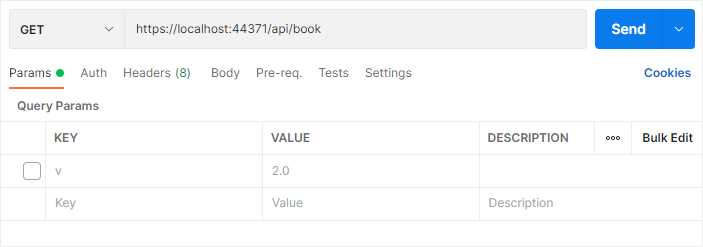
Figure 41: Remove the parameter version
On the Headers tab, add the header key you defined in Code Listing 67 and specify the version you want as the value.
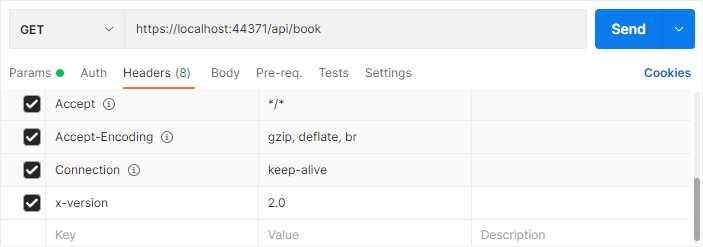
Figure 42: Specify a version in the header
Now call the book list API by doing a GET request for the URL https://localhost:44371/api/book, and you will see that the list of books returned is coming from version 2.0 of your controller. By making a small change to the API, we can switch between specifying the version in the query string and specifying the version in the header.
Versioning with headers and query strings
If you want to give the consumers of your API some flexibility when specifying the version they want, you can do this (you guessed it) in the ConfigureServices method of the Startup class. Consider the code in Code Listing 68.
Code Listing 68: Combining version readers
services.AddApiVersioning(o => { o.AssumeDefaultVersionWhenUnspecified = true; o.DefaultApiVersion = new ApiVersion(1, 1); o.ReportApiVersions = true; o.ApiVersionReader = ApiVersionReader.Combine( new HeaderApiVersionReader("x-version") , new QueryStringApiVersionReader("version", "ver", "v")); }); |
Here we are telling the API to accept a version specified in the query string as well as in the header. What’s more, I’m telling the API to accept the following query string parameters to look for the version to call:
https://localhost:44371/api/book?v=2.0
https://localhost:44371/api/book?ver=2.0
https://localhost:44371/api/book?version=2.0
If the consumer specifies any of these query string parameters or specifies a header key called x-version, the API will use that to call the correct version of the API.
Versioning using the URL
Specifying the version in the URL for the API endpoint you want to use is another technique that many developers use for versioning. I quite like this because the version is enforced as part of the route. Start by modifying the ConfigureServices method in the Startup class, as seen in Code Listing 69.
Code Listing 69: Specify URL versioning
services.AddApiVersioning(o => { o.AssumeDefaultVersionWhenUnspecified = true; o.DefaultApiVersion = new ApiVersion(1, 1); o.ReportApiVersions = true; o.ApiVersionReader = new UrlSegmentApiVersionReader(); }); |
The next part is a bit of a pain but is required for this versioning method to work. Because we are going to specify the version in the URL, we need to modify the Route attribute on all our controllers. Start by modifying the BookController and tell it to expect a route that includes the version in the route after the Api segment, as seen in Code Listing 70. This controller is specific to version 1.0 and version 1.1 of your API.
Code Listing 70: The modified BookController
[Route("api/v{version:apiVersion}/[controller]")] [ApiVersion("1.0")] [ApiVersion("1.1")] [ApiController] public class BookController : ControllerBase { |
Next, modify the Book2Controller by modifying its Route attribute to expect a route that includes the version of the API, as seen in Code Listing 71.
Code Listing 71: The modified Book2Controller
[Route("api/v{version:apiVersion}/[controller]")] [ApiVersion("2.0")] [ApiController] public class Book2Controller : ControllerBase { |
With these changes in place, run your API and call the following URLs:
https://localhost:44371/api/v1/book
https://localhost:44371/api/v1.1/book
https://localhost:44371/api/v2/book
The API still works and returns the list of books as expected. Some developers might not like this method of versioning APIs because it is less forgiving and less flexible than other methods. Some, however, might like that because specifying the version in the URL clearly states their intent. Whichever method you choose, implementing this in your API is quite simple to do.


- 80+ high-performance ASP.NET Core controls, including DataGrid, Charts, and Scheduler.
- Lightweight and responsive.
- Modular and touch-friendly.
- Built-in themes.