
ASP.NET Core APIs Succinctly®

CHAPTER 2
Returning Data with Your API
The first thing we will be doing is adding a new controller and letting it return some dummy data. This is just a way to start hooking up the bits and pieces that make up our API.
Creating actions
In Visual Studio, create a new controller called BookController. You can delete the default WeatherForecastController that was created as part of the project.
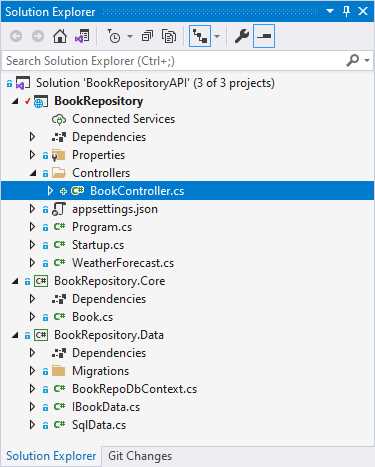
Figure 26: The new BookController
Your solution will look as illustrated in Figure 26. Open the controller and start by adding a simple GET action that will return an anonymous object containing a book title and ISBN. Looking at Code Listing 19, it is important to note that the BookController class inherits from ControllerBase. This is just the base class for a controller without view support. Seeing as we aren’t going to have any views, this is perfect.
Code Listing 19: The BookController
using Microsoft.AspNetCore.Mvc; namespace BookRepository.Controllers { [Route("api/book")] public class BookController : ControllerBase { public object Get() { return new { Title = "Sapiens", ISBN = "9780062316110" }; } } } |
You will also notice that we are specifying the route on the BookController class with a route attribute of api/book. If you ran your API project now and performed a GET request in Postman using the URL https://localhost:44371/api/book, then your hardcoded JSON data will be returned to you.
By convention, however, we would never hard-code a route, as illustrated in Code Listing 19. We would use [controller] to tell the API to use whatever comes before the word controller as our route. Do this now by changing the route from [Route("api/book")] to [Route("api/[controller]")], as seen in Code Listing 20.
Code Listing 20: Using a more flexible route
Run your API in Visual Studio and perform the same GET request in Postman using the URL https://localhost:44371/api/book. As illustrated in Figure 27, the results returned are the same as before we changed the route. The only difference is that it is not hard-coded to Book.
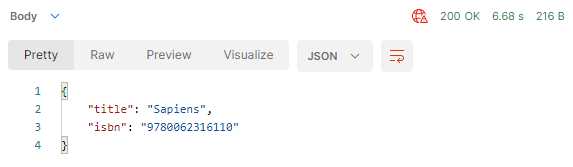
Figure 27: The GET results
You will also notice that the API returned a status code of 200. This means that the GET request was successful. The question we now have is, what if something went wrong during the API call? How would we inform the user of this event? This is where an explanation of using status codes is required.
Using status codes
Calling an API requires a request and a response: you make a request, and the API responds. As part of the response, the API uses status codes to indicate the status of the request. Did it succeed or not; was the resource found or not; are you authorized to make this request or not?
There are quite a few status codes that can be used, but the following table lists some of the main ones that you might come across.
Table 1: Status codes
Code | Description |
|---|---|
200 | OK |
201 | Created |
202 | Accepted |
302 | Found |
304 | Not Modified |
307 | Temp Redirect |
308 | Perm Redirect |
400 | Bad Request |
401 | Not Authorized |
403 | Forbidden |
404 | Not Found |
405 | Method Not Allowed |
409 | Conflict |
500 | Internal Error |
The three status code ranges that you will be most concerned about are:
- 2xx: The request worked.
- 4xx: You did something wrong.
- 5xx: There was an error on the server.
The 500 range includes:
- 503: Service Unavailable
- 504: Gateway Timeout
There is not just a single 500 status code, as listed in Table 1. For a full list of HTTP status codes, have a look at the list provided by the Internet Assigned Numbers Authority.
Status codes give us the ability to provide a clear response to the requester as to the outcome of their request. It is these status codes that we will be utilizing in our API. Looking back to Code Listing 20, modify your code as illustrated in Code Listing 21.
Code Listing 21: Modified action
I have changed the Get method to return an IActionResult and added the HttpGet attribute to the method. This allows me to indicate that this method is the GET action on the same route that we specified on the controller. The name of the method (or action), therefore, isn’t important, and we can be a bit more descriptive in naming our actions. I am also wrapping the return object with an Ok method that indicates what status code to return. The Ok method is defined in the ControllerBase class, so it is available to the derived BookController class. The GetBooks action is, therefore, our endpoint on this API to return a list of books.
Calling your API in Postman again, you should still receive the response as seen in Figure 27. You will see how to use different status codes later on in this book, but for now, we are just returning Ok which is a status 200.
Returning collections with GET
Our API project contains a data access layer. We set this up in Chapter 1. We now want to be able to use the data layer and perform API actions against our database. If you look back to Code Listing 16, you will remember that we registered our data access service in the services collection in the Startup.cs class. This allows us to use dependency injection to inject this service into our classes and use the service to perform actions against the database.
To inject the data access service into our controller, we will need to create a constructor. Looking at the complete code in Code Listing 22, you will see that it has changed somewhat. I have added a constructor and passed in the IBookData interface. This dependency injection allows me to use the data access service in my controller.
Code Listing 22: Modifying the BookController
|
using Microsoft.AspNetCore.Http; using Microsoft.AspNetCore.Mvc; using System; namespace BookRepository.Controllers { [Route("api/[controller]")] public class BookController : ControllerBase { private readonly IBookData _service; public BookController(IBookData service) { _service = service; } [HttpGet] public IActionResult GetBooks() { try { var books = _service.ListBooks(); return Ok(books); } catch (Exception) { return StatusCode(StatusCodes.Status500InternalServerError, "There was a database failure"); } } } } |
I have also added a try block with a catch that returns a different status code. The StatusCodes class is in the Microsoft.AspNetCore.Http namespace, so you will have to import this namespace, too.
In the try block, I am using the service to return the list of books. With this code in place, call the API again in Postman, and you will see that it returns the results stored in the database.
Code Listing 23: The list of books returned from my database
[ { "id": 2, "isbn": "076790818X", "title": "A Short History of Nearly Everything", "description": "Science has never been more involving or entertaining.", "publisher": "Crown", "author": "Bill Bryson" }, { "id": 1, "isbn": "0465030335", "title": "Letters to a Young Contrarian", "description": "In the book that he was born to write, provocateur and best-selling author Christopher Hitchens inspires future generations of radicals, gadflies, mavericks, rebels, angry young (wo)men, and dissidents.", "publisher": "Basic Books", "author": "Christopher Hitchens" }, { "id": 3, "isbn": "9780062316110", "title": "Sapiens", "description": "One hundred thousand years ago, at least six different species of humans inhabited Earth. Yet today there is only one—homo sapiens. What happened to the others?", "publisher": "Harper Perennial", "author": "Yuval Noah Harari" } ] |
The results that are returned for you will most likely be different (because you would have added different book data than I have). In Chapter 1, Figure 23, however, you can see that the data in my database table matches the data returned here in the API call. But there is still something that I don’t like. I want to do this GET request asynchronously (and you should implement async). For this, we need to modify the IBookData interface, as seen in Code Listing 24.
Code Listing 24: The modified IBookData interface
using BookRepository.Core; using System.Collections.Generic; using System.Threading.Tasks; namespace BookRepository.Data { public interface IBookData { IEnumerable<Book> ListBooks(); Task<IEnumerable<Book>> ListBooksAsync(); Book GetBook(int Id); Book UpdateBook(Book bookData); Book AddBook(Book newBook); int Save(); } } |
I have added Task<IEnumerable<Book>> ListBooksAsync() to the interface, and this needs to be implemented on the SqlData.cs class. The implementation of this async method is illustrated in Code Listing 25.
Code Listing 25: Implemented ListBooksAsync in SqlData.cs
public async Task<IEnumerable<Book>> ListBooksAsync() { return await _database.Books .OrderBy(b => b.Title) .ToListAsync(); } |
We can now use this asynchronous method in our Controller action by changing the IActionResult to async Task<IActionResult> and awaiting the call to the service, as illustrated in Code Listing 26.
Code Listing 26: Calling ListBooksAsync in the controller
using BookRepository.Data; using Microsoft.AspNetCore.Http; using Microsoft.AspNetCore.Mvc; using System; using System.Threading.Tasks; namespace BookRepository.Controllers { [Route("api/[controller]")] public class BookController : ControllerBase { private readonly IBookData _service; public BookController(IBookData service) { _service = service; } [HttpGet] public async Task<IActionResult> GetBooks() { try { var books = await _service.ListBooksAsync(); return Ok(books); } catch (Exception) { return StatusCode(StatusCodes.Status500InternalServerError, "There was a database failure"); } } } } |
Calling the API endpoint again will still return the same data from your database, but the call is done asynchronously.
Note: Be sure to add the System.Threading.Tasks namespace.
This whole time, we have just been changing the logic in our controller while the actual API call remains the same.
Returning models instead of entities
There is one more thing that I want to do. I do not want to directly return the entity from my API call. Looking back to Code Listing 23, you will notice that the data returned included the database ID for the book. This is information that I do not want to expose to the user. I can use a model here to control what I return to the user.
Note: Sometimes you will want to filter out data for security reasons too.
Start by adding a Models folder to your BookRepository project. Inside this folder, add a new class called BookModel, as illustrated in Figure 28.
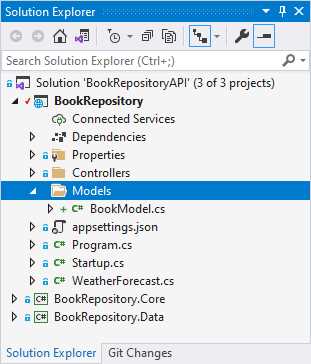
Figure 28: The Models folder and the BookModel class
The code for BookModel is almost the same as the Book entity. The only difference here is that BookModel does not have a property for the Id.
Code Listing 27: The BookModel
This is what we want. We do not want to return the whole Book entity to the user, and a model allows us to filter the data that is returned to the user.
The next change that we need to do is modify our API action on the BookController to return the BookModel instead of the Book entity. Now the code illustrated in Code Listing 28 is perfectly valid code. There are, however, much shorter (and in my opinion, better) ways to do this mapping between the Book entity and the BookModel model. There is a very good tool called AutoMapper that will automatically map classes.
You can find AutoMapper on NuGet.
I decided that implementing AutoMapper here and going into an explanation of how to set it up and use it was beyond the scope of this book. Just be aware that there are mapping tools such as AutoMapper that can reduce the code illustrated in Code Listing 28 to a few lines.
Code Listing 28: The Modified controller action
[HttpGet] public async Task<ActionResult<List<BookModel>>> GetBooks() { try { var books = await _service.ListBooksAsync(); return (from book in books let model = new BookModel() { Author = book.Author, Description = book.Description, Title = book.Title, Publisher = book.Publisher, ISBN = book.ISBN } select model).ToList(); } catch (Exception) { return StatusCode(StatusCodes.Status500InternalServerError, "There was a database failure"); } } |
Comparing the code for the GetBooks action in Code Listing 28 to the code in Code Listing 26, you will notice that I have changed the GetBooks action from public async Task<IActionResult> GetBooks() to public async Task<ActionResult<List<BookModel>>> GetBooks().
I have changed the IActionResult to ActionResult that takes the return type List<BookModel> as a parameter.
I can now remove the return Ok(books) and return the mapped BookModel directly. Because this matches the return type of GetBooks, a status of 200 will be returned for us.
Calling the API again in Postman, you will see that the book data is returned without the Id property for each book, as illustrated in Code Listing 29.
Code Listing 29: The data returned from the BookModel
[ { "isbn": "076790818X", "title": "A Short History of Nearly Everything", "description": "Science has never been more involving or entertaining.", "publisher": "Crown", "author": "Bill Bryson" }, { "isbn": "0465030335", "title": "Letters to a Young Contrarian", "description": "In the book that he was born to write, provocateur and best-selling author Christopher Hitchens inspires future generations of radicals, gadflies, mavericks, rebels, angry young (wo)men, and dissidents.", "publisher": "Basic Books", "author": "Christopher Hitchens" }, { "isbn": "9780062316110", "title": "Sapiens", "description": "One hundred thousand years ago, at least six different species of humans inhabited Earth. Yet today there is only one—homo sapiens. What happened to the others?", "publisher": "Harper Perennial", "author": "Yuval Noah Harari" } ] |
We have now filtered out data and given the user only the data that we wanted to expose to them.
Returning a single item
While I do not want to display a book ID to the user, I do want to use that ID so that I can return a single book from my API. Doing this is easy. As before, I will be modifying my interface to add an asynchronous call to the database to return a single book based on its Id.
Modify your interface as illustrated in Code Listing 30.
Code Listing 30: The IBookData interface
using BookRepository.Core; using System.Collections.Generic; using System.Threading.Tasks; namespace BookRepository.Data { public interface IBookData { IEnumerable<Book> ListBooks(); Task<IEnumerable<Book>> ListBooksAsync(); Book GetBook(int Id); Task<Book> GetBookAsync(int Id); Book UpdateBook(Book bookData); Book AddBook(Book newBook); int Save(); } } |
Implement that method on your SqlData class, as illustrated in Code Listing 31.
Code Listing 31: The GetBookAsync implementation in SqlData
In your controller (Code Listing 32), add a new action called GetBook and include the HttpGet attribute. In addition to HttpGet, include a route value called Id. This will bind the route value to the Id parameter passed to the GetBook action, and it will look for it after the slash of the [controller] section in the controller route api/[controller].
Code Listing 32: The GetBook action
[HttpGet("{Id}")] public async Task<ActionResult<BookModel>> GetBook(int Id) { try { var result = await _service.GetBookAsync(Id); return result == null ? NotFound($"The book with ID {Id} was not found") : new BookModel() { Author = result.Author, Description = result.Description, Title = result.Title, Publisher = result.Publisher, ISBN = result.ISBN }; } catch (Exception) { return StatusCode(StatusCodes.Status500InternalServerError, "There was a database failure"); } } |
The action then calls the GetBookAsync method on the data service, and if the result is null, it will return a NotFound status.
Run your API and in Postman make a GET request to the URL https://localhost:44371/api/book/1, replacing the port 44371 that I am using with the port you are using.
Code Listing 33: The book result returned
{ "isbn": "0465030335", "title": "Letters to a Young Contrarian", "description": "In the book that he was born to write, provocateur and best-selling author Christopher Hitchens inspires future generations of radicals, gadflies, mavericks, rebels, angry young (wo)men, and dissidents.", "publisher": "Basic Books", "author": "Christopher Hitchens" } |
Looking back to Figure 23 in Chapter 1, you will see that this is the book with Id = 1 that I added to my database table. Changing your API call to specify an invalid book Id (999 for example), the API will return a Not Found status, as illustrated in Figure 29.

Figure 29: Book not found response
If you do get a valid book returned with Id = 999, I will have to congratulate you on your persistence in adding all those books. Try looking for -1 instead to see the NotFound return status.
Searching data
I want to be able to give the user the ability to search books based on the ISBN. This will allow the user to find specific books because ISBNs are unique, and if you have the exact ISBN, you will find the book that you are looking for. I also want the user to be able to find books if they only enter a part of the ISBN. The API should return all books that have ISBNs starting with the number they type.
To enable searching, we will use query strings and the query string will be mapped to the Isbn parameter on the SearchIsbn action, which is illustrated in Code Listing 34. We are also telling the API that any URLs that come to the API with the word search after the controller section in the route must be handled by this action called SearchIsbn.
The SearchIsbn action simply does the call to the ListBooksAsync method on our data service, and then filters the returned book list for all books that have ISBNs starting with the value we supplied in the query string.
Code Listing 34: Adding the SearchIsbn action
[HttpGet("search")] public async Task<ActionResult<List<BookModel>>> SearchIsbn(string Isbn) { try { var books = await _service.ListBooksAsync(); var results = books.Where(b => b.ISBN.StartsWith(Isbn)); return !results.Any() ? NotFound() : (from book in results let model = new BookModel() { Author = book.Author, Description = book.Description, Title = book.Title, Publisher = book.Publisher, ISBN = book.ISBN } select model).ToList(); } catch (Exception) { return StatusCode(StatusCodes.Status500InternalServerError, "There was a database failure"); } } |
If no books are found, then we simply return a NotFound status. Assuming that you have a book with an ISBN of 076790818X in your table, run the API and call the book search using the URL https://localhost:44371/api/book/search?Isbn=076790818X.
Seeing as my table does have a book with the ISBN 076790818X, the API will return that specific book result, as seen in Code Listing 35.
Code Listing 35: The result for ISBN 076790818X
[ { "isbn": "076790818X", "title": "A Short History of Nearly Everything", "description": "Science has never been more involving or entertaining.", "publisher": "Crown", "author": "Bill Bryson" } ] |
If, however, I am unsure of the ISBN and only know that it starts with a 0, I can perform a book search using the URL https://localhost:44371/api/book/search?Isbn=0 instead.
Code Listing 36: The result for book ISBNs starting with 0
[ { "isbn": "076790818X", "title": "A Short History of Nearly Everything", "description": "Science has never been more involving or entertaining.", "publisher": "Crown", "author": "Bill Bryson" }, { "isbn": "0465030335", "title": "Letters to a Young Contrarian", "description": "In the book that he was born to write, provocateur and best-selling author Christopher Hitchens inspires future generations of radicals, gadflies, mavericks, rebels, angry young (wo)men, and dissidents.", "publisher": "Basic Books", "author": "Christopher Hitchens" } ] |
In a production system, searching for an ISBN starting with 0 is not going to be useful at all (it will return too many books), but the logic here is clear. I have only three books in my database, so doing this search is easy enough to illustrate the point.
As homework, why don’t you try and create a search for other book properties? Add in several books from the same author and do an author search. Your API code can be extended easily to accommodate this type of search.
Let’s see how to modify data in the next chapter.


- 80+ high-performance ASP.NET Core controls, including DataGrid, Charts, and Scheduler.
- Lightweight and responsive.
- Modular and touch-friendly.
- Built-in themes.