
ASP.NET Core APIs Succinctly®

CHAPTER 3
Modifying Data with Your API
APIs would not be much use if they couldn’t allow the modification of data to occur. We saw in the previous chapter that we can precisely control what the user sees by returning a model instead of an entity during a GET request. As is the case here, when modifying data, you are in control, and you can expose that functionality to the consumer of your API.
There are other HTTP verbs to accommodate the modification of data. The verbs you would commonly use with APIs are:
- GET: Read data from a resource.
- POST: Create a new resource.
- PUT: Update an existing resource.
- PATCH: Make a partial update on a resource.
- DELETE: Delete a resource.
You would need to think about how you would allow something such as a DELETE, for example. As with a PUT or a PATCH, you would most likely supply an ID of some kind when doing a DELETE. You would not want to allow the consumer of your API to delete all the resources at once.
Add entities using POST
As I mentioned in Chapter 1, the interface in our API will be changing somewhat throughout the development of the API. I want the ability to create a new book in my book repository, but later on, I might want to add other entity types. I not only want EF to add my entity to the BookRepoDbContext, but to save the entity, too. I also want the inserted ID of the entity returned to me.
Code Listing 37: Added SaveAsync in the interface
|
using System.Collections.Generic; using System.Threading.Tasks; namespace BookRepository.Data { public interface IBookData { IEnumerable<Book> ListBooks(); Task<IEnumerable<Book>> ListBooksAsync(); Book GetBook(int Id); Task<Book> GetBookAsync(int Id); Book UpdateBook(Book bookData); void AddBook(Book newBook); int Save(); Task<int> SaveAsync<T>(T entity); } } |
For this reason, I will modify my interface (Code Listing 37) to specify that a SaveAsync method must be implemented that takes a generic type T and returns an integer. I must then provide the implementation for this in the SqlData.cs class, as illustrated in Code Listing 38.
Code Listing 38: The SaveAsync implementation in SqlData
public async Task<int> SaveAsync<T>(T entity) { var addedEntity = _database.Add(entity); var entityId = -1; if (await _database.SaveChangesAsync() > -1) { entityId = Convert.ToInt32(addedEntity.Property("Id").CurrentValue); } return entityId; } |
This SaveAsync method will accept an entity, add that entity to the BookRepoDbContext, and then attempt to save the entity to the database. I can then grab the inserted Id field value because I know that my tables in the database will always have an Id field.
Note: There are better ways to do the SaveAsync—specifically, surrounding the return of the inserted Id field. Because I am using a hard-coded string value for the property name, casing matters. Therefore, if you specify ID and the column on the table is called Id, you will receive an error. This book is, however, not a book on EF Core. I want you to get the most out of this book concerning APIs. I’ll leave the exact mechanics of the BookRepository.Data project up to you to fine-tune.
Entity Framework will provide this ID to you after the SaveChangesAsync method has been successfully called. Back in the BookController, we will be utilizing model binding to bind the JSON passed to the endpoint to our BookModel. To enable this, add the attribute [ApiController] to your BookController class, as illustrated in Code Listing 39.
Code Listing 39: The Added ApiController attribute
namespace BookRepository.Controllers { [Route("api/[controller]")] [ApiController] public class BookController : ControllerBase { |
This allows our controller to act as an API. We are telling .NET Core a lot about what we expect from this controller. It will, therefore, attempt to do model binding for us.
Code Listing 40: The Post API method
public async Task<ActionResult<BookModel>> Post(BookModel model) { try { var entityLocation = ""; var entity = new Book() { Author = model.Author, Description = model.Description, Title = model.Title, Publisher = model.Publisher, ISBN = model.ISBN }; var createdBookId = await _service.SaveAsync(entity); if (createdBookId > 0) { entityLocation = _linkGenerator.GetPathByAction("GetBook", "Book", new { Id = createdBookId }); return Created(entityLocation, model); } } catch (Exception) { return StatusCode(StatusCodes.Status500InternalServerError, "There was a database failure"); } return BadRequest(); } |
As seen in Code Listing 40, create an API method that will accept our POST request.
Note: The _linkGenerator will show a red squiggly line. I’ll get back to that shortly.
The code is a lot like before with regards to the model, but this time in reverse. The SaveAsync method accepts an entity of type T, but we know that we need to pass the database a Book entity.
Because the SaveAsync method accepts a parameter of type T, it is quite easy to pass the model instead of the entity which will throw an exception. This seems like a job for an interface and a constraint. I do not want to allow the accidental passing of a model to the SaveAsync method. It must always take an entity as a parameter.
Create a new interface in the BookRepository.Core project. Call this interface IEntity and give it a property called Id. I want to require all entities that implement IEntity to contain a property called Id. Not ID or RecordId, but Id. See where I’m going with this?
The code in Code Listing 41 for the IEntity interface is really simple.
Code Listing 41: The IEntity interface
Implement this IEntity interface on the Book entity, as seen in Code Listing 42.
Code Listing 42: The Book entity implementing IEntity
namespace BookRepository.Core { public class Book : IEntity { public int Id { get; set; } public string ISBN { get; set; } public string Title { get; set; } public string Description { get; set; } public string Publisher { get; set; } public string Author { get; set; } } } |
Swing back to the IBookData interface and add a constraint on the SaveAsync generic method to tell it to only accept types that implement IEntity (Code Listing 43).
Code Listing 43: Added constraint on SaveAsync
using BookRepository.Core; using System.Collections.Generic; using System.Threading.Tasks; namespace BookRepository.Data { public interface IBookData { IEnumerable<Book> ListBooks(); Task<IEnumerable<Book>> ListBooksAsync(); Book GetBook(int Id); Task<Book> GetBookAsync(int Id); Book UpdateBook(Book bookData); void AddBook(Book newBook); int Save(); Task<int> SaveAsync<T>(T entity) where T : IEntity; } } |
Lastly, this needs to be implemented in the SqlData class on the SaveAsync method, as seen in Code Listing 44.
Code Listing 44: Constraint implemented in SqlData class
public async Task<int> SaveAsync<T>(T entity) where T : IEntity { var addedEntity = _database.Add(entity); var entityId = -1; if (await _database.SaveChangesAsync() > -1) { entityId = Convert.ToInt32(addedEntity.Property("Id").CurrentValue); } return entityId; } |
The code we wrote for the Post method on our controller (as illustrated in Code Listing 40) is now much more fault-tolerant. We can only pass the data service entities to perform data modifications on. The last bit that we need to talk about is the _linkGenerator (which you undoubtedly see underlined with a red squiggly line in your code editor).
Because I have the Id of the created entity being returned to me, I want some way to tell the consumer of this API where to find this created resource. This is done with a LinkGenerator, which is in the Microsoft.AspNetCore.Routing namespace.
Code Listing 45: The modified BookController constructor
private readonly IBookData _service; private readonly LinkGenerator _linkGenerator; public BookController(IBookData service, LinkGenerator linkGenerator) { _service = service; _linkGenerator = linkGenerator; } |
Modify the controller’s constructor (Code Listing 45) to take a LinkGenerator as a parameter and save that off to a field called _linkGenerator. Back in the Post method, you can use the GetPathByAction method of the _linkGenerator to return the location of the created entity. Consider the code snippet in Code Listing 46.
Code Listing 46: The getPathByAction code snippet
entityLocation = _linkGenerator.GetPathByAction("GetBook", "Book", new { Id = createdBookId }); |
I am telling the _linkGenerator to create a valid link to the resource I have just created with the Id returned from the SaveAsync method. This resource can be found by doing a GET request (which calls the GetBook action) on the BookController.
When this link has been generated, return a Created response specifying the entity location and the model that was used to create the entity.

Figure 30: The Postman POST
We can now use Postman to create a new book for us. As seen in Figure 30, create a POST with the URL endpoint of /api/book and specify that you will be sending raw JSON in the body. Format the body as JSON to contain the details of the book that you want to create and click Send.

Figure 31: The 201 Created response specifying the location
As seen in Figure 31, Postman returned a 201 Created response and includes the location of the created book for us. In this case, it is located at /api/Book/13, which means that the inserted Id in the table is 13. Your Id returned here will differ from mine.
Go ahead and perform a GET request with Postman for your book Id returned in the POST you performed. You will see the newly created book returned from the GET request.
Performing model validation
One more thing that I want to do is ensure that any books added contain at least an ISBN and a title. Without these, the POST should fail.
Code Listing 47: Adding required attributes on BookModel
As seen in Code Listing 47, modify the code in the BookModel and add the [Required] attribute. You will also need to add the System.ComponentModel.DataAnnotations namespace.

Figure 32: Posting an invalid BookModel
In Postman, perform a POST for an invalid BookModel without an ISBN, as seen in Figure 32.

Figure 33: The model validation message for the bad request
Postman reports an error from the API, as seen in Figure 33.
Tip: You would probably also want to add some validation in your POST to ensure that the ISBN you are adding is unique. This can be done in the POST method on your BookController.
With a simple attribute added to the BookModel, we can specify requirements for the models we use in the API. For more information on the other data annotations available, have a look at the official Microsoft documentation.
After fixing the body of the data you are posting (by adding in an ISBN), create the book via Postman. You will see that because you have specified the ISBN, your book is correctly created, and the location returned in the header of the API call in Postman. Make a note of this created book Id. We will use this to update the book in the next section using PUT.
Change entities using PUT
I enjoy reading, and I want my book repository to be as complete as possible. I have added some more books to my book repository using POST, as detailed earlier in this chapter. I do, however, notice that I have made a mistake on the last book that I have added. The book Foundation and Empire (as seen in Figure 34) should include the text Book 2 in the title.

Figure 34: The list of books
We need to allow the updating of an entity by implementing the PUT verb. The code to do this is quite simple, as seen in Code Listing 48. I want to create an action decorated with the HttpPut attribute and tell it to expect the Id of a book. I also want to pass the entity to update. The code then tries to find an existing book with the Id we specified. This can just be done by calling the GetBookAsync method on the data service.
If no such book is found, then we must return a NotFound, as this is the most appropriate response in this case. If we do find a book with the given Id, then we need to apply the changes to the entity and call UpdateAsync on the data service.
Note: The complete source code for this book is available on GitHub. If I do not detail a bit of code here (such as on the data service), please refer to the source code.
Code Listing 48: Implementing the PUT verb
|
public async Task<ActionResult<BookModel>> Put(int Id, BookModel model) { try { var bookToUpdate = await _service.GetBookAsync(Id);
if (bookToUpdate != null) { bookToUpdate.Author = model.Author; bookToUpdate.Description = model.Description; bookToUpdate.Title = model.Title; bookToUpdate.Publisher = model.Publisher; bookToUpdate.ISBN = model.ISBN; return await _service.UpdateAsync(bookToUpdate) ? model : BadRequest(); } else { return NotFound($"Can't find book with Id {Id}"); } } catch (Exception ex) { return StatusCode(StatusCodes.Status500InternalServerError, $"There was a database failure: {ex.Message}"); } } |
It is then the entity that we want to update that is passed to the data service’s UpdateAsync method, as seen in Code Listing 49.
Code Listing 49: The UpdateAsync data service method
public async Task<bool> UpdateAsync<T>(T entity) where T : IEntity { var updatedEntity = _database.Attach(entity); updatedEntity.State = EntityState.Modified;
return (await _database.SaveChangesAsync() > 0); } |
If the update was successful, I will just return the mode. Alternatively, I will return a BadRequest. With this PUT method added, modify the book with the correct details by creating a PUT request in Postman using the URL that includes the Id of the book to update (and in your case, the Id you made a note of earlier).
The URL will be something similar to https://localhost:44371/api/book/1021, where 1021 at the end of the URL will be replaced with your book Id.

Figure 35: The PUT to update a book in Postman
To verify that the update succeeded, perform a GET with the URL https://localhost:44371/api/book and make a note of the books returned. You could also just do a GET for the specific book Id you updated. In my example, I would do a GET request in Postman using the URL https://localhost:44371/api/book/1021, but you would just use your specific book Id instead of mine.
Remove entities using DELETE
The last thing I want to add to my API is the ability to delete a book. By this time, you should have a few books in your book repository. There are perhaps some books that are no longer in your library, or perhaps you added a book with incorrect data that you do not wish to update.
Deleting a book is easily implemented. I have added DeleteAsync to my IBookData interface and implemented it in my SqlData service, as seen in Code Listing 50.
Code Listing 50: The DeleteAsync data service method
public async Task<bool> DeleteAsync<T>(T entity) where T : IEntity { var updatedEntity = _database.Remove(entity); updatedEntity.State = EntityState.Deleted; return (await _database.SaveChangesAsync() > 0); } |
Back in the BookController, I have added a Delete action that expects the book Id of the book you want to delete (Code Listing 51). Notice how we don’t pass it a model in this instance.
Code Listing 51: The Delete action in BookController
[HttpDelete("{Id}")] public async Task<IActionResult> Delete(int Id) { try { var bookToDelete = await _service.GetBookAsync(Id); return bookToDelete != null ? await _service.DeleteAsync(bookToDelete) ? Ok() : BadRequest() : NotFound($"Can't find book with Id {Id}"); } catch (Exception ex) { return StatusCode(StatusCodes.Status500InternalServerError, $"There was a database failure: {ex.Message}"); } } |
I perform the same GetBookAsync call to my data service as in the PUT, but this time if I find a book, I just call the DeleteAsync on my data service. If the delete works, I just return Ok; otherwise, a BadRequest is returned. If the book with that Id is not found, I return a NotFound, which is exactly what we want.
Lastly, I add the HttpDelete attribute to the DELETE action.

Figure 36: The DELETE in Postman
In Postman I create a DELETE and give it the URL https://localhost:44371/api/book/14, where my book Id is 14. Your book Id will differ. This is all that I supply, and when I click Send, as seen in Figure 36, Postman just returns a status 200.
If you do a GET for the book Id you just deleted, you will see that the book can’t be found, as seen in Figure 37 for my book Id of 14.
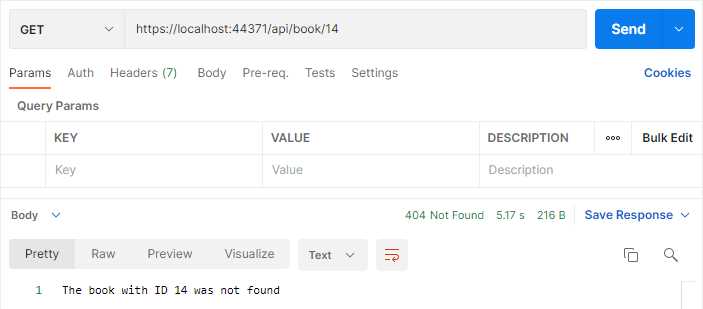
Figure 37: Book Id 14 not found
With the DELETE implemented, we have the basics in place for our API. In the next chapter, let’s expand a bit on the functionality of the API and add more logic around versioning.


- 80+ high-performance ASP.NET Core controls, including DataGrid, Charts, and Scheduler.
- Lightweight and responsive.
- Modular and touch-friendly.
- Built-in themes.