
Ansible Succinctly®

CHAPTER 11
Templating
In this chapter, we are going to discuss the Jinja2 templates. Jinja2 is a templating language for Python. Ansible uses Jinja2 templating to enable the dynamic creation of the content. The dynamic content is going to be driven by the variables used within a playbook. This is useful when we need to apply changes to the static content and adapt it to the managed hosts.
For instance, a load balancer configuration file might need to be updated with the list of available web servers. Rather than hard-coding this information in the load balancer’s config file, and in fact duplicating this information that we need later on to maintain, we can simply utilize the list of hosts we already have predefined in our inventory file, change the content of the config file, and ship it to the load balancer.
When playbooks are executed, these variables get replaced by actual values defined in the playbooks. This way, templating offers an efficient and flexible solution to create or alter content with ease.
Jinja2 basic syntax
A Jinja2 template file is a text file that contains variables that get evaluated and replaced by actual values upon runtime or code execution. In a Jinja2 template file, you will find the following syntax:
- {{ }}: Used for embedding variables and using their value during code execution. For example, a simple syntax using the double curly braces is as shown: The {{ webserver }} is running on {{ nginx-version }}.
- {% %}: Used for control statements such as loops and if-else statements.
- {# #}: These denote comments that describe a task.
We can perform conditional statements such as loops and if-else statements, and transform the data using filters and more.
Code Listing 68: Example of a Jinja2 loop
{% for host in groups['webservers'] %} {{ host }} {% endfor %} |
Jinja2 module
To invoke the transformation of the template, we have to integrate it within a playbook. Ansible offers a module called template.
Code Listing 69: Basic template module with arguments
tasks: - name: Jinja2 template template: src: haproxy.cfg dest: /etc/haproxy/haproxy.cfg owner: root group: root mode: 0644 |
Template has a few arguments we could supply:
- src: The source file we would like to transform; in this case, haproxy.cfg.
- dest: Where we want to copy the content after the transformation.
- owner: Name of the user who should own the file/directory, as would be fed to chown.
- group: Name of the user who should own the file/directory, as would be fed to chown.
- mode: The permissions the resulting file or directory should have.
To debug the template, we could utilize the debug module with a special lookup function. This is particularly useful as the content won’t be deployed to any host, but we could see the result of the transformation.
The lookup plugin is an Ansible extension to the Jinja2 templating language. For more information, you can run ansible-doc -t lookup -l to list all available lookup plugins. For more information about the lookup template plugin, you can always consult the documentation by running the ansible-doc -t lookup template command.
Code Listing 70: Task used for displaying transformations locally
tasks: - name: Show the template content debug: msg: "{{ lookup('template', './haproxy.cfg') }}" |
Let’s run this code in debug mode.
The inventory file we are going to use is as follows, and we can see that we are defining a webservers group with two servers.
Code Listing 71: Inventory file
[webservers] web160 web161 [load_balancers] lb |
Let’s create a file named webservers.j2 and put it in the local folder, where we run the playbook.yml. The content of the webservers.j2 is shown in Code Listing 72. This is actually our template file. Typically the file can have the .j2 extension, but this is purely optional, as it might be useful when using text editors with the Jinja2 syntax option.
group['webservers'] is something we haven’t yet seen. It’s a built-in collection that would return the content of the hosts as defined in the inventory file.
Code Listing 72: Webservers.j2 template file
Available Web Servers: {# message variable defined in the template #} {{ message }} {# displaying list of hosts as defined in the inventory#} {% for host in groups['webservers'] %} {{ host }} {% endfor %} {# message variable defined in the template #} Host joined by a comma separated value {{ groups['webservers'] | join(",") }} |
Code Listing 73: Playbook running the template
--- - name: Using a jinja2 template hosts: load_balancers gather_facts: false vars: - message: "We love Ansible"
tasks: - name: Show the template content debug: msg: "{{ lookup('template', './webservers.j2') }}" |
The result of executing the playbook follows.
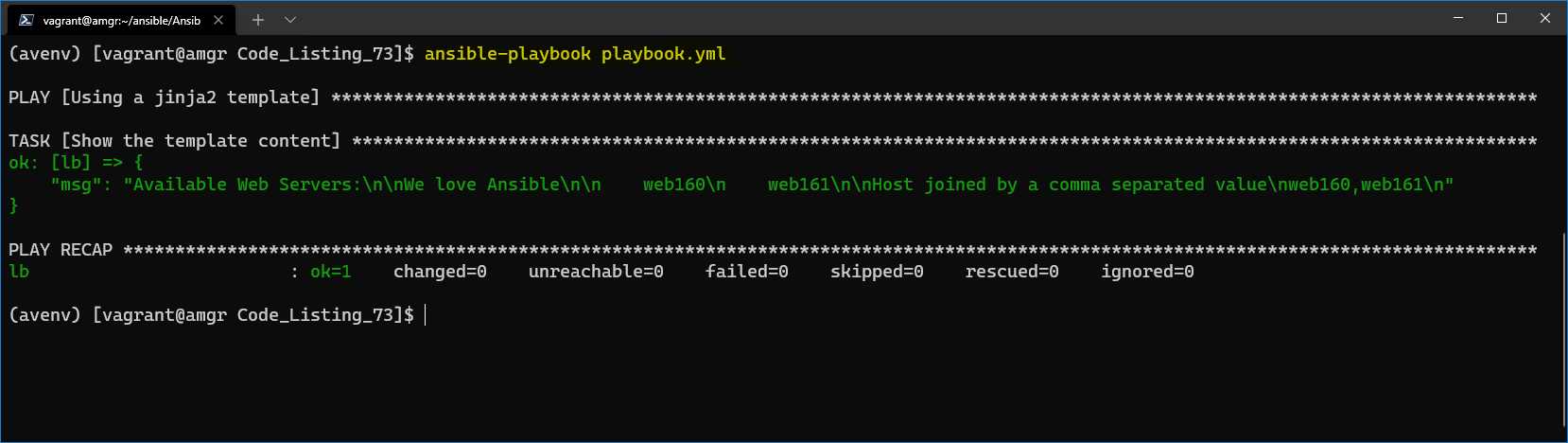
Figure 40: Debug output of the template
To run the code against the load balancer, let’s change the playbook to look as follows.
Code Listing 74: Template module used in a task
--- - name: Using a jinja2 template hosts: load_balancers gather_facts: false vars: - message: "We love Ansible"
tasks: - name: Jinja2 template template: src: webservers.j2 dest: /home/vagrant |
We are using the template module rather than the one used for the debugging purpose.
With the newly defined task, we are going to transform the file locally, and then the file will be copied to the load balancer at the destination folder /home/vagrant, as specified in the dest argument.
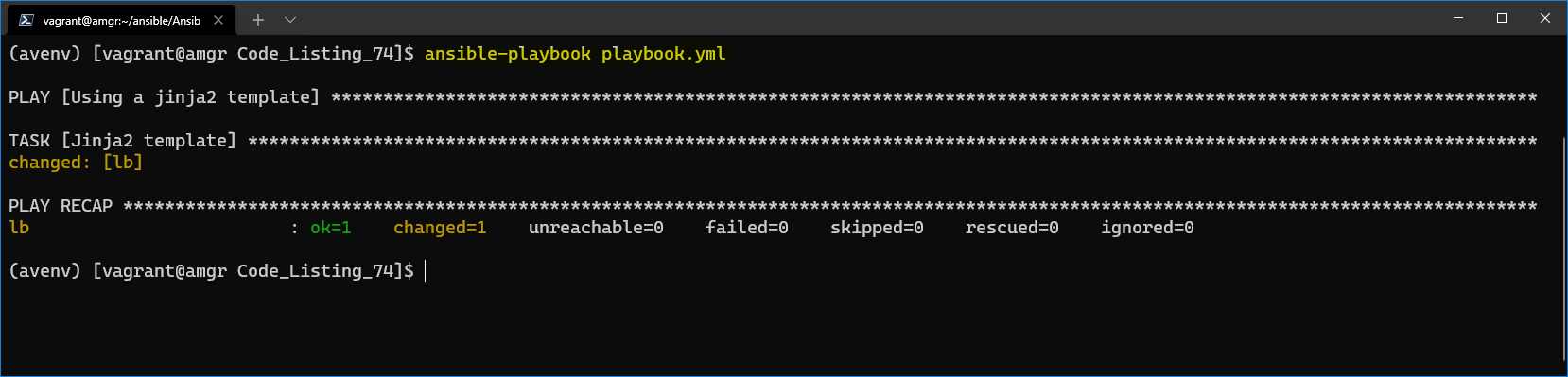
Figure 41: Task with deployment on the load balancer
The task went fine, but let’s check on the load balancer server and see the content of the file we have transformed and copied across. By using the cat command, we can see the content of the file.
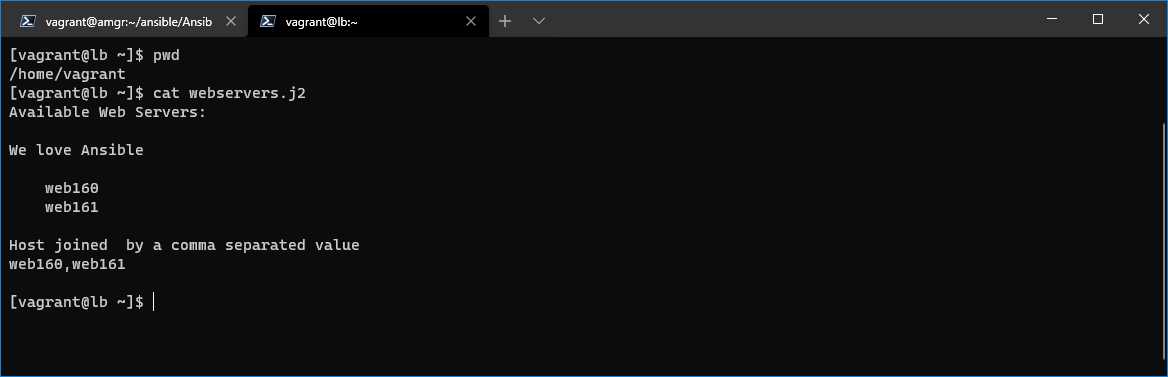
Figure 42: Load balancer home directory
The content of the file is as shown in the following code listing.
Code Listing 75: Result of the command execution
We love Ansible web160 web161 Host joined by a comma separated value web160,web161 |


- 1800+ high-performance UI components.
- Includes popular controls such as Grid, Chart, Scheduler, and more.
- 24x5 unlimited support by developers.