
Ansible Succinctly®

CHAPTER 10
Ansible Playbook Handlers
There are situations where we want a task to run only when a change is made on a managed host. For example, we may want to restart a particular service if a task updates the configuration of a service, or we might reboot the machine after some package installation.
Ansible uses handlers to address this use case. We may ask, why not simply create a task at the end of the playbook that would reboot the server, or something similar? This task would need to depend on the execution of other tasks and to check the status of each of them to decide if something has to happen or not.
Ansible has solved this issue elegantly by introducing handlers. Handlers are tasks that only run when notified by other tasks, and only when the change happens on the managed host. If a task doesn’t notify the handler, it won’t run.
A nice thing about handlers is that they run only once, even if notified by multiple tasks. This fits perfectly, for instance, with the reboot use-case where it doesn’t make sense to reboot the server after each task requiring it, but only once when all the tasks have been executed.
Handlers have a unique name globally and typically get placed at the end of the playbook. All of the modules used by tasks can also be used in the handler, so technically everything we can do in a task, we can do also in a handler itself.
Let’s see how to declare and link a handler to a task.
Code Listing 67: Handler definition
--- - name: Handler restarting httpd service after installation hosts: webservers become: yes gather_facts: false tasks: - name: Install apache package yum: name: httpd state: present notify: Restart apache handlers: - name: Restart apache service: name: httpd state: restarted |
In the previous code snippet, we can see a playbook containing one task and one handler.
The task’s responsibility is to install the httpd (Apache HTTP Server) by using the yum package manager. The state present in the task means that we want the httpd service to be present on the system as a result of running the task.
We can also see that there is a notify keyword after the task (aligned to the name and module), and the handler’s name to which the link is made (notify: Restart apache).
On the other hand, at the bottom of the playbook, we define a handler in the same way we would define a task: by specifying a name, module, and eventual arguments. The state restarted simply means that we want the service to be restarted.
By running the playbook, we will get the following result.
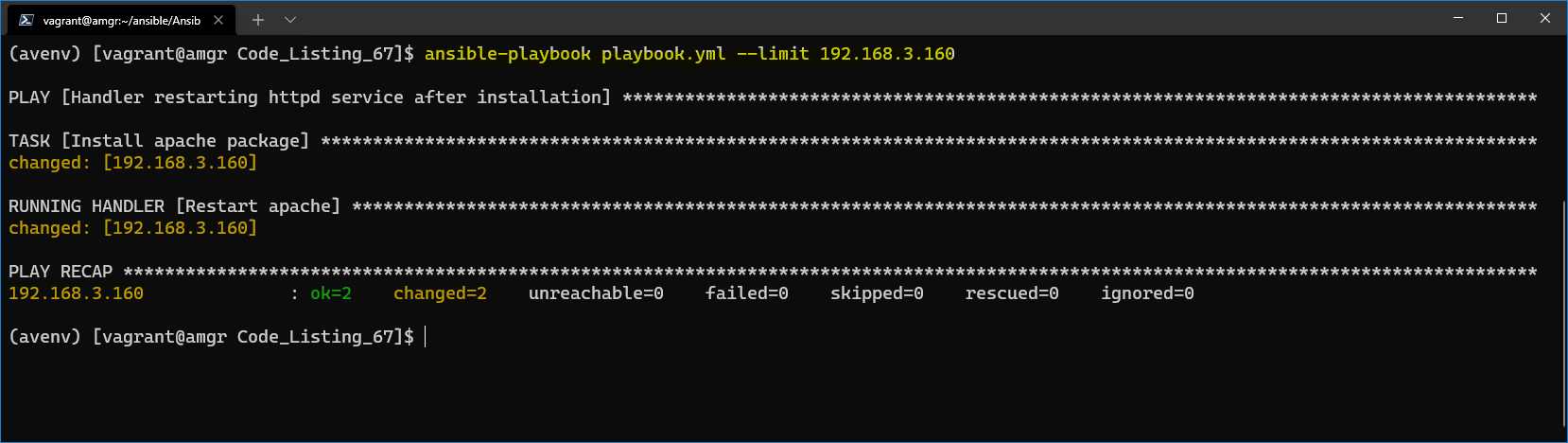
Figure 39: Result—handler restarting Apache package
We can see that the service got installed on the managed host 192.168.3.160 (web160) and that the httpd service got restarted.
Here are some more facts about handlers to keep in mind:
- We can declare more than one handler (in the example, we only had one).
- The order in which the handlers are executed depends on the order in which they are called (not declared) by the task.
- The handler will be executed only after all tasks are executed!
- If the task doesn’t change the system, the handler won’t run.
- In handlers, we can use variables in the same way we use them normally in tasks.


- 1800+ high-performance UI components.
- Includes popular controls such as Grid, Chart, Scheduler, and more.
- 24x5 unlimited support by developers.