
Ansible Succinctly®

CHAPTER 6
Ansible Inventory
The inventory or host configuration file is a file that defines the hosts or groups of hosts upon which commands, modules, and tasks in an Ansible Playbook will operate. In other words, it defines a list of systems that we wish to manage with Ansible.
Typically, this file is located in the /etc/ansible directory if Ansible is installed with the default Linux package manager. This file is not provided by the pip installation, so it has to be created manually.
Some important facts about the inventory file:
- The inventory file defines a collection of hosts that are target systems of the automation.
- The inventory file contains a list of hosts that can be grouped together into groups. One host can be part of multiple groups. For example, we could group hosts into webservers, databases, load balancers, and so on.
- Groups can be grouped together and managed collectively.
- The inventory file contains variables that could apply to either hosts or groups.
- The inventory file is a file that can be written in INI-style or YAML-style formats.
- It is possible to create an inventory file in a dynamic way, but this is outside of the scope of this book.
Inventory location
As mentioned previously, the file has a default location; however, we can create our own local version, just to be used by our project. Wherever this location is, it is controlled by the ansible.cfg file, which specifies the location of the inventory file that can be either local (relative), as in the following example, or absolute.
Code Listing 28: Inventory file location in ansible.cfg
[defaults] Inventory = ./inventory |
Inventory file content
The inventory file format can be either INI- or YAML-based. It contains a list of hosts that can be specified as IP addresses, as qualified domain names, or both.
Code Listing 29: Inventory file in its simplest form
mail.example.com 192.168.3.100 web.mydomain.local |
Host groups
We can organize the list of hosts in an intelligent way, so that whenever we want to apply some changes, those changes get applied in one go to several hosts belonging to the group.
The following example shows how we can define three arbitrary groups: webservers, databases, and production. Under each of them we can see that one server (web1.domain.com) can make part of two different groups.
Code Listing 30: Inventory file with groups defined
[webservers] web1.domain.com web2.domain.com 192.168.3.1 [databases] db.domain.com [production] web1.domain.com |
There are two groups that are defined by default in Ansible:
- All: Contains every host as defined in the inventory file.
- Ungrouped: Contains all hosts that don’t have another group defined (aside from all).
This implies that every host will belong to at least one of the two groups.
Nested groups
It’s also possible to “group the groups.” This is achieved by appending :children to the group definition. We can define the list of hosts in Europe by putting together the list of Italian and Swiss hosts.
Code Listing 31: Inventory file with nested groups
[italy] web1.domain.it web2.domain.it [switzerland] web1.domain.ch [europe:children] italy switzerland |
Host ranges
It is also possible to define host ranges when defining hosts, in case we have a repetitive and large list of servers that otherwise would be cumbersome to handle manually.
Range is typically defined by [START:END], and it can contain letters or numbers.
Code Listing 32: Range of host names
1. web[1:2].domain.com 2. [a:c].domain.com 3. 192.168.3.[1:200] 4. 192.168.[2:3].[1:200] |
- The first case defines two web servers starting with web1.domain.com and web2.domain.com.
- The second case defines the list, such as: a.domain.com, b.domain.com, c.domain.com.
- The third case defines the servers in a range from 192.168.3.1, 192.168.3.2 until 192.168.3.200.
- The fourth example defines the range of:
- 192.168.2.1, 192.168.2.2, … until 192.168.2.200
- 192.168.3.1, 192.168.3.2, … until 192.168.3.200
There is also a possibility to create an alias (such as WS1), in case we have only the IP addresses. This is quite useful when displaying the information about the machine while executing commands, as the IP addresses might not give us enough information, especially if we have a lot of machines to manage.
Code Listing 33: Define an alias in the inventory file
some_server ansible_port=5555 ansible_host=192.0.2.5 |
Why it is it important to group the hosts together? This is mainly because it’s more convenient to launch a command against a group (or all) of servers rather than doing it one by one, which would defeat the reason for having the inventory file altogether.
Host verification
Ansible offers the ansible-inventory command line tool, which is used to display or dump the configured inventory files as Ansible sees it. By default, it produces an output in JSON format, but it can also produce a YAML file, which is useful if we like to convert the format from INI-style to YAML.
Let’s quickly check the command by creating a folder on the amgr node and naming it chapter_6. Let’s also create two files: the inventory file with the content (Code Listing 34), and the ansible.cfg (Code Listing 35).
Code Listing 34: Inventory file
[webservers] 192.168.3.160 192.168.3.161 [load_balancers] 192.168.3.200 [databases] 192.168.3.199 |
Code Listing 35: ansible.cfg with inventory file specified
[defaults] Inventory = ./inventory |
By running the ansible-inventory command, we can get a list of hosts as a graph.
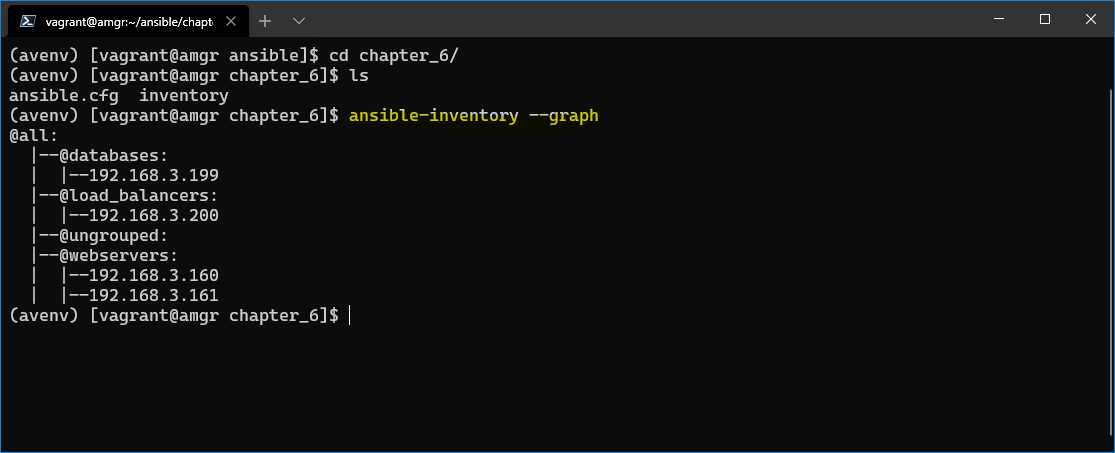
Figure 18: Inventory content shown as graph
We can get a list of hosts converted into YAML format by supplying the -y argument and –list.
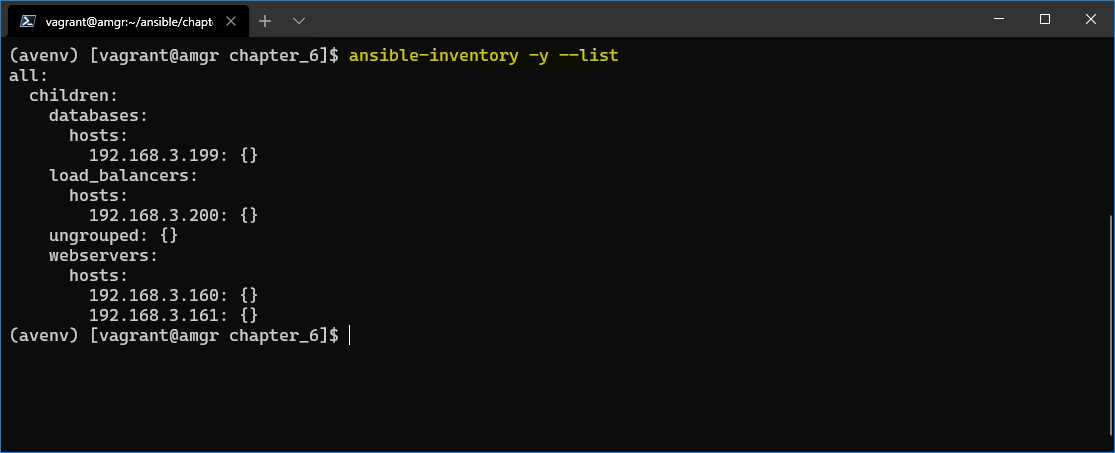
Figure 19: Inventory file shown as YAML
Dynamic inventories
It’s outside the scope of this book to discuss dynamic inventories, but it’s worth mentioning that there is such a possibility.
Dynamic inventories are particularly important in cases where the infrastructure is not predefined, or it might change overtime.
Ansible supports this scenario either through inventory plugins, which would then integrate with the data providers (cloud, LDAP), or by predefined, custom scripts that are custom built.
You can find more information by consulting the Ansible documentation.


- 1800+ high-performance UI components.
- Includes popular controls such as Grid, Chart, Scheduler, and more.
- 24x5 unlimited support by developers.