
Ansible Succinctly®

CHAPTER 5
Ansible Configuration
Certain settings in Ansible are adjustable via a configuration file (ansible.cfg). This file contains all of the Ansible configuration.
Installing Ansible via the pip tool doesn’t create such a file. To verify this, we can run the version command as follows.
Code Listing 24: Ansible.cfg location
(avenv) [vagrant@amgr ~]$ ansible --version |
You will get a similar output to the one shown in Figure 16, and you might notice that the config file setting is set to None. This means that when we install Ansible via the pip command, the ansible.cfg file is not set up by default. In the next chapter, I will provide more information about how to deal with the ansible.cfg file.
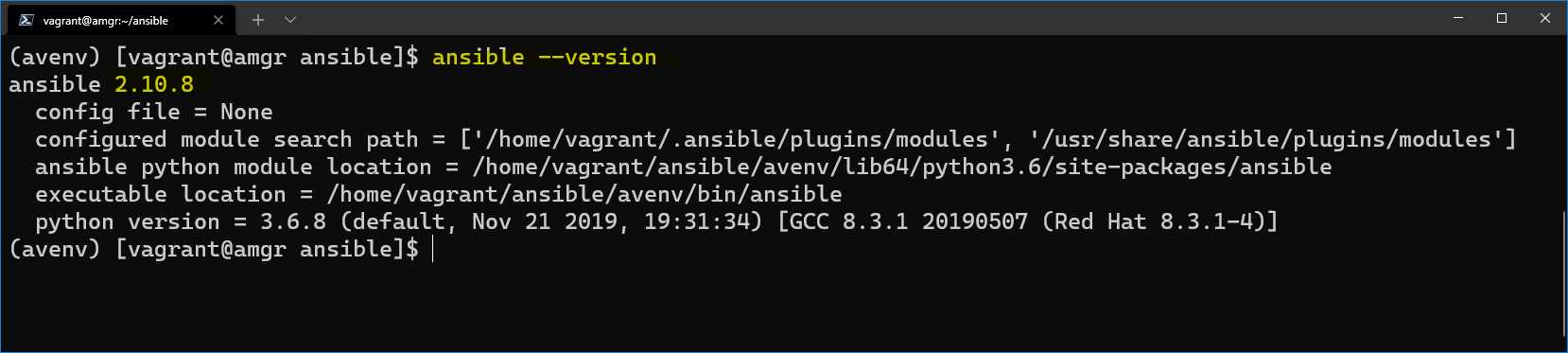
Figure 16: Ansible version information
Ansible will look at the configuration file in a variety of locations, with the following priority, and use the first file found (all others are ignored).
Table 5
ANSIBLE_CONFIG | If there is an environment variable ANSIBLE_CONFIG set up to point to any file on the file system. In the ANSIBLE_CONFIG we can specify the file location directly anywhere in the system before running Ansible, for example: export ANSIBLE_CONFIG=/path_to_file/ansible.cfg |
./ansible.cfg | The . represents the current directory. |
~/.ansible.cfg | ~ is a shortcut for the user’s home directory. In our case, this would be the vagrant user under its home directory. /home/vagrant. |
/etc/ansible/ansible.cfg | File in a system location, globally defined. |
Note: Throughout this book, the ansible.cfg file will be always placed in the “current folder” ./ansible.cfg. In this way, we can have different folders with different ansible.cfg files.
To find out all of the currently configured options, the ansible-config utility can help us.
Code Listing 25: Check current Ansible configuration
(avenv) [vagrant@amgr ~]$ ansible-config list |
The output of this command is going to be a long list of configuration items with explanations.
In case the ansible.cfg file is present, we can see its content by running the following command.
Code Listing 26: Displaying the current config file
(avenv) [vagrant@amgr ~]$ ansible-config view |
An error will be returned if the file is not present at any of the aforementioned locations.
An example of a complete ansible.cfg file can be found on the Ansible GitHub account.
This file can be copied in the current folder, and its default parameters could be changed. Alternatively, we can have an empty ansible.cfg file and simply set the values we want to override.
Another very useful command option is --only-changed, which will show only the values that we have potentially overwritten, and which are different from the default ones.
Code Listing 27: Displaying changes in ansible.cfg
(avenv) [vagrant@amgr ~]$ ansible-config dump --only-changed |
There are quite few sections in the ansible.cfg file with subconfiguration keys.
Table 6: Ansible.cfg configuration sections
[defaults] | Default generic Ansible settings. |
[inventory] | Dynamic inventory plugin settings. |
[privilege_escalation] | Ansible can use existing privilege escalation systems to allow a user to execute tasks as another user. |
[paramiko_connection] | Paramiko is the default SSH connection implementation on Enterprise Linux 6 or earlier and is not used by default on other platforms. |
[ssh_connection] | OpenSSH specific settings. |
[persistent_connection] | When communicating with a remote device, you have control over how long Ansible maintains the connection to that device, as well as how long Ansible waits for a command to complete on that device. |
[sudo_become_plugin] | User to be used as the sudo. |
[colors] | Colors in the editor when running commands. |
[galaxy] | Galaxy platform-specific settings. |
The [defaults] section
Among other sections, the ansible.cfg file has a [defaults] section, which contains the basic configuration information, such as where to locate the inventory file, which user to use when connecting to remote hosts, and the remote host port.
![Snippet of a [defaults] section](https://s3.amazonaws.com/ebooks.syncfusion.com/LiveReadOnlineFiles/ansible-succinctly/Images/snippet-of-a-defaults-section.png)
Figure 17: Snippet of a [defaults] section


- 1800+ high-performance UI components.
- Includes popular controls such as Grid, Chart, Scheduler, and more.
- 24x5 unlimited support by developers.