
Angular 2 Succinctly®

CHAPTER 8
Tweaking It a Bit
Now that Hello World is running, we want to look at a feature that NPM scripts provide to make development easier.
ng serve
ng serve is the Angular CLI web server which runs locally (localhost) in your browser. When you run npm start (the script that runs ng serve), you’ll see information about the build processor, and hopefully an indication that the build is now valid.

Figure 10: Start Up
ng serve is also looking at the folder and detecting changes. If you keep the browser open and change your source files, you’ll see that the program detects the change, recompiles the code, and refreshes the browser on the fly.
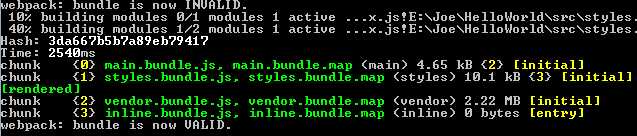
Figure 11: Detecting Changes
This watching for changes and incrementally compiling them makes it easier to make code updates and immediately see the impact of the change. It will show you which file was changed, and then update your browser with the changes—a nice feature during your development cycle.
Summary
Once your application is started, the tools provided give you a nice environment to explore and see what is happening behind the scenes.


- 80+ high-performance Angular components, including DataGrid, Diagram, and Scheduler.
- Support for AOT compilation and tree shaking.
- Lightweight and user-friendly.