
Angular 2 Succinctly®

CHAPTER 14
Services and Interfaces
Often when developing applications, you will need some code to provide functionality or data to multiple components. For that type of operation, Angular 2 allows you to create reusable services and pass (inject) them into your component for use. Shared data or functionality should immediately shout “create a service!”
Standings page
The Standings page is going to be broken into two pieces: the display and the data component. Separation of presentation and data is almost always a preferred approach to building applications. We will provide a service to get the data needed and a presentation layer to show the data.
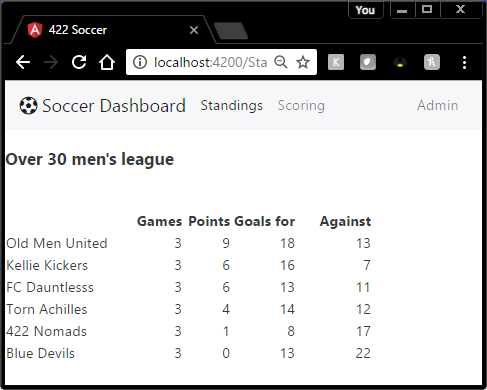
Figure 16: Standings Page
As the scores are updated in the scoring component, the standings are updated, and when the browser revisits the page, the updated standings will appear.
Data model
The basic data model for our Soccer Dashboard is the schedule data. The schedule data includes both games already played (for the standings module) and games yet to be played for scoring module. Since the data model will serve both components, we are going to create a service to handle it.
Database design
We could use a Microsoft SQL Server database to hold our tables. Angular 2 will rely on some sort of web service to communicate with the data, so any database system (or even text files) could be used; it is a black box to Angular.
Teams table
Each soccer team has a row in the teams table. The structure of the table is:
Column | Data Type | Notes |
Id | int | primary key |
Name | varchar(32) | not null |
You’d have more fields, such as start date, team type (co-ed, over-30, etc.), but we are only showing the basic structure. Feel free to enhance as you’d like.
Refs table
The refs table keeps track of the referees that the club uses. Each referee will have a user ID so they can log in to see the game they need to record the scores for.
Column | Data Type | Notes |
Id | int | primary key |
RefName | varchar(32) | not null |
UserId | varchar(20) | not null |
Schedule table
The schedule table contains the games that are scheduled and those that have already been played. Any game not yet played will contain a -1 in the scoring columns. This allows the referee to find games that have likely been played (on a date in the past), have not yet been scored (where scores are -1), and were refereed by the user.
Column | Data Type | Notes |
|---|---|---|
Id | int | primary key |
PlayingDate | date | not null |
HomeID | integer | foreign key to teams |
AwayID | integer | foreign key to teams |
HomeScore | int | defaults to -1 |
AwayScore | int | defaults to -1 |
RefID | integer | foreign key to refs |
notes | varchar(max) |
Service design
The service design process consists of two steps. First, we design the interfaces to put and get the data from the database. Then we design the service to make the data available to the various components. Within the app folder, create interfaces and services folders.
Interfaces
Even though the database design has three tables, we only need one interface to read and update the games table. We will also create an interface to hold the rankings, even though this will be computed in the code, rather than stored in the database.
Code Listing 109: Schedule Interface
/** Schedule interface */ export interface iSchedule{ id: number, PlayingDate: Date, HomeTeam: string, AwayTeam: string, HomeScore: number, AwayScore: number, RefName: string, notes?: string } |
Note that even though the physical table relies on foreign keys to link the content together, our interface has the actual team and referee names. Most likely, the database has a view to create the populated schedule from the three physical tables.
Code Listing 110: Ranking Interface
/** Rankings interface */ export interface iRanking { TeamName: string, GamesPlayed: number, Wins: number, Ties: number, GoalsFor: number, GoalsAgainst: number } |
Service code
With our interfaces built, we can put together a service that provides two basic functions. One is to return the entire schedule as a collection of schedule objects. The second function is to update the scores and notes for a particular schedule ID number.
Getting the data
In this chapter, we are going to create internal data for mockup and testing purposes. In a later chapter, we will get the data from an HTTP web service call. For now, this file will be stored in the services folder.
Schedule-data.ts
We will create a TypeScript file called Schedule-data.ts. The purpose of the file is to provide data to the service.
Code Listing 111
import {iSchedule} from "../interfaces/schedule"; import {iTeam} from "../interfaces/teams"; export const SEASON_SCHEDULE: iSchedule[] = [ {id:1,PlayingDate:new Date(2016,8,23), HomeTeam:'Old Men United',AwayTeam:'Kellie Kickers', HomeScore:4,AwayScore:3,RefName:'Joanne',notes:'Overtime game'}, {id:2,PlayingDate:new Date(2016,8,26), HomeTeam:'Torn Achilles',AwayTeam:'422 Nomads', HomeScore:7,AwayScore:2,RefName:'Colin',notes:''}, {id:3,PlayingDate:new Date(2016,8,28), HomeTeam:'Blue Devils',AwayTeam:'FC Dauntlesss', HomeScore:4,AwayScore:6,RefName:'Gene',notes:''}, ... ] export const TEAMS: iTeam[] = [ { id:1,name:"Old Menu United",type:"Over 30"}, { id:2,name:"422 Nomads",type:"Over 30"}, { id:3,name:"FC Dauntless",type:"Over 30"}, { id:4,name:"Kellie's Kickers",type:"Over 30"}, { id:5,name:"Blue Devils",type:"Over 30"}, { id:6,name:"Torn Achilles",type:"Over 30"} ] |
The first line imports the schedule interface into the component. The component itself simply exports a collection of schedule objects. We now have the data elements (interface and collection) that we need to provide to our service.
Injectable
We now need to make a class that will be used as a service to other components. The first step is the use the @Injectable method, which means the code can be injected into other components. We will need to import both the Injectable module from Angular and the module to provide the data that we just wrote.
Code Listing 112
import {Injectable} from 'angular2/core'; import {SEASON_SCHEDULE, TEAMS } from './schedule-data'; @Injectable() |
We follow this with the class code, which will contain the various methods that the service will offer.
Code Listing 113
export class SoccerService{ method calls } |
We can have both private and public (default) methods in the service class; it follows the rules of a TypeScript class.
Code Listing 114: SoccerService.ts
/** * SoccerService * Joe Booth: Angular 2 Succinctly */ import { Injectable } from '@angular/core'; import { SEASON_SCHEDULE, TEAMS } from './schedule-data';
@Injectable() export class SoccerService { getSchedule() : any { return Promise.resolve(SEASON_SCHEDULE); } getTeams() : any { return Promise.resolve(TEAMS); } private ComputeRankings() { // To compute rankings from the schedule } } |
In our service, we are offering two methods: the getSchedule() and the getTeams() methods. They promise to return a data collection (in this case, from the schedule-data class). Since the service simply returns the data, it doesn’t care how the data is generated—it expects the schedule-data class to take care of that. In this example, we might need a private method that computes the rankings from the schedule data. (We will do this in a later chapter.)
Note: Promise is a TypeScript/JavaScript command that allows asynchronous operations to be performed. The .resolve keyword provides the source of the data that will return the object.
Not all browsers support asynchronous operations, so you can make standard calls by returning the data directly, rather than using a promise. For example:
Code Listing 115
getTeamsAsync() : any { return Promise.resolve(TEAMS); } getTeams() : any { return TEAMS; } |
I would recommend providing both methods in your services so that as browsers begin to support ECMAScript 6, it should an easy update to the service to start taking advantage of the asynchronous operation support.
Consuming the service
Now that our service is created, we want to use it in our components, in this case, to provide the data the component needs to display.
Importing the service
The first step is to tell our components where they can find the service, using the import statement.
Code Listing 116
import { SoccerService} from './services/soccerService'; import { Title } from '@angular/platform-browser'; |
I’ve put the services and interfaces in separate folders, off the app folder. Be sure to adjust your file locations if you use a different structure. You will need to import this service to any component that uses the service. I’ve also decided to import the Title service from Angular (allowing me to set the browser’s title bar).
Code Listing 117
// Our interfaces import { Team } from './interfaces/Teams'; import { Title } from '@angular/platform-browser'; import { Ranking } from './interfaces/rankings'; import { Schedule } from './interfaces/schedule'; import { SoccerService} from './services/soccerService'; |
Adding the provider metadata
The next step is to tell the component about service providers it will use. This is a new component directive called providers. It takes a list of the services and other injectable modules our component might need.
Code Listing 118
providers: [Title,SoccerService] |
In this example, we are injecting the Title module from angular/platform-browser, and our soccerService module. You can add as many injectable modules as needed for your component.
Update the constructor
The constructor of your component will need to be updated to receive the injected modules. For example, our soccer component is going to update the browser title and get its data from the soccerService. The following code shows the modified constructor.
Code Listing 119
public constructor( private _titleService: Title, private _soccerService: SoccerService ) { this._titleService.setTitle("422 Soccer"); this.getTeams(); } |
Although you can name the injected modules any way you choose, I prefer the underscore character to distinguish them from other variables within your component. In Code Listing 119, we are using the Title service from Angular to update the browser’s title, and we will add our own method, GetTeams(), to copy the team data from the service into a collection variable within our component.
Using the service
Our service provides different methods for returning data. We’ve added a method to get the teams both synchronously and asynchronously. I’ve added a Boolean flag called UsingAsync to my component (and defaulted it to false for now). The GetTeams method will use this flag to determine how to update the internal Teams collection object. Remember that if the method is running asynchronously, it is possible that your code will continue to run before the method completes.
Code Listing 120
getTeams() { if (this.UsingAsync) { let xx = this._soccerService.getAllTeamsAsync(); xx.then((Teams:Team[])=> this.MyTeams =Teams ); } else { this.MyTeams = this._soccerService.getAllTeams(); } } |
In this example, we are coding both methods to get the team data, but only using the synchronous version for now.
The UsingAsync Boolean property (when true) uses the xxxAsync() methods. These methods call the service and get a promise back.
Code Listing 121
let xx = this._soccerService.getTeamsAsync(); |
In the second portion, the then() tells the method what to do once the service is back. In this case, we are simply taking the service results and updating our MyTeams variable with them.
Code Listing 122
xx.then((Teams:Team[])=> this.MyTeams =Teams |
You can learn more about promises and asynchronous programming in TypeScript and JavaScript by downloading any of the books mentioned previously from the Syncfusion library.
App.standings
The modified app.standings component code is shown in Code Listing 123.
Code Listing 123
import { Component } from '@angular/core'; import { Title } from '@angular/platform-browser'; // Our interfaces import { Team } from './interfaces/Teams'; import { SoccerService} from './services/soccerService'; @Component({ template: '<h3>Standings</h3>', providers: [Title,SoccerService] }) export class AppStandings { public UsingAsync: boolean = false; public MyTeams: Team[]; public constructor(private _titleService: Title, private _soccerService: SoccerService ) { this._titleService.setTitle("422 Sportsplex"); this.getTeams(); } getTeams() { if (this.UsingAsync) { let xx = this._soccerService.getAllTeamsAsync(); xx.then((Teams:Team[])=> this.MyTeams =Teams ); } else { this.MyTeams = this._soccerService.getAllTeams(); } } } |
Summary
A service is a TypeScript class that provides data (or other functionality) to components as needed. In this chapter, we looked at a simple service that returns data to the components and showed how to create the service and inject it into the component. We also covered how to use the service methods within the component.
When you are designing systems, you should always consider writing any data provider as a service. Separation of data and presentation is part of Angular and makes development much more robust. The template handles the view, the components class, and the logic specific to the component, and the service provides data or globally needed business functionality.


- 80+ high-performance Angular components, including DataGrid, Diagram, and Scheduler.
- Support for AOT compilation and tree shaking.
- Lightweight and user-friendly.