
Angular Succinctly®

CHAPTER 12
Our Application
In this chapter, we are going to put together a simple example application called the Soccer Dashboard to tie everything together in Angular application development. The application is used to display standings for a sports league, and to allow real-time updates as the score keepers post the scores.
In one of my soccer leagues, many of the players wanted to know the standings and results right after the games were finished. By allowing the referees to record the scores on their mobile phones, even as they are leaving the field, it is very possible that the website showing the standings could be up to date before the players leave the fields for their trip home.
Note: The code samples in this book are available for download here.
Screen mockups
The following are mockups (generated with Balsamiq) that illustrate what the application should look like. One benefit of mockups is that you can avoid the “iceberg effect,” where clients think the application is further along because they see the screens (the tip of the iceberg) without realizing the amount of code that still needs to be completed.
Standings page
The Standings page shows the teams sorted by points (assuming three points for a win and one for a tie). The secondary sort order is total goals. Keep in mind that when designing any ranking system, you will need multiple sort criteria to handle ties. Also, express the ranking in the most common style for the appropriate sport. Soccer uses points, while baseball uses games behind.
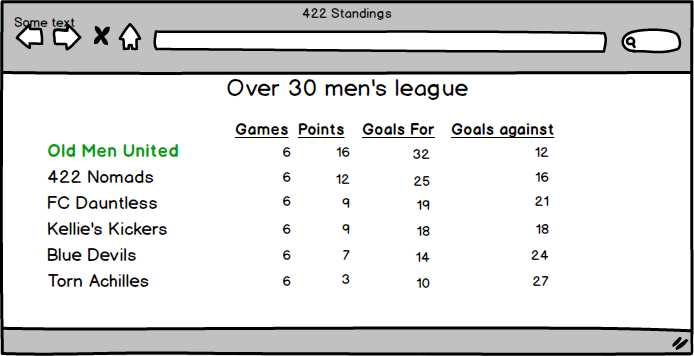
Figure 11: Standings Page
Note: If you were to run a tournament, you could show the standings on a large monitor with a JavaScript timer to re-poll the service and get updated scores every few minutes.
Scorekeeper’s page
This page is designed to be as simple as possible, so the referees or scorekeepers can quickly update the game results (feeding the Standings page). They select the game from the drop-down list, and then add the scores.
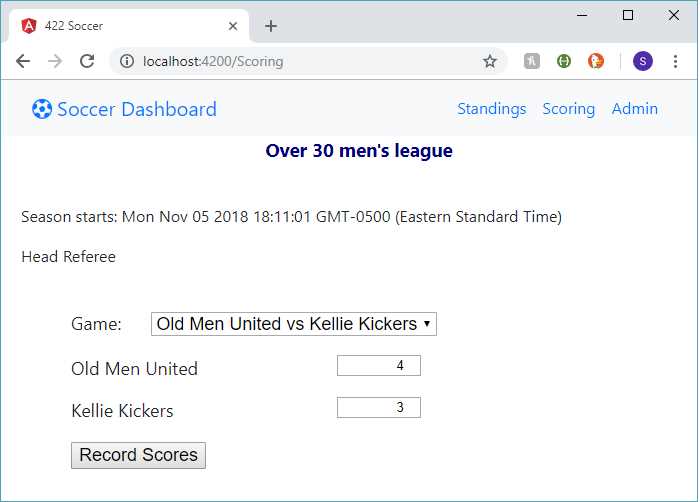
Figure 12: Scorekeeper’s page
The component code will update the scores in the database, and the Standings page will be updated when it is next refreshed.
Note: The code samples in this book are available for download here.
Summary
This application should provide a basic walkthrough of how to create modules, menus, services, etc., in an Angular application. The focus is on the front end, and the data is stored in SQL database tables. You can manually update those tables, or expand the application to create some additional Angular components to allow an admin user to update the base data tables.


- 80+ high-performance Angular components, including DataGrid, Diagram, and Scheduler.
- Support for AOT compilation and tree shaking.
- Lightweight and user-friendly.