
Akka.NET Succinctly®

CHAPTER 10
Other Components
EventBus
By definition, in Akka.NET the actors are communicating directly with each other by sending messages (by using Tell, Ask, Forward, etc.). This is what we can call one-to-one communication; one actor sends a message to another actor. However, sometimes there is a need to send information to more than one actor at a time (one-to-many), where an individual actor sends a message to a group of actors. In effect, this means that Akka.NET offers a publisher-subscriber mechanism out of the box.
The ActorSystem uses the EventStream for a number of internal things, including logging, sending dead letters, and cluster events.
An Akka.NET, both system and user-generated events (messages) can be published by using the EventStream. EventStream is the simplest and most common implementation of an EventBus.
EventStream supports several methods, such as:
- Publish: Publishes a message to the EventBus.
- Subscribe: An actor subscribes to the EventBus.
- Unsubscribe: An actor unsubscribes from receiving new messages.
The scenario is: One actor publishes a message (of some type) to the EventBus, while on the other side, one or more actors are subscribed to the events published to the EventBus of a particular type. Subscribers will automatically receive messages of that particular type as soon as the message is published.
Note: EventStream only works within one ActorSystem context. This means that the messages won’t be available on another node (server).
Let’s demonstrate the usage of the EventBus with an example.
We are creating two actors: BookPublisher, responsible for publishing new books, and BookSubscriber, which will receive a message every time a new event is published on the bus. The implementation of the BookPublisher is interesting, as it uses the Context.System.EventStream.Publish() method to publish the message, meaning that the EventStream is available and accessible within an actor.
BookSubscriber is not any different from the actors we already checked. It just handles the receiving of the NewBookMessage type.
The NewBookMessage type is a simple class that only contains the name of the book we are publishing.
Code Listing 59: Publisher/Subscriber example
public class BookPublisher: ReceiveActor { public BookPublisher() { Receive<NewBookMessage>(x => Handle(x)); } private void Handle(NewBookMessage x) { Context.System.EventStream.Publish(x); } } public class BookSubscriber: ReceiveActor { public BookSubscriber() { Receive<NewBookMessage>(x => HandleNewBookMessage(x)); }
private void HandleNewBookMessage(NewBookMessage book) { Console.WriteLine( $"Book: {book.BookName} got published - message received by {Self.Path.Name}!"); } } public class NewBookMessage { public NewBookMessage(string name) { BookName = name; } public string BookName { get; } } |
The client code contains some new methods we haven’t seen yet. In the Main method, after creating an ActorRef, we are subscribing that actor to the event stream, and in specific cases, to receive the NewBookMessage types only.
We are using the Subscribe method directly in the Main function; however, this could be used directly when the actor gets instantiated, by using either the actor’s constructor or PreStart method.
Code Listing 60: Main method enabling publishing and subscribing to messages
static void Main(string[] args) { ActorSystem system = ActorSystem.Create("pub-sub-example"); var publisher = system.ActorOf<BookPublisher>("book-publisher"); var subscriber1 = system.ActorOf<BookSubscriber>("book-subscriber1"); var subscriber2 = system.ActorOf<BookSubscriber>("book-subscriber2"); system.EventStream.Subscribe(subscriber1, typeof(NewBookMessage)); system.EventStream.Subscribe(subscriber2, typeof(NewBookMessage)); publisher.Tell(new NewBookMessage("Don Quixote")); publisher.Tell(new NewBookMessage("War and Peace")); Console.Read(); system.Terminate(); } |
In the output, as we might expect, both subscriber actors will get the two published messages.
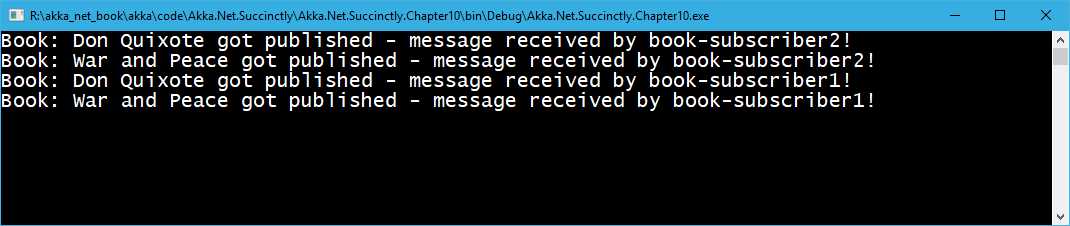
Figure 31: Publisher-Subscriber result
DeadLetters
There is a possibility that messages are not delivered to an actor. Those messages will be automatically delivered to a special actor called DeadLetters, which is available at the /deadLetters path. This rule usually applies to the nontransport lost messages, which means that Akka.NET makes no guarantees for lost messages at the transport layer.
Every time an actor terminates, there is a chance that some messages will be lost. If the actor is not available, and other actors are sending messages to it, those messages will end up in the DeadLetters mailbox.
How can we monitor DeadLetters?
An actor can subscribe to class Akka.Event.DeadLetter on the event stream. The subscribed actor will then receive all dead letters published in the (local) system from that point onwards. As dead letters are not propagated over the network, we would need to create an instance of the subscriber on each node.
Here is an example of how dead letters can be monitored.
Code Listing 61: Dead letters monitoring
public class DeadLetterMonitor : ReceiveActor { public DeadLetterMonitor() { Receive<DeadLetter>(x => Handle(x)); } private void Handle(DeadLetter deadLetter) { var msg = $"message: {deadLetter.Message}, \n" + $"sender: {deadLetter.Sender}, \n" + $"recipient: {deadLetter.Recipient}\n"; Console.WriteLine(msg); } } public class EchoActor : ReceiveActor { } static void Main(string[] args) { ActorSystem system = ActorSystem.Create("dead-letter-example"); var deadLettersSubscriber = system.ActorOf<DeadLetterMonitor>("dl-subscriber"); var echoActor = system.ActorOf<EchoActor>("empty-echo-actor"); system.EventStream.Subscribe(deadLettersSubscriber, typeof(DeadLetter)); echoActor.Tell(PoisonPill.Instance); echoActor.Tell("Hello"); Console.Read(); system.Terminate(); } |
There are two actors—one is called DeadLetterMonitor, whose responsibility is to subscribe to and handle the DeadLetter messages. In order to get the DeadLetter messages, the actor has to subscribe to the EventStream, and specify the type of messages it would receive (in our case, the DeadLetter type). Don’t forget that the DeadLetter type is part of the Akka.Event namespace, so it has to be declared with using Akka.Event.
In order to simulate the unsuccessful sending of a message, we are going to create an instance of an EchoActor, which we will stop just before sending the first message. In this case, the system is going to try to send a message to a stopped actor, and as we have seen, this is not possible, and therefore the message will end up being captured by the DeadLetterMonitor.
When running this code, we can see the following output:
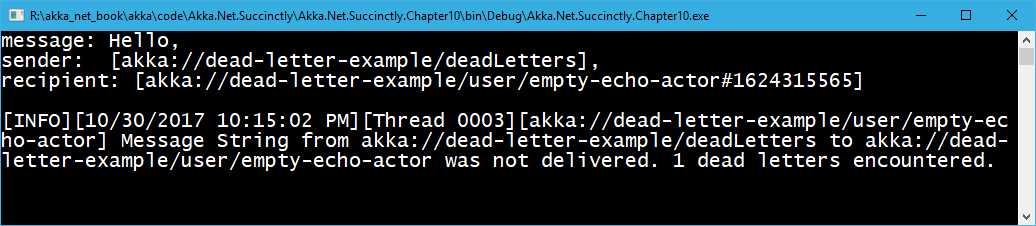
Figure 32: Dead letters monitoring result
We can clearly see that the message did get delivered to the DeadLetterMonitor actor. We can also see that akka://dead-letter-example/deadLetters is the actor sending the message.


- 1800+ high-performance UI components.
- Includes popular controls such as Grid, Chart, Scheduler, and more.
- 24x5 unlimited support by developers.