
Akka.NET Succinctly®

CHAPTER 12
Akka.NET Routers
So far, we have seen a single usage of actors: creating one actor at a time, and sending messages to and from actors. However, there are use cases where we would like to scale out the application and be able to have a responsive application, even under a heavy load.
Akka.NET provides special actors, called routers, that have the ability to group together actors and distribute a single message to several actors by applying different strategies. As a consequence of this, we can build systems that can perform as many operations simultaneously as possible.
In this chapter, we are going to explain how to work with the most common routers:
- Round Robin
- Random routing
- Shortest Mailbox queue
- Consistent Hashing
We can specify the router that an actor will use at the time of the creation of that actor. Props object contains a method WithRouter that can be used to specify it.
Round Robin
The Round Robin router is defined by the class RoundRobinPool, and is part of the namespace Akka.Routing. The Round Robin router can be configured to contain a number of instances of actors we would like to support in our application. Every time a new message arrives, the router will make sure that the next actor in the list will receive that message. This is particularly useful when we would like to balance the amount of work each actor needs to perform.
In Figure 35, we can see that the sender sends five messages, but we have configured the RoundRobinPool to contain only four actors. This would mean that Actor 1 will receive Message 1, Actor 2 will receive Message 2, Actor 3 will receive Message 3, and Actor 4 will receive Message 4. The next message (Message 5) will simply start from Actor 1, and so on, in a loop.
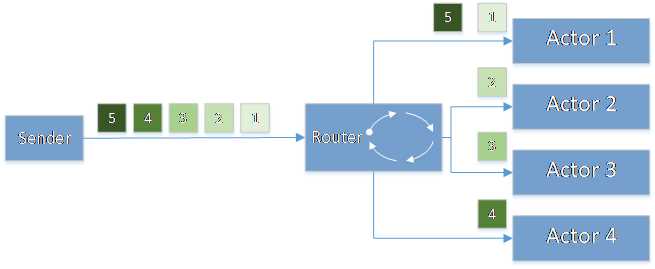
Figure 35: Round Robin router
To demonstrate this with the code, we will use the CalculatorActor we have seen previously, but modify it to include the debugging info so that we can follow which actor instance received which message.
Code Listing 72: CalculatorActor with logging
public class CalculatorActor : ReceiveActor { public CalculatorActor() { Receive<Add>(add => HandleAddition(add)); } public void HandleAddition(Add add) { Console.WriteLine($"{Self.Path} received the request: {add.Term1}+{add.Term2}"); Sender.Tell(new Answer(add.Term1 + add.Term2)) ; } } |
Code Listing 75 is the Main method that contains the code that creates the CalculatorActor .WithRouter(new Akka.Routing.RoundRobinPool(4)) to define the RoundRobin router, and in addition, sets up four instances of CalculatorActor to be created and used.
Code Listing 73: Issuing five calls to a round-robin router
static void Main(string[] args) { ActorSystem system = ActorSystem.Create("my-first-akka"); var calculatorProps = Props.Create<CalculatorActor>() .WithRouter(new Akka.Routing.RoundRobinPool(4)); var calculatorRef = system.ActorOf(calculatorProps, "calculator"); var result1 = calculatorRef.Ask(new Add(10, 20)).Result as Answer; var result2 = calculatorRef.Ask(new Add(11, 30)).Result as Answer; var result3 = calculatorRef.Ask(new Add(12, 40)).Result as Answer; var result4 = calculatorRef.Ask(new Add(13, 10)).Result as Answer; var result5 = calculatorRef.Ask(new Add(14, 25)).Result as Answer; Console.WriteLine($"Result 1 : {result1.Value}"); Console.WriteLine($"Result 2 : {result2.Value}"); Console.WriteLine($"Result 3 : {result3.Value}"); Console.WriteLine($"Result 4 : {result4.Value}"); Console.WriteLine($"Result 5 : {result5.Value}"); Console.Read(); system.Terminate(); } |
Running this code returns the following output, where we can clearly see that the fifth message was delivered to the actor named $a, which was also the first actor in the sequence.
Notice that the names of actors are automatically generated, while the name calculator, which we set when setting up the router, becomes the parent. RoundRobinPool doesn’t allow you to set up custom names for these actors.
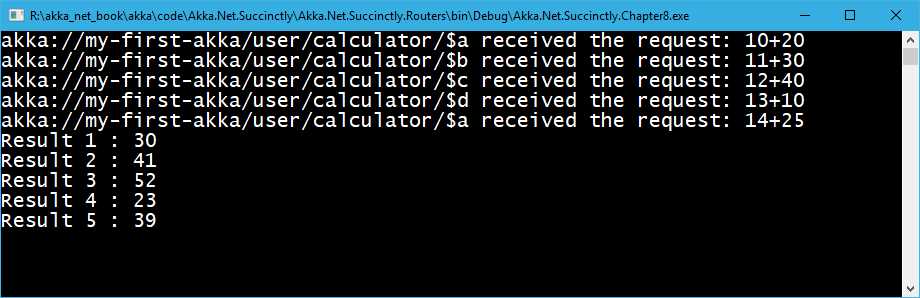
Figure 36: RoundRobinPool–output
Random routing
Random routing probably defines the easiest way of routing, where the messages are sent randomly to the available actors, and therefore without any order. Random routing is defined by the RandomPool class, which, among other parameters, accepts the number of instances to be used.
As shown in Figure 37, the messages can be delivered to any actor at any given time. It’s worth pointing out that one message goes to only one actor.
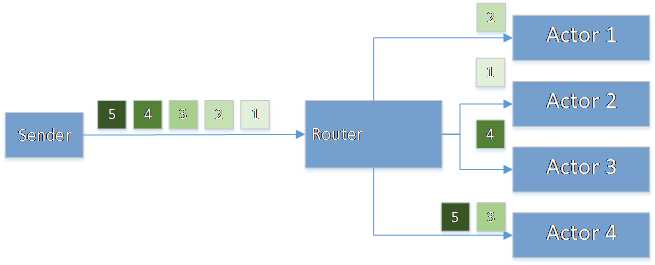
Figure 37: Random Routing
To use the Round Robin example, we will slightly change the previous example so that we use RandomPool rather than RoundRobinPool.
Code Listing 74: RandomPool example
static void Main(string[] args) { … var calculatorProps = Props.Create<CalculatorActor>() .WithRouter(new Akka.Routing.RandomPool(4)); … } |
If we run the application, we can see that in the output, only the actors $a and $c have received the messages, in a random order.
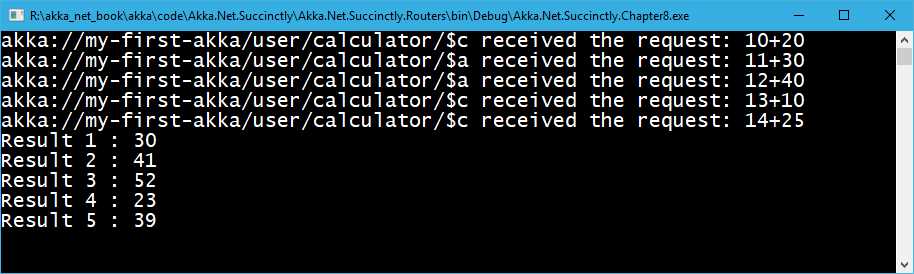
Figure 38: Random router output
Shortest MailBox queue
We already know that every actor has its own private MailBox. Once the message is sent to it, the latest message gets appended to the end of the queue, so it will be picked up once all of the other messages are processed. The time it takes to process that last message depends on the duration of the processing of all other single messages that come before it.
To speed up this process, Akka.NET offers a mechanism so that the message will be sent to the actor whose MailBox contains fewer items in its queue. This way, the message can be processed as quickly as possible. In Figure 39, we can see that the router will choose Actor 2 to process the next message.
This logic is implemented by SmallestMailboxPool.
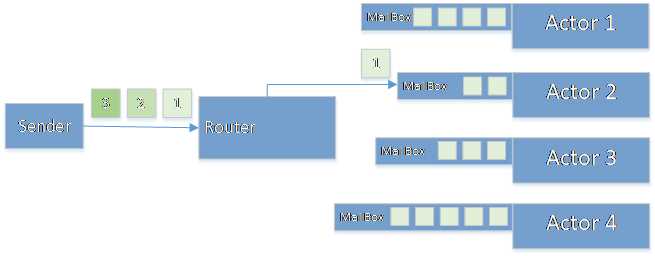
Figure 39: Shortest Mailbox router
We leave the example as it is, and only change the router, as follows:
Code Listing 77: Shortest Mailbox router
static void Main(string[] args) { … var calculatorProps = Props.Create<CalculatorActor>() .WithRouter(new Akka.Routing.SmallestMailboxPool(4)); … } |
Consistent Hashing
Consistent Hashing is a very interesting router, and a bit different from the previous ones we have seen. Instead of choosing a random router, we want to consistently send the messages with some characteristics, always to the same actor. The decision is based on the hashing of the message, or better, of the chosen property of the message. Consistent Hashing is implemented by the ConsistentHashingPool class, for which we can override the default hashing mechanism by using the WithHashMapping method, as follows:
Code Listing 75: Consistent Hashing example
using Akka.Routing; static void Main(string[] args) { ActorSystem system = ActorSystem.Create("my-first-akka"); var calculatorProps = Props.Create<CalculatorActor>() .WithRouter(new ConsistentHashingPool(4) .WithHashMapping(x => { if (x is Add) { return ((Add)x).Term1; }
return x; })); var calculatorRef = system.ActorOf(calculatorProps, "calculator"); calculatorRef.Tell(new Add(100, 20)); calculatorRef.Tell(new Add(100, 30)); calculatorRef.Tell(new Add(12, 40)); calculatorRef.Tell(new Add(100, 10)); calculatorRef.Tell(new Add(14, 25)); Console.Read(); system.Terminate(); } public class CalculatorActor : ReceiveActor { … public void HandleAddition(Add add) { Console.WriteLine($"{Self.Path} received the request: {add.Term1}+{add.Term2}"); if (!(Sender is DeadLetterActorRef)) Sender.Tell(new Answer(add.Term1 + add.Term2)); } … } |
In this example, we are choosing the Term1 property to be hashed, so the actor to be used will depend on the hash value of the Term1 property. Because we are using Tell, we had to slightly change the handling of the message in the CalculatorActor so that it doesn’t return a message when the Sender is not an actor.
By executing this code, we can see that the Actor for Term1 = 100 is always $a.

Figure 40: Consistent Hashing output
The risk with this strategy is that one of the routers might take most of the load, depending on the messages—if most of the calculation performed is with number 100, then mostly only one actor will be used, which might not give optimal results.


- 1800+ high-performance UI components.
- Includes popular controls such as Grid, Chart, Scheduler, and more.
- 24x5 unlimited support by developers.