
Akka.NET Succinctly®

CHAPTER 2
Akka.NET Components
In this chapter, we are going to list the main building blocks of Akka.NET. This includes the libraries (modules) and some key concepts used by the framework.
In order to write any application, we have to rely upon the dependency on the Akka.NET framework. Akka.NET comes as a set of very modular libraries that compose quite a wide range of functionalities. All of the libraries are available through NuGet, as we are going to see later on.
A part of the Akka(Core), Akka.Remote, and Akka.TestKit, the other components won’t be discussed in this book; however, it’s still good to know about them.
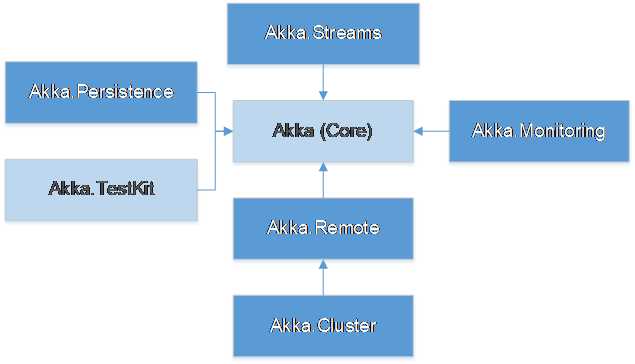
Akka (Core) library
As you can see in Figure 4, the Akka.NET core library is the base library upon which all the other components depend.
It contains the definition of an actor, the default object serialization mechanism, routing rules, Human-Optimized Config Object Notation (HOCON) configuration rules, the message dispatching mechanism, and much more. In order to use Akka.NET, we have to have a dependency on this library.
The following command can be run in the Visual Studio Package Manager to reference the Akka base library in Visual Studio:
Code Listing 3: Installing Akka.NET via Package Manager in Visual Studio
PM> Install-Package Akka |
Akka.TestKit
Akka.TestKit is a base library with building blocks that allow the effective testing of an actor system. Akka.TestKit defines the core libraries, and every unit-testing framework will implement the plumbing needed to translate the unit-testing engine’s specific needs.
We will discuss unit testing in Chapter 11.
Akka.Remote
Akka.Remote brings the capability to build an ActorSystem across multiple processes over a computer network. Akka.NET supports communication between actors deployed remotely (living on different servers), with the great advantage that the programming model hides this complexity. Communication from the programming view is not different from the local versus remote, as the code would look exactly the same. Usually the Akka.Remote package is not used in isolation, but as a building block for the clustering capability.
Remoting enables the following functionalities:
- Referencing (individual) actors or actor systems on a remote host.
- Messaging between the two actor systems (local and remote). This involves managing low-level aspects of network (re)connections.
To reference the library in Visual Studio, the following command can be run in the Visual Studio Package Manager:
Code Listing 4: Installing Akka.Remote via Package Manager in Visual Studio
PM> Install-Package Akka.Remote |
The installation of Akka.Remote will automatically include a reference to the Akka (core) library and DotNetty (an event-driven asynchronous network application framework), which is used as the transport mechanism.
Akka.Cluster
While Akka.Remoting solves the problem of addressing and communicating with components on remote systems, clustering gives the ability to organize a number of ActorSystems to behave as a “single unit,” which enables the scalability and high availability of the system itself.
Clustering provides additional services on top of remoting, such as:
- Handling the remote systems so that they can communicate with each other in a reliable way.
- Handling the change in the server’s setup: new cluster memberships, removal (failure) of servers, etc.
- Detecting disconnected systems that are temporarily unreachable.
- Distributing the computation between members (scaling out).
To reference the library in Visual Studio, the following command can be run in the Visual Studio Package Manager:
Code Listing 5: Installing Akka.Cluster package via Package Manager in Visual Studio
PM> Install-Package Akka.Cluster |
The installation of Akka.Cluster will automatically include a reference to the Akka (core) library, DotNetty, and Akka.Remote.
Akka.Streams
Sometimes actors are not the most suitable tool when it comes to processing a stream (unlimited) of data. In this sense, Akka.Streams builds on top of actors and provides a higher level of abstraction. Akka.Streams is also an implementation of the Reactive Streams standard.
Streams implement the following:
- Handling streams of events or large datasets, keeping the proper usage of performance and resources.
- Flexible pipelines in order to reuse functionalities.
- Enabling consumption of Reactive Streams compliant interfaces of other, third-type libraries.
To reference the library in the Visual Studio solution, run the following in the Visual Studio Package Manager:
Code Listing 6: Installing Akka.Streams via Package Manager in Visual Studio
PM> Install-Package Akka.Streams |
The installation of Akka.Streams will automatically include a reference to the Akka (core) library and Reactive.Streams library.
Akka.Persistence
Persistence provides a means to enable actors to persist their current state. There are several libraries that implement persisting data to various systems, such as Microsoft SQL Server, MySql, and Redis.
Persistence resolves the following:
- How to restore the state of an entity/actor when system restarts or crashes.
- Implementation of a system following a CQRS/Event Sourcing pattern.
- Reliable delivery of messages.
To reference the library in Visual Studio, run the following in the Visual Studio Package Manager:
Code Listing 7: Installing Akka.Persistence via Package Manager in Visual Studio
PM> Install-Package Akka.Persistence |
Additionally, there are a number of other packages that have a specific implementation for a given database system:
Code Listing 8: Installing Akka.Persistence packages via Package Manager in Visual Studio
PM> Install-Package Akka.Persistence.SqlServer PM> Install-Package Akka.Persistence.PosgreeSql PM> Install-Package Akka.Persistence.SqlLite PM> Install-Package Akka.Persistence.MySql |


- 1800+ high-performance UI components.
- Includes popular controls such as Grid, Chart, Scheduler, and more.
- 24x5 unlimited support by developers.