
Akka.NET Succinctly®

CHAPTER 8
Actor Path and Actor Selection
In this chapter we are going to discuss the actor path and actor selection. We’ll see how the two are different, and their relationship with the actor reference, which we have mentioned already.
Actor path
Every time a new actor is created, a unique path is automatically associated to it. When we create an actor, we can set a name so that the actor is easily recognizable; otherwise, the framework will automatically add a random name. This is necessary for the actor to have its own unique path. This is very similar to the actual HTTP URL.
As an example of the music player seen in the previous chapter, let’s simply add some information in the MusicPlayerActor to display some information about the internals. The parts in bold are new.
Code Listing 51: Change to the MusicPlayerActor to display path information
private void PlaySong(PlaySongMessage message) { CurrentSong = message; Console.WriteLine($"{CurrentSong.User} is currently listening to '{CurrentSong.Song}'");
DisplayInformation(); Become(PlayingBehavior); } private void DisplayInformation() { Console.WriteLine("Actor's information:"); Console.WriteLine($"Typed Actor named: {Self.Path.Name}"); Console.WriteLine($"Actor's path: {Self.Path}"); Console.WriteLine($"Actor is part of the ActorSystem: {Context.System.Name}"); Console.WriteLine($"Actor's parent: {Context.Self.Path.Parent.Name}"); } |
The DisplayInformation method will now be displayed every time a new song is being played.
Code Listing 52: Sending message to the MusicPlayerCoordinatorActor
static void Main(string[] args) { ActorSystem system = ActorSystem.Create("my-first-akka"); var dispatcher = system.ActorOf<MusicPlayerCoordinatorActor>("player-coordinator"); dispatcher.Tell(new PlaySongMessage("Smoke on the water", "John"));
Console.Read(); system.Terminate(); } |
The output of this looks as follows:

Figure 23: Output displaying actor's information
We can clearly see that the Self.Path returns:
akka://my-first-akka/user/player-coordinator/John
We can distinguish the various parts in the actor’s path itself: protocol, actor system, and the actual path of the actor.

Figure 24: Actors Path
The various parts are explained in the following table.
Table 5: Actor's path parts
Protocol | akka:// | Defines the communication protocol Akka.NET uses to communicate between actors. This is especially useful when it comes to the remote deployments of actors. For instance, we can define the use of the tcp protocol, such as akka.tcp or akka.udp. |
Actor system | my-first-akka | The name of the ActorSystem to which the actor belongs. |
Address | @localhost:8000 | In case of remote deployment of actors (actors running on another system), there is a possibility to also add the address location of that system. |
Path | player-coordinator/John | Refers to the path of this actor in the hierarchy. |
What is the difference between actor reference and path?
An actor path represents a name, which may or may not be inhabited by an actor, and the path itself does not have a lifecycle—it never becomes invalid. That means a path can exist, but an actor instance might not be present (actor is shut down). It is possible to create an actor, terminate it, and then create a new actor with the same actor path. The newly created actor is a new instance of the actor, and therefore not the same (original) actor. This said, the actor reference to the old instance is not valid for the new instance. Note that messages sent to the old actor reference will not be delivered to the new actor’s instance, even though they have the same path.
Actor selector
Let’s imagine a situation where the two actors have to communicate to each other, but there is no direct connection between the two—an actor to which we are not holding an actor reference. In all of the examples we have seen so far, we always had an actor reference, which is a direct link to an actor.
In order to enable the communication between the two not directly connected actors, Akka.NET offers the ActorSelection mechanism. So instead of using the IActorRef instance to send a message to an actor, we can use the ActorSelection and directly reference the actor by using the actor’s path.
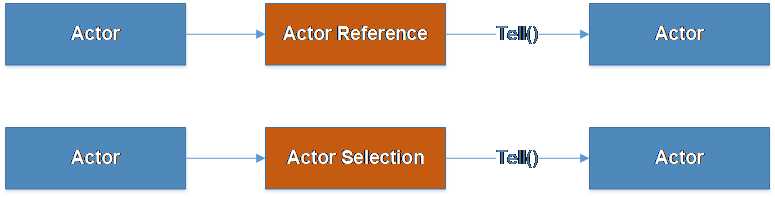
Figure 25: Actor's communication through Actor Reference and Actor Selection
ActorSelector is available as part of the ActorSystem or ActorContext classes. One possible usage follows.
To keep the previous music player example: let’s imagine that we would like to Log all of the songs that have been played to get some sort of statistics or user preferences for the songs, so that the next time the user logs in, we can actually display similar songs or propose the old songs.
In order to do this, we are going to create a new actor, SongPerformanceActor (only one instance!), whose responsibility it is to keep track of songs being played, and every MusicPlayerActor will inform this new actor about the currently played song.
The new actor’s communication is going to be as follows:
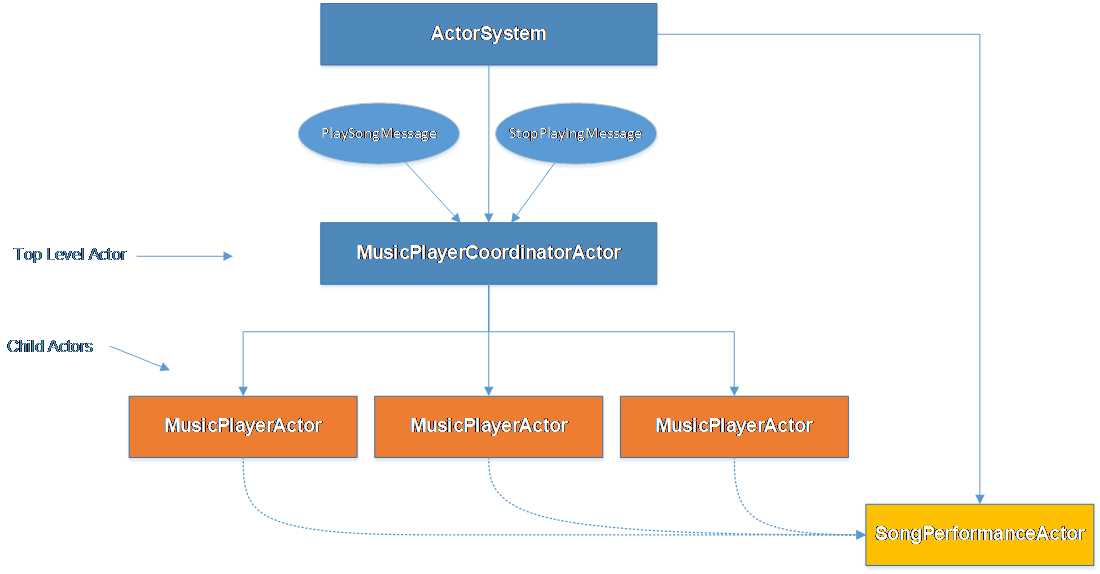
Figure 26: Tracking song statistics
Let’s see how this works through an example.
The new SongPerformanceActor is quite straightforward: the plan is to have only one instance of it, and it will keep the state. The actor has the SongPerformanceCounter property, which holds the number of times one song (key) has been played.
Every time a new PlaySongMessage is sent to the actor, we will increase the counter by 1.
The following is the code for the SongPeformanceActor:
Code Listing 53: SongPerformanceActor
public class SongPerformanceActor : ReceiveActor { protected Dictionary<string, int> SongPeformanceCounter; public SongPerformanceActor() { SongPeformanceCounter = new Dictionary<string, int>(); Receive<PlaySongMessage>(m => IncreaseSongCounter(m)); } public void IncreaseSongCounter(PlaySongMessage m) { var counter = 1; if (SongPeformanceCounter.ContainsKey(m.Song)) { counter = SongPeformanceCounter[m.Song]++; } else { SongPeformanceCounter.Add(m.Song, counter); } Console.WriteLine($"Song: {m.Song} has been played {counter} times"); } } |
The whole logic of the actor is placed into the IncreaseSongCounter method. First, we check whether the song is already in the dictionary, and if not, we simply add it with the count of 1.
Alternatively, we retrieve the song item, and increase the value of it by 1.
As we mentioned, the MusicPlayerActor is responsible for sending a message to the SongPerformanceActor. For brevity, leaving everything as is in the previous example, the only change to be made is to the PlaySong method, as highlighted in bold in the following code snippet:
Code Listing 54: Change made to the MusicPlayerActor in order to track statistics
private void PlaySong(PlaySongMessage message) { CurrentSong = message; Console.WriteLine($"{CurrentSong.User} is currently listening to '{CurrentSong.Song}'"); var statsActor = Context.ActorSelection("../../statistics"); statsActor.Tell(message);
Become(PlayingBehavior); } |
We can see that in order to send a message, the MusicPlayerActor used the Context.ActorSelection method. The ActorSelection method accepts the Path of the actor, which we are supplying. It is possible to supply relative or absolute paths to the method:
- Relative path: ../../statistics
- Absolute path: akka://my-first-akka/user/statistics
How do we know the path? In the Main method, we have given the actor name statistics. As we are directly creating the actor under the system.ActorOf, this makes it a top-level actor. We can clearly see this, as the actor is under the /user path directly.
The following code creates this actor and makes it available to be used by other actors.
Code Listing 55: Main code that creates an instance of the SongPerformanceActor
static void Main(string[] args) { ActorSystem system = ActorSystem.Create("my-first-akka"); var dispatcher = system.ActorOf<MusicPlayerCoordinatorActor>("player-coordinator"); var stats = system.ActorOf<SongPerformanceActor>("statistics"); dispatcher.Tell(new PlaySongMessage("Smoke on the water", "John")); dispatcher.Tell(new PlaySongMessage("Smoke on the water", "Mike")); dispatcher.Tell(new PlaySongMessage("Another Brick in the wall", "Andrew")); Console.Read(); system.Terminate(); } |
This code produces the following output:

Figure 27: ActorSelection example result
We can clearly see that the statistics are tracked correctly. Another thing to note is the order in which the messages are displayed. We can see that the SongPeformanceActor displays the message, but not fully in sequence. This is obviously due to the fact that this is fully asynchronous and under the hood: since we have three users (John, Mike, and Andrew), three MusicPlayerActor instances will be created. Tell is not a blocking call!


- 1800+ high-performance UI components.
- Includes popular controls such as Grid, Chart, Scheduler, and more.
- 24x5 unlimited support by developers.