
Akka.NET Succinctly®

CHAPTER 5
Actor Lifecycle and States
Actor’s lifecycle
An actor has a lifecycle. With the lifecycle, we attend to the actual stages or statuses through which the actor passes: creation, starting, stopping, termination, etc. The actor API offers extension points, so that it is possible to hook into the various stages of the actor’s lifecycle, and perform actions.
Let’s start with a diagram depicting the various states of an actor’s lifecycle:
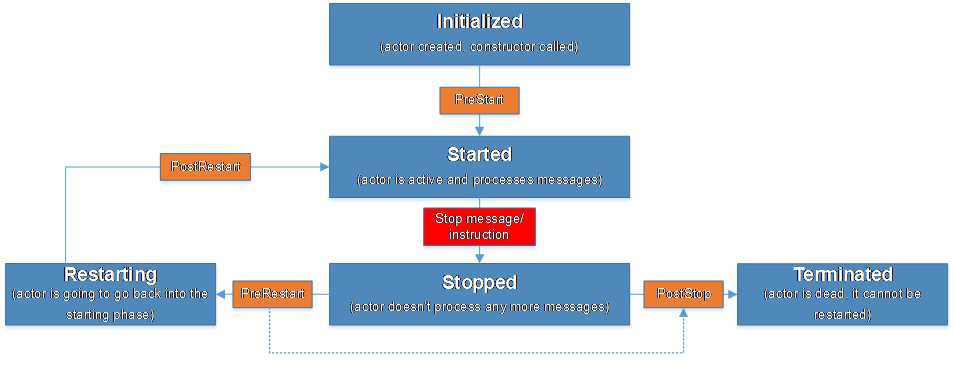
Figure 14: Actor LifeCycle
We can see the stages (in blue) and the actual methods executing after that phase (in orange).
Let’s go through the various stages, and explain them further.
Table 2: Actor's lifecycle stages
Initialized | The actor instance is created and the actor’s constructor has been called. At this point no messages are yet received—only after the constructor is executed will the PreStart be called. PreStart is a method that enables us to prepare all the necessary work before starting to receive messages. |
Started | After the PreStart method has finished executing, the actor is alive and able to receive and process messages from the mailbox, one by one. The actor can be instructed to Stop, as we are going to see later. The stop message (or the stop instruction) will lead to the state change, and the actor will go to the next state: Stopped. |
Stopped | There are several ways to stop an actor, and two possible outcome scenarios:
In any case, if PostStop is invoked, there is no way back—the actor is terminated. |
Terminated | The state in which the actor is not active anymore, and cannot be restarted—in effect, this actor doesn’t exist anymore. |
Restarting | If the parent actor has identified the error, and it doesn’t want to terminate the actor, then this actor can be asked to restart. At this point, the actor will be in the restarting state. After this state, the actor is going to become active again, as when originally created. After the PreRestart has run (as we have seen in the Stopped phase), just before the actor starts again, we have the ability to implement the PostRestart method. |
How can we use the various Hook methods?
Table 3: Actor's lifecycle methods
This method is called before the actor starts receiving its first message. Here we can place any kind of custom initialization code. For instance, opening files, database connections, etc. | |
PostStop | This method is called after the actor has been stopped, and is not receiving or processing messages. Here we can place any custom cleanup code. |
PreRestart | This method is called before the actor begins restarting. While PreStart and PostStop are not receiving any input parameters, PreRestart will have available the latest message being processed, and the exception that caused it to restart. One of the reasons for the existence of this method is to save the message being processed when the exception occurs, to be reprocessed later after the actor restarts. |
PostRestart | PostRestart gets called after the PreRestart method, but before the PreStart method. PostRestart as an input parameter has the exception that last occurred, so it allows the code to do something with this exception: to run some diagnostics or logging, etc. |
Example
In the following example, we are going to see how to track the invocation of the actor’s constructor, PreStart, and PostStop methods.
The idea here is that we have a very trivial EmailMessage to be sent by using the EmailSenderActor. EmailSenderActor will implement the overloads of the Hook methods in order to display in the console what is happening.
Let’s define the EmailMessage, which is the message to be passed to the actor. EmailMessage is for demonstration purposes only, and doesn’t implement anything unusual.
Code Listing 34: Definition of the EmailMessage
public class EmailMessage { public EmailMessage(string from, string to, string content) { From = from; To = to; Content = content; } public string From { get; } public string To { get; } public string Content { get; } } |
Let’s implement the actual actor, with the overloads, which will be further explained.
Code Listing 35: Definition of the EmailSenderActor
public class EmailSenderActor: ReceiveActor { public EmailSenderActor() { Console.WriteLine("Constructor() -> EmailSenderActor"); Receive<EmailMessage>(message => HandleEmailMessage(message)); } private void HandleEmailMessage(EmailMessage message) { Console.WriteLine($"Email sent from {message.From} to {message.To}"); } protected override void PreStart() { Console.WriteLine("PreStart() -> EmailSenderActor");
} protected override void PreRestart(Exception reason, object message) { Console.WriteLine("PreRestart() -> EmailSenderActor"); /* base.PreRestart(reason, message); */ } protected override void PostRestart(Exception reason) { Console.WriteLine("PostRestart() -> EmailSenderActor"); base.PostRestart(reason); } protected override void PostStop() { Console.WriteLine("PostStop() -> EmailSenderActor"); } } |
As you can see, we have simply implemented the overridden methods, which we have discussed previously, and the only thing they do is display a message in the console to show that those have been executed.
An interesting point to note is the PreRestart implementation. If we call base.PreRestart, this method will automatically stop all the child actors and call PostStop. Code Listing 36 shows the actual implementation of the base method we have overridden.
Code Listing 36: PreRestart base class implementation
protected virtual void PreRestart(Exception reason, object message) { ActorBase .Context .GetChildren() .ToList<IActorRef>() .ForEach((Action<IActorRef>)(c => { ActorBase.Context.Unwatch(c); ActorBase.Context.Stop(c); })); this.PostStop(); } |
Now we can create the code that sends the message and eventually stops the ActorSystem. This is something we have not yet mentioned: the ActorSystem.Terminate method will actually terminate the actor system, which will obviously terminate all of the actors instantiated. In our case, this will also cause our actor to terminate.
Code Listing 37: Sending messages to the EmailSenderActor
static void Main(string[] args) { ActorSystem system = ActorSystem.Create("my-first-akka"); IActorRef emailSender = system.ActorOf<EmailSenderActor>("emailSender"); EmailMessage emailMessage = new EmailMessage("[email protected]", "[email protected]", "Hi"); emailSender.Tell(emailMessage); Thread.Sleep(1000); system.Terminate();
Console.Read(); } |
The output of this is as follows:
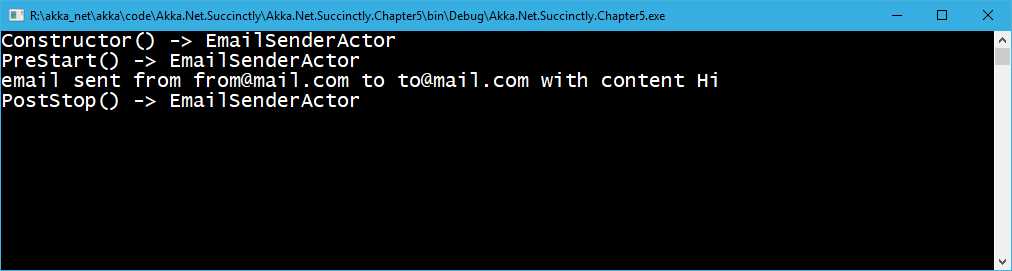
Figure 15: Showing the Actor’s LifeCycle
Actor termination
In this section, we are going to explain how to terminate an actor: how to programmatically make sure that an actor will be terminated.
There are several ways to achieve this:
- Calling the ActorContext.Stop() method.
- Sending the Kill message.
- Sending the PoisonPill message.
- Terminating the ActorSystem, as we have seen in the previous example.
- Using the GracefulStop.
Stopping an actor
Stopping an actor can be done by using the ActorContext.Stop method. This is available in a few places, such as:
- The ActorSystem contains the Stop method, to which we can pass the actual actor reference.
- The actor itself has the ability to call the Stop method by calling Context.Stop(Self).
- The actor can stop child actors by calling Context.Stop(childActorReference).
One of the most important things to note is that the Stop method will only let the actor execute the message currently being executed before shutting down the whole actor instance. This means that no other messages will be executed, including those that are enqueued before the actual Stop() method is invoked.
Code Listing 38: Stopping an actor via ActorSystem
static void Main(string[] args) { ActorSystem system = ActorSystem.Create("my-first-akka"); IActorRef emailSender = system.ActorOf<EmailSenderActor>("emailSender"); EmailMessage emailMessage = new EmailMessage("[email protected]", "[email protected]", "Hi");
emailSender.Tell(emailMessage);
system.Stop(emailSender); system.Terminate(); } |
Sending the PoisonPill message
PoisonPill is a special kind of message (system message) that instructs the actor to shut itself down after receiving this kind of message. However, the actor will stop only after executing all of the messages that were part of the mailbox before receiving the PoisonPill message. Messages coming after, if any, will throw an error (because, in effect, actor doesn’t exist anymore).
In Code Listing 38, we are sending three email messages to be executed; however, as we are going to see, only the first and second ones will be processed, while the third one will not, as it comes after the PoisonPill message. The PoisonPill.Instance represents an instance of the message.
Code Listing 39: Sending a PoisonPill
static void Main(string[] args) { ActorSystem system = ActorSystem.Create("my-first-akka"); IActorRef emailSender = system.ActorOf<EmailSenderActor>("emailSender"); EmailMessage emailMessage = new EmailMessage("[email protected]", "[email protected]", "Hi");
emailSender.Tell(emailMessage); emailSender.Tell(emailMessage); emailSender.Tell(PoisonPill.Instance); emailSender.Tell(emailMessage); Thread.Sleep(1000); system.Terminate();
Console.Read(); } |
With the following output, we can clearly see that the first two emails are sent, but the third one is not.
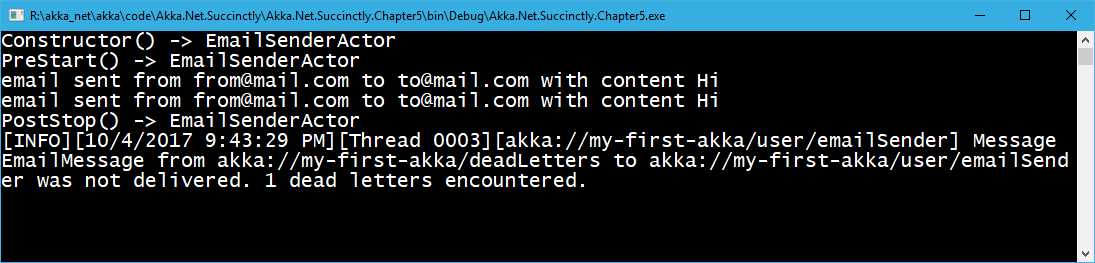
Figure 16: PoisonPill effect
Sending the Kill message
Killing an actor is very similar to sending the PoisonPill message, which we have previously seen. The system offers the Kill.Instance message to be passed to the actor. The difference in this case is that when the actor encounters this kind of message, an exception will be thrown (ActorKilledExeption). This can be pretty useful if we want to show in logs that the actor was terminated. The usage of this seems to be rare, but it’s good to know.
Code Listing 40: Sending the Kill.Instance message to an actor
static void Main(string[] args) { ActorSystem system = ActorSystem.Create("my-first-akka"); IActorRef emailSender = system.ActorOf<EmailSenderActor>("emailSender"); EmailMessage emailMessage = new EmailMessage("[email protected]", "[email protected]", "Hi");
emailSender.Tell(emailMessage); emailSender.Tell(emailMessage); emailSender.Tell(Kill.Instance); emailSender.Tell(emailMessage); Thread.Sleep(1000); system.Terminate();
Console.Read(); } |
Executing this code produces the following output—as before, the third message hasn’t been delivered!
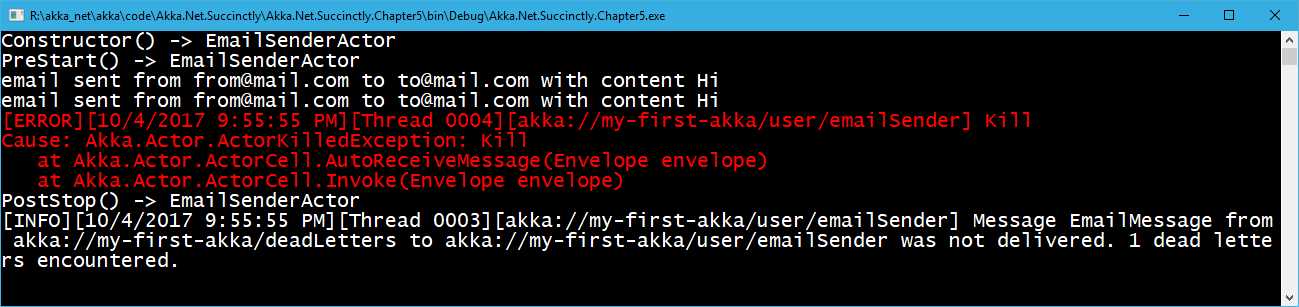
Figure 17: Sending the Kill message to an actor result
Gracefully stopping the actor
IActorRef also offers the GracefulStop method. By default, this method sends a PoisionPill and will return to your caller a Task<bool>, which will complete within the timeout you specify.
Code Listing 41: Gracefully stopping an actor
static void Main(string[] args) { ActorSystem system = ActorSystem.Create("my-first-akka"); IActorRef emailSender = system.ActorOf<EmailSenderActor>("emailSender"); EmailMessage emailMessage = new EmailMessage("[email protected]", "[email protected]", "Hi"); emailSender.Tell(emailMessage); var result = emailSender.GracefulStop(TimeSpan.FromSeconds(10)); Thread.Sleep(1000); system.Terminate(); } |
The result of this method produces the following output:
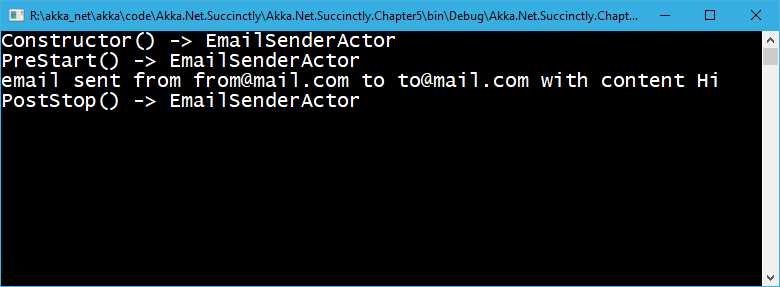
Figure 18: GracefulStop example output
Restarting an actor
Restarting an actor is just a bit more complicated, as it involves the understanding of the supervision strategies. We are going to discuss the actor hierarchy and supervision strategies in the next chapter, but for the time being, let’s just say that every time we create a new actor, there is a default supervision strategy being associated to this actor. This means there is a standard behavior, and the system will know how to handle the failure (an exception being thrown by the actor).
The default supervision strategy will make it so that every time the actor has a processing error (an exception being thrown), it will ask the actor to restart, which means that a new instance of an actor will be created.
Note: By using Props.Create<Actor>(), we are able to supply a Supervision Strategy. If none has been supplied, the default one will be used.
The following example shows what happens when the actor throws an error. In order to demonstrate this, let’s slightly change our EmailSenderActor to throw an ArgumentException in case the email content is not set (null or empty). So, let’s go and change the HandleEmailMessage method as follows:
Code Listing 42: Email with no content, throws an error
private void HandleEmailMessage(EmailMessage message) { if(string.IsNullOrEmpty(message.Content)) { throw new ArgumentException("Cannot handle the empty content"); } Console.WriteLine($"email sent from {message.From} to {message.To}"); } |
Here’s an example that sends a message that will throw an error:
Code Listing 43: Calling the actor
static void Main(string[] args) { ActorSystem system = ActorSystem.Create("my-first-akka"); IActorRef emailSender = system.ActorOf<EmailSenderActor>("emailSender"); //send an invalid message (null content). EmailMessage invalidEMail = new EmailMessage("[email protected]", "[email protected]", null); EmailMessage validEmail = new EmailMessage("[email protected]", "[email protected]", "Hi"); emailSender.Tell(validEmail); emailSender.Tell(invalidEMail); emailSender.Tell(validEmail); Console.Read(); system.Terminate(); } |
What we are doing here is simply sending a valid versus an invalid (empty content) email. As we have previously mentioned, we already know that the second message (invalidEmail) will raise an error and cause the actor to restart.
Let’s just check this output, as shown in the following figure.
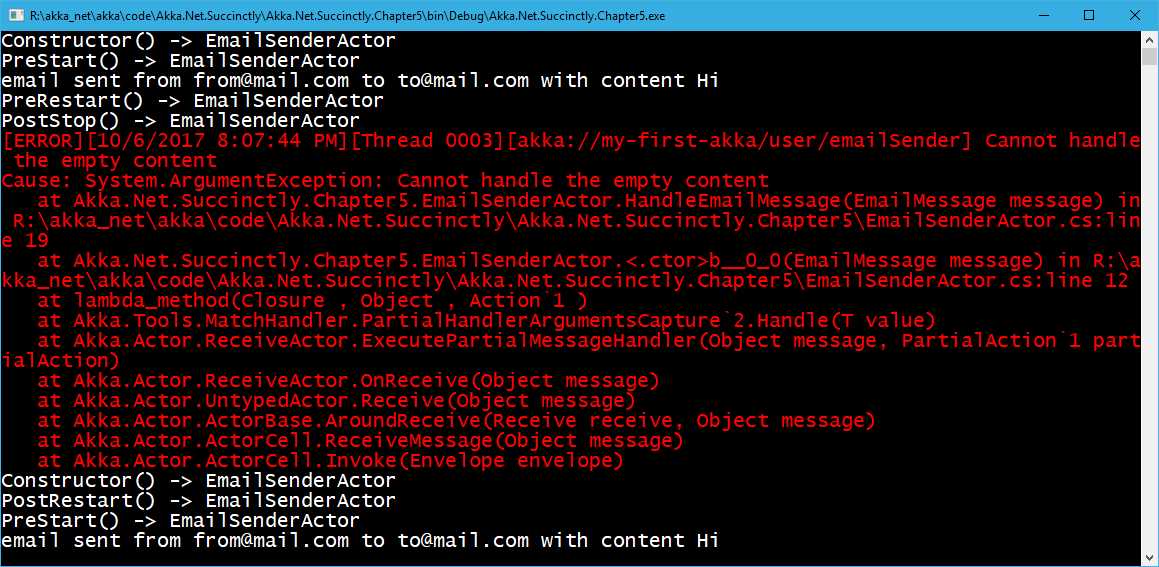
Figure 19: Restarting an actor
What we can see is that the first message gets sent just fine. The second one is obviously raising an exception (shown in red), but just before that, we can see that the PreRestart and PostStop events have been raised. Immediately afterwards, we can see that the actor restarts and the constructor gets called again, followed by the PostRestart method. What we have clarified here is that the PostRestart actually happens after the constructor is called.
Note: It’s important to keep in mind that when the actor restarts, it doesn’t maintain its state. That means a new instance of the actor gets created, and all of the private variables will simply be lost!


- 1800+ high-performance UI components.
- Includes popular controls such as Grid, Chart, Scheduler, and more.
- 24x5 unlimited support by developers.