
Akka.NET Succinctly®

CHAPTER 7
Actor Hierarchies
We’ve seen how to create the top-level actors by using the ActorSystem directly. In this chapter, we are going to see how to create the hierarchy of actors, which means: how an actor can create subactors and form a hierarchy.
Creating actor hierarchies
When creating new actors from existing actors, we don’t use the ActorSystem as the entry point, but instead use the ActorContext object, which is part of the base actor’s implementation.
ActorContext (or just Context, as this is how the actor base library exposes it) exposes contextual information for the actor and the current message. It provides more information, such as: factory methods to create child actors (in the same way the ActorSystem does), lifecycle monitoring, supervised children, and so on.
That said, let’s see the actor’s hierarchy in action by creating an example that expands the music player application so that it can support multiple users playing a song.
If you recall, in the previous example we only had one instance of the MusicPlayerActor. This actor was only capable of playing one song at a time. We will expand this example and create a sort of a multi-user music player that will be able to serve requests from multiple users.
What we will do is create another actor, MusicPlayerCoordinatorActor, which will act as a coordinator between user requests.
It’s this actor’s responsibility to create new instances (child actors) of MusicPlayerActor based on the user, so that each user will have its own copy of the MusicPlayerActor, so that it can play its own songs.
This controller actor, called MusicPlayerCoordinatorActor, is a regular actor, as we have seen before. However, it won’t play any songs—this responsibility will still be within the MusicPlayerActor. The so-called coordinator actor is actually a pattern, and it enables actors to scale.
In Figure 21, we can see how the MusicPlayerCoordinatorActor receives the two messages (PlaySongMessage and StopPlayingMessage) and coordinates with the subactors.
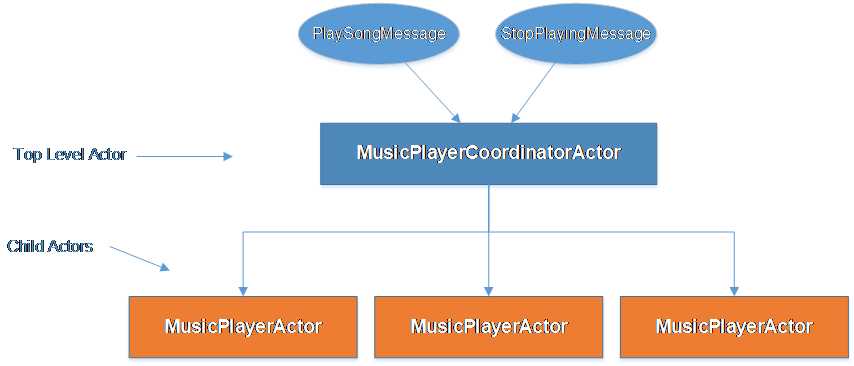
Figure 21: Actors’ hierarchy
The input messages have to change slightly to include the user together with the song. The highlighted changes can be seen in the following code:
Code Listing 47: Input messages that include a user
public class PlaySongMessage { public PlaySongMessage(string song, string user) { Song = song; User = user; } public string Song { get; } public string User { get; } } public class StopPlayingMessage { public StopPlayingMessage(string user) { User = user; } public string User { get; } } |
Now we can create the new coordinator actor:
Code Listing 48: MusicPlayerCoordinatorActor definition
public class MusicPlayerCoordinatorActor : ReceiveActor { protected Dictionary<string, IActorRef> MusicPlayerActors; public MusicPlayerCoordinatorActor() { MusicPlayerActors = new Dictionary<string, IActorRef>(); Receive<PlaySongMessage>(message => PlaySong(message)); Receive<StopPlayingMessage>(message => StopPlaying(message)); } private void StopPlaying(StopPlayingMessage message) { var musicPlayerActor = GetMusicPlayerActor(message.User); if (musicPlayerActor != null) { musicPlayerActor.Tell(message); } } private void PlaySong(PlaySongMessage message) { var musicPlayerActor = EnsureMusicPlayerActorExists(message.User); musicPlayerActor.Tell(message); } private IActorRef EnsureMusicPlayerActorExists(string user) { IActorRef musicPlayerActorReference = GetMusicPlayerActor(user); MusicPlayerActors.TryGetValue(user, out musicPlayerActorReference); if (musicPlayerActorReference == null) { //create a new actor's instance. musicPlayerActorReference = Context.ActorOf<MusicPlayerActor>(user); //add the newly created actor in the dictionary. MusicPlayerActors.Add(user, musicPlayerActorReference); } return musicPlayerActorReference; } private IActorRef GetMusicPlayerActor(string user) { IActorRef musicPlayerActorReference; MusicPlayerActors.TryGetValue(user, out musicPlayerActorReference); return musicPlayerActorReference; } } |
This actor contains a dictionary MusicPlayerActors object defined as Dictionary<string, IActorRef>, which contains the instances of the child actors. The string key is the player’s name, as we would like to have only one MusicPlayerActor per user that plays the song.
Instances of an actor are created by the helper method EnsureMusicPlayerActorExists, whose responsibility it is to check first whether we already have an instance of an actor in a dictionary, and if not, to create an instance by using the Context.ActorOf<MusicPlayerActor>(user). The Context we see here is actually an ActorContext object, which we have mentioned previously in this chapter.
We can see that every time a new message is received, this will be forwarded to the subactor that corresponds to the user playing the song. We also give a user’s name as the name of the actor.
The MusicPlayerActor has been slightly changed so that it can display information about the current user. Now this actor contains the user name in the messages displayed.
Code Listing 49: MusicPlayerActor definition
public class MusicPlayerActor : ReceiveActor { protected PlaySongMessage CurrentSong; public MusicPlayerActor() { StoppedBehavior(); } private void StoppedBehavior() { Receive<PlaySongMessage>(m => PlaySong(m)); Receive<StopPlayingMessage>(m => Console.WriteLine($"{m.User}'s player: Cannot stop, the actor is already stopped")); } private void PlayingBehavior() { Receive<PlaySongMessage>(m => Console.WriteLine($"{CurrentSong.User}'s player: Cannot play. Currently playing '{CurrentSong.Song}'")); Receive<StopPlayingMessage>(m => StopPlaying()); } private void PlaySong(PlaySongMessage message) { CurrentSong = message;
Console.WriteLine( $"{CurrentSong.User} is currently listening to '{CurrentSong.Song}'"); Become(PlayingBehavior); } private void StopPlaying() { Console.WriteLine($"{CurrentSong.User}'s player is currently stopped."); CurrentSong = null; Become(StoppedBehavior); } } |
Now we can finally define the client code and send a few messages to the coordinator actor. We can see that now the User is specified in the message with the name of the song.
Code Listing 50: Client sending messages to MusicPlayerCoordinatorActor
static void Main(string[] args) { ActorSystem system = ActorSystem.Create("my-first-akka"); IActorRef dispatcher = system.ActorOf<MusicPlayerCoordinatorActor>("player-coordinator"); dispatcher.Tell(new PlaySongMessage("Smoke on the water", "John")); dispatcher.Tell(new PlaySongMessage("Another brick in the wall", "Mike")); dispatcher.Tell(new StopPlayingMessage("John")); dispatcher.Tell(new StopPlayingMessage("Mike")); dispatcher.Tell(new StopPlayingMessage("Mike")); Console.Read(); system.Terminate(); } |
We can see that we have a very similar output to when we had a single MusicPlayer, except that now we can handle an unlimited number of users.

Figure 22: Result of sending multiple messages to the controller


- 1800+ high-performance UI components.
- Includes popular controls such as Grid, Chart, Scheduler, and more.
- 24x5 unlimited support by developers.