Data Grid Filtering for Date Data Type with Grouping of List on Filter Item like Microsoft Excel
Dear Syncfusion,
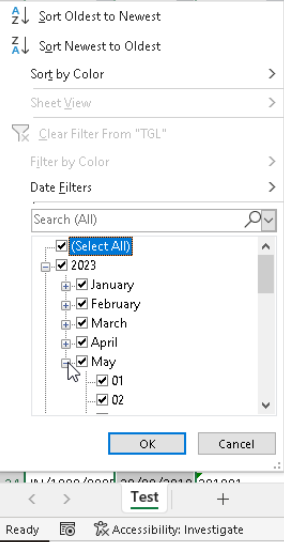
In the filtering for Syncfusion data grid especially for date type data, it is impractical when we want to select or deselect date based on year/ month? We need grouping interface like microsoft excel to make the user work faster with checkbox listing to select period based on year/ months with only check/ uncheck the year/ month/ date. Excel interface nowdays more humane for user to work faster and efficient,
Here is the example from Microsoft Office Excel (data grouped by years, months and date):
your current feature:
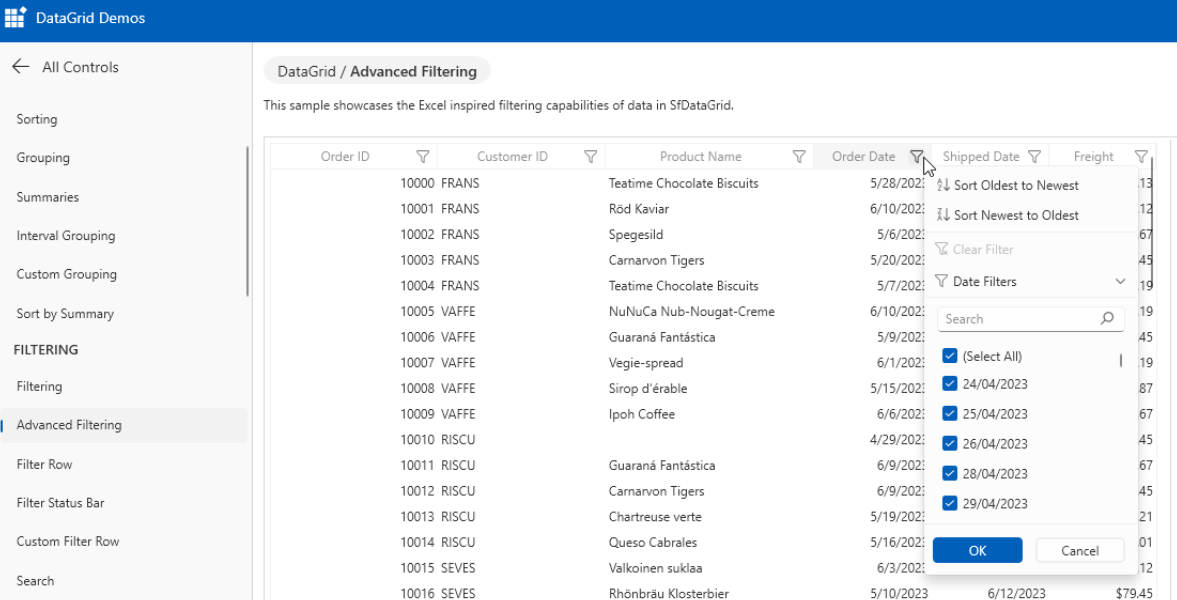
I hope Syncfusion can applied this feature in Data Grid WPF for user friendly interface and make them work faster and efficient rather than tick untick one by one
Or maybe could you give the example like winforms for WPF datagrid like this K
Thank you anyway :)
Hi Agung,
We have checked the possibility to achieve your requirement via a workaround.
Due to complexities, we are unable to achieve your requirement through a
workaround.
Currently, SfDataGrid does not have support for displaying the Date data type
with the grouping of list on filter items, Already we have considered to provide support for “Support to display the TreeView control instead of the checked list box in filter control UI” in WPF and logged a feature request for the same. We will
implement this feature in any of our upcoming releases.
At the planning stage for every release cycle, we review all open features and
identify features for implementation based on specific parameters including
product vision, technological feasibility, and customer interest. We will let you
know when this feature is implemented. We appreciate your patience until then.
Feedback Link: https://www.syncfusion.com/feedback/7221/support-to-display-the-treeview-control-instead-of-checked-listbox-in-filter
If you have any more specifications/suggestions for the feature request, you can
add them as a comment in the portal and cast your vote to make it count.
Regards,
Vijayarasan S
Hi Vijayarasan,
Yes I understand, the compexity, thank you
Regards,
Agung
I am looking for the same kind of functionality, but just a bit simpler, maybe...?
Is it possible to create filter like this? In my case I only have three items, of which the last two are belonging to a group called "Variable".

Thank you in advance!

