- Home
- Forum
- ASP.NET Core - EJ 2
- Adding children to node prevents some functionality from working
Adding children to node prevents some functionality from working
I have a node, like this:
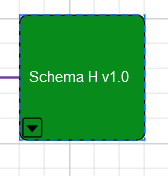
When I click on the userhandle in the lower left, at run-time, I add 3 more nodes (using javascript). These nodes are added as children of the original node.
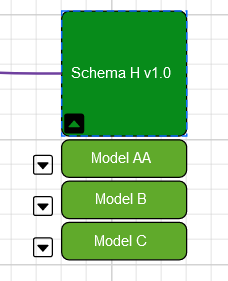
so far so good.
If I drag my parent node around the canvas, the 3 new nodes move with it (which is what I want and expect).
Now if I click the userhandle of one of these nodes (in this case the one called Model C), I create 5 new nodes at run-time, which are children of the Model C node.
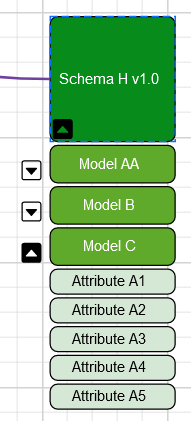
Now the issue is if I drag the original node, everything moves EXCEPT the Model C node...it gets left behind.
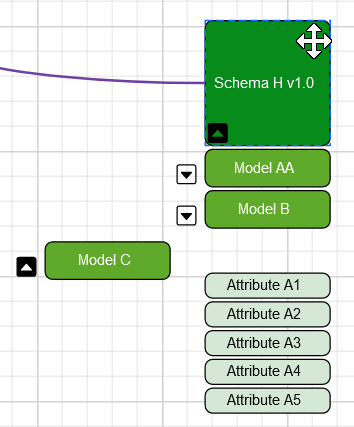
This seems to be a bug. I would expect everything to move together.
Let me know if you need more info. Thanks!
Hi Kabe,
We will validate and update you with more details on September 02, 2022.
Regards,
Sivaranjith.
Hi Kabe,
We have created a sample to achieve your requirement. Please find the sample and video below for your reference.
Regards,
Sivaranjith
Attachment: sample_and_video_a5b54392.zip
First, thanks so much for your excellent reply and sample project. I'm very impressed with your support! Plus your example gave me some good ideas.
I modified the sample to produce the issue I was having. (I also included a video in gif format). My setup is slightly different in that I don't wish to use the overall 'group' node. By adding new nodes as children I can drag around the child nodes without moving the parent. This will allow people to drag the nodes of interest off to the side.
The only issue, as you can see, is that dragging a parent node should move the children nodes. This works except once I 'expand' the model node...when I move the top level node all other nodes move (which is great) EXCEPT for the model node (even though the model's children move too)!
Attachment: SyncfusionWebAppRevised_81039a99.zip
Hi Kabe,
The reported issue occurs due to adding children to the existing children in group. We should add children only for a group node not for the children in the group. We have modified your sample in which we have added all the children in one group. Please find the sample below.
Regards,
Sivaranjith
Attachment: SyncfusionWebApp1_b9a0e4ca.zip
Ok, I think I understand. Thanks for the modified project! I think the only issue I have with this is that when I drag model C the 'attributes' don't move with it.
Is there a way that when I drag Model C that the attributes can move with it? Or would that be too much if there were say 100 attributes? I could also perhaps shift the attributes on a MouseUp after dragging the Model node.
What do you think?
Attachment: drag_a6ba57f7.zip
Hi Kabe,
We have modified the sample to achieve your requirement. When we move the node, the diagram positionChange event will be triggered. In that event, we move the children along with the model C node. Please find the sample and code example below.
Code example:
|
function positionChange(args){ var diagram = document.getElementById("diagram").ej2_instances[0]; if(args.state === 'Progress'){ if(args.source !==undefined){ if(args.source.inEdges !==undefined ? args.source.id ==='c4':args.source.nodes[0].id ==='c4') { let right = -(args.oldValue.offsetX - args.newValue.offsetX); let top = -(args.oldValue.offsetY - args.newValue.offsetY);
let atrib1 = diagram.nameTable['c5']; let atrib2 = diagram.nameTable['c6']; let atrib3 = diagram.nameTable['c7']; atrib1.offsetX+=right; atrib2.offsetX+=right; atrib3.offsetX+=right; atrib1.offsetY+=top; atrib2.offsetY+=top; atrib3.offsetY+=top; diagram.dataBind()
} } } }
|
Regards,
Sivaranjith
Attachment: userhandle_child_node_af99b6f8.zip
This is perfect. Thanks so much!
Hi Kabe,
Glad to hear that, Let us know if you need any further assistance.
Regards,
Sivaranjith

