How to create a weather vane and a compass concisely?

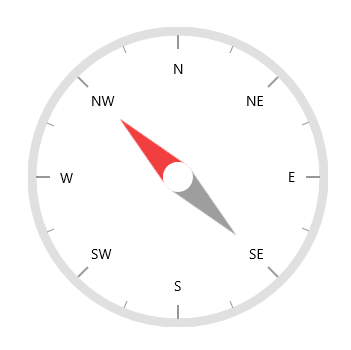
According to the documentation, a circular gauge can add multiple pointers. However, can they set the starting point and direction separately?
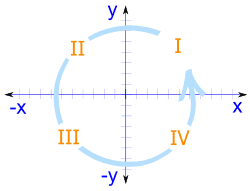
The plane coordinate system here, let's go back to the middle school classroom, we are familiar with the x-axis, the left side is the negative semi-axis, and the right side is the positive semi-axis. On the y-axis, the top is the positive half-axis and the bottom is the negative half-axis.
One ray is on one side of the x-axis, and the other ray is rotated counterclockwise.
I mean, when they rotate, obviously the compass is a complete one, half pointing north and half compass, they can't be "broken" in the middle, so, let's assume, that one of the needles has a starting angle of 0 ° , Then he should rotate along the angle of 0 ° -90 ° -180 ° -270 ° -360 ° .
At the same time, the other pointer must be rotated from the angle of 180° -270° -360° (0° )-90° -180 ° .
They need to be at the same speed, and the angle between the pointers must always be equal to 180
°
.
In fact, we can think that these two angles should be opposite angles formed by two straight lines, and their angles are equal.

Of course, I could create two gauges and overlap them, but is there a cleaner solution?
Currently,
our development team is checking your query and update you with the details on
2nd August 2022. We appreciate your patience until then.
Another thread https://www.syncfusion.com/forums/176553/help-request-is-this-expected-behavior-takes-a-long-time-on-a-cold-start
Looking forward to your reply
Based on your requirement we have prepared a sample, in which we used two needle pointers to rotate around the gauge evenly as mentioned in the below code snippet. Based on the initial needle pointer value we will update the second needle pointer value, so that both pointers rotate around the gauge evenly. Please get the sample from the below attachment.
XAML
|
<gauge:SfCircularGauge x:Name="gauge" Height="500" Width="500" HeaderAlignment="Custom" GaugeHeaderPosition="0.5,0.1"> <gauge:SfCircularGauge.GaugeHeader> <TextBlock … /> </gauge:SfCircularGauge.GaugeHeader> <gauge:SfCircularGauge.Annotations> <gauge:GaugeAnnotation> …. </gauge:GaugeAnnotation> </gauge:SfCircularGauge.Annotations> <gauge:SfCircularGauge.Scales> <gauge:CircularScale ShowLabels="False" Interval="20" MinorTicksPerInterval="0" StartValue="0" EndValue="80" StartAngle="0" SweepAngle="360" RimStroke="#453830" RimStrokeThickness="9" TickStroke="#535c4d" LabelStroke="#9E9E9E" SmallTickStroke="#BEBEBE"> <gauge:CircularScale.Pointers> <gauge:CircularPointer x:Name="arrowPointer" PointerType="NeedlePointer" Value="{Binding ArrowPointerValue}" NeedleLengthFactor="1" NeedlePointerType="Arrow" PointerCapDiameter="20" PointerCapStroke="Transparent" NeedlePointerStroke="Black" EnableAnimation="False" EnableDragging="False" NeedlePointerStrokeThickness="30"/> <gauge:CircularPointer PointerType="NeedlePointer" Value="{Binding ArrowPointerValue,Mode=TwoWay, Converter={StaticResource ValueConverter}}" EnableAnimation="False" EnableDragging="False" NeedleLengthFactor="1" PointerCapDiameter="20" PointerCapStroke="Transparent" NeedlePointerStroke="Black" NeedlePointerStrokeThickness="10"/> </gauge:CircularScale.Pointers> </gauge:CircularScale> </gauge:SfCircularGauge.Scales> </gauge:SfCircularGauge> |

If your requirement is different from this,
Please revert with more details about your requirements. It will help us provide
an appropriate solution at the earliest.
Attachment: GaugeGettingStarted_d6cb029c.zip
It is amazing work!
But it seems that the animation is not available now

It is amazing work!
But it seems that the animation is not available now
The SfCircularGauge
has animation support for Pointers. But in the previously provided sample, we
used two pointers to achieve your requirement. So, if we enable animation,
then those pointers will be animated asynchronously at load time (it is the
default behavior since each pointer has different value). So, we have modified
the sample to achieved your requirement “Pointers to rotate around the gauge evenly” along with animation by using a single needle pointer with its tail and
animation support. We add a tail to the needle pointer using the properties
such as TailLengthFactor, TailStroke and TailStrokeThickness. But, the
TailStrokeThickness property is not working correctly. So, we have internally
logged a bug report for this problem and the fix for this problem will be
included in our upcoming weekly release which is expected to be rolled out on
Aug 16, 2022. Please get the modified sample from the below attachment.
Attachment: GaugeGettingStarted_86f15c3f.zip
We have fixed the reported issue “[UWP] TailStrokeThickness property is not working correctly.” and the fix is included in our weekly NuGet of Aug 16, 2022.
NuGet Version: v20.2.0.44
We
thank you for your support and appreciate your patience in waiting for this
release. Please get in touch with us if you require any further assistance.
- 8 Replies
- 3 Participants
-
SH Shompinice
- Jul 31, 2022 11:12 AM UTC
- Aug 17, 2022 12:41 PM UTC

